
Als je een WooCommerce-winkel runt en aan bedrijven verkoopt, weet je waarschijnlijk dat niet alle groothandelsklanten hetzelfde zijn. Sommigen plaatsen kleine bestellingen, anderen kopen in grote hoeveelheden. Daarom is het logisch om verschillende groothandelsprijzen aan te bieden aan verschillende soorten klanten.
Met de Wholesale Prices Premium plugin kun je eenvoudig meerdere groothandelsniveaus instellen, elk met zijn eigen kortingsniveau. Hiermee kun je grote kopers belonen met betere prijzen, terwijl je kleinere klanten nog steeds ondersteunt.
In deze handleiding laten we je zien hoe je gelaagde groothandelsprijzen kunt maken en beheren in WooCommerce — zelfs als je geen ontwikkelaar bent.
Waarom gelaagde groothandelsprijzen gebruiken in WooCommerce?
Gelaagde prijzen zijn een krachtig hulpmiddel voor WooCommerce-winkel eigenaren die willen:
- Hogere aankoopvolumes stimuleren met toenemende kortingen
- Voor meerdere soorten B2B-klanten zorgen (kleine retailers, middelgrote bedrijven, bulkkopers)
- Prijsstrategieën automatiseren op basis van klantsegmentatie
- Klantloyaliteit verbeteren door grote bestellingen te belonen
- Prijsbeheer vereenvoudigen zonder aangepaste code
Met Wholesale Prices Premium kun je aangepaste groothandelsrollen bouwen met precieze prijscontrole, rechtstreeks vanuit je WordPress-dashboard.
Stapsgewijze instructies
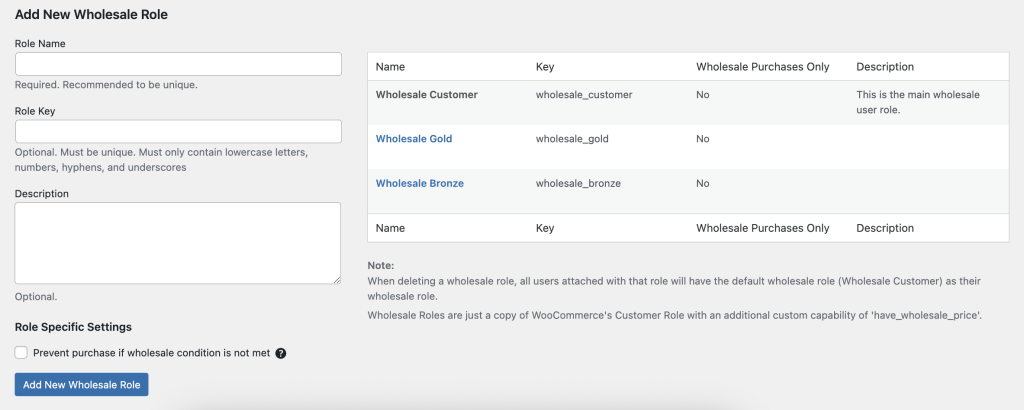
- Log in op je WordPress Admin Dashboard.
- Navigeer naar Groothandel → Rollen.
- Klik op Nieuwe groothandelsrol toevoegen in de bovenste werkbalk.
- Vul de velden in:
- Rol Sleutel (bijv. wholesale_bronze) — een unieke identificatie.
- Rol Naam (bijv. Bronze Groothandel) — het weergavelabel.
- Rol Sleutel (bijv. wholesale_bronze) — een unieke identificatie.
- Klik op Rol toevoegen om je nieuwe groothandelsniveau op te slaan.
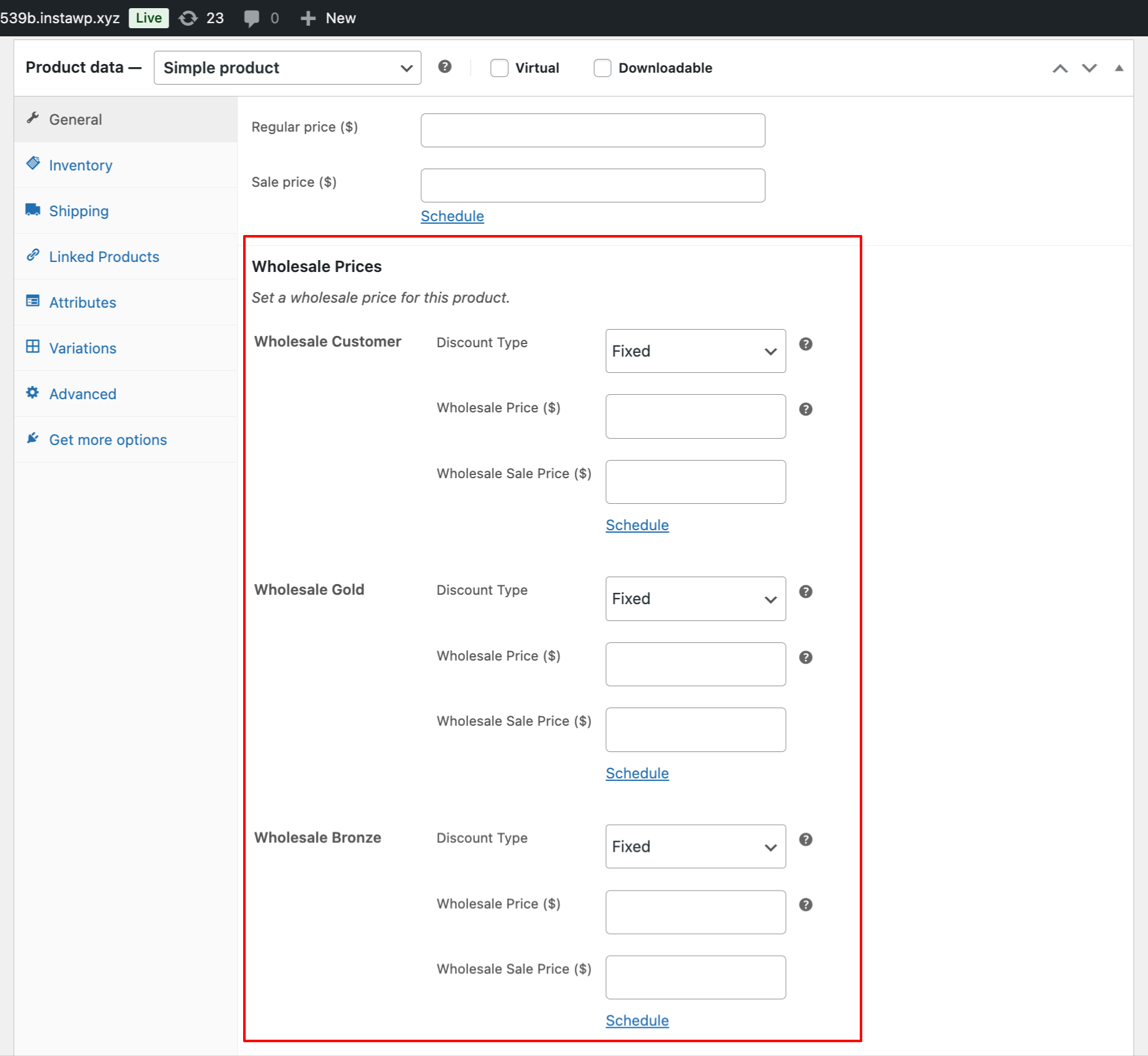
- Bij het bewerken van producten zie je nu aparte groothandelsprijsvelden voor elke rol — bijv. Brons, Zilver, Goud — onder Productgegevens → Algemeen (Groothandel).
Voorbeeld Gebruiksscenario
Uw winkel wil drie groothandelsniveaus:
| Niveau | Rol-sleutel | Prijsstrategie |
| Bronze Groothandel | groothandel_brons | 5% korting voor kleine retailers |
| Silver Groothandel | groothandel_zilver | 10% korting voor middelgrote bedrijven |
| Gold Groothandel | groothandel_goud | 15% korting voor kopers met een hoog volume |
Workflow:
- Voeg de drie bovenstaande rollen toe.
- Stel de respectievelijke groothandelsprijzen in binnen het Groothandel-tabblad van elk product.
- Wijs klanten toe aan het juiste niveau. Zorg ervoor dat je slechts één rol per gebruiker toewijst. Verplaats ze naar een andere groothandelsrol als je ze een grotere korting wilt aanbieden.
- U kunt ook onze Lead Capture-plugin gebruiken om een registratiepagina te maken. Op deze pagina kunt u groothandelsrollen handmatig of automatisch toewijzen aan nieuw geregistreerde klanten.
Als u al een bestaande groothandels- of aangepaste rol van een andere plugin heeft, kunt u geen groothandelsmogelijkheden toewijzen vanuit onze plugin. Alle groothandelsrollen moeten worden aangemaakt onder onze Groothandel → Rol-sectie om toegang te krijgen tot de volledige functionaliteit.

