
La traduction ou la disponibilité d'autres langues est très importante, en particulier pour la page d'inscription en gros. Heureusement, tous nos plugins Wholesale Suite sont optimisés pour la traduction. Ils contiennent des chaînes de traduction qui peuvent être traduites dans n'importe quelle langue prise en charge par WordPress.
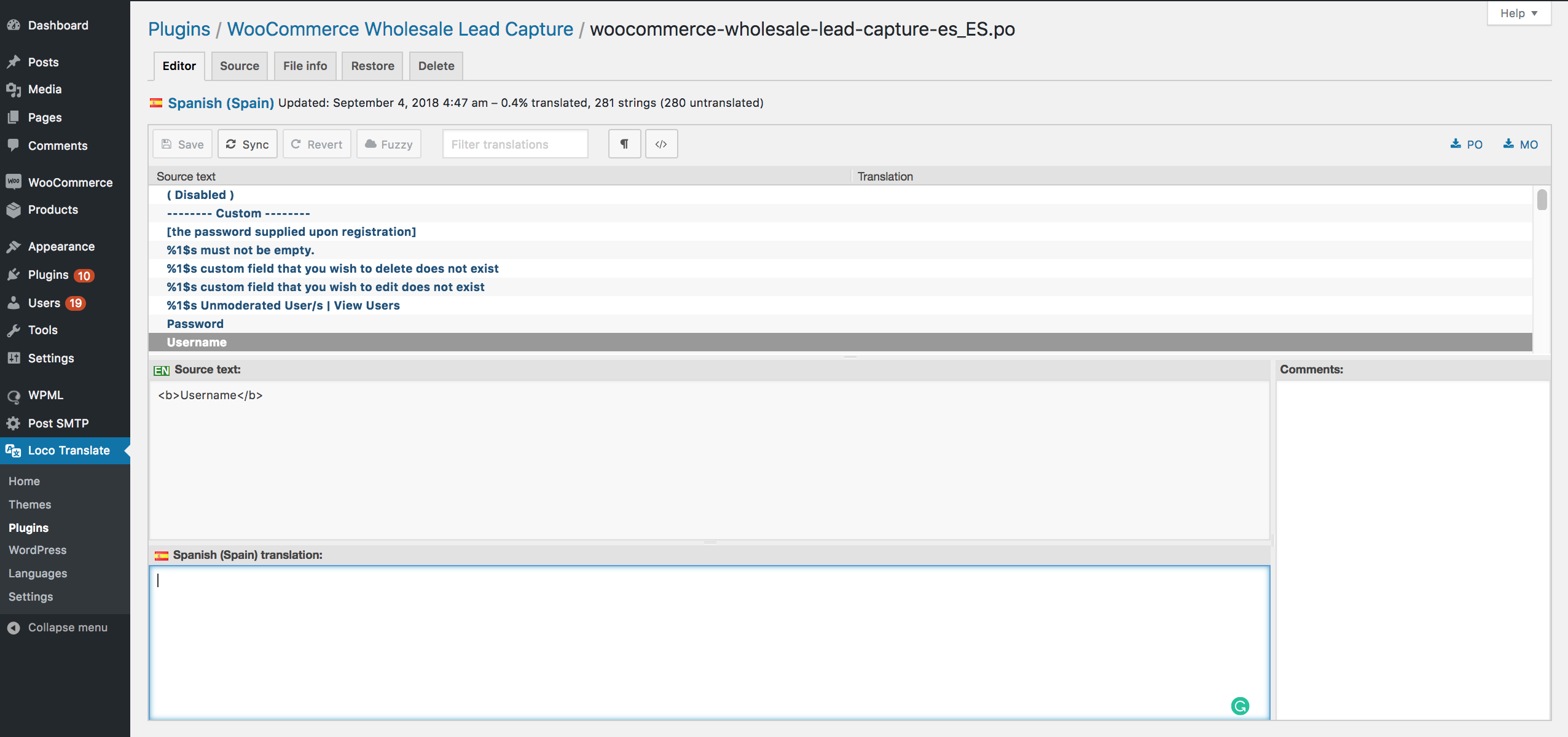
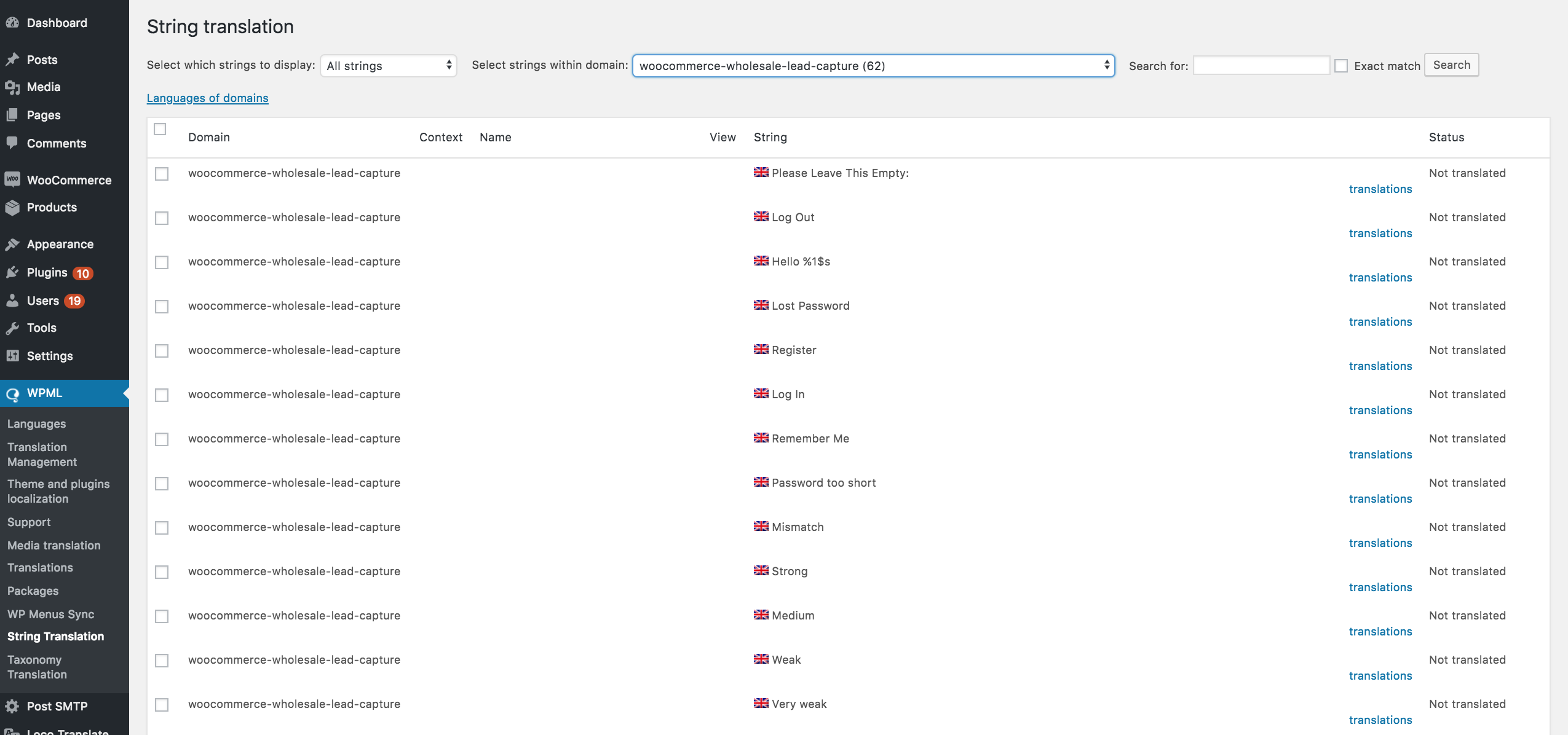
La manière la plus simple de traduire les champs intégrés est d'utiliser Loco Translate, PoEdit ou WPML.
Dans Loco Translate, vous devriez pouvoir trouver les chaînes dans Loco Translate > Plugins > WooCommerce Wholesale Lead Capture et les traduire.
En utilisant WPML, allez dans WPML > Localisation des thèmes et plugins > WooCommerce Wholesale Lead Capture > Traduction des chaînes.
Traduction des champs personnalisés
Étant donné que les champs personnalisés sont créés par l'utilisateur, ils doivent être traduits manuellement à l'aide de crochets personnalisés, puis ajoutés à votre functions.php.
Dans l'exemple ci-dessous, vous devez modifier l'ID du champ, le code de langue et la traduction.
add_filter("wwlc_registration_form_fields", function ($registration_form_fields) {

    $registration_form_fields2 = $registration_form_fields;

    foreach ($registration_form_fields as $key1 => $field) {
        // Target the field with ID 'wwlc_cf_store'
        if ($field['id'] == 'wwlc_cf_store') {
            switch (ICL_LANGUAGE_CODE) {
                case "en":
                    if (isset($field['default_value'])) {
                        $registration_form_fields2[$key1]['default_value'] = "Tell us about your business ";
                    }
                    break;
                case "fr":
                    if (isset($field['default_value'])) {
                        $registration_form_fields2[$key1]['default_value'] = "Your French Translation ";
                    }
                    break;
                // Add more cases for other languages if needed
            }
        }
    }

    return $registration_form_fields2;

}, 10, 90);
Traduction de la valeur des options
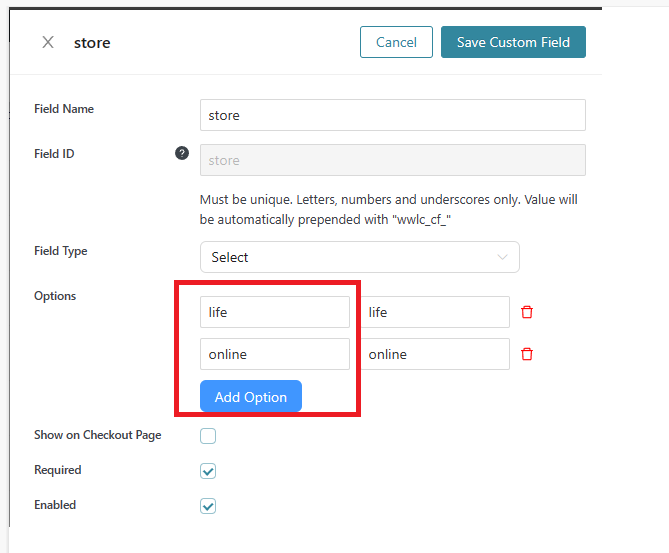
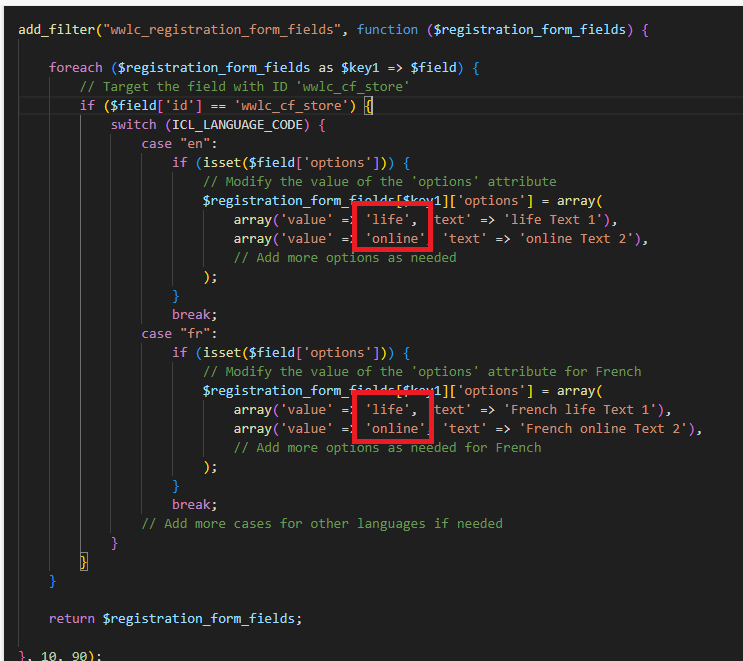
Comme ci-dessus, nous ferons référence à l'ID du champ personnalisé et à la définition de ses données d'options. Il est important que les valeurs du tableau correspondent à la valeur de l'option du champ personnalisé d'origine.
add_filter("wwlc_registration_form_fields", function ($registration_form_fields) {

    foreach ($registration_form_fields as $key1 => $field) {
        // Target the field with ID 'wwlc_cf_store'
        if ($field['id'] == 'wwlc_cf_store') {
            switch (ICL_LANGUAGE_CODE) {
                case "en":
                    if (isset($field['options'])) {
                        // Modify the value of the 'options' attribute
                        $registration_form_fields[$key1]['options'] = array(
                            array('value' => 'life', 'text' => 'life Text 1'),
                            array('value' => 'online', 'text' => 'online Text 2'),
                            // Add more options as needed
                        );
                    }
                    break;
                case "fr":
                    if (isset($field['options'])) {
                        // Modify the value of the 'options' attribute for French
                        $registration_form_fields[$key1]['options'] = array(
                            array('value' => 'life', 'text' => 'French life Text 1'),
                            array('value' => 'online', 'text' => 'French online Text 2'),
                            // Add more options as needed for French
                        );
                    }
                    break;
                // Add more cases for other languages if needed
            }
        }
    }

    return $registration_form_fields;

}, 10, 90);
Voici mon champ d'options personnalisé :
Le code complet devrait ressembler à ceci :
Questions fréquemment posées
Quels outils de traduction fonctionnent avec les champs de la page d'inscription en gros ?
Généralement, Loco Translate, PoEdit et WPML prennent tous en charge les champs intégrés de WooCommerce Wholesale Lead Capture. Pour Loco Translate, allez dans Plugins > WooCommerce Wholesale Lead Capture. Les utilisateurs de WPML accèdent à WPML > Localisation des thèmes et plugins > Traduction des chaînes.
WPML prend-il en charge la traduction des champs personnalisés sur le formulaire d'inscription ?
Oui, WPML gère les champs d'inscription intégrés via son écran de traduction des chaînes. Cependant, tout ce que vous avez créé vous-même ne sera pas converti automatiquement — ceux-ci nécessitent un crochet manuel dans functions.php ciblant chaque ID de champ.
Les champs d'inscription personnalisés sont-ils traduits automatiquement avec un plugin de langue ?
Non, seuls les éléments intégrés sont capturés par ces outils. Comme ils sont créés par l'utilisateur, vous devez ajouter un filtre à functions.php qui cible l'identifiant de chaque champ et renvoie le texte correct pour la locale active du visiteur.
Puis-je traduire les valeurs d'options de liste déroulante sur la page d'inscription ?
Absolument, les options de liste déroulante suivent la même approche basée sur les crochets que les autres entrées personnalisées. Dans ce même filtre, faites correspondre les valeurs d'options d'origine dans un tableau et renvoyez le texte d'affichage localisé pour chaque code de langue que vous prenez en charge.
Pourquoi mes traductions de page d'inscription ne s'affichent-elles pas sur le front-end ?
Si le texte localisé n'apparaît pas, vérifiez que le code de langue dans votre fonction correspond à ce que WordPress signale comme actif (par exemple, « fr » pour le français). Vérifiez également que l'extrait cible l'identifiant exact — une faute de frappe le saute silencieusement.
Besoin d'aide ?
Si vous avez une question ou rencontrez des problèmes, nous sommes là pour vous aider.
- Utilisateurs premium : Ouvrir un ticket de support
- Utilisateurs gratuits : Visitez notre forum communautaire

