
Wenn Sie einen WooCommerce-Shop betreiben und an Unternehmen verkaufen, wissen Sie wahrscheinlich, dass nicht alle Großhandelskunden gleich sind. Einige tätigen kleine Bestellungen, andere kaufen in großen Mengen. Deshalb ist es sinnvoll, unterschiedliche Großhandelspreise für verschiedene Kundentypen anzubieten.
Mit dem Wholesale Prices Premium Plugin können Sie ganz einfach mehrere Großhandelsstufen einrichten, jede mit ihrer eigenen Rabattebene. So können Sie Großabnehmer mit besseren Preisen belohnen und gleichzeitig kleinere Kunden unterstützen.
In diesem Leitfaden zeigen wir Ihnen, wie Sie gestaffelte Großhandelspreise in WooCommerce erstellen und verwalten – auch wenn Sie kein Entwickler sind.
Warum gestaffelte Großhandelspreise in WooCommerce verwenden?
Gestaffelte Preise sind ein mächtiges Werkzeug für WooCommerce-Shop-Betreiber, die:
- Höhere Kaufvolumina mit steigenden Rabatten anreizen
- Mehrere Arten von B2B-Kunden bedienen (kleine Einzelhändler, mittelständische Unternehmen, Großabnehmer)
- Preisstrategien basierend auf Kundensegmentierung automatisieren
- Kundenbindung verbessern, indem große Bestellungen belohnt werden
- Preisverwaltung ohne benutzerdefinierten Code vereinfachen
Mit Wholesale Prices Premium können Sie benutzerdefinierte Großhandelsrollen mit präziser Preisgestaltung direkt von Ihrem WordPress-Dashboard aus erstellen.
Schritt-für-Schritt-Anleitung
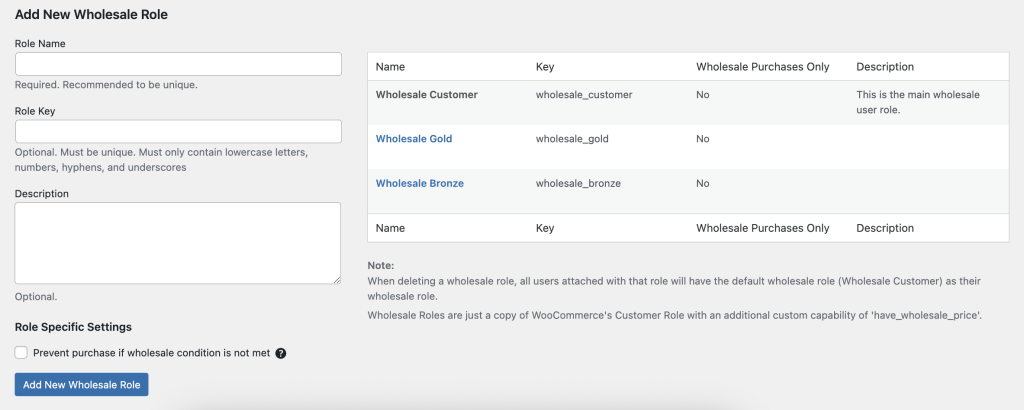
- Melden Sie sich in Ihrem WordPress Admin Dashboard an.
- Navigieren Sie zu Großhandel → Rollen.
- Klicken Sie in der oberen Symbolleiste auf Neue Großhandelsrolle hinzufügen.
- Füllen Sie die Felder aus:
- Rollen-Schlüssel (z. B. wholesale_bronze) – eine eindeutige Kennung.
- Rollenname (z. B. Bronze Großhandel) – die angezeigte Bezeichnung.
- Rollen-Schlüssel (z. B. wholesale_bronze) – eine eindeutige Kennung.
- Klicken Sie auf Rolle hinzufügen, um Ihre neue Großhandelsstufe zu speichern.
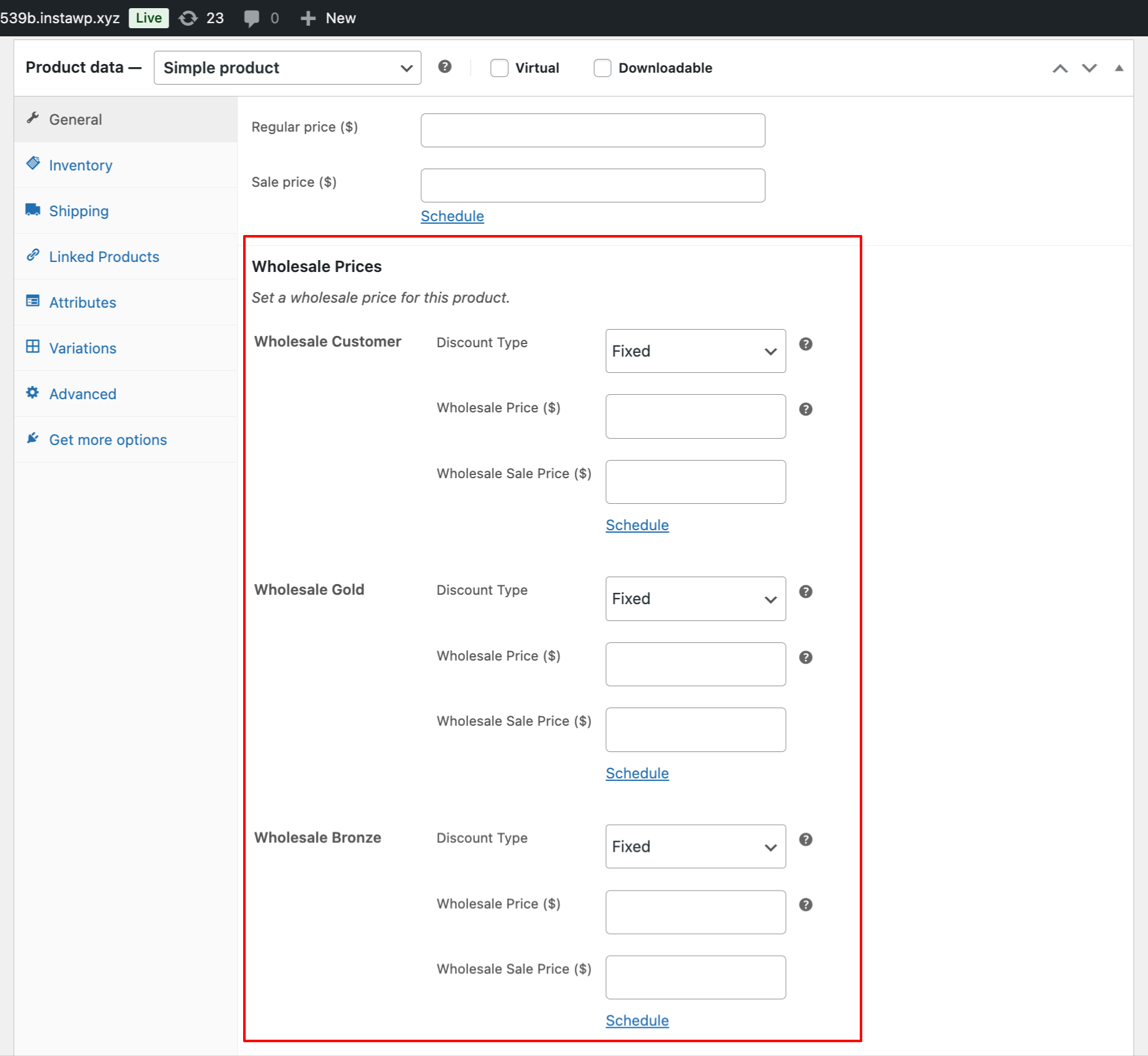
- Beim Bearbeiten von Produkten sehen Sie nun separate Großhandelspreisfelder für jede Rolle – z. B. Bronze, Silber, Gold – unter Produktdaten → Allgemein (Großhandel).
Anwendungsbeispiel
Ihr Geschäft möchte drei Großhandelsstufen haben:
| Stufe | Rollen-Schlüssel | Preisstrategie |
| Bronze Großhandel | Großhandel Bronze | 5 % Rabatt für kleine Einzelhändler |
| Silber Großhandel | Großhandel Silber | 10 % Rabatt für mittelgroße Unternehmen |
| Gold Großhandel | wholesale_gold | 15 % Rabatt für Käufer mit hohem Volumen |
Arbeitsablauf:
- Fügen Sie die drei oben genannten Rollen hinzu.
- Legen Sie die entsprechenden Großhandelspreise im Tab „Großhandel“ jedes Produkts fest.
- Weisen Sie Kunden der entsprechenden Stufe zu. Stellen Sie sicher, dass Sie nur eine Rolle pro Benutzer zuweisen. Verschieben Sie sie in eine andere Großhandelsrolle, wenn Sie ihnen einen größeren Rabatt anbieten möchten.
- Sie können auch unser Lead Capture Plugin verwenden, um eine Registrierungsseite zu erstellen. Auf dieser Seite können Sie neuen registrierten Kunden manuell oder automatisch Großhandelsrollen zuweisen.
Wenn Sie bereits eine bestehende Großhandels- oder benutzerdefinierte Rolle von einem anderen Plugin haben, können Sie keine Großhandelsfunktionen von unserem Plugin zuweisen. Alle Großhandelsrollen müssen unter unserem Abschnitt Großhandel → Rolle erstellt werden, um die volle Funktionalität zu erhalten.

