
Se gestisci un negozio WooCommerce e vendi ad aziende, probabilmente sai che non tutti i clienti all'ingrosso sono uguali. Alcuni effettuano piccoli ordini, altri acquistano in grandi quantità. Ecco perché ha senso offrire prezzi all'ingrosso diversi a tipi diversi di clienti.
Con il plugin Wholesale Prices Premium, puoi facilmente impostare livelli multipli all'ingrosso, ognuno con il proprio livello di sconto. Questo ti consente di premiare i grandi acquirenti con prezzi migliori, continuando a supportare i clienti più piccoli.
In questa guida, ti mostreremo come creare e gestire prezzi all'ingrosso a livelli in WooCommerce, anche se non sei uno sviluppatore.
Perché utilizzare prezzi all'ingrosso a livelli in WooCommerce?
I prezzi a livelli sono uno strumento potente per i proprietari di negozi WooCommerce che desiderano:
- Incentivare volumi di acquisto più elevati con sconti crescenti
- Servire più tipi di clienti B2B (piccoli rivenditori, medie imprese, acquirenti all'ingrosso)
- Automatizzare le strategie di prezzo in base alla segmentazione dei clienti
- Migliorare la fidelizzazione dei clienti premiando gli ordini di grandi dimensioni
- Semplificare la gestione dei prezzi senza codice personalizzato
Utilizzando Wholesale Prices Premium, puoi creare ruoli all'ingrosso personalizzati con un controllo preciso dei prezzi direttamente dalla tua dashboard di WordPress.
Istruzioni passo passo
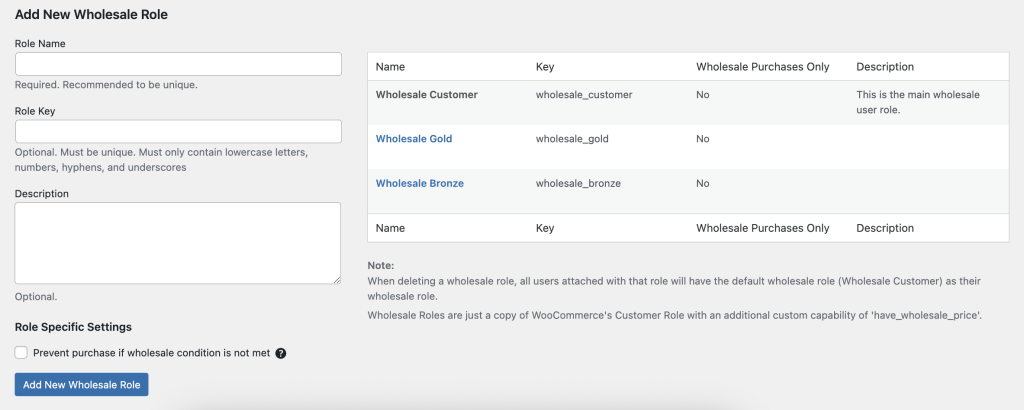
- Accedi alla tua bacheca di amministrazione di WordPress.
- Vai su Wholesale → Ruoli.
- Fai clic su Aggiungi nuovo ruolo all'ingrosso nella barra degli strumenti in alto.
- Compila i campi:
- Chiave del ruolo (es. wholesale_bronze) — un identificatore univoco.
- Nome del ruolo (es. Bronze Wholesale) — l'etichetta di visualizzazione.
- Chiave del ruolo (es. wholesale_bronze) — un identificatore univoco.
- Fai clic su Aggiungi ruolo per salvare il tuo nuovo livello all'ingrosso.
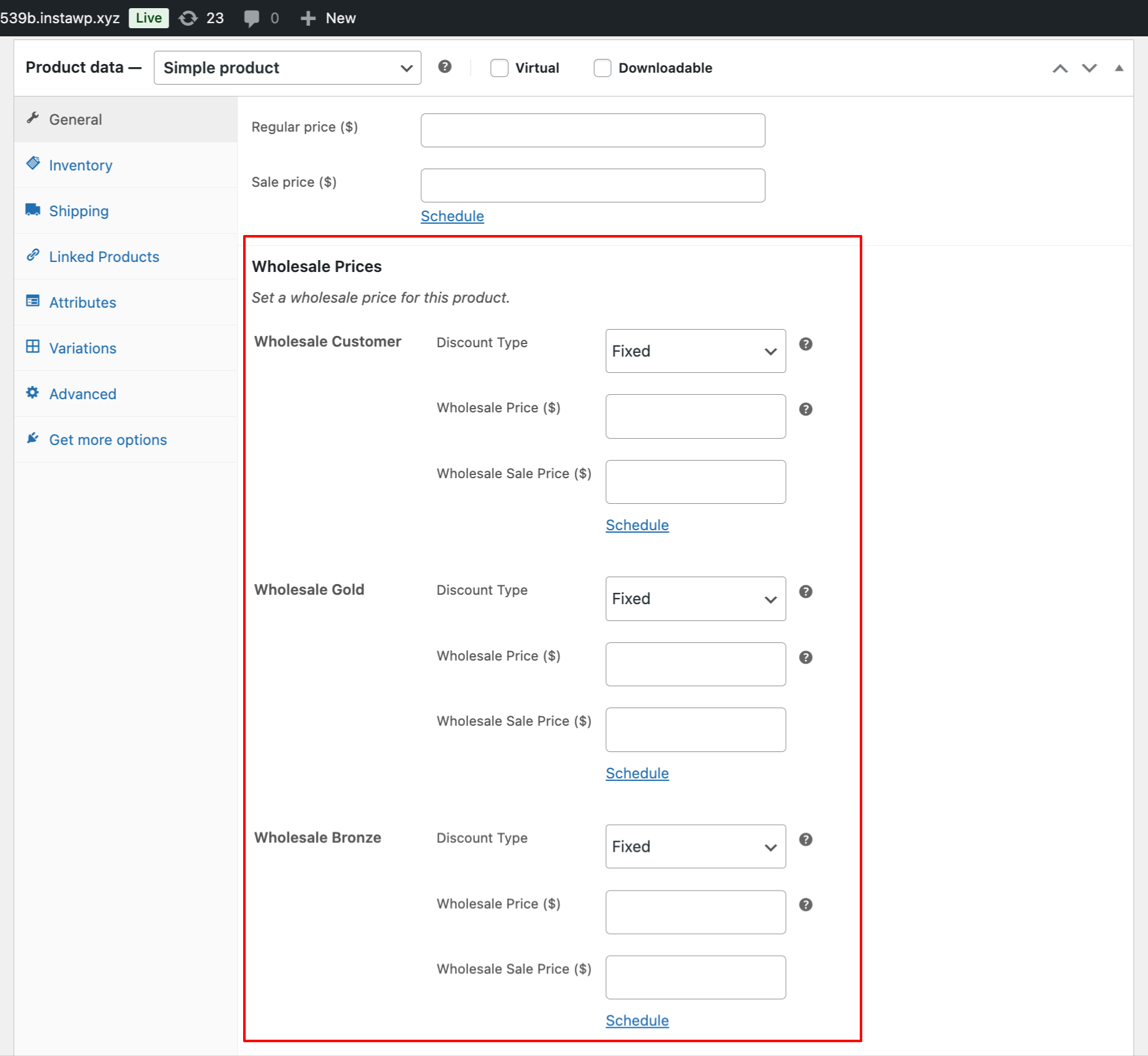
- Quando modifichi i prodotti, vedrai ora campi di prezzo all'ingrosso separati per ogni ruolo, ad esempio Bronzo, Argento, Oro, sotto Dati prodotto → Generale (All'ingrosso).
Caso d'uso di esempio
Il tuo negozio desidera tre livelli wholesale:
| Livello | Chiave ruolo | Strategia di prezzo |
| Bronzo all'ingrosso | bronzo_all_ingrosso | Sconto del 5% per piccoli rivenditori |
| Argento all'ingrosso | argento_all_ingrosso | Sconto del 10% per aziende di medie dimensioni |
| Oro all'ingrosso | oro_all_ingrosso | Sconto del 15% per acquirenti ad alto volume |
Flusso di lavoro:
- Aggiungi i tre ruoli sopra.
- Imposta i rispettivi prezzi all'ingrosso all'interno della scheda All'ingrosso di ciascun prodotto.
- Assegna i clienti al livello appropriato. Assicurati di assegnare un solo ruolo per utente. Spostali in un ruolo all'ingrosso diverso se desideri offrire loro uno sconto maggiore.
- Puoi anche usare il nostro plugin Lead Capture per creare una pagina di registrazione. In questa pagina, puoi assegnare ruoli all'ingrosso ai nuovi clienti registrati manualmente o automaticamente.
Se hai già un ruolo all'ingrosso o personalizzato esistente da un altro plugin, non puoi assegnare funzionalità all'ingrosso dal nostro plugin. Tutti i ruoli all'ingrosso devono essere creati nella sezione Ingrosso → Ruoli per accedere alla piena funzionalità.

