
Als uw groothandelsbestelformulier te veel of te weinig producten tegelijk laadt, kunt u dit regelen via de eigen instellingen van het formulier. U kunt ook overschakelen van genummerde pagina's naar lazy loading, zodat er automatisch meer producten worden geladen terwijl een klant naar beneden scrolt in plaats van door pagina's te klikken.
De instelling Producten per pagina en de optie Lazy Loading, beide in Wholesale Order Form, regelen dit, en ze interageren met elkaar op manieren die de moeite waard zijn om te begrijpen voordat u ze wijzigt.
Deze instellingen worden per formulier-editor geconfigureerd en bevinden zich in de huidige Wholesale Order Form builder. Elk bestelformulier dat u maakt, heeft zijn eigen onafhankelijke instelling, dus verschillende formulieren kunnen verschillende waarden gebruiken.
Vereisten
- Wholesale Order Form geïnstalleerd en geactiveerd.
- Een bestelformulier dat al binnen de plugin is aangemaakt. Als u dit nog niet hebt ingesteld, lees dan eerst Set up Wholesale Order Form.
Wijzig hoeveel producten per pagina worden geladen
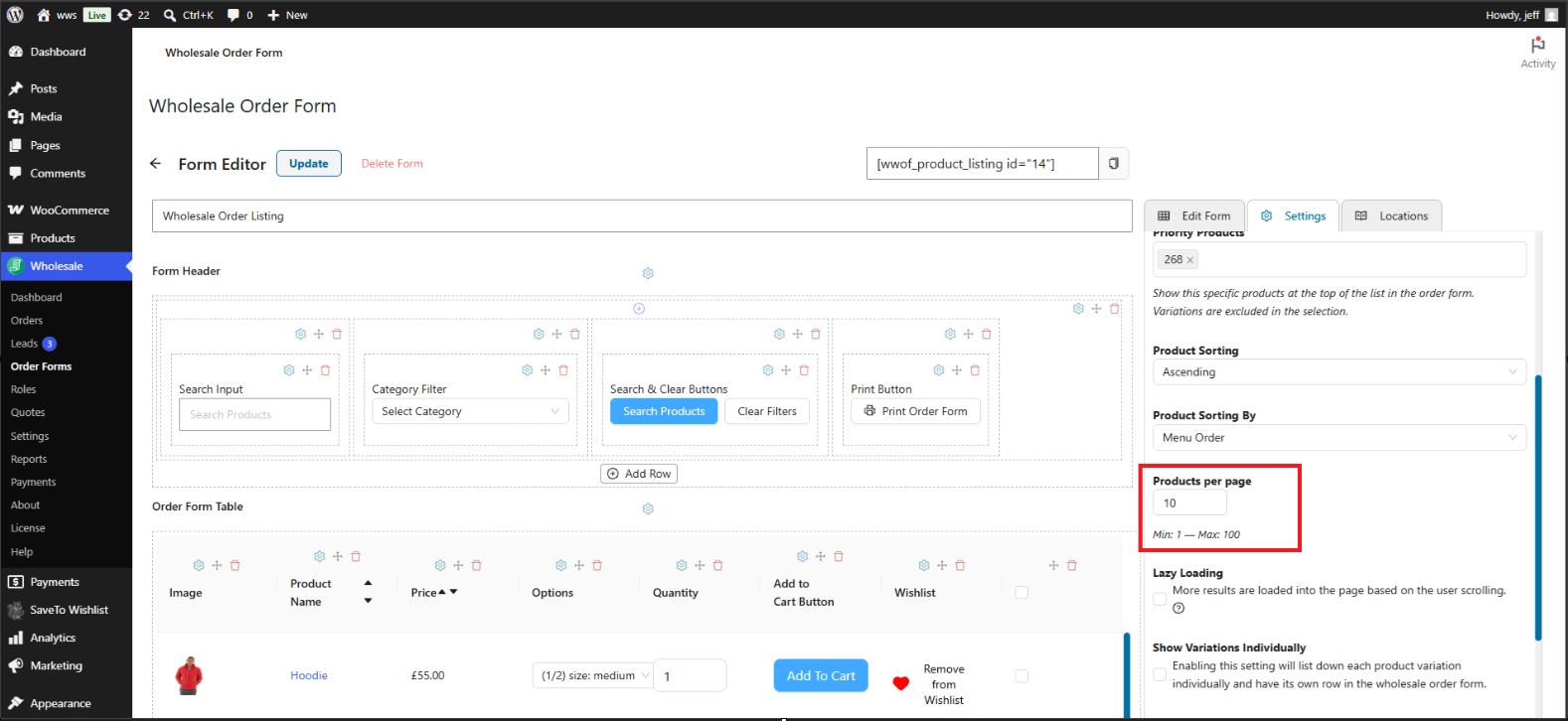
Standaard toont een bestelformulier 10 producten per pagina. Het verhogen van dit aantal toont meer producten voordat de klant naar de volgende pagina hoeft te gaan. Het verlagen ervan kan helpen om het formulier sneller te laden op winkels met grote catalogi.
- Ga naar Wholesale → Order Forms.
- Klik op Bewerken op het bestelformulier dat u wilt wijzigen om het te openen in de Formulier-editor.
- Open in de zijbalk het tabblad Instellingen.
- Stel Producten per pagina in op een getal tussen 1 en 100.
- Klik op Publiceren of Bijwerken om uw wijzigingen op te slaan.
Deze instelling bepaalt ook hoeveel resultaten per pagina verschijnen wanneer een klant producten zoekt of filtert op het formulier, niet alleen de standaard productlijst.
Schakel over naar lazy loading in plaats van genummerde pagina's
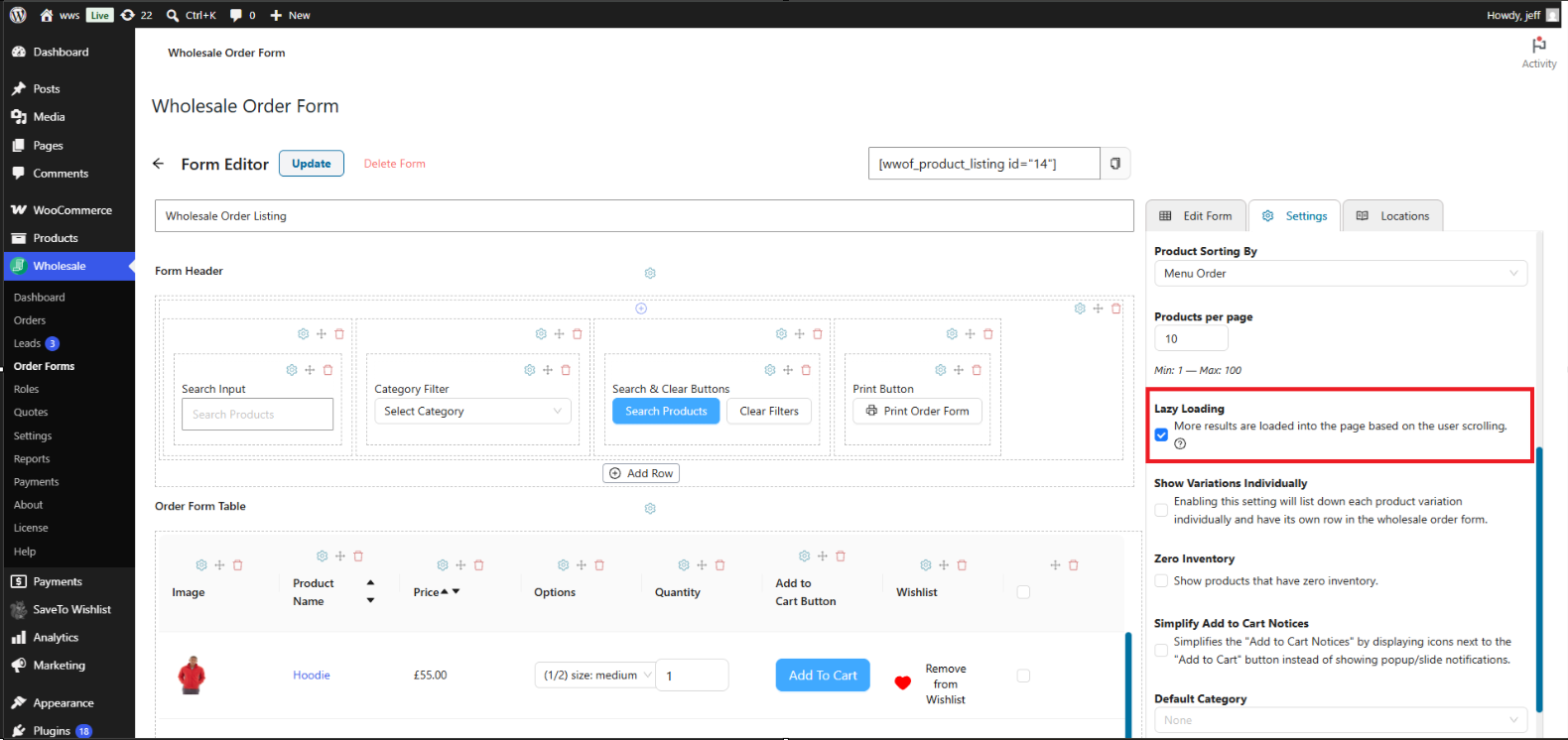
In plaats van producten over genummerde pagina's te verdelen, laadt Lazy Loading automatisch meer producten in de pagina terwijl de klant naar beneden scrolt. Gebruik dit wanneer u de voorkeur geeft aan een continue scrollervaring boven het klikken tussen pagina's.
- Ga naar Groothandel → Bestelformulieren en klik op Bewerken op het formulier dat u wilt wijzigen.
- Open in de zijbalk het tabblad Instellingen.
- Schakel het selectievakje Lazy Loading in.
- Klik op Publiceren of Bijwerken om uw wijzigingen op te slaan.
De instelling Producten per pagina blijft van toepassing wanneer Lazy Loading is ingeschakeld: het bepaalt hoeveel extra producten worden geladen telkens wanneer de klant verder naar beneden scrolt op de pagina.
Genummerde paginabesturingen worden automatisch verborgen voor het formulier wanneer Lazy Loading is ingeschakeld, aangezien de twee weergavestijlen niet samen worden gebruikt.
Probleemoplossing
Ik heb Producten per pagina gewijzigd, maar het live bestelformulier toont nog steeds het oude nummer. Wat moet ik controleren?
Bevestig dat u op Publiceren of Bijwerken hebt geklikt na het aanbrengen van de wijziging, en niet alleen de editor hebt gesloten. Als de instelling is opgeslagen, wis dan de cache van de pagina of objecten op uw site, en laad vervolgens het bestelformulier opnieuw in een privé- of incognito browservenster om een lokale browsercache uit te sluiten.
Ik heb Lazy Loading ingeschakeld, maar het formulier toont nog steeds paginanummers. Wat moet ik controleren?
Zorg ervoor dat het selectievakje Lazy Loading daadwerkelijk is opgeslagen door het tabblad Instellingen opnieuw te openen na het publiceren. Als het is ingeschakeld, maar het formulier nog steeds paginanummers weergeeft, wis dan de cache van uw site en laad de pagina opnieuw.
Producten per pagina is correct ingesteld, maar het aantal ziet er anders uit wanneer een klant zoekt. Waarom?
De laatste pagina van elke resultatenreeks, inclusief een zoekopdracht of categorie filter, toont van nature minder producten dan de waarde Producten per pagina als het totale aantal overeenkomende producten geen exact veelvoud is van dat getal. Dit is verwacht gedrag, geen bug.
Veelgestelde vragen
Is er een maximum aantal producten dat ik per pagina kan instellen?
Ja. Producten per pagina accepteert een waarde tussen 1 en 100.
Kan ik Producten per pagina en Lazy Loading samen gebruiken?
Ja, en zo zijn de twee instellingen ontworpen om te werken. Producten per pagina bepaalt hoeveel producten er initieel worden geladen en hoeveel extra producten er elke keer worden geladen wanneer de klant scrolt, terwijl Lazy Loading bepaalt of die producten worden geladen via scrollen in plaats van paginanummers.
Is deze instelling van toepassing op elk bestelformulier op mijn site?
Nee. Producten per pagina en Lazy Loading worden afzonderlijk geconfigureerd voor elk bestelformulier. Als u meerdere bestelformulieren heeft, werk dan elk afzonderlijk bij.
Heeft Lazy Loading invloed op de prestaties van winkels met grote catalogi?
Lazy Loading kan de initiële laadtijd van de pagina verbeteren omdat het formulier slechts de eerste batch producten vooraf ophaalt en vervolgens meer laadt indien nodig, in plaats van de hele catalogus in één keer te renderen.
Is Producten per pagina van toepassing wanneer Variaties Individueel Tonen is ingeschakeld?
Ja. Wanneer Variaties Individueel Tonen is ingeschakeld, wordt elke productvariantie als een eigen rij weergegeven, en Producten per pagina telt die individuele variantierijen in plaats van de hoofdproducten.
Wat gebeurt er als ik Producten per pagina leeg laat?
Het bestelformulier valt terug op de standaardinstelling van 10 producten per pagina.
Kan ik paginering volledig verwijderen en elk product op één pagina tonen?
Stel Producten per pagina in op 100, de maximaal toegestane waarde. Voor catalogi groter dan 100 producten, schakel in plaats daarvan Lazy Loading in, zodat klanten kunnen blijven scrollen om de rest van de producten te bereiken zonder een harde paginalimiet.
Help & ondersteuning
We hebben een toegewijd ondersteuningsteam voor Wholesale Suite dat onze producten, WooCommerce, en de branche goed kent. Neem contact met ons op als u vragen heeft of hulp nodig heeft bij de configuratie.
Als u een bestaande klant bent, ga dan naar het ondersteuningsticket aanvraagformulier en stuur ons een bericht.
Als u een gratis plugin gebruiker bent, stuur ons dan een ondersteuningsverzoek op het forum. We houden de supportforums van WordPress.org voor de gratis plugin actief in de gaten en helpen onze gebruikers daar zo goed mogelijk.

