
Si tienes una tienda WooCommerce y vendes a empresas, probablemente sepas que no todos los clientes mayoristas son iguales. Algunos hacen pedidos pequeños, otros compran al por mayor. Por eso tiene sentido ofrecer precios mayoristas diferentes a distintos tipos de clientes.
Con el plugin Wholesale Prices Premium, puedes configurar fácilmente múltiples niveles mayoristas, cada uno con su propio nivel de descuento. Esto te permite recompensar a los grandes compradores con mejores precios mientras sigues apoyando a los clientes más pequeños.
En esta guía, te mostraremos cómo crear y gestionar precios mayoristas por niveles en WooCommerce, incluso si no eres desarrollador.
¿Por qué usar precios mayoristas por niveles en WooCommerce?
Los precios por niveles son una herramienta potente para los propietarios de tiendas WooCommerce que desean:
- Incentivar mayores volúmenes de compra con descuentos crecientes
- Atender a múltiples tipos de clientes B2B (pequeños minoristas, medianas empresas, compradores al por mayor)
- Automatizar estrategias de precios basadas en la segmentación de clientes
- Mejorar la fidelidad del cliente recompensando pedidos grandes
- Simplificar la gestión de precios sin código personalizado
Usando Wholesale Prices Premium, puedes crear roles mayoristas personalizados con un control de precios preciso directamente desde tu panel de WordPress.
Instrucciones paso a paso
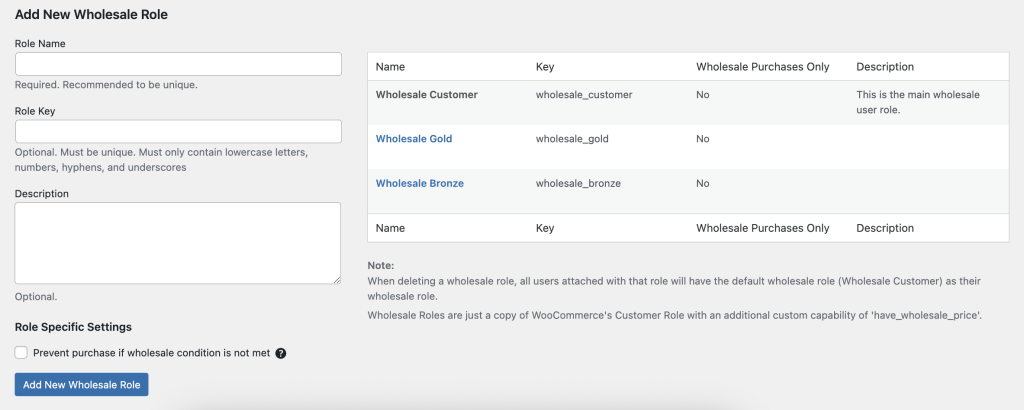
- Inicia sesión en tu Panel de Administración de WordPress.
- Navega a Mayorista → Roles.
- Haz clic en Añadir Nuevo Rol Mayorista en la barra de herramientas superior.
- Completa los campos:
- Clave del Rol (ej. wholesale_bronze) — un identificador único.
- Nombre del Rol (ej. Mayorista Bronce) — la etiqueta de visualización.
- Clave del Rol (ej. wholesale_bronze) — un identificador único.
- Haz clic en Añadir Rol para guardar tu nuevo nivel mayorista.
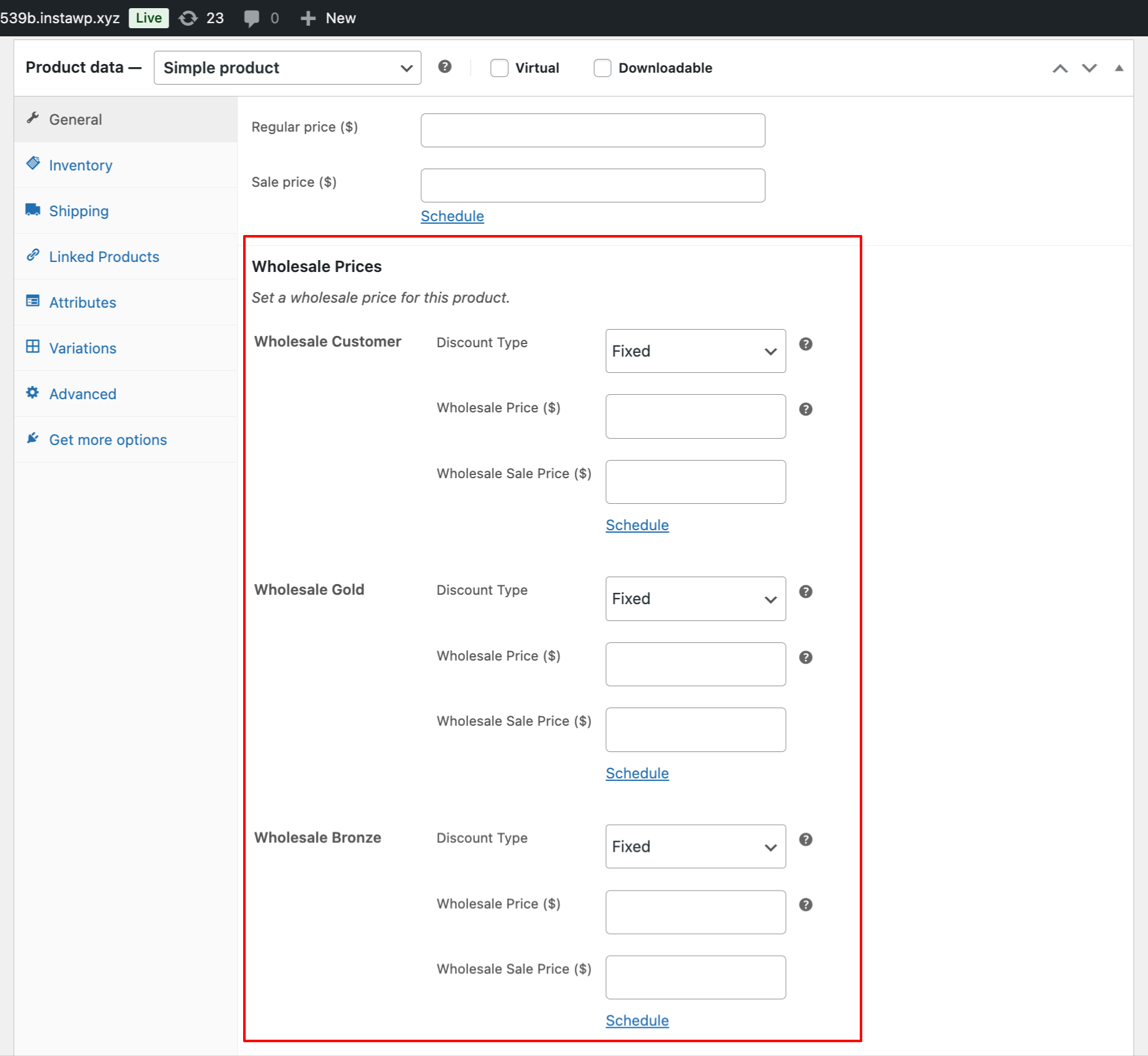
- Al editar productos, ahora verás campos de precios mayoristas separados para cada rol — ej. Bronce, Plata, Oro — en Datos del producto → General (Mayorista).
Caso de uso de ejemplo
Tu tienda quiere tres niveles mayoristas:
| Nivel | Clave de rol | Estrategia de precios |
| Mayorista Bronce | bronce_mayorista | Descuento del 5% para pequeños minoristas |
| Mayorista Plata | plata_mayorista | Descuento del 10% para medianas empresas |
| Mayorista Oro | oro_mayorista | Descuento del 15% para compradores de gran volumen |
Flujo de trabajo:
- Añade los tres roles anteriores.
- Establece los precios mayoristas correspondientes dentro de la pestaña Mayorista de cada producto.
- Asigna clientes al nivel apropiado. Asegúrate de asignar un solo rol por usuario. Muévelos a un rol mayorista diferente si quieres ofrecerles un mayor descuento.
- También puedes usar nuestro plugin Captura de Leads para crear una página de registro. En esta página, puedes manualmente o automáticamente asignar roles mayoristas a los nuevos clientes registrados.
Si ya tienes un rol mayorista o personalizado existente de otro plugin, no puedes asignar capacidades mayoristas de nuestro plugin. Todos los roles mayoristas deben crearse en nuestra sección Mayorista → Rol para acceder a la funcionalidad completa.

