
Standaard, wanneer een ingelogde groothandelsklant een product bekijkt waarvoor een groothandelsprijs geldt, toont WooCommerce Wholesale Prices de reguliere verkoopprijs doorgestreept naast de groothandelsprijs. Als u liever wilt dat uw groothandelsklanten alleen de groothandelsprijs zien, kunt u dit uitschakelen.
Dit artikel behandelt de instelling Verkooprijs verbergen, waar u deze kunt vinden en welke delen van uw winkel het beïnvloedt.
Verkooprijs verbergen is een enkele, winkelbrede instelling. Zodra ingeschakeld, is deze van toepassing op elk product met een groothandelsprijs in uw winkel, inclusief eenvoudige, variabele en gegroepeerde producten, zowel op de productpagina als in de winkelwagen.
Vereisten
- WooCommerce Wholesale Prices geïnstalleerd en geactiveerd. Deze instelling is beschikbaar in de gratis versie van de plugin.
- Minstens één product met een groothandelsprijs ingesteld voor een groothandelsrol, zodat u de wijziging kunt bevestigen.
Standaard prijsweergave voor groothandelsklanten
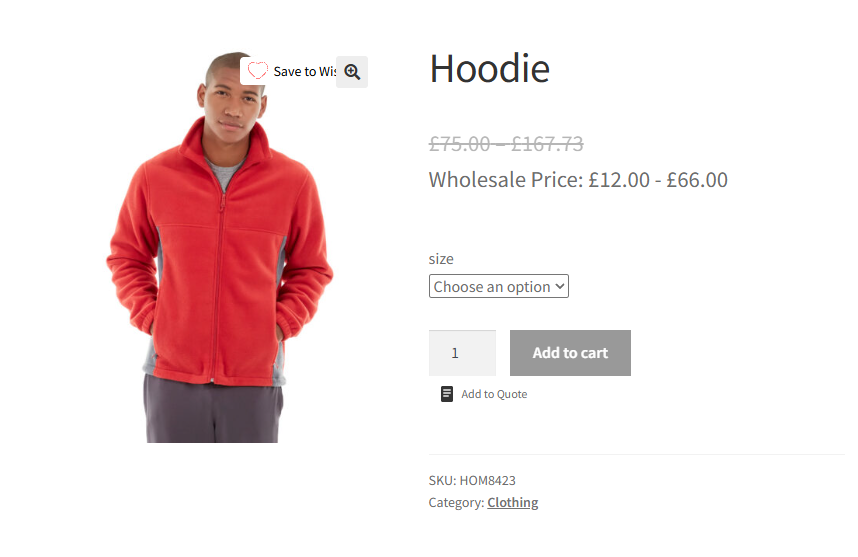
Voordat u deze instelling wijzigt, ziet een groothandelsklant het volgende op een product met een groothandelsprijs: de reguliere prijs doorgestreept, met de groothandelsprijs eronder weergegeven.
Schakel Verkooprijs verbergen in
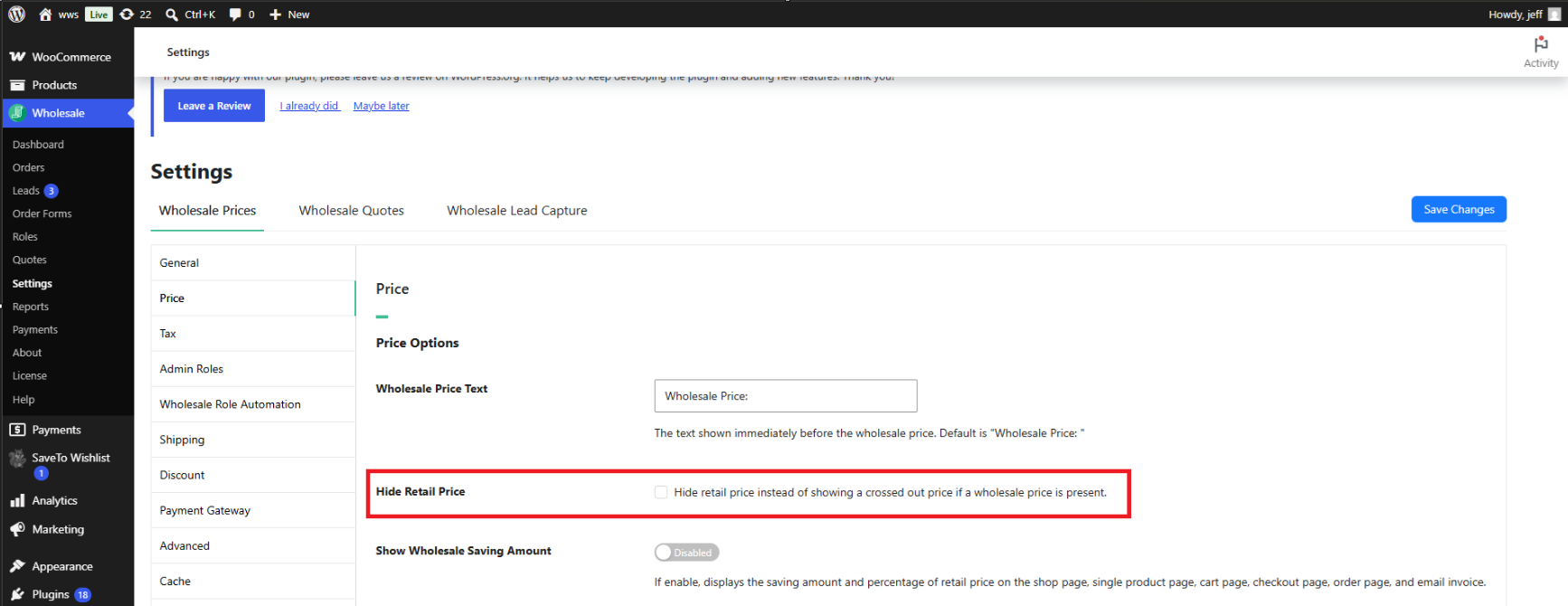
- Ga naar Groothandel → Instellingen → Groothandelsprijzen → Prijs.
- Schakel het selectievakje Verkooprijs verbergen in.
- Klik op Wijzigingen opslaan.
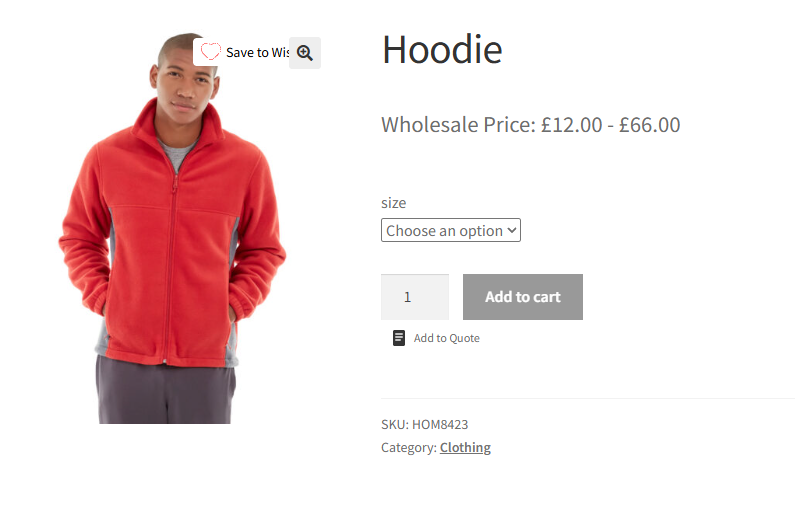
Eenmaal opgeslagen, verschijnt de doorgestreepte reguliere prijs niet langer voor groothandelsklanten. Alleen de groothandelsprijs wordt weergegeven, op de productpagina, in de winkelwagen en op de blokgebaseerde winkelwagen- en afrekenpagina's.
Probleemoplossing
Ik heb Verkooprijs verbergen ingeschakeld, maar de doorgestreepte prijs wordt nog steeds weergegeven op de productpagina. Wat moet ik controleren?
Bevestig dat u op Wijzigingen opslaan heeft geklikt na het inschakelen van het selectievakje, en niet alleen de instellingenpagina heeft verlaten. Als de instelling is opgeslagen, wis dan de paginacache of objectcache op uw site en laad de productpagina opnieuw in een privé- of incognitovenster om een lokale browsercache uit te sluiten.
Verkooprijs verbergen is ingeschakeld, maar de winkelwagen toont nog steeds de oude doorgestreepte prijs. Wat moet ik controleren?
Winkelwageninhoud wordt opgeslagen in de sessie van de klant, dus een product dat al in de winkelwagen stond voordat de instelling werd gewijzigd, moet mogelijk worden verwijderd en opnieuw worden toegevoegd. Wis ook de paginacache van uw site en laad de winkelwagen- of afrekenpagina opnieuw.
De instelling lijkt van toepassing te zijn op sommige groothandelsrollen, maar niet op andere. Wat kan er mis zijn?
Verkooprijs verbergen is een globale instelling en is niet beperkt tot een specifieke groothandelsrol. Als de doorgestreepte prijs nog steeds verschijnt voor een bepaalde rol, bevestig dan dat er daadwerkelijk een groothandelsprijs is ingesteld voor die rol op het product. De doorgestreepte prijs heeft alleen betrekking op de eigen groothandelsprijzen van een product, niet op de rol die het bekijkt.
Veelgestelde vragen
Is Verkooprijs verbergen beschikbaar in de gratis versie van de plugin, of vereist het Premium?
Verberg Winkelprijs is beschikbaar in de gratis WooCommerce Wholesale Prices plugin. U heeft WooCommerce Wholesale Prices Premium niet nodig om het te gebruiken.
Is deze instelling van toepassing op variabele en gegroepeerde producten?
Ja. Verberg Winkelprijs verwijdert de doorgestreepte prijs uit het prijsbereik dat wordt weergegeven op variabele producten en uit de prijzen die worden weergegeven op gegroepeerde producten, naast eenvoudige producten.
Zullen reguliere, niet-groothandelsklanten enige verandering opmerken nadat ik deze instelling heb ingeschakeld?
Nee. Verberg Winkelprijs heeft alleen invloed op de prijsopslag die wordt gegenereerd wanneer een groothandelsprijs van toepassing is op de klant die het product bekijkt. Klanten die tegen reguliere winkelprijzen browsen, zien standaard WooCommerce-prijzen, onbeïnvloed door deze instelling.
Verandert Verberg Winkelprijs hoe de groothandelsprijs wordt berekend?
Nee. Deze instelling bepaalt alleen of de doorgestreepte reguliere prijs wordt weergegeven. De groothandelsprijs zelf, en hoe deze wordt berekend, blijft ongewijzigd.
Is de instelling van toepassing op de op blokken gebaseerde winkelwagen- en afrekenpagina's van WooCommerce?
Ja. Verberg Winkelprijs is van toepassing op zowel de klassieke winkelwagen- en afrekenpagina's als de op blokken gebaseerde winkelwagen- en afrekenpagina's.
Kan ik de doorgestreepte prijs verbergen voor sommige producten, maar zichtbaar houden voor andere?
Nee. Verberg Winkelprijs is een enkele, winkelbrede instelling. Het inschakelen ervan verwijdert de doorgestreepte prijs voor elk product met groothandelsprijs; er is geen optie per product om het individueel in of uit te schakelen.
Heeft het inschakelen van Verberg Winkelprijs invloed op de tekst van het label "Groothandelsprijs:" die vóór de prijs wordt weergegeven?
Nee. De tekst van het groothandelsprijslabel wordt beheerd door een aparte instelling Groothandelsprijs Tekst en blijft weergegeven zoals geconfigureerd, ongeacht de instelling Verberg Winkelprijs.
Help & Ondersteuning
We hebben een toegewijd ondersteuningsteam voor Wholesale Suite dat onze producten, WooCommerce en de branche zeer goed kent. U bent welkom om hun expertise op elk moment, wereldwijd, te benutten.
Als u een bestaande klant bent, ga dan naar het ondersteuningsticket aanvraagformulier en stuur ons een bericht.
Als u een gratis plugin gebruiker bent, stuur ons dan een ondersteuningsverzoek op het forum. We houden de supportforums van WordPress.org voor de gratis plugin actief in de gaten en helpen onze gebruikers daar zo goed mogelijk.

