
Als u zowel groothandel als detailhandel verkoopt via dezelfde WooCommerce-winkel, heeft u mogelijk productvariaties, zoals een specifieke maat, kleur of verpakkingsgrootte, die alleen beschikbaar moeten zijn voor uw groothandelsklanten. Gewone klanten mogen deze variaties helemaal niet zien, laat staan ze kunnen kopen.
Dit artikel behandelt hoe individuele productvariaties te beperken tot een of meer groothandelsrollen met behulp van WooCommerce Wholesale Prices Premium, zodat die variaties verborgen zijn voor iedereen buiten de door u gekozen rollen.
Deze instelling is per variatie van toepassing, dus u kunt enkele variaties open laten voor iedereen, terwijl u andere beperkt tot uw groothandelsklanten voor hetzelfde product.
Vereisten
- WooCommerce Wholesale Prices Premium geïnstalleerd en geactiveerd.
- Een variabel product met ten minste één variatie die al in WooCommerce is aangemaakt.
- Groothandelsrollen geconfigureerd op Groothandel → Rollen.
Een variatie beperken tot specifieke groothandelsrollen
Configureer deze instelling op de variatie zelf, niet op het bovenliggende product.
- Bewerk het product en ga naar Productgegevens → Variaties. Het product moet ingesteld zijn als Variabel product om dit tabblad weer te geven.
- Klik op de variatie die u wilt beperken om deze uit te vouwen.
- Zoek het veld Exclusieve groothandelsvariatie.
- Selecteer een of meer groothandelsrollen uit de dropdown. Laat het leeg om de variatie voor iedereen beschikbaar te houden.
- Klik op Wijzigingen opslaan en vervolgens op Bijwerken van het product.
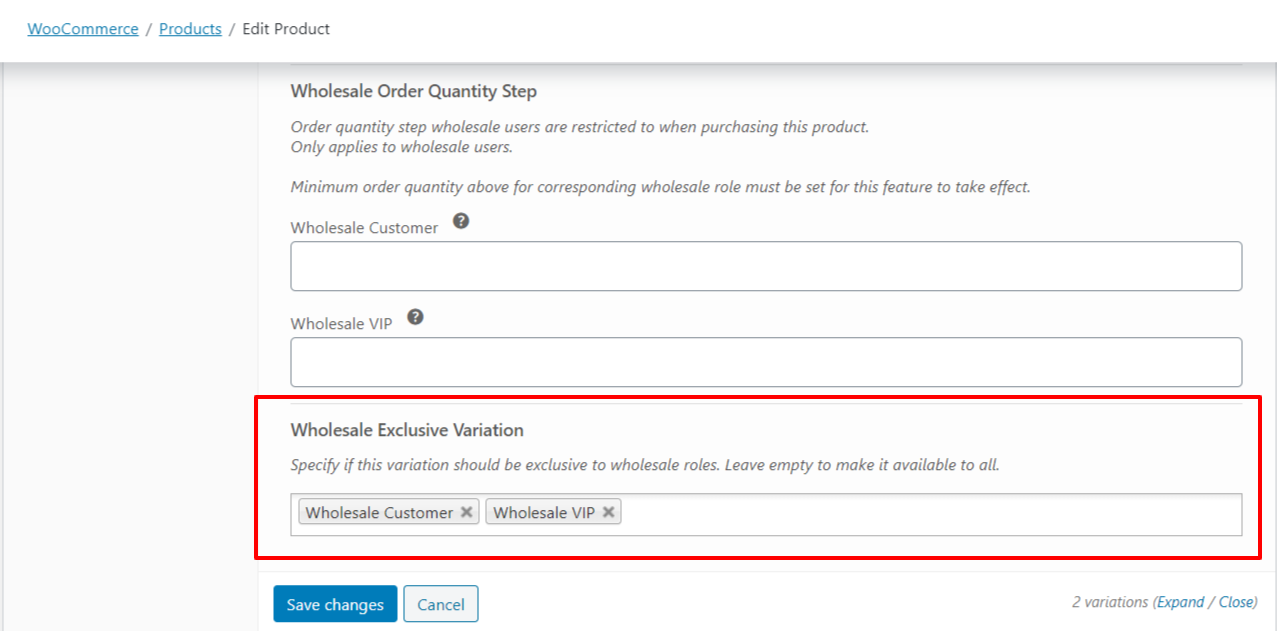
Hoe exclusieve groothandelsvariaties worden afgedwongen
Het beperken van een variatie tot een of meer groothandelsrollen verbergt deze en maakt deze onkoopbaar voor alle anderen. Alleen accounts met een van de geselecteerde rollen kunnen die variatie zien of kopen. Klanten met een andere groothandelsrol, niet-groothandelsklanten en gasten kunnen deze niet zien of selecteren. Beheerder- en winkelmanageraccounts zien altijd elke variatie en kunnen deze kopen, ongeacht deze instelling.
Een variatie beperken versus een heel product beperken
Exclusieve groothandelsvariatie is van toepassing op een enkele variatie, niet op het bovenliggende product. Als u een heel product wilt verbergen of beperken tot specifieke groothandelsrollen in plaats van één variatie, gebruik dan in plaats daarvan het veld Beperken tot groothandelsrollen in het Publicatievak van het product.
Probleemoplossing
Waarom ziet een beheerder- of winkelmanageraccount nog steeds een beperkte variatie?
Beheerder- en winkelmanageraccounts omzeilen exclusieve variatiebeperkingen volledig, zodat ze altijd elke variatie zien en kunnen kopen, ongeacht de geselecteerde rollen. Test met een account dat alleen is toegewezen aan een groothandelsrol, niet met een beheerdersaccount.
Ik heb geen groothandelsrol geselecteerd. Waarom is de variatie nog steeds zichtbaar voor iedereen?
Als u Wholesale Exclusive Variation leeg laat, wordt de standaardwaarde 'beschikbaar voor iedereen' toegepast, zodat de variatie zich gedraagt alsof deze niet is beperkt. Om een variatie te verbergen voor iedereen buiten een set rollen, selecteert u die rol, of rollen, in het veld.
Waarom wordt niet het hele product verborgen, maar slechts één variatie?
Deze instelling wordt per variatie toegepast, niet op het bovenliggende product. Andere variaties op hetzelfde product, samen met de eigen vermelding van het product, blijven zichtbaar, tenzij u ze individueel beperkt of de aparte instelling Restrict To Wholesale Roles op het product zelf gebruikt.
Veelgestelde vragen
Kan ik meer dan één groothandelsrol selecteren voor een enkele variatie?
Ja. Wholesale Exclusive Variation is een veld voor meerdere selecties, dus u kunt meerdere groothandelsrollen tegelijk kiezen. Elke klant die een van de geselecteerde rollen heeft, kan die variatie zien en kopen.
Zien gastklanten of uitgelogde bezoekers een beperkte variatie?
Nee. Alleen ingelogde klanten die een van de geselecteerde groothandelsrollen hebben, kunnen een beperkte variatie zien of kopen. Gasten en klanten zonder een bijpassende groothandelsrol kunnen dat niet.
Heb ik WooCommerce Wholesale Prices Premium nodig, of werkt dit met de gratis plugin?
Deze functie vereist WooCommerce Wholesale Prices Premium. Het is niet beschikbaar in de gratis WooCommerce Wholesale Prices plugin.
Als een klant meer dan één groothandelsrol is toegewezen, welke wordt dan gecontroleerd tegen de beperking?
Alleen de primaire groothandelsrol van de klant wordt gecontroleerd tegen de rollen die zijn geselecteerd in Wholesale Exclusive Variation. Als ze toegang nodig hebben op basis van een secundaire rol, wijs die rol dan in plaats daarvan toe als hun primaire rol.
Werkt dit met groothandelsrollen die zijn gemaakt via een vendor marketplace plugin zoals WC Vendors?
Ja. Wholesale Exclusive Variation integreert met groothandelsrollen die worden gebruikt in een WC Vendors marketplace-opstelling.
Als ik de geselecteerde rollen later wijzig, wordt de wijziging dan onmiddellijk toegepast?
Ja. De beschikbaarheid van variaties wordt bij elke paginalading geëvalueerd tegen uw huidige instellingen, dus een bijgewerkte roelselectie wordt toegepast zodra u deze opslaat.
Kan ik variaties op een eenvoudig product beperken?
Nee. Wholesale Exclusive Variation is alleen beschikbaar voor variaties op een variabel product, aangezien eenvoudige producten geen variaties hebben om te beperken. Om een eenvoudig product zelf te beperken, gebruikt u de instelling Restrict To Wholesale Roles op het product.
Help & ondersteuning
We hebben een toegewijd ondersteuningsteam voor Wholesale Suite dat onze producten, WooCommerce en de branche zeer goed kent. U bent welkom om hun expertise op elk moment, wereldwijd, te benutten.
Als u een bestaande klant bent, ga dan naar het ondersteuningsticket aanvraagformulier en stuur ons een bericht.
Als u een gratis plugin gebruiker bent, stuur ons dan een ondersteuningsverzoek op het forum. We houden de supportforums van WordPress.org voor de gratis plugin actief in de gaten en helpen onze gebruikers daar zo goed mogelijk.

