
Wholesaleklanten die precies zien hoeveel ze besparen in vergelijking met de detailhandel, zijn meer gemotiveerd om grotere bestellingen te plaatsen en terug te keren naar uw winkel. WooCommerce Wholesale Prices Premium bevat een weergave van het bespaarde bedrag die elke klant hun besparingen toont als een dollarbedrag, een percentage, of beide. U kunt ervoor kiezen om dit weer te geven op de winkelpagina, productpagina, winkelwagen, afrekenen, orderbevestiging en e-mailfactuur.
Dit artikel legt uit hoe u de weergave van het bespaarde bedrag kunt inschakelen, kunt kiezen op welke pagina's deze verschijnt en de berichttekst kunt aanpassen die aan uw wholesaleklanten wordt getoond.
Vereisten
- WooCommerce Wholesale Prices Premium geïnstalleerd en geactiveerd. De weergave van het bespaarde bedrag is een functie die alleen beschikbaar is in Premium en is niet inbegrepen in de gratis WooCommerce Wholesale Prices plugin.
Schakel de weergave van het groothandelsbesparingsbedrag in
- Ga naar Wholesale → Instellingen → Wholesale Prices → Prijs.
- Scroll naar de sectie Prijsopties.
- Schakel Wholesale Bespaard Bedrag Tonen in op Ingeschakeld.
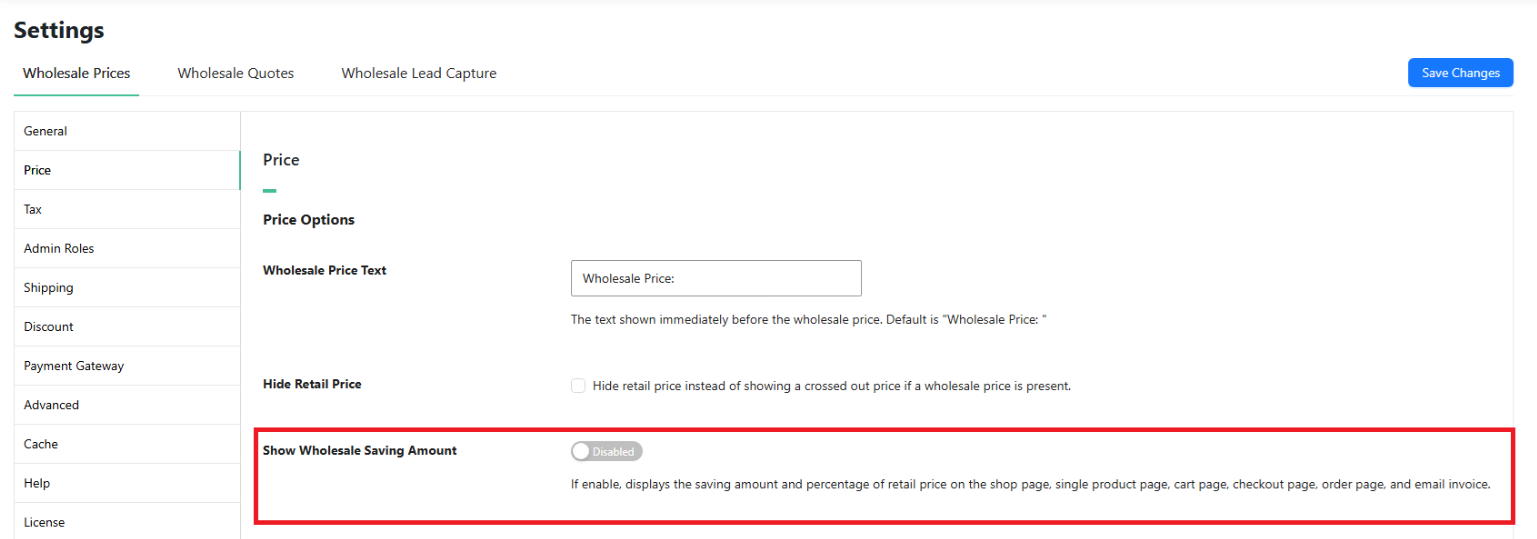
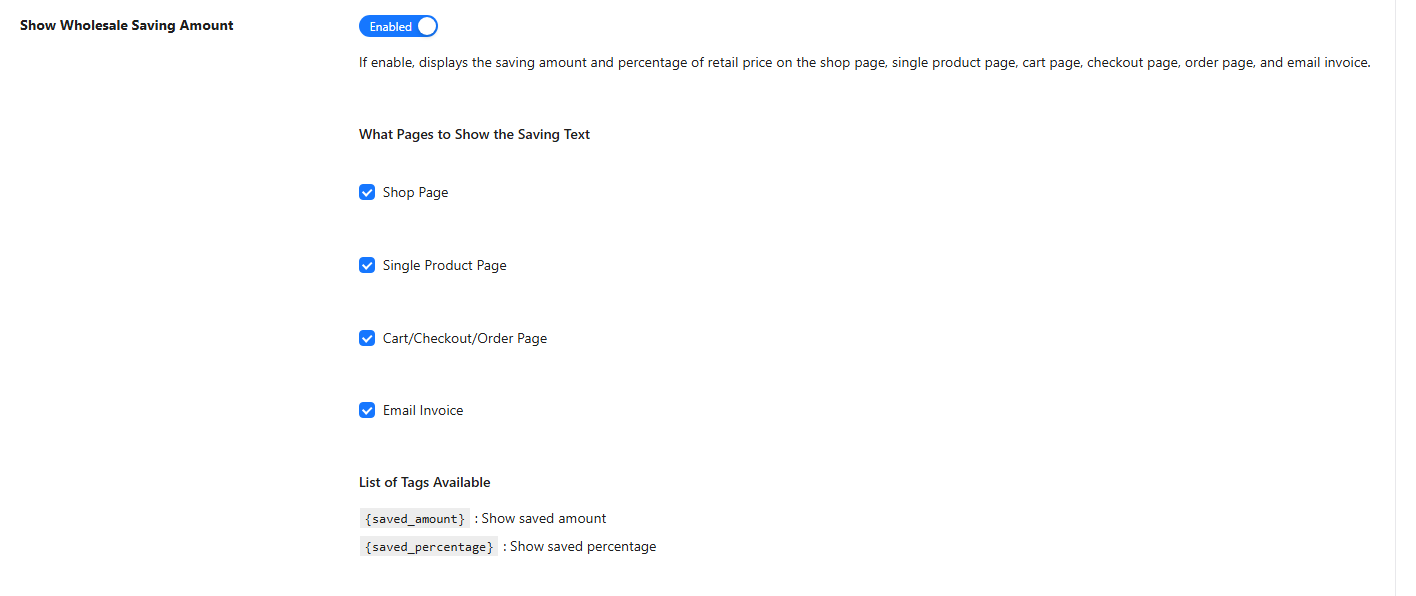
Eenmaal ingeschakeld, verschijnt de subsectie Welke Pagina's de Besparingstekst Tonen direct onder de schakelaar.
Kies waar de besparingstekst verschijnt
Vink de vakjes aan voor elke locatie waar u het bespaarde bedrag wilt weergeven.
- Winkelpagina – toont het bespaarde bedrag onder de wholesaleprijs op productlijsten, categorietegels en gerelateerde productsecties.
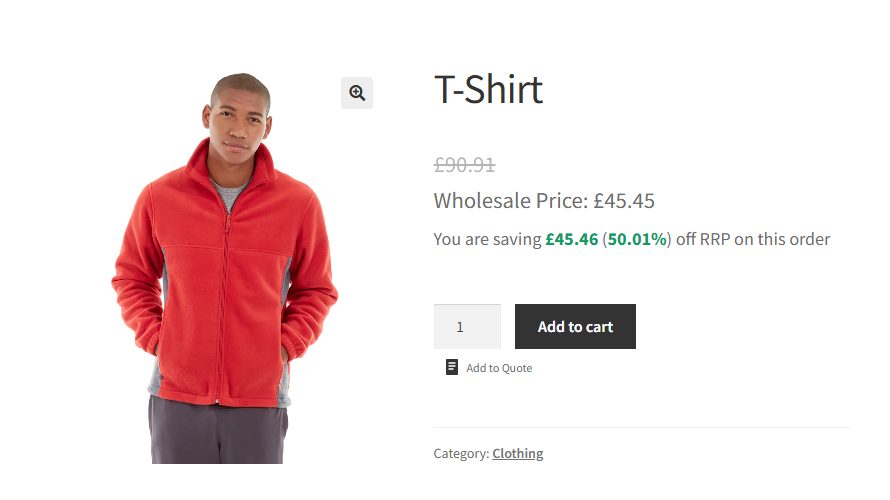
- Individuele Productpagina – toont het bespaarde bedrag op de individuele productpagina.
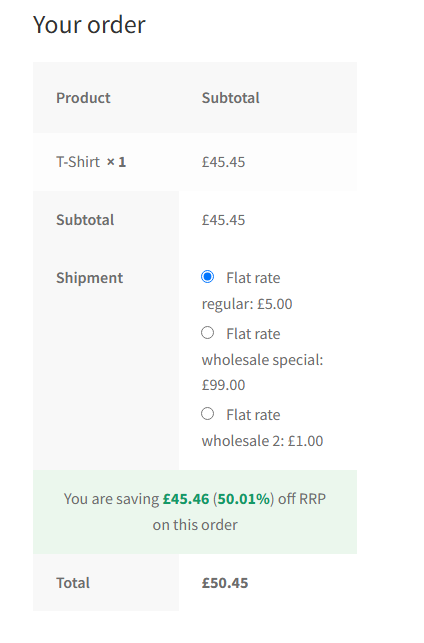
- Winkelwagen/Afrekenen/Bestelpagina – toont de totale besparingen voor de bestelling boven de rij met het besteltotaal op de winkelwagenpagina, afrekenpagina en orderbevestigingspagina.
- E-mailfactuur – bevat de totale bestelbesparingen in de orderbevestigingsmail die naar de klant wordt verzonden.
Pas de tekst van het besparingsbedrag aan
Het veld Wholesale Bespaard Bedrag Tekst regelt het bericht dat aan klanten wordt getoond. De standaardtekst is:
You are saving {saved_amount} ({saved_percentage}) off RRP on this orderU kunt dit wijzigen in elke willekeurige zin. Twee sjabloontags zijn beschikbaar om de berekende waarden in te voegen.
{saved_amount}– vervangen door het bespaarde dollarbedrag, geformatteerd met de valuta-instellingen van uw winkel.{saved_percentage}– vervangen door de besparing uitgedrukt als een percentage van de verkoopprijs.

Op de winkel- en productpagina's wordt de besparingstekst toegevoegd aan de wholesaleprijs voor elk product. Op de winkelwagen, afrekenen, orderbevestiging en e-mailfactuur weerspiegelt de besparingstekst de totale besparingen voor de gehele bestelling.
Veelgestelde vragen
Werkt de weergave van het bespaarde bedrag voor variabele producten?
Op de winkel- en individuele productpagina's is de weergave van het spaarbedrag alleen van toepassing op eenvoudige producten. Variabele producten zijn niet inbegrepen in de spaarberekening per product op die pagina's. In de winkelwagen, bij het afrekenen, op de orderbevestiging en op de factuur per e-mail worden besparingen berekend op basis van de werkelijke artikelprijzen in de winkelwagen, dus elk producttype is inbegrepen in het totale spaarbedrag.
Verschijnt het spaarbedrag voor alle klanten of alleen voor groothandelsklanten?
De weergave van het spaarbedrag verschijnt alleen voor ingelogde groothandelsklanten. Retailklanten en gasten zien geen spaartekst.
Welke prijs wordt gebruikt als de retailprijs bij het berekenen van besparingen?
Standaard gebruikt de plugin de huidige verkoopprijs van het product als de retailbasis. Als er een verkoopprijs actief is voor het product, wordt de besparing berekend op basis van de verkoopprijs in plaats van de reguliere prijs. Om besparingen altijd te berekenen op basis van de reguliere prijs, ongeacht een actieve aanbieding, schakelt u Always Use Regular Price in bij Wholesale → Settings → Wholesale Prices → Price.
Kan ik alleen het dollarbedrag tonen zonder het percentage, of alleen het percentage?
Ja. Bewerk het veld Wholesale Saving Amount Text en verwijder de tag die u niet nodig heeft. Om alleen het dollarbedrag te tonen, gebruikt u een bericht zoals U bespaart {saved_amount} op deze bestelling. Om alleen het percentage te tonen, gebruikt u U bespaart {saved_percentage} op de retailprijs van deze bestelling.
Wordt op de winkelwagenpagina het spaarbedrag per artikel of voor de hele bestelling weergegeven?
In de winkelwagen, bij het afrekenen, op de orderbevestiging en op de factuur per e-mail, weerspiegelt het spaarbedrag de totale besparingen voor de hele bestelling. Besparingen per artikel worden alleen getoond op de winkelpagina en de individuele productpagina, en alleen voor eenvoudige producten.
Ik heb de functie ingeschakeld, maar de spaartekst verschijnt niet. Wat moet ik controleren?
Bevestig eerst dat het klantenaccount is toegewezen aan een groothandelsrol. De weergave van het spaarbedrag verschijnt alleen voor ingelogde groothandelsklanten. Controleer vervolgens of u ten minste één optie hebt aangevinkt in de sectie What Pages to Show the Saving Text en of u de bijbehorende pagina bekijkt. Verifieer ook dat de groothandelsprijs lager is dan de retailprijs die als basis wordt gebruikt – de plugin geeft de spaartekst alleen weer als er een positief verschil is. Wis ten slotte eventuele server-side of full-page cache en test in een privé browsesessie om gecachte antwoorden uit te sluiten.
Verschijnt de weergave van het spaarbedrag in het Wholesale Order Form?
De weergave van het spaarbedrag is gekoppeld aan de standaard WooCommerce winkel-, product-, winkelwagen- en afrekenpagina's. Het geeft geen spaartekst weer binnen de WooCommerce Wholesale Order Form tabel zelf. Besparingen zijn nog steeds zichtbaar in de winkelwagen en bij het afrekenen nadat een klant items heeft toegevoegd via het bestelformulier.
Kan ik HTML gebruiken in het veld Wholesale Saving Amount Text?
De tags {saved_amount} en {saved_percentage} worden vervangen door vetgedrukte waarden wanneer ze worden weergegeven. De omringende tekst wordt ongewijzigd weergegeven, dus basis-HTML zoals regeleinden of inline-stijlen werkt. Test aangepaste markup op een staging-site voordat u deze op een live winkel gebruikt.
Houdt de besparings tekst rekening met de belastingweergave-instellingen van de winkel?
Ja. Op de winkelwagen- en afrekenpagina's gebruikt de berekening van de besparing dezelfde belastingweergavemodus - inclusief of exclusief - die is geconfigureerd voor de winkelwagen in uw WooCommerce belastinginstellingen. Het bespaarde bedrag komt dus overeen met de prijzen die de klant ziet in de winkelwagentotalen.
Help & Ondersteuning
We hebben een toegewijd ondersteuningsteam voor Wholesale Suite dat onze producten, WooCommerce en de branche zeer goed kent. U bent welkom om hun expertise op elk moment, wereldwijd, te benutten.
Als u een bestaande klant bent, ga dan naar het ondersteuningsticket aanvraagformulier en stuur ons een bericht.
Als u een gratis plugin gebruiker bent, stuur ons dan een ondersteuningsverzoek op het forum. We houden de supportforums van WordPress.org voor de gratis plugin actief in de gaten en helpen onze gebruikers daar zo goed mogelijk.

