
Als groothandelsklanten in uw winkel een andere prijssuffix moeten zien dan detailklanten, bijvoorbeeld "Excl. BTW" voor groothandelskopers terwijl detailklanten "Incl. BTW" zien, vraagt u zich misschien af of Wholesale Suite u toestaat dit apart in te stellen van de reguliere WooCommerce prijssuffix van uw winkel.
WooCommerce Wholesale Prices Premium bevat twee speciale instellingen voor prijssuffixen voor groothandelsrollen: één voor de groothandelsprijs zelf en één voor de reguliere prijs die een groothandelsklant ziet. Beide bevinden zich in uw groothandelsinstellingen, en de placeholders {price_including_tax} en {price_excluding_tax} laten u het BTW-aangepaste bedrag inline weergeven.
Deze functie is alleen beschikbaar in WooCommerce Wholesale Prices Premium. Als u de gratis WooCommerce Wholesale Prices plugin gebruikt, zijn deze instellingen niet beschikbaar.
Vereisten
- WooCommerce geïnstalleerd en actief, met Belastingen inschakelen ingeschakeld onder WooCommerce → Instellingen → Algemeen.
- WooCommerce Wholesale Prices Premium geïnstalleerd en geactiveerd. Deze functie is niet beschikbaar in de gratis WooCommerce Wholesale Prices-plugin.
- Ten minste één groothandelsrol geconfigureerd onder Groothandel → Rollen.
Stel een aangepaste suffix in voor de groothandelsprijs
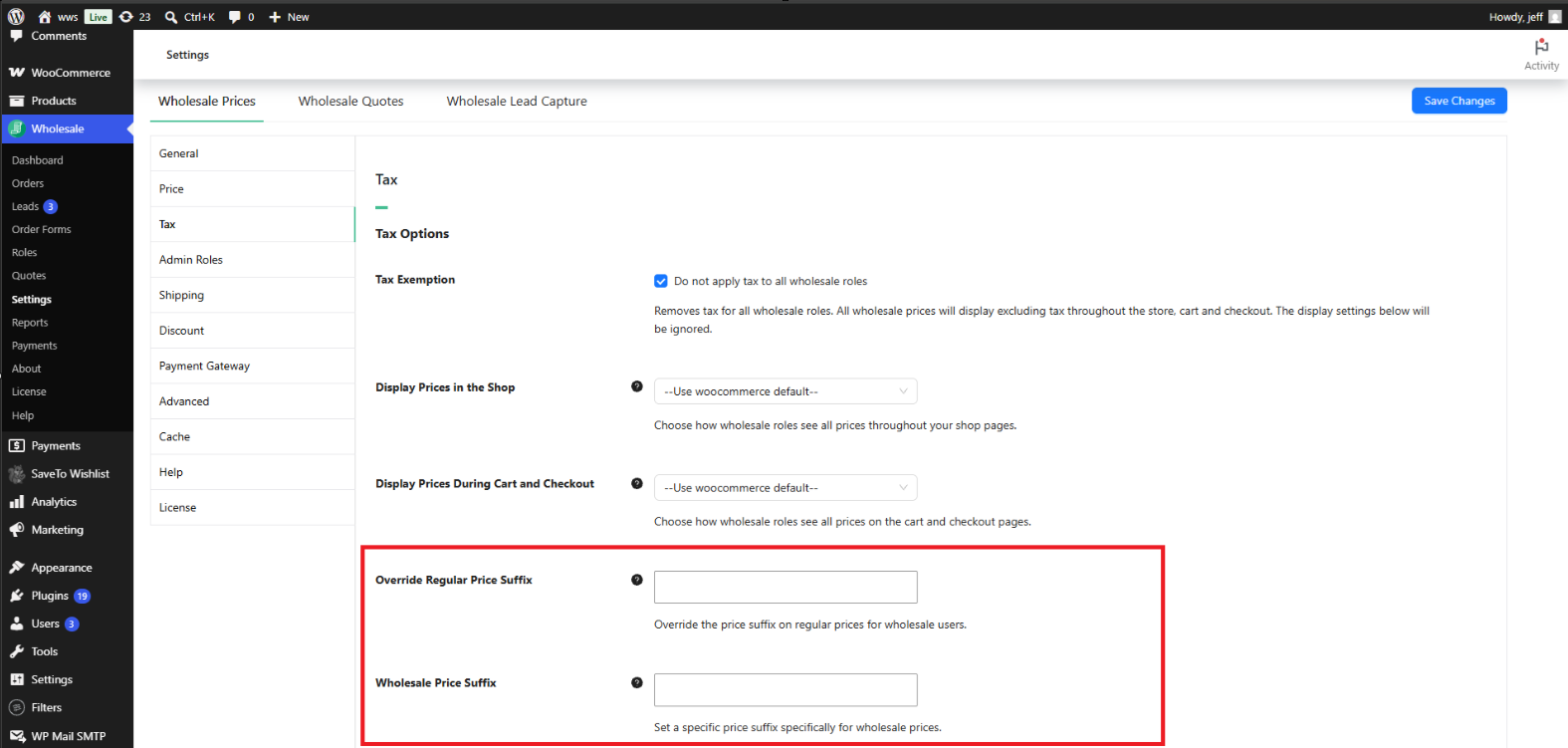
De instelling Wholesale Price Suffix bepaalt de tekst die verschijnt na de groothandelsprijs voor een ingelogde groothandelsklant.
- Ga naar Groothandel → Instellingen.
- Klik op het tabblad Groothandelsprijzen.
- Klik op het tabblad Btw.
- Zoek onder Tax Options het veld Wholesale Price Suffix.
- Voer de tekst in die u wilt weergeven en klik vervolgens op Save Changes.
Laat dit veld leeg om de eigen instelling Price display suffix van uw winkel te gebruiken, te vinden onder WooCommerce → Settings → Tax. Het instellen van een waarde hier overschrijft die suffix specifiek voor groothandelsrollen, zonder invloed op hoe detailklanten prijzen zien.
Stel een aangepaste suffix in voor de reguliere prijs
Een groothandelsklant kan in sommige gevallen nog steeds de reguliere (niet-groothandel) prijs van een product zien, bijvoorbeeld een doorgestreeepte originele prijs naast een verkoopprijs, of de prijs van een product waarvoor geen groothandelsprijs is ingesteld. De instelling Override Regular Price Suffix bepaalt de suffix die na die reguliere prijs wordt weergegeven, specifiek voor gebruikers die zijn ingelogd met een groothandelsrol.
- Ga naar Groothandel → Instellingen → Groothandelsprijzen → Belasting.
- Zoek onder Tax Options het veld Override Regular Price Suffix.
- Voer de tekst in die u wilt weergeven en klik vervolgens op Save Changes.
Laat dit veld leeg om dezelfde Price display suffix instelling voor de hele winkel te gebruiken onder WooCommerce → Settings → Tax. Deze instelling heeft alleen invloed op de suffix die aan groothandelsklanten wordt getoond; detailklanten en gasten blijven de suffix zien die door die instelling voor de hele winkel is gedefinieerd.
Gebruik de prijs-placeholders in een suffix
Beide suffixvelden accepteren twee placeholders: {price_including_tax} en {price_excluding_tax}. Wanneer een van beide placeholders aanwezig is in de suffixtekst, vervangt Wholesale Suite deze door de werkelijke berekende prijs van het product voor die belastingbehandeling, geformatteerd als een valutabedrag.
Bijvoorbeeld, het invoeren van Ex. Tax ({price_excluding_tax}) in het veld Wholesale Price Suffix wordt weergegeven als iets als "Ex. Tax ($45.00)" naast de groothandelsprijs, met behulp van het eigen exclusief-belastingbedrag van dat product.
Hoe het er aan de voorkant uitziet
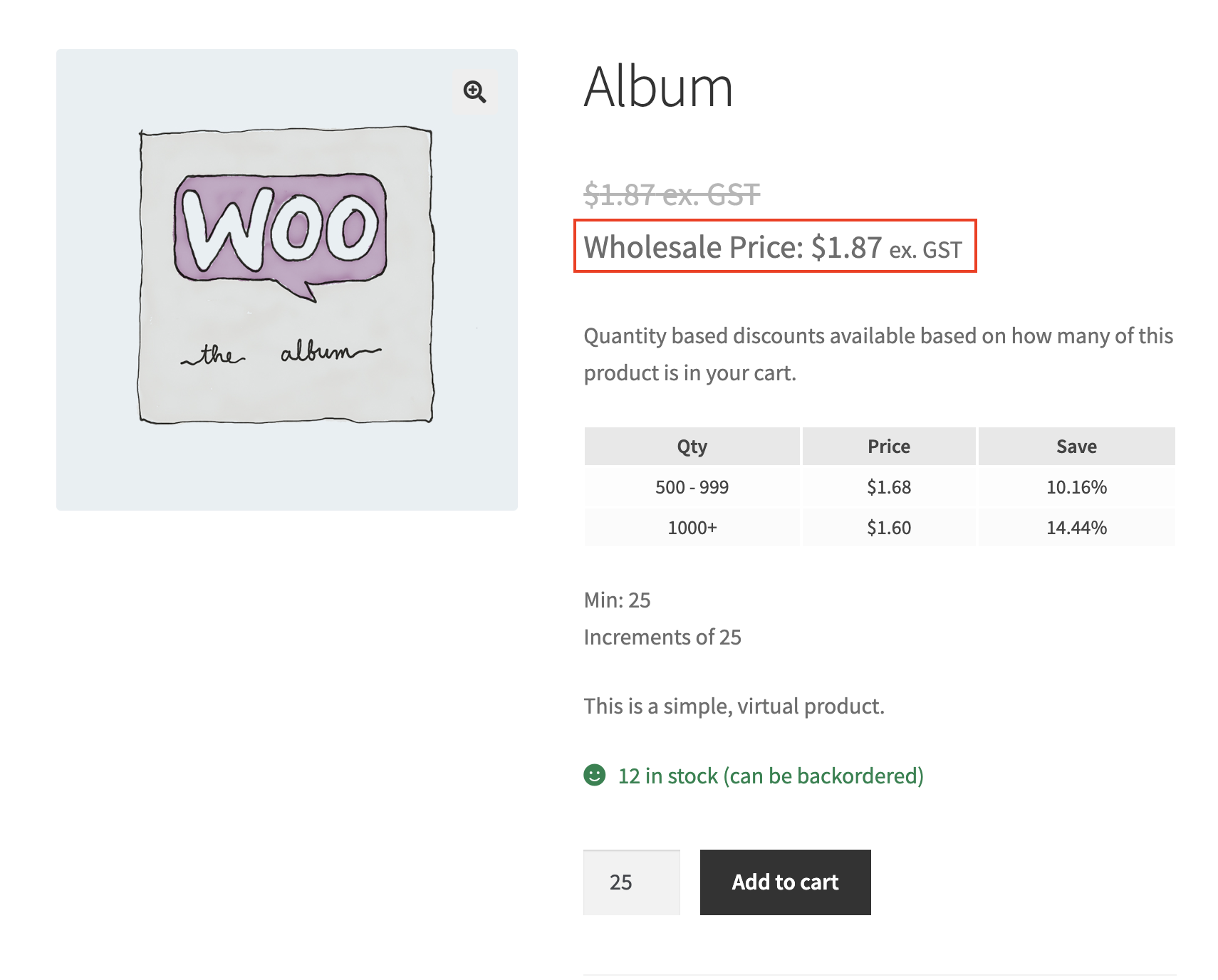
Eenmaal opgeslagen, verschijnt de aangepaste suffix naast de prijs voor elke klant die is ingelogd met een groothandelsrol.
Probleemoplossing
Ik heb een aangepaste groothandelsprijs-suffix ingesteld, maar het product toont nog steeds de standaard WooCommerce-suffix. Wat moet ik controleren?
Bevestig dat u bent ingelogd als een gebruiker die is toegewezen aan een groothandelsrol. Beide suffixinstellingen zijn alleen van toepassing op groothandelsrollen; detailhandelklanten en gasten zien altijd de suffix van WooCommerce → Instellingen → Belasting → Prijsweergave-suffix. Bevestig ook dat Belastingen inschakelen is ingeschakeld onder WooCommerce → Instellingen → Algemeen, aangezien WooCommerce alleen een prijs-suffix weergeeft wanneer belastingberekening is ingeschakeld.
Waarom ziet de suffix op de doorgestreepte originele prijs er anders uit dan de suffix op de groothandelsprijs?
Dit zijn twee onafhankelijke instellingen. De groothandelsprijs zelf gebruikt Groothandelsprijs-suffix, terwijl een reguliere (niet-groothandel) prijs die aan een groothandelsklant wordt getoond, zoals de originele prijs van een artikel in de uitverkoop, Reguliere prijs-suffix overschrijven gebruikt. Stel beide in onder Groothandel → Instellingen → Groothandelsprijzen → Belasting → Belastingopties als u dezelfde tekst op beide plaatsen wilt hebben.
Ik heb een suffixinstelling gewijzigd, maar de winkelpagina is niet bijgewerkt. Wat moet ik controleren?
Wis eventuele pagina- of objectcache op uw site, inclusief caching-plugins en caching op hostniveau, en laad vervolgens de winkelpagina opnieuw terwijl u bent ingelogd als de groothandelsklant. Bevestig ook dat u op Wijzigingen opslaan hebt geklikt na het invoeren van de suffixtekst.
Heeft dit invloed op administrator- of shopmanageraccounts?
Nee, tenzij dat account ook is toegewezen aan een groothandelsrol. Beide suffixinstellingen zijn alleen van toepassing op gebruikers met een groothandelsrol die aan hun account is gekoppeld. Een beheerder of winkelmanageraccount zonder groothandelsrol blijft de Prijsweergave-suffix van de hele winkel zien.
Veelgestelde vragen
Vereist deze functie WooCommerce Wholesale Prices Premium?
Ja. Zowel de instelling Groothandelsprijs-suffix als Reguliere prijs-suffix overschrijven maken deel uit van WooCommerce Wholesale Prices Premium. Ze zijn niet beschikbaar in de gratis WooCommerce Wholesale Prices-plugin.
Wat gebeurt er als ik beide suffixvelden leeg laat?
Groothandelsklanten zien dezelfde Prijsweergave-suffix-tekst die is gedefinieerd onder WooCommerce → Instellingen → Belasting, dezelfde suffix die detailhandelklanten zien.
Verandert dit hoe klanten in de detailhandel of gasten prijzen zien?
Nee. Deze instellingen hebben alleen invloed op gebruikers die zijn ingelogd met een groothandelsrol. Detailhandelklanten en gasten blijven de suffix zien die is gedefinieerd onder WooCommerce → Instellingen → Belasting.
Kan ik een andere suffix instellen voor elke groothandelsrol?
Nee. De instellingen Groothandelsprijs-suffix en Reguliere prijs-suffix overschrijven zijn van toepassing op alle groothandelsrollen tegelijk. Er is geen optie voor een suffix per rol.
Verandert dit de werkelijke groothandelsprijs, of alleen hoe deze wordt weergegeven?
Alleen hoe deze wordt weergegeven. De onderliggende groothandelsprijs en eventuele belasting die daarop wordt berekend, blijven hetzelfde. Deze instellingen regelen alleen de tekst die na de prijs wordt weergegeven.
Kan ik platte tekst combineren met de {price_including_tax} of {price_excluding_tax} placeholder?
Ja. Elke tekst die naast een placeholder wordt ingevoerd, blijft zoals hij is, en alleen de placeholder zelf wordt vervangen door de berekende prijs. Bijvoorbeeld, Incl. BTW ({price_including_tax}) behoudt het label “Incl. BTW” en vervangt het de werkelijke inclusief-BTW-prijs.
Moet ik iets apart configureren in Wholesale Order Form?
Nee. WooCommerce Wholesale Order Form gebruikt de standaard prijsweergave van WooCommerce, dus het pikt automatisch dezelfde instellingen voor Wholesale Price Suffix en Override Regular Price Suffix op van WooCommerce Wholesale Prices Premium.
Wat gebeurt er als ik nog geen groothandelsrollen heb ingesteld?
Deze instellingen doen niets totdat er ten minste één groothandelsrol bestaat en een klant is ingelogd met die rol. Stel eerst uw groothandelsrollen in via Groothandel → Rollen.
Help & ondersteuning
We hebben een toegewijd ondersteuningsteam voor Wholesale Suite dat onze producten, WooCommerce en de branche zeer goed kent. U bent welkom om hun expertise op elk moment, wereldwijd, te benutten.
Als u een bestaande klant bent, ga dan naar het ondersteuningsticket aanvraagformulier en stuur ons een bericht.
Als u een gratis plugin gebruiker bent, stuur ons dan een ondersteuningsverzoek op het forum. We houden de supportforums van WordPress.org voor de gratis plugin actief in de gaten en helpen onze gebruikers daar zo goed mogelijk.

