
Si vous vendez à la fois en gros et au détail via le même magasin WooCommerce, vous pouvez avoir des variations de produits, telles qu'une taille, une couleur ou une taille de paquet spécifique, qui ne devraient être disponibles que pour vos clients de gros. Les clients réguliers ne devraient pas voir ces variations du tout, et encore moins pouvoir les acheter.
Cet article explique comment restreindre des variations de produits individuelles à un ou plusieurs rôles de gros en utilisant WooCommerce Wholesale Prices Premium, de sorte que ces variations soient masquées à toute personne extérieure aux rôles que vous choisissez.
Ce paramètre s'applique par variation, vous pouvez donc laisser certaines variations ouvertes à tous tout en restreignant d'autres à vos clients de gros sur le même produit.
Prérequis
- WooCommerce Wholesale Prices Premium installé et activé.
- Un produit variable avec au moins une variation déjà créée dans WooCommerce.
- Rôles de gros configurés dans Gros → Rôles.
Restreindre une variation à des rôles de gros spécifiques
Configurez ce paramètre sur la variation elle-même, pas sur le produit parent.
- Modifiez le produit et allez dans Données produit → Variations. Le produit doit être défini comme Produit variable pour que cet onglet apparaisse.
- Cliquez sur la variation que vous souhaitez restreindre pour la développer.
- Localisez le champ Variation exclusive de gros.
- Sélectionnez un ou plusieurs rôles de gros dans le menu déroulant. Laissez-le vide pour que la variation reste disponible pour tous.
- Cliquez sur Enregistrer les modifications, puis sur Mettre à jour le produit.
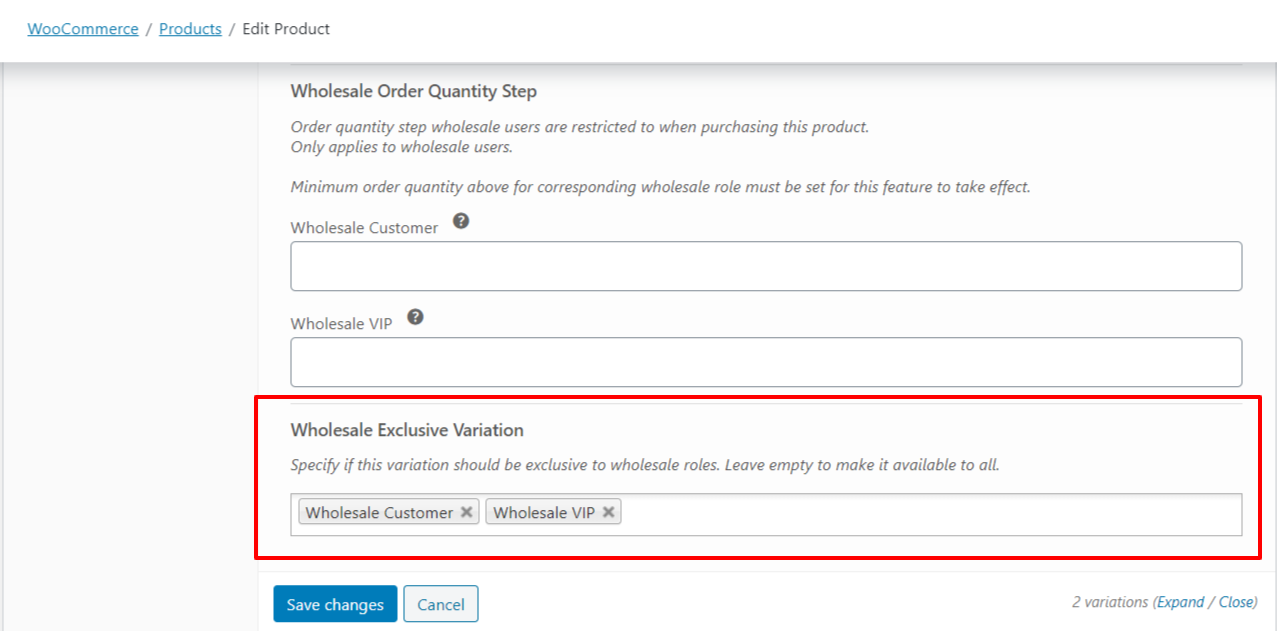
Comment les variations exclusives de gros sont appliquées
Restreindre une variation à un ou plusieurs rôles de gros la masque et la rend non achetable pour les autres. Seuls les comptes détenant l'un des rôles sélectionnés peuvent voir ou acheter cette variation. Les clients ayant un rôle de gros différent, les clients non-gros et les invités ne peuvent ni la voir ni la sélectionner. Les comptes administrateur et gérant de boutique voient et peuvent toujours acheter toutes les variations, quel que soit ce paramètre.
Restreindre une variation par rapport à restreindre un produit entier
La variation exclusive de gros s'applique à une seule variation, pas au produit parent. Si vous avez besoin de masquer ou de restreindre un produit entier à des rôles de gros spécifiques au lieu d'une seule variation, utilisez plutôt le champ Restreindre aux rôles de gros dans la boîte de publication du produit.
Dépannage
Pourquoi un compte administrateur ou gérant de boutique voit-il toujours une variation restreinte ?
Les comptes administrateur et gérant de boutique ignorent complètement les restrictions de variations exclusives, ils voient et peuvent donc toujours acheter toutes les variations, quels que soient les rôles sélectionnés. Testez avec un compte qui n'a qu'un rôle de gros attribué, pas avec un compte administrateur.
Je n'ai sélectionné aucun rôle de gros. Pourquoi la variation est-elle toujours visible par tout le monde ?
Laisser Variation exclusive de gros vide applique la valeur par défaut « disponible pour tous », de sorte que la variation se comporte comme si elle n'était pas restreinte. Pour masquer une variation à toute personne extérieure à un ensemble de rôles, sélectionnez ce rôle, ou ces rôles, dans le champ.
Pourquoi toute la gamme de produits n’est-elle pas masquée, mais seulement une variation ?
Ce paramètre est appliqué par variation, et non au produit parent. Les autres variations du même produit, ainsi que la fiche du produit elle-même, restent visibles à moins que vous ne les restreigniez individuellement ou que vous n’utilisiez le paramètre distinct Restreindre aux rôles de vente en gros sur le produit lui-même.
Questions fréquemment posées
Puis-je sélectionner plus d’un rôle de vente en gros pour une seule variation ?
Oui. Variation exclusive pour la vente en gros est un champ multi-sélection, vous pouvez donc choisir plusieurs rôles de vente en gros à la fois. Tout client détenant l’un des rôles sélectionnés peut voir et acheter cette variation.
Les clients invités ou les visiteurs non connectés voient-ils une variation restreinte ?
Non. Seuls les clients connectés détenant l’un des rôles de vente en gros sélectionnés peuvent voir ou acheter une variation restreinte. Les invités et les clients sans rôle de vente en gros correspondant ne le peuvent pas.
Ai-je besoin de WooCommerce Wholesale Prices Premium, ou cela fonctionne-t-il avec le plugin gratuit ?
Cette fonctionnalité nécessite WooCommerce Wholesale Prices Premium. Elle n’est pas disponible dans le plugin gratuit WooCommerce Wholesale Prices.
Si un client se voit attribuer plus d’un rôle de vente en gros, lequel est vérifié par rapport à la restriction ?
Seul le rôle de vente en gros principal du client est vérifié par rapport aux rôles sélectionnés dans Variation exclusive pour la vente en gros. S’il a besoin d’un accès basé sur un rôle secondaire, attribuez-lui plutôt ce rôle comme rôle principal.
Cela fonctionne-t-il avec les rôles de vente en gros créés via un plugin de marché de fournisseurs comme WC Vendors ?
Oui. Variation exclusive pour la vente en gros s’intègre aux rôles de vente en gros utilisés dans une configuration de marché WC Vendors.
Si je modifie les rôles sélectionnés plus tard, le changement s’applique-t-il immédiatement ?
Oui. La disponibilité des variations est évaluée par rapport à vos paramètres actuels chaque fois que la page se charge, de sorte qu’une sélection de rôles mise à jour s’applique dès que vous l’enregistrez.
Puis-je restreindre les variations d’un produit simple ?
Non. Variation exclusive pour la vente en gros n’est disponible que pour les variations d’un produit variable, car les produits simples n’ont pas de variations à restreindre. Pour restreindre un produit simple lui-même, utilisez le paramètre Restreindre aux rôles de vente en gros sur le produit.
Aide et support
Nous avons une équipe de support dédiée pour Wholesale Suite qui connaît très bien nos produits, WooCommerce et le secteur. Vous êtes invité à utiliser leur expertise à tout moment, partout dans le monde.
Si vous êtes un client existant, veuillez vous rendre sur le formulaire de demande de ticket de support et envoyez-nous un message.
Si vous êtes un utilisateur de plugin gratuit, veuillez nous envoyer une demande de support sur le forum. Nous surveillons activement les forums de support de WordPress.org pour le plugin gratuit et aidons nos utilisateurs du mieux que nous pouvons.

