
Se vendi sia all'ingrosso che al dettaglio tramite lo stesso negozio WooCommerce, potresti avere variazioni di prodotto, come una taglia, un colore o una confezione specifica, che dovrebbero essere disponibili solo per i tuoi clienti all'ingrosso. I clienti normali non dovrebbero vedere affatto queste variazioni, tanto meno essere in grado di acquistarle.
Questo articolo spiega come limitare singole variazioni di prodotto a uno o più ruoli all'ingrosso utilizzando WooCommerce Wholesale Prices Premium, in modo che tali variazioni siano nascoste a chiunque al di fuori dei ruoli scelti.
Questa impostazione si applica per variazione, quindi puoi lasciare alcune variazioni aperte a tutti mentre ne limiti altre ai tuoi clienti all'ingrosso sullo stesso prodotto.
Requisiti
- WooCommerce Wholesale Prices Premium installato e attivato.
- Un prodotto variabile con almeno una variazione già creata in WooCommerce.
- Ruoli all'ingrosso configurati su Wholesale → Roles.
Limitare una variazione a specifici ruoli all'ingrosso
Configura questa impostazione sulla variazione stessa, non sul prodotto padre.
- Modifica il prodotto e vai su Dati prodotto → Variazioni. Il prodotto deve essere impostato su Prodotto variabile affinché questa scheda appaia.
- Fai clic sulla variazione che desideri limitare per espanderla.
- Individua il campo Variazione esclusiva all'ingrosso.
- Seleziona uno o più ruoli all'ingrosso dal menu a discesa. Lascialo vuoto per mantenere la variazione disponibile a tutti.
- Fai clic su Salva modifiche, quindi su Aggiorna il prodotto.
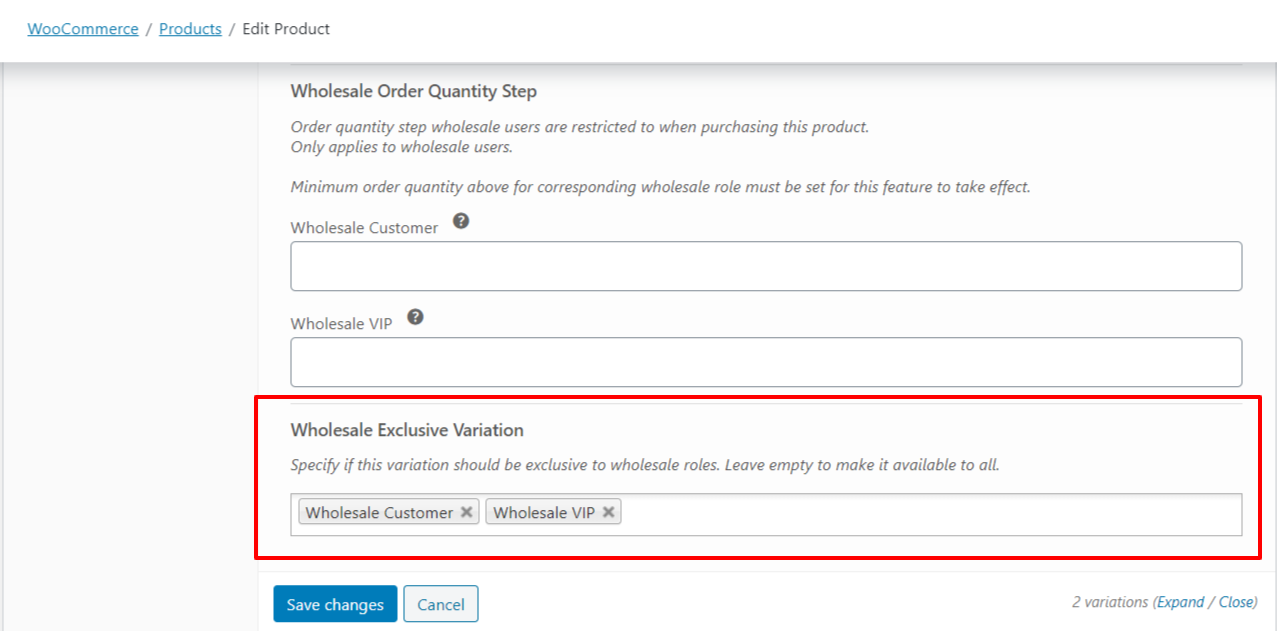
Come vengono applicate le variazioni esclusive all'ingrosso
Limitare una variazione a uno o più ruoli all'ingrosso la nasconde e la rende non acquistabile a tutti gli altri. Solo gli account che detengono uno dei ruoli selezionati possono vedere o acquistare tale variazione. I clienti con un ruolo all'ingrosso diverso, i clienti non all'ingrosso e gli ospiti non possono vederla né selezionarla. Gli account amministratore e responsabile del negozio vedono sempre e possono acquistare ogni variazione, indipendentemente da questa impostazione.
Limitare una variazione rispetto a limitare un intero prodotto
Variazione esclusiva all'ingrosso si applica a una singola variazione, non al prodotto padre. Se hai bisogno di nascondere o limitare un intero prodotto a specifici ruoli all'ingrosso invece che a una variazione, utilizza invece il campo Limita a ruoli all'ingrosso nella casella Pubblica del prodotto.
Risoluzione dei problemi
Perché un account amministratore o responsabile del negozio vede ancora una variazione limitata?
Gli account amministratore e responsabile del negozio aggirano completamente le restrizioni delle variazioni esclusive, quindi vedono e possono sempre acquistare ogni variazione indipendentemente dai ruoli selezionati. Testa con un account a cui è assegnato solo un ruolo all'ingrosso, non con un account amministratore.
Non ho selezionato alcun ruolo all'ingrosso. Perché la variazione è ancora visibile a tutti?
Lasciare vuoto Variazione esclusiva all'ingrosso applica il valore predefinito "disponibile per tutti", quindi la variazione si comporta come se non fosse limitata. Per nascondere una variazione a chiunque al di fuori di un set di ruoli, seleziona quel ruolo, o quei ruoli, nel campo.
Perché non viene nascosto l'intero prodotto, ma solo una variazione?
Questa impostazione viene applicata per variazione, non al prodotto padre. Altre variazioni sullo stesso prodotto, insieme alla scheda del prodotto stesso, rimangono visibili a meno che tu non le limiti individualmente o utilizzi l'impostazione separata Restringi ai ruoli all'ingrosso sul prodotto stesso.
Domande frequenti
Posso selezionare più di un ruolo all'ingrosso per una singola variazione?
Sì. Variazione esclusiva all'ingrosso è un campo multi-selezione, quindi puoi scegliere più ruoli all'ingrosso contemporaneamente. Qualsiasi cliente in possesso di uno dei ruoli selezionati può vedere e acquistare quella variazione.
I clienti ospiti o i visitatori non registrati vedono una variazione limitata?
No. Solo i clienti registrati in possesso di uno dei ruoli all'ingrosso selezionati possono vedere o acquistare una variazione limitata. Gli ospiti e i clienti senza un ruolo all'ingrosso corrispondente non possono.
Ho bisogno di WooCommerce Wholesale Prices Premium, o funziona con il plugin gratuito?
Questa funzionalità richiede WooCommerce Wholesale Prices Premium. Non è disponibile nel plugin gratuito WooCommerce Wholesale Prices.
Se a un cliente vengono assegnati più ruoli all'ingrosso, quale viene verificato rispetto alla restrizione?
Solo il ruolo all'ingrosso primario del cliente viene verificato rispetto ai ruoli selezionati in Variazione esclusiva all'ingrosso. Se necessita di accesso basato su un ruolo secondario, assegna invece quel ruolo come ruolo primario.
Funziona con i ruoli all'ingrosso creati tramite un plugin di marketplace per fornitori come WC Vendors?
Sì. Variazione esclusiva all'ingrosso si integra con i ruoli all'ingrosso utilizzati in una configurazione di marketplace WC Vendors.
Se modifico i ruoli selezionati in seguito, la modifica viene applicata immediatamente?
Sì. La disponibilità della variazione viene valutata rispetto alle impostazioni correnti ogni volta che la pagina viene caricata, quindi una selezione di ruoli aggiornata si applica non appena la salvi.
Posso limitare le variazioni su un prodotto semplice?
No. Variazione esclusiva all'ingrosso è disponibile solo per le variazioni di un prodotto variabile, poiché i prodotti semplici non hanno variazioni da limitare. Per limitare un prodotto semplice stesso, utilizza l'impostazione Restringi ai ruoli all'ingrosso sul prodotto.
Aiuto e supporto
Abbiamo un team di supporto dedicato per Wholesale Suite che conosce molto bene i nostri prodotti, WooCommerce e il settore. Sei il benvenuto a sfruttare la loro esperienza in qualsiasi momento, in tutto il mondo.
Se sei un cliente esistente, vai al modulo di richiesta ticket di supporto e inviaci un messaggio.
Se sei un utente di plugin gratuiti, ti preghiamo di inviarci una richiesta di supporto sul forum. Monitoriamo attivamente i forum di supporto di WordPress.org per il plugin gratuito e aiutiamo i nostri utenti l nel miglior modo possibile.

