
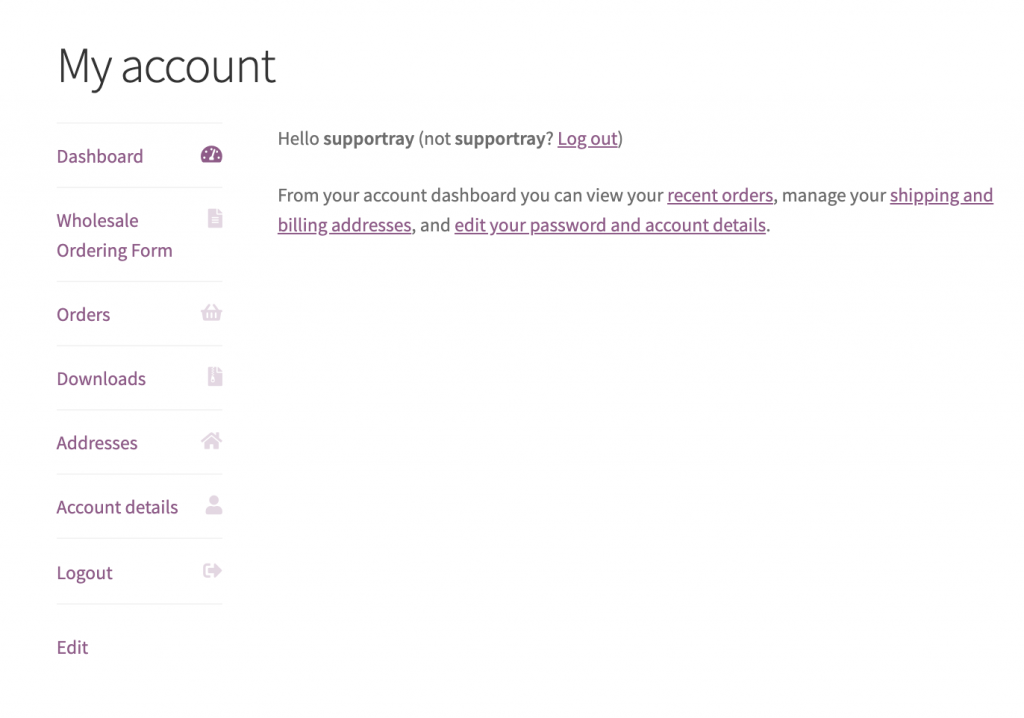
Si sus clientes mayoristas llegan a la página Mi cuenta después de iniciar sesión, puede agregar un enlace directo a su formulario de pedido como una nueva pestaña para que lo alcancen con un solo clic. El fragmento a continuación utiliza dos filtros estándar de WooCommerce para registrar un elemento de menú personalizado y dirigirlo a su página de WooCommerce Wholesale Order Form.
Requisitos previos
- WooCommerce Wholesale Order Form instalado y activo, con al menos una página de formulario de pedido publicada.
- Un tema hijo o un plugin de fragmentos de código (como WPCode) para agregar PHP personalizado de forma segura.
Cómo agregar el enlace de pedido mayorista
- Copie el fragmento a continuación.
- Actualice la URL en la línea marcada para que coincida con la dirección de su página de formulario de pedido mayorista.
- Agregue el fragmento al archivo
functions.phpde su tema hijo o péguelo en un plugin de fragmentos de código como WPCode.
add_filter ( 'woocommerce_account_menu_items', 'wholesale_ordering_link' );
function wholesale_ordering_link( $menu_links ){

  $new = array( 'wholesaleorderinglink' => 'Wholesale Ordering Form' );

  $menu_links = array_slice( $menu_links, 0, 1, true )
  + $new
  + array_slice( $menu_links, 1, NULL, true );

  return $menu_links;

}

add_filter( 'woocommerce_get_endpoint_url', 'wholesale_ordering_hook_endpoint', 10, 4 );
function wholesale_ordering_hook_endpoint( $url, $endpoint, $value, $permalink ){

  if( $endpoint === 'wholesaleorderinglink' ) {

    // Replace this URL with your wholesale order form page address
    $url = 'https://example.com/wholesale-ordering/';

  }
  return $url;

}
Después de guardar, su página Mi cuenta mostrará una nueva pestaña de Formulario de pedido mayorista para todos los usuarios que hayan iniciado sesión. Puede confirmar que funciona iniciando sesión como cliente mayorista.
¿Necesitas ayuda?
Si tienes alguna pregunta o encuentras algún problema, estamos aquí para ayudarte.
- Usuarios premium: Abrir un ticket de soporte
- Usuarios gratuitos: Visita nuestro foro comunitario

