
Standaard vereist Wholesale Lead Capture dat gebruikers een staat invoeren tijdens het registratieproces. Hoewel dit goed werkt voor veel bedrijven, is het niet altijd ideaal. Sommige landen gebruiken geen staten en in andere gevallen geven bedrijven er de voorkeur aan het aantal vereiste velden te verminderen om conversies te verbeteren. Het optioneel maken van het staat-veld zorgt voor een soepelere registratie-ervaring en vermindert de frictie van het formulier.
Gelukkig staat Wholesale Lead Capture ontwikkelaars toe om registratievelden aan te passen met behulp van WordPress hooks. Met een eenvoudig en veilig codefragment kunt u het staat-veld optioneel maken zonder kernbestanden van de plugin te bewerken.
Waarom het staat-veld optioneel maken
Het optioneel maken van het staat-veld verbetert de algehele gebruikerservaring. Minder vereiste velden betekenen snellere formulierinvoer, wat vaak leidt tot hogere registratiepercentages. Dit is vooral belangrijk voor internationale klanten die mogelijk geen staat hebben om in te voeren.
Bovendien verminderen optionele velden frustratie en het afbreken van formulieren. Wanneer gebruikers niet worden geblokkeerd door onnodige validatiefouten, voltooien ze eerder het registratieproces. Als gevolg hiervan wordt uw formulier voor het vastleggen van groothandelsleads flexibeler en conversievriendelijker.
Voordat u begint
Zorg ervoor dat u toegang hebt tot uw WordPress-bestanden voordat u deze aanpassing toepast. De code moet worden toegevoegd met behulp van een child theme, een aangepaste plugin of een plugin voor codefragmenten. Deze aanpak zorgt ervoor dat uw wijzigingen niet verloren gaan wanneer thema's of plugins worden bijgewerkt.
Het wordt ook aanbevolen om een back-up van uw site te maken voordat u wijzigingen aanbrengt. Hoewel dit codefragment veilig is, biedt een back-up gemoedsrust.
Hoe Wholesale Lead Capture registratievelden afhandelt
Wholesale Lead Capture slaat zijn registratievelden op in een globale array. Deze array bepaalt hoe elk veld zich gedraagt, inclusief of het vereist of optioneel is. Door deze array aan te passen, kunt u veldinstellingen zoals labels, validatieregels en de vereiste status aanpassen.
In dit geval richten we ons op het staat-veld en wijzigen we de vereiste waarde. Hierdoor blijft het veld zichtbaar, maar is het niet langer verplicht tijdens de registratie.
Codefragment om het staat-veld optioneel te maken
Voeg het volgende codefragment toe aan het functions.php-bestand van uw child theme, een aangepaste plugin of een plugin voor codefragmenten. Deze methode is update-veilig en wordt aanbevolen voor onderhoud op lange termijn.
add_action( 'init' , function() {
    global $WWLC_REGISTRATION_FIELDS;
    $WWLC_REGISTRATION_FIELDS[ 'wwlc_state' ][ 'required' ] = 0;
});
Wat te verwachten na het toepassen van de wijziging
Na het toevoegen van de code blijft het staat-veld zichtbaar op het registratieformulier van Wholesale Lead Capture. Gebruikers ontvangen echter geen validatiefouten meer als het veld leeg wordt gelaten. De rest van het registratieformulier blijft normaal functioneren.
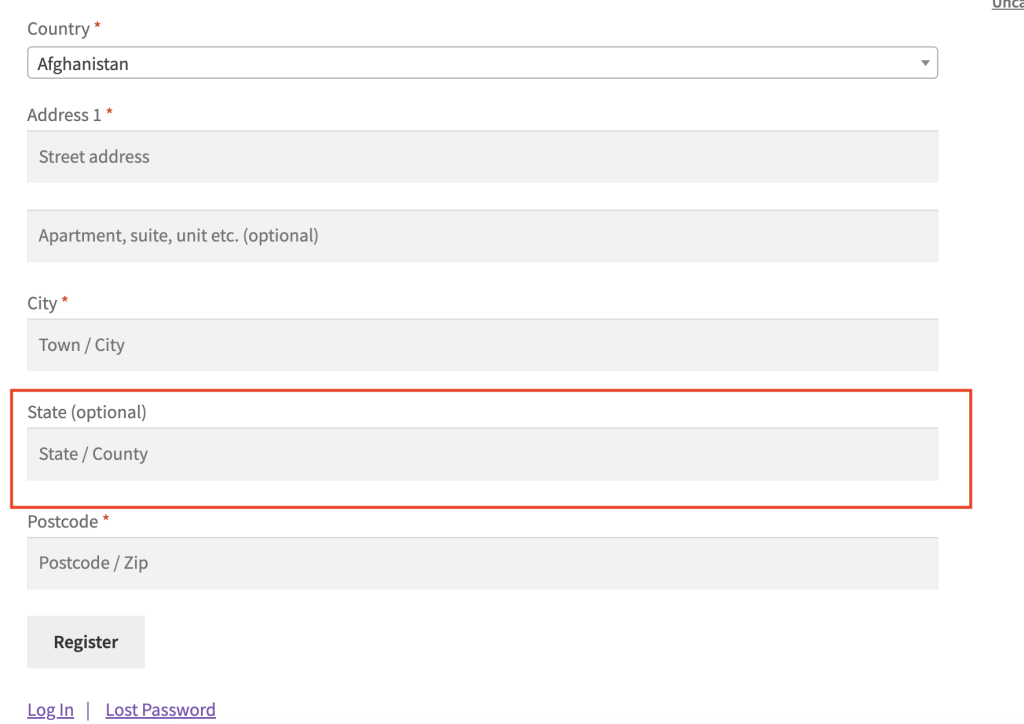
Deze wijziging heeft geen invloed op bestaande gebruikers of eerder ingediende gegevens. Het is alleen van toepassing op nieuwe registraties die hierna plaatsvinden.
Het optioneel maken van het staat-veld in Wholesale Lead Capture is een eenvoudige maar effectieve aanpassing. Met slechts een paar regels code kunt u de gebruikerservaring verbeteren, internationale klanten ondersteunen en registratieconversies verhogen.
Veelgestelde vragen
Heeft deze wijziging van het staatsveld invloed op bestaande groothandelsregistraties?
Nee. Dit codefragment heeft geen invloed op bestaande registratiegegevens. Het werkt alleen de validatieregel bij voor de toekomst, zodat uw database eerder verzamelde locatiegegevens intact houdt en alle gebruikersrecords ongewijzigd laat.
Verwijdert het optioneel maken van het staatsveld het van het formulier?
Nee. Het veld optioneel maken verwijdert het niet - het verschijnt nog steeds op het formulier, maar slaat de validatie over wanneer het leeg wordt gelaten. Om het veld volledig te verbergen, heeft u een aparte codeaanpassing nodig.
Kan ik andere registratievelden op dezelfde manier optioneel maken?
Ja. U kunt dezelfde aanpak toepassen op andere registratievelden in Wholesale Lead Capture. Vervang wwlc_state door de juiste veldidentifier in de globale $WWLC_REGISTRATION_FIELDS array en stel de required waarde in op 0.
Waarom is het staatsveld nog steeds vereist nadat ik de code heb toegevoegd?
Als de wijziging niet van kracht wordt, controleer dan of u het codefragment hebt toegevoegd aan het functions.php-bestand van een actief child-thema of een speciale site-plugin, niet aan een bestand van een parent-thema dat updates kunnen overschrijven. Wis ook eventuele cachinglagen die verouderde inhoud kunnen serveren.
Hulp Nodig?
Als je een vraag hebt of tegen problemen aanloopt, staan we klaar om te helpen.
- Premium gebruikers: Open een ondersteuningsticket
- Gratis gebruikers: Bezoek ons communityforum

