
Wenn Großhandelskunden in Ihrem Shop ein anderes Preissuffix sehen müssen als Einzelhandelskunden, z. B. „Exkl. MwSt.“ für Großhandelskäufer, während Einzelhandelskunden „Inkl. MwSt.“ sehen, fragen Sie sich vielleicht, ob Wholesale Suite es Ihnen ermöglicht, dies getrennt vom regulären WooCommerce-Preissuffix Ihres Shops festzulegen.
WooCommerce Wholesale Prices Premium enthält zwei dedizierte Preissuffix-Einstellungen für Großhandelsrollen: eine für den Großhandelspreis selbst und eine für den regulären Preis, den ein Großhandelskunde sieht. Beide befinden sich in Ihren Großhandelseinstellungen, und die Platzhalter {price_including_tax} und {price_excluding_tax} ermöglichen es Ihnen, den steuerbereinigten Betrag inline anzuzeigen.
Diese Funktion ist nur in WooCommerce Wholesale Prices Premium verfügbar. Wenn Sie das kostenlose Plugin WooCommerce Wholesale Prices verwenden, sind diese Einstellungen nicht verfügbar.
Voraussetzungen
- WooCommerce installiert und aktiv, mit Steuern aktivieren aktiviert unter WooCommerce → Einstellungen → Allgemein.
- WooCommerce Wholesale Prices Premium installiert und aktiviert. Diese Funktion ist im kostenlosen WooCommerce Wholesale Prices-Plugin nicht verfügbar.
- Mindestens eine Großhandelsrolle konfiguriert unter Großhandel → Rollen.
Legen Sie ein benutzerdefiniertes Suffix für den Großhandelspreis fest
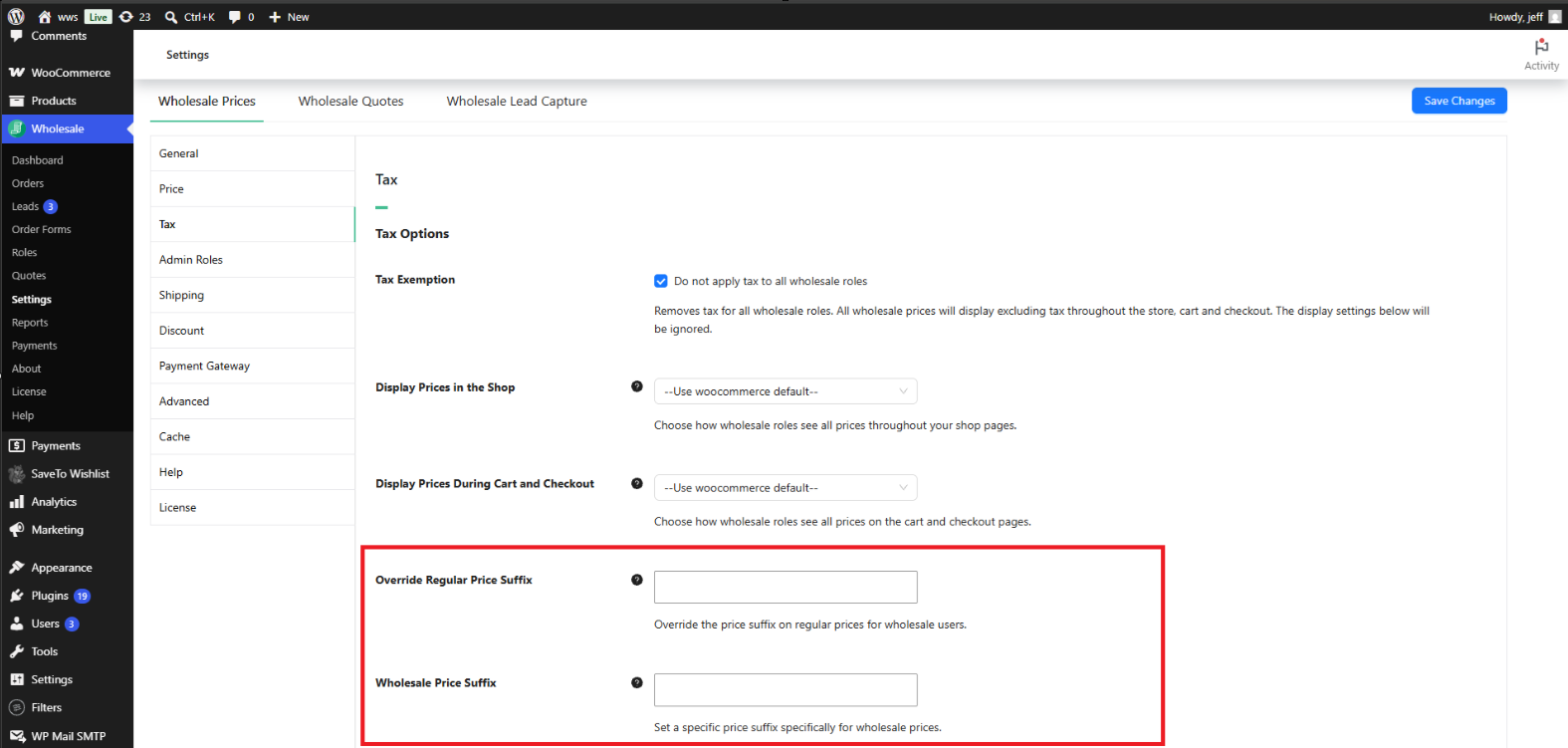
Die Einstellung Großhandelspreissuffix steuert den Text, der nach dem Großhandelspreis für einen angemeldeten Großhandelskunden angezeigt wird.
- Gehen Sie zu Großhandel → Einstellungen.
- Klicken Sie auf den Tab Großhandelspreise.
- Klicken Sie auf die Registerkarte Steuer.
- Suchen Sie unter Steueroptionen das Feld Großhandelspreissuffix.
- Geben Sie den Text ein, den Sie anzeigen möchten, und klicken Sie dann auf Änderungen speichern.
Lassen Sie dieses Feld leer, um die eigene Einstellung Preisanzeigesuffix Ihres Shops zu verwenden, die Sie unter WooCommerce → Einstellungen → Steuer finden. Das Festlegen eines Wertes hier überschreibt dieses Suffix speziell für Großhandelsrollen, ohne die Anzeige von Preisen für Einzelhandelskunden zu beeinträchtigen.
Legen Sie ein benutzerdefiniertes Suffix für den regulären Preis fest
Ein Großhandelskunde kann in einigen Fällen immer noch den regulären (nicht-Großhandels-)Preis eines Produkts sehen, z. B. einen durchgestrichenen Originalpreis neben einem Sonderpreis oder den Preis eines Produkts, für das kein Großhandelspreis festgelegt ist. Die Einstellung Reguläres Preissuffix überschreiben steuert das Suffix, das nach diesem regulären Preis speziell für Benutzer angezeigt wird, die mit einer Großhandelsrolle angemeldet sind.
- Gehen Sie zu Großhandel → Einstellungen → Großhandelspreise → Steuern.
- Suchen Sie unter Steueroptionen das Feld Reguläres Preissuffix überschreiben.
- Geben Sie den Text ein, den Sie anzeigen möchten, und klicken Sie dann auf Änderungen speichern.
Lassen Sie dieses Feld leer, um die gleiche shopweite Einstellung Preisanzeigesuffix unter WooCommerce → Einstellungen → Steuer zu verwenden. Diese Einstellung wirkt sich nur auf das Suffix aus, das Großhandelskunden angezeigt wird; Einzelhandelskunden und Gäste sehen weiterhin das Suffix, das durch diese shopweite Einstellung definiert ist.
Verwenden Sie die Preisplatzhalter in einem Suffix
Beide Suffix-Felder akzeptieren zwei Platzhalter: {price_including_tax} und {price_excluding_tax}. Wenn einer der Platzhalter im Suffix-Text vorhanden ist, ersetzt Wholesale Suite ihn durch den tatsächlich berechneten Preis des Produkts für diese Steuerbehandlung, formatiert als Währungsbetrag.
Wenn Sie beispielsweise Exkl. MwSt. ({price_excluding_tax}) in das Feld Suffix für Großhandelspreise eingeben, wird es neben dem Großhandelspreis wie „Exkl. MwSt. (45,00 $)“ angezeigt, wobei der Betrag des Produkts ohne Steuern verwendet wird.
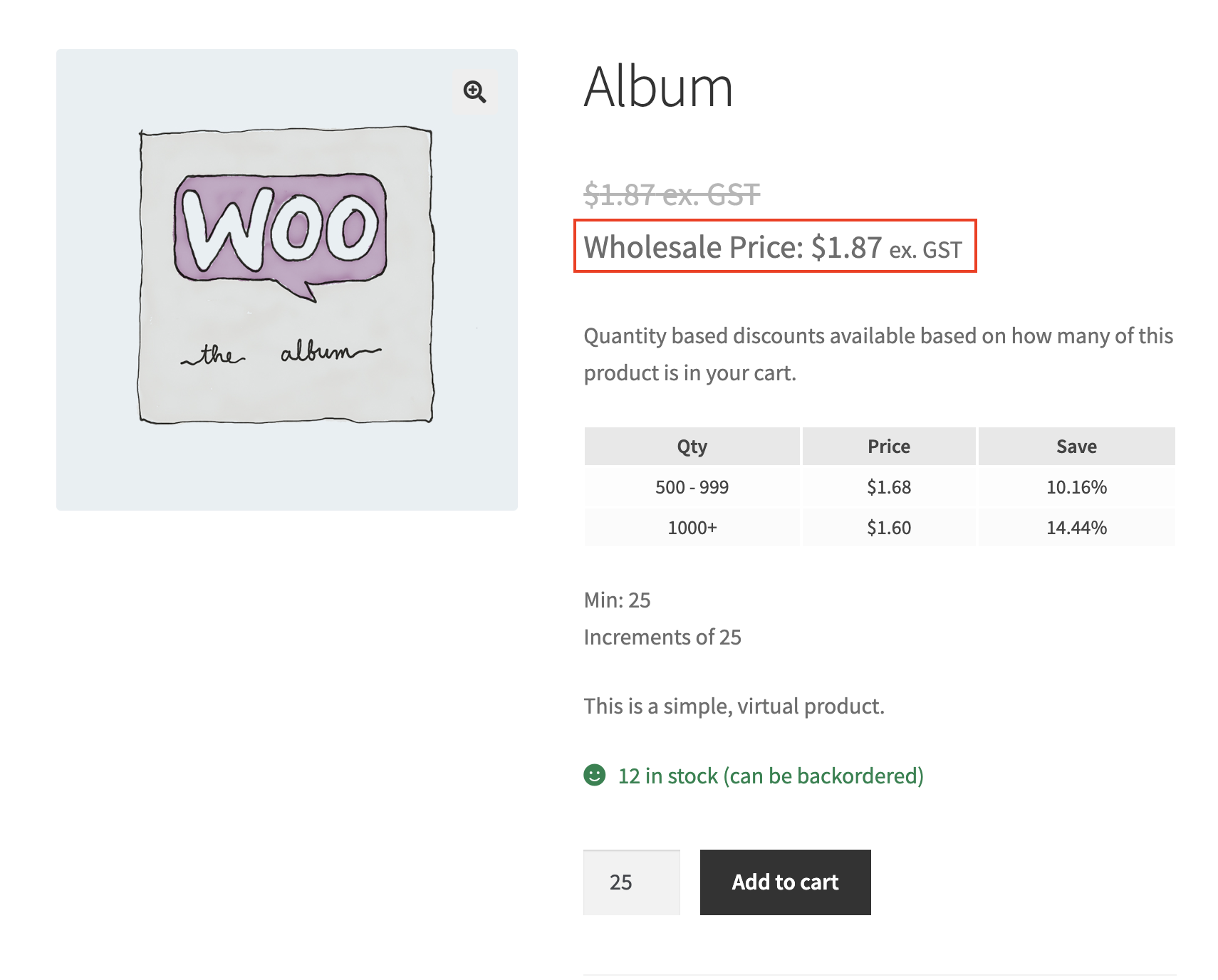
So sieht es im Frontend aus
Nach dem Speichern erscheint das benutzerdefinierte Suffix neben dem Preis für jeden Kunden, der mit einer Großhandelsrolle angemeldet ist.
Fehlerbehebung
Ich habe ein benutzerdefiniertes Suffix für Großhandelspreise festgelegt, aber das Produkt zeigt immer noch das Standard-Suffix von WooCommerce an. Was soll ich überprüfen?
Bestätigen Sie, dass Sie als Benutzer angemeldet sind, dem eine Großhandelsrolle zugewiesen ist. Beide Suffix-Einstellungen gelten nur für Großhandelsrollen; Einzelhandelskunden und Gäste sehen immer das Suffix unter WooCommerce → Einstellungen → Steuern → Suffix für Preisangabe. Stellen Sie außerdem sicher, dass Steuern aktivieren unter WooCommerce → Einstellungen → Allgemein aktiviert ist, da WooCommerce nur dann ein Suffix für die Preisangabe anzeigt, wenn die Steuerberechnung aktiviert ist.
Warum sieht das Suffix für den durchgestrichenen Originalpreis anders aus als das Suffix für den Großhandelspreis?
Dies sind zwei unabhängige Einstellungen. Der Großhandelspreis selbst verwendet das Suffix für Großhandelspreise, während ein regulärer (Nicht-Großhandels-)Preis, der einem Großhandelskunden angezeigt wird, wie der Originalpreis eines reduzierten Artikels, das Suffix für reguläre Preise überschreiben verwendet. Legen Sie beide unter Großhandel → Einstellungen → Großhandelspreise → Steuern → Steueroptionen fest, wenn Sie denselben Text an beiden Stellen wünschen.
Ich habe eine Suffix-Einstellung geändert, aber die Shop-Seite wurde nicht aktualisiert. Was soll ich überprüfen?
Leeren Sie den Seiten- oder Objekt-Cache auf Ihrer Website, einschließlich Caching-Plugins und Host-Caching, und laden Sie dann die Shop-Seite neu, während Sie als Großhandelskunde angemeldet sind. Stellen Sie außerdem sicher, dass Sie nach der Eingabe des Suffix-Textes auf Änderungen speichern geklickt haben.
Betrifft dies Administrator- oder Shop-Manager-Konten?
Nein, es sei denn, diesem Konto ist auch eine Großhandelsrolle zugewiesen. Ein Administrator- oder Shop-Manager-Konto ohne Großhandelsrolle sieht weiterhin das allgemeine Suffix für Preisangabe des Shops.
Häufig gestellte Fragen
Benötigt diese Funktion WooCommerce Wholesale Prices Premium?
Ja. Sowohl die Einstellung Suffix für Großhandelspreise als auch Suffix für reguläre Preise überschreiben sind Teil von WooCommerce Wholesale Prices Premium. Sie sind im kostenlosen WooCommerce Wholesale Prices Plugin nicht verfügbar.
Was passiert, wenn ich beide Suffix-Felder leer lasse?
Großhandelskunden sehen denselben Suffix für Preisangabe-Text, der unter WooCommerce → Einstellungen → Steuern definiert ist, dasselbe Suffix, das auch Einzelhandelskunden sehen.
Ändert dies, wie Einzelhandelskunden oder Gäste Preise sehen?
Nein. Diese Einstellungen wirken sich nur auf Benutzer aus, die mit einer Großhandelsrolle angemeldet sind. Einzelhandelskunden und Gäste sehen weiterhin das Suffix, das unter WooCommerce → Einstellungen → Steuern definiert ist.
Kann ich für jede Großhandelsrolle ein anderes Suffix festlegen?
Nein. Die Einstellungen für Großhandelspreissuffix und Reguläres Preissuffix überschreiben gelten für alle Großhandelsrollen gleichzeitig. Es gibt keine Option für rollenspezifische Suffixe.
Ändert dies den tatsächlichen Großhandelspreis oder nur dessen Anzeige?
Nur die Anzeige. Der zugrunde liegende Großhandelspreis und die darauf berechneten Steuern bleiben gleich. Diese Einstellungen steuern nur den Text, der nach dem Preis angezeigt wird.
Kann ich einfachen Text mit dem Platzhalter {price_including_tax} oder {price_excluding_tax} kombinieren?
Ja. Jeder Text, der neben einem Platzhalter eingegeben wird, bleibt unverändert, und nur der Platzhalter selbst wird durch den berechneten Preis ersetzt. Zum Beispiel behält inkl. MwSt. ({price_including_tax}) die Beschriftung „inkl. MwSt.“ bei und ersetzt sie durch den tatsächlichen Betrag inklusive Steuern.
Muss ich im WooCommerce Wholesale Order Form etwas separat konfigurieren?
Nein. WooCommerce Wholesale Order Form verwendet die Standard-Preisdarstellung von WooCommerce und übernimmt daher automatisch dieselben Einstellungen für Großhandelspreissuffix und Reguläres Preissuffix überschreiben aus WooCommerce Wholesale Prices Premium.
Was passiert, wenn ich noch keine Großhandelsrollen eingerichtet habe?
Diese Einstellungen haben keine Auswirkung, bis mindestens eine Großhandelsrolle vorhanden ist und ein Kunde sich mit dieser Rolle anmeldet. Richten Sie Ihre Großhandelsrollen zuerst unter Großhandel → Rollen ein.
Hilfe & Support
Wir haben ein engagiertes Support-Team für Wholesale Suite, das unsere Produkte, WooCommerce und die Branche sehr gut kennt. Sie können seine Expertise jederzeit und weltweit nutzen.
Wenn Sie bereits Kunde sind, gehen Sie bitte zum Support-Ticket-Anfrageformular und senden Sie uns eine Nachricht.
Wenn Sie ein kostenloser Plugin-Benutzer sind, senden Sie uns bitte eine Supportanfrage im Forum. Wir überwachen aktiv die Supportforen von WordPress.org für das kostenlose Plugin und helfen unseren Benutzern dort so gut wir können.

