
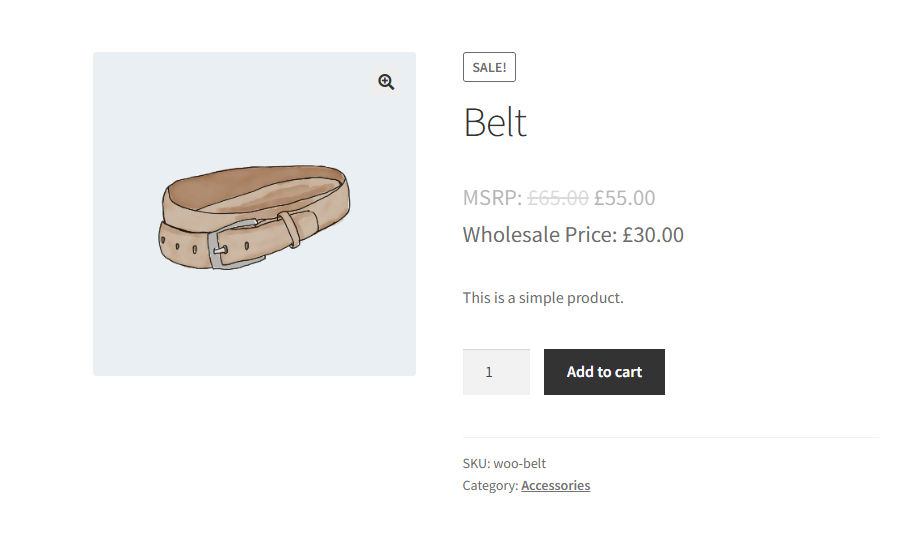
Quando i clienti all'ingrosso visitano il tuo negozio, vedono il prezzo al dettaglio normale visualizzato accanto al loro prezzo all'ingrosso scontato. Per impostazione predefinita, tale cifra di vendita al dettaglio appare barrata e senza contesto aggiuntivo, quindi potrebbe non essere immediatamente chiaro ai tuoi acquirenti se rappresenta il Prezzo di Vendita al Dettaglio Consigliato dal Produttore (MSRP) o il Prezzo Minimo Pubblicizzato (MAP).
Lo snippet di codice in questa guida inserisce un piccolo blocco di CSS nel tuo negozio solo quando un cliente all'ingrosso è connesso. Aggiunge un'etichetta di testo semplice, come "MSRP: " o "MAP: ", direttamente prima del prezzo normale barrato e, facoltativamente, rimuove la barratura in modo che l'etichetta venga letta chiaramente come prezzo di riferimento. I visitatori al dettaglio e gli acquirenti ospiti non sono assolutamente interessati.
Requisiti
- WooCommerce Wholesale Prices Premium installato e attivato.
- Almeno un ruolo all'ingrosso configurato nel tuo negozio. L'etichetta appare solo per i clienti all'ingrosso connessi. Se a un utente non è assegnato alcun ruolo all'ingrosso, il CSS non viene mai iniettato.
- Un modo per aggiungere codice PHP personalizzato al tuo sito, o il file
functions.phpdel tuo tema o un plugin dedicato per snippet di codice come WPCode. Si consiglia di utilizzare un plugin per snippet in modo che la tua personalizzazione sopravviva agli aggiornamenti del tema.
Aggiungi l'etichetta MSRP o MAP al prezzo normale
Copia lo snippet qui sotto e aggiungilo al tuo sito tramite il file functions.php del tuo tema o tramite il plugin WPCode.
Come funziona lo snippet
Quando WordPress carica una pagina, lo snippet controlla se al visitatore corrente è assegnato un ruolo all'ingrosso. Il controllo del ruolo restituisce un array delle chiavi dei ruoli all'ingrosso del visitatore e un array vuoto significa che il visitatore non è un cliente all'ingrosso. Quindi, se adatti lo snippet, tratta un array vuoto come "non all'ingrosso" e invia il CSS solo quando l'array non è vuoto. Quando è presente un ruolo all'ingrosso, lo snippet invia un piccolo blocco di CSS inline che fa due cose:
- Aggiunge il testo dell'etichetta. La regola
del .amount::before { content: "MSRP: "; }inserisce "MSRP: " immediatamente prima dell'importo del prezzo all'interno dell'elemento del prezzo normale barrato. WooCommerce Wholesale Prices Premium racchiude il prezzo al dettaglio normale in un elemento barrato quando lo visualizza accanto al prezzo all'ingrosso, quindi questo si rivolge esattamente all'elemento giusto. - Rimuove la barratura. La regola
del.original-computed-price { text-decoration: none; }rimuove lo stile di barratura predefinito. Il prezzo normale viene quindi letto chiaramente come "MSRP: $55.00" anziché apparire barrato.
Personalizza il testo dell'etichetta
Per utilizzare un'etichetta diversa, cambia il testo all'interno di content: "MSRP: "; con quello che ti serve, ad esempio content: "MAP: "; o content: "RRP: ";. Mantieni lo spazio finale all'interno delle virgolette in modo che l'etichetta e l'importo del prezzo non si uniscano.
Mantieni la barratura (facoltativo)
Se desideri l'etichetta ma preferisci mantenere lo barrato sul prezzo normale, rimuovi la regola del.original-computed-price dallo snippet. Il prezzo viene visualizzato come testo barrato con la tua etichetta anteposta, ad esempio, MSRP: $100.00 con una linea sopra.
Risoluzione dei problemi
L'etichetta non viene visualizzata
Se hai aggiunto lo snippet ma l'etichetta non appare, segui questi controlli in ordine:
- Conferma che stai navigando nel negozio mentre sei loggato come utente a cui è assegnato un ruolo all'ingrosso. Il CSS viene iniettato solo per i clienti all'ingrosso, quindi gli utenti amministratori e i clienti al dettaglio non vedranno l'etichetta.
- Conferma che WooCommerce Wholesale Prices Premium è installato e attivo.
- Verifica che lo snippet sia stato salvato e sia attivo nel tuo plugin per gli snippet di codice, o che sia stato aggiunto al file
functions.phpcorretto (il file del tuo tema attivo, non di un tema genitore). - Cancella la cache della pagina o la cache degli oggetti sul tuo sito e ricarica la pagina del prodotto.
- Ispeziona il sorgente della pagina e cerca il blocco
<style>iniettato. Se non è presente, PHP non lo sta generando, quindi rivedi i passaggi da 1 a 3. Se è presente ma l'etichetta ancora non appare, un tema o un plugin potrebbero sovrascrivere il CSS. Controlla gli strumenti per sviluppatori del tuo browser per regole in conflitto.
Domande frequenti
Posso usare "MAP: " invece di "MSRP: "?
Sì. Nello snippet, trova la riga content: "MSRP: "; e sostituisci MSRP con qualsiasi testo desideri, come MAP, RRP, List Price, e così via. L'unico requisito è che il valore rimanga una stringa CSS content valida racchiusa tra virgolette doppie.
Dove appare l'etichetta sullo storefront?
Il CSS viene iniettato globalmente ogni volta che un cliente all'ingrosso è loggato, quindi l'etichetta appare ovunque WooCommerce Wholesale Prices Premium renda il prezzo normale all'interno di un elemento barrato. Questo include le pagine dei singoli prodotti, le pagine di archivio del negozio e delle categorie, e le pagine del carrello e del checkout.
I clienti al dettaglio o i visitatori ospiti vedranno l'etichetta?
No. Lo snippet controlla la presenza di un ruolo all'ingrosso prima di generare qualsiasi CSS. Se il visitatore corrente non è loggato come cliente all'ingrosso, nessuno stile viene iniettato e lo storefront rimane invariato per loro.
Lo snippet funziona sui prodotti variabili?
Sì. Il CSS si rivolge all'elemento barrato che WooCommerce Wholesale Prices Premium utilizza per visualizzare il prezzo normale, che è lo stesso elemento per prodotti semplici, variabili e raggruppati. L'etichetta appare su tutti i tipi di prodotto supportati.
Qual è la differenza tra questo snippet e l'impostazione Override Regular Price Suffix?
WooCommerce Wholesale Prices include un campo Override Regular Price Suffix integrato in Wholesale → Settings → Wholesale Prices → Tax. Questo campo è disponibile nel plugin gratuito, quindi non è necessaria la versione Premium per utilizzarlo. Inserendo un valore qui, si aggiunge testo *dopo* il prezzo normale, ad esempio, *€100,00 MSRP*. Lo snippet CSS in questa guida antepone invece l'etichetta *prima* dell'importo del prezzo e può anche rimuovere lo stile barrato, offrendo una presentazione più pulita. Usa l'impostazione integrata quando un semplice suffisso è sufficiente. Usa lo snippet quando hai bisogno che l'etichetta appaia prima del prezzo o vuoi sopprimere il barrato.
Posso aggiungere anche un'etichetta al prezzo all'ingrosso stesso?
Sì. Il campo Wholesale Price Suffix, che si trova direttamente sotto Override Regular Price Suffix in Wholesale → Settings → Wholesale Prices → Tax, ti consente di aggiungere testo dopo il prezzo all'ingrosso. Ad esempio, inserendo *Il tuo prezzo* viene visualizzato il prezzo all'ingrosso come *€60,00 Il tuo prezzo*. Questa impostazione integrata si applica globalmente a tutti i prodotti e a tutti i ruoli all'ingrosso.
L'etichetta influisce sui calcoli dei prezzi o sulle tasse?
No. Lo snippet inietta solo CSS per la presentazione. Non modifica alcun valore di prezzo, calcolo delle tasse o totale dell'ordine. È puramente una modifica visiva.
Aiuto e supporto
Abbiamo un team di supporto dedicato per Wholesale Suite che conosce molto bene i nostri prodotti, WooCommerce e il settore. Sei il benvenuto a sfruttare la loro esperienza in qualsiasi momento, in tutto il mondo.
Se sei un cliente esistente, vai al modulo di richiesta ticket di supporto e inviaci un messaggio.
Se sei un utente di plugin gratuiti, ti preghiamo di inviarci una richiesta di supporto sul forum. Monitoriamo attivamente i forum di supporto di WordPress.org per il plugin gratuito e aiutiamo i nostri utenti l nel miglior modo possibile.

