
Il tuo negozio mostra Prezzo all'ingrosso: prima della tariffa scontata. Se questa dicitura non si adatta ai tuoi clienti, puoi cambiarla in qualsiasi cosa ti piaccia, come Prezzo rivenditore, Costo commerciale o Tariffa VIP. Questo articolo copre l'impostazione che la cambia ovunque, uno snippet che assegna a ogni ruolo all'ingrosso la propria etichetta e la stringa separata utilizzata per gli incrementi di quantità.
Cambia l'etichetta per tutti
Il campo è incluso nel plugin gratuito WooCommerce Wholesale Prices, quindi non hai bisogno di Wholesale Prices Premium per questa parte.
- Vai su Wholesale > Impostazioni nella tua bacheca di WordPress.
- Apri la scheda Wholesale Prices, quindi la sottoscheda Price.
- Sotto Price Options, digita la tua dicitura in Wholesale Price Text.
- Fai clic su Salva modifiche.
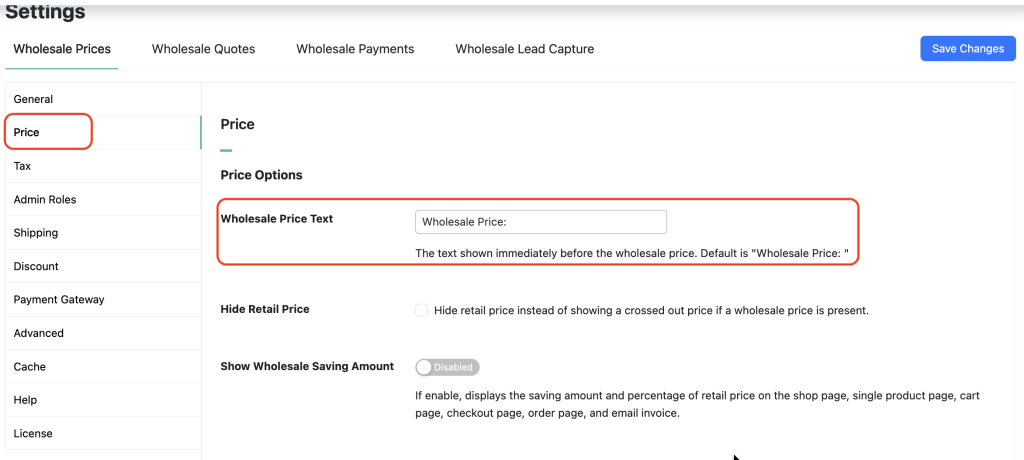
La nuova etichetta appare subito nei tuoi elenchi di prodotti. Per il plugin gratuito da solo, questo è tutto ciò che ti serve. Se desideri la guida alla versione gratuita con l'alternativa del filtro, consulta come cambiare il testo del prezzo all'ingrosso nella versione gratuita.
Assegna a ogni ruolo all'ingrosso la propria etichetta
L'impostazione applica un'unica etichetta a ogni cliente. Per mostrare un'etichetta diversa per ruolo all'ingrosso, filtra il testo con wwp_filter_wholesale_price_title_text. Aggiungi questo a un tema child, a un plugin specifico per il sito o a un plugin di snippet di codice.
add_filter( 'wwp_filter_wholesale_price_title_text', 'override_wholesale_text', 10, 1 );

function override_wholesale_text( $wholesaletext ) {

    if ( ! class_exists( 'WWP_Wholesale_Roles' ) ) {
        return $wholesaletext;
    }

    $wwp_wholesale_roles = WWP_Wholesale_Roles::getInstance();
    $wholesale_role      = $wwp_wholesale_roles->getUserWholesaleRole();

    // Replace the role keys below with your own.
    if ( ! empty( $wholesale_role ) && in_array( 'wholesale_customer', $wholesale_role, true ) ) {
        return 'Wholesale Price:';
    }

    if ( ! empty( $wholesale_role ) && in_array( 'wholesale_vip', $wholesale_role, true ) ) {
        return 'VIP Price:';
    }

    return $wholesaletext;
}
Il return $wholesaletext; finale è importante. Senza di esso, un cliente in qualsiasi ruolo che non hai elencato vede un'etichetta vuota invece di quella predefinita.
Cambia il testo dell'incremento della quantità
Wholesale Prices Premium stampa una nota sull'incremento sotto il prezzo quando un prodotto utilizza un incremento di quantità, ad esempio Incrementi di 6. Non esiste un'impostazione per questa dicitura. La stringa è traducibile, quindi la cambi nello stesso modo in cui cambi qualsiasi altra stringa del plugin.
Traduci Increments of %1$s nel text domain WooCommerce Wholesale Prices Premium. Mantieni il segnaposto %1$s nella tua sostituzione, perché contiene il numero dell'incremento.
Domande frequenti
Dove cambio il testo del prezzo all'ingrosso nelle impostazioni di WooCommerce?
Vai su Wholesale > Settings > Wholesale Prices > Price e trova Wholesale Price Text sotto Price Options. Digita la tua dicitura, come "Prezzo rivenditore", quindi fai clic su Save Changes. Il nuovo testo appare ovunque vengano mostrati i prezzi all'ingrosso.
Ho bisogno del plugin Premium per questo?
No. Il campo Wholesale Price Text è incluso nel plugin gratuito Wholesale Prices. Premium aggiunge la gestione dei prezzi per ruolo che rende utile la configurazione delle etichette specifiche per ruolo sopra menzionate.
La modifica dell'etichetta funziona con i prodotti variabili?
Sì. La dicitura si applica a ogni tipo di prodotto, inclusi prodotti variabili e raggruppati. Non è necessario impostarla per prodotto.
Ruoli diversi all'ingrosso possono mostrare un'etichetta diversa?
Sì, con il filtro sopra. Gli acquirenti standard possono vedere "Prezzo all'ingrosso" mentre un ruolo VIP vede "Prezzo VIP". Mantieni il ritorno di fallback in modo che altri ruoli ricevano ancora il valore predefinito.
L'etichetta appare anche nel carrello e nel checkout?
L'impostazione controlla l'etichetta mostrata con il prezzo nelle pagine dei prodotti e negli elenchi. I modelli di carrello e checkout formattano i prezzi separatamente e un tema o un page builder può sovrascriverli, quindi controlla ogni fase del flusso dopo aver salvato.
Perché il mio nuovo testo del prezzo all'ingrosso non viene visualizzato?
Svuota la cache della pagina e qualsiasi CDN, quindi ricarica mentre sei connesso come cliente all'ingrosso. Se la vecchia etichetta persiste, conferma il valore salvato in Wholesale > Impostazioni > WooCommerce Wholesale Prices > Prezzo e verifica se uno snippet sta filtrando il testo altrove.
Serve aiuto?
Se hai una domanda o riscontri problemi, siamo qui per aiutarti.
- Utenti Premium: Apri un ticket di supporto
- Utenti Gratuiti: Visita il nostro forum della community

