
Se hai configurato requisiti minimi d'ordine in WooCommerce Wholesale Prices Premium, potresti aver notato che un cliente all'ingrosso che non raggiunge tale minimo può comunque completare il checkout, solo che ai prezzi al dettaglio anziché ai prezzi all'ingrosso. Se preferisci bloccare completamente l'acquisto finché il requisito non viene soddisfatto, WooCommerce Wholesale Prices Premium include un'impostazione per questo.
I clienti all'ingrosso che aggiungono meno articoli del requisito minimo possono comunque completare il checkout per impostazione predefinita, solo a prezzi al dettaglio. Se è necessario bloccare completamente il checkout finché non viene raggiunto il minimo, WooCommerce Wholesale Prices Premium dispone di un'impostazione per ruolo Impedisci acquisto se la condizione all'ingrosso non è soddisfatta che interrompe l'ordine finché il cliente non soddisfa le tue regole di quantità, subtotale o per prodotto.
Requisiti
- WooCommerce installato e attivo.
- WooCommerce Wholesale Prices Premium installato e attivato. Questa impostazione non è disponibile nel plugin gratuito WooCommerce Wholesale Prices.
- Almeno un requisito minimo d'ordine configurato per il ruolo all'ingrosso che si desidera limitare.
Perché i clienti all'ingrosso possono comunque completare l'ordine al di sotto del minimo per impostazione predefinita
Per impostazione predefinita, WooCommerce Wholesale Prices Premium non blocca il checkout quando il carrello di un cliente all'ingrosso scende al di sotto della quantità minima d'ordine o del subtotale configurato. Invece, il carrello mostra i prezzi al dettaglio per quel cliente insieme a un avviso che spiega cosa devono aggiungere per qualificarsi per i prezzi all'ingrosso. Il cliente può comunque procedere al checkout, solo senza lo sconto all'ingrosso.
Se si desidera impedire al cliente di effettuare il checkout del tutto finché non soddisfa il requisito, abilitare l'opzione Impedisci acquisto se la condizione all'ingrosso non è soddisfatta per il loro ruolo all'ingrosso.
Imposta i requisiti minimi d'ordine
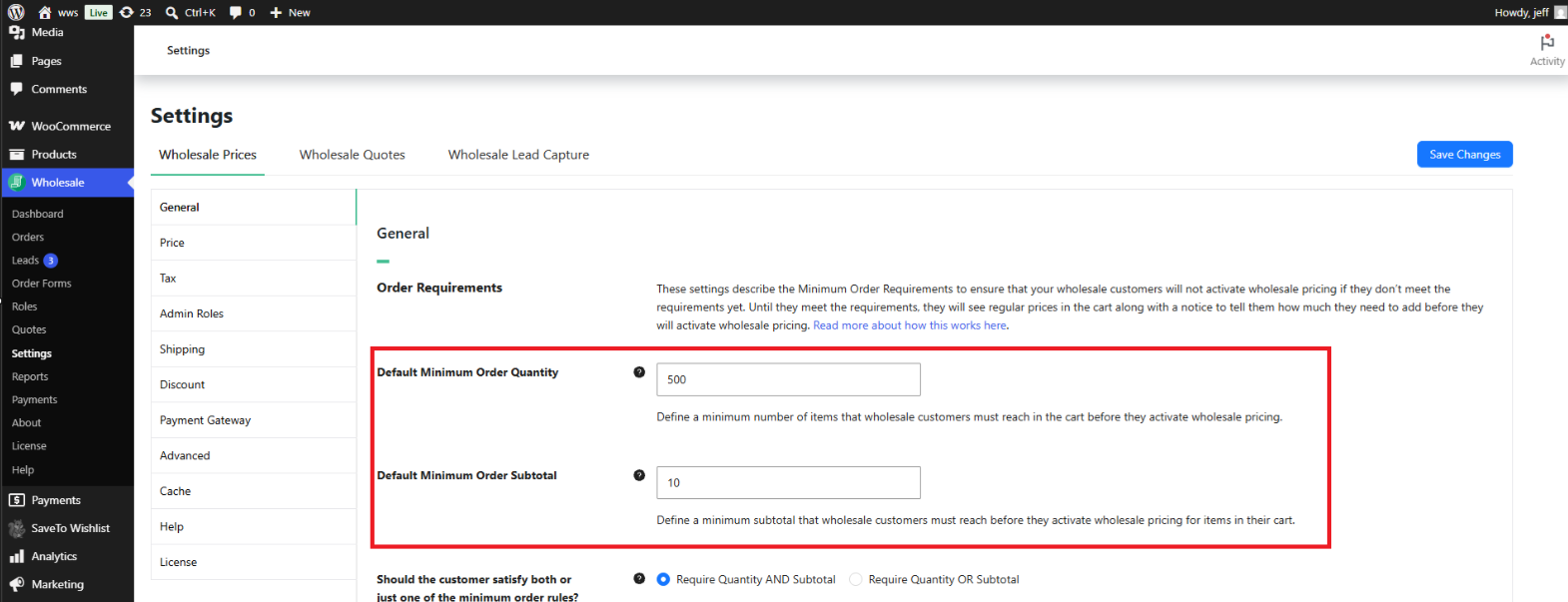
L'impostazione di blocco dell'acquisto ha effetto solo una volta che esiste un requisito minimo d'ordine per il ruolo. Configura prima questo in Wholesale → Impostazioni → Prezzi all'ingrosso → Generale, nella sezione Requisiti d'ordine.
- Quantità minima d'ordine predefinita – il numero totale minimo di unità che un cliente all'ingrosso deve aggiungere al proprio carrello prima che si applichino i prezzi all'ingrosso.
- Subtotale minimo d'ordine predefinito – il valore minimo del carrello, calcolato utilizzando i prezzi all'ingrosso anziché i prezzi al dettaglio, che un cliente all'ingrosso deve raggiungere prima che si applichino i prezzi all'ingrosso.
- Il cliente deve soddisfare entrambi o solo una delle regole d'ordine minimo? – scegli Richiedi Quantità E Subtotale se entrambi i minimi devono essere soddisfatti, o Richiedi Quantità O Subtotale se soddisfare uno dei due è sufficiente. Questa impostazione non ha effetto se è configurato solo uno dei due minimi.
Impostazione di minimi diversi per ruolo
Per utilizzare minimi diversi per ruoli all'ingrosso differenti, abilita Requisiti minimi specifici per ruolo all'ingrosso nella stessa sezione Requisiti d'ordine. Questo aggiunge una tabella in cui puoi aggiungere una riga per ogni ruolo, impostando la sua Quantità minima d'ordine, Importo subtotale minimo ($) e Logica ordine minimo (E o O) specifici.
Sovrascrittura dei minimi per un singolo cliente
Puoi anche sovrascrivere il requisito minimo per un cliente specifico. Apri il profilo del cliente in Utenti, scorri fino alla sezione delle impostazioni per il commercio all'ingrosso e imposta Sovrascrivi quantità minima d'ordine o Sovrascrivi subtotale minimo d'ordine per inserire valori che si applicano solo a quel cliente. Una sovrascrittura per utente ha la precedenza sia sulle impostazioni per ruolo che sulle impostazioni predefinite globali.
Abilita "Impedisci acquisto se la condizione all'ingrosso non è soddisfatta"
Una volta impostato un requisito d'ordine minimo per il ruolo, abilita il blocco degli acquisti per quel ruolo:
- Vai a Wholesale → Roles.
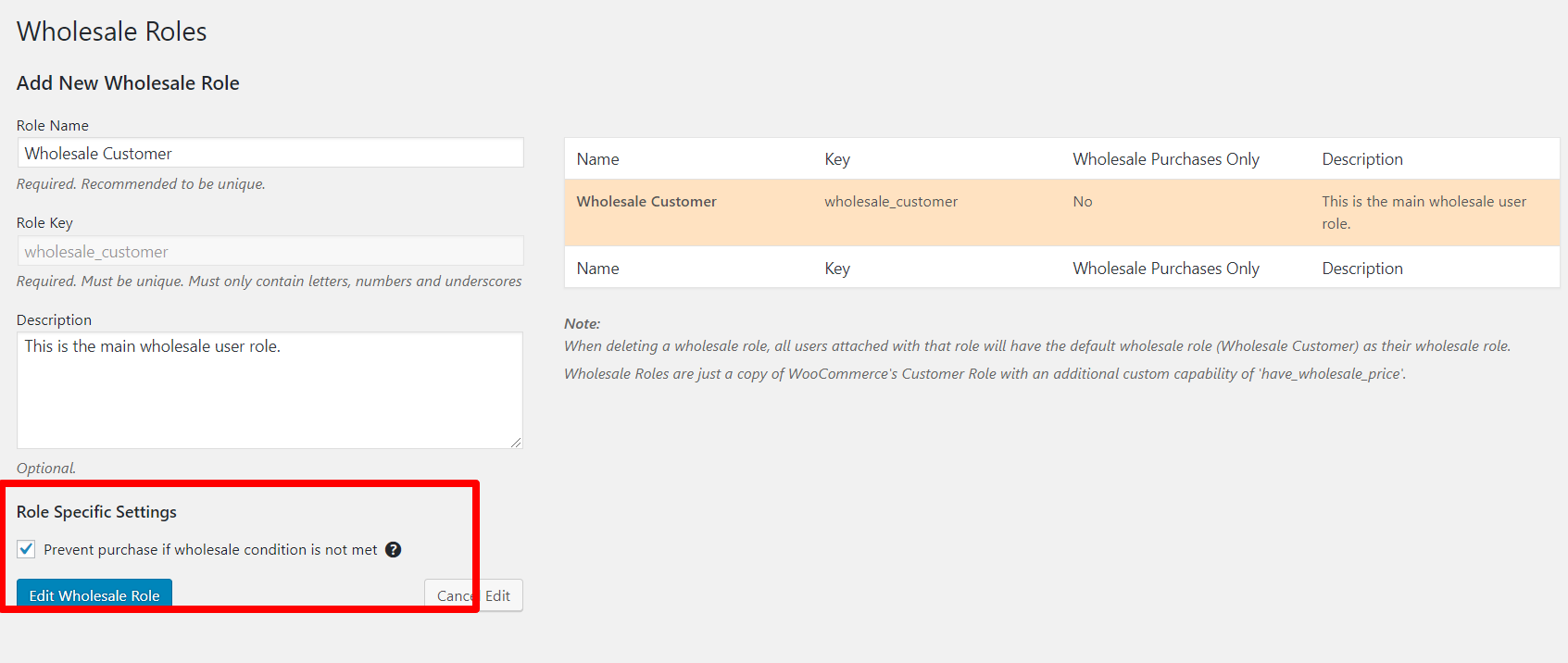
- Fai clic su Modifica nel ruolo all'ingrosso che desideri limitare.
- Nella sezione Impostazioni specifiche del ruolo, seleziona Impedisci acquisto se la condizione all'ingrosso non è soddisfatta.
- Salva il ruolo.
Con questa opzione abilitata, un cliente assegnato a quel ruolo non può completare il checkout finché il suo carrello non soddisfa la quantità minima d'ordine o il subtotale configurato per il suo ruolo.
Come viene calcolato il subtotale minimo
Il subtotale minimo dell'ordine viene calcolato utilizzando i prezzi all'ingrosso dei prodotti nel carrello, non i prezzi al dettaglio. Ciò mantiene il controllo del subtotale allineato con ciò che il cliente paga effettivamente una volta applicati i prezzi all'ingrosso. Se un prodotto ha un prezzo al dettaglio di $200 e un prezzo all'ingrosso di $100, il controllo del subtotale conta $100 verso il minimo, non $200.
Quantità minima d'ordine per prodotto
Separato dal minimo a livello di carrello descritto sopra, WooCommerce Wholesale Prices Premium ti consente anche di impostare una quantità minima d'ordine su singoli prodotti e variazioni di prodotto, per uno specifico ruolo all'ingrosso. Questo è configurato nelle impostazioni dei prezzi all'ingrosso del prodotto, non in Commercio all'ingrosso → Impostazioni, e funziona indipendentemente dalla quantità minima e dal subtotale a livello di carrello. Un cliente può soddisfare il minimo a livello di carrello pur non raggiungendo il minimo per prodotto su un articolo specifico, e viceversa.
Risoluzione dei problemi
Un cliente all'ingrosso può comunque effettuare il checkout anche se ho impostato un requisito d'ordine minimo
Il requisito d'ordine minimo da solo cambia solo il prezzo mostrato, non se il checkout è disponibile. Conferma che Impedisci acquisto se la condizione all'ingrosso non è soddisfatta sia selezionato per il ruolo all'ingrosso specifico di quel cliente in Commercio all'ingrosso → Ruoli.
Ho abilitato "Impedisci acquisto" ma il cliente può ancora effettuare il checkout
Conferma che il cliente è assegnato al ruolo all'ingrosso che hai modificato, non a un ruolo all'ingrosso diverso in cui l'opzione non è abilitata. Controlla anche se una sovrascrittura per utente sul profilo di quel cliente ha modificato il suo minimo richiesto, poiché una sovrascrittura inferiore potrebbe significare che il suo carrello soddisfa già il requisito.
Questa restrizione si applica agli account amministratore o shop manager?
La restrizione è legata all'assegnazione di un ruolo all'ingrosso, non a un livello di capacità di WordPress. Un account amministratore o responsabile del negozio a cui non è assegnato un ruolo all'ingrosso non è interessato da questa impostazione. Se assegni un ruolo all'ingrosso a un account amministratore per test, lo stesso requisito minimo d'ordine e la stessa restrizione d'acquisto si applicano anche a quell'account.
Cosa succede se abilito Impedisci acquisto ma non ho impostato una quantità minima d'ordine o un subtotale?
Se non è configurata alcuna quantità minima d'ordine o subtotale per il ruolo, non c'è alcun requisito affinché il cliente fallisca, quindi il checkout procede normalmente indipendentemente da questa impostazione. Configura almeno un minimo nella sezione Requisiti d'ordine affinché questa opzione abbia effetto.
Domande frequenti
Questa funzionalità richiede WooCommerce Wholesale Prices Premium?
Sì. I requisiti minimi d'ordine e l'impostazione Impedisci acquisto se la condizione all'ingrosso non è soddisfatta fanno entrambi parte di WooCommerce Wholesale Prices Premium e non sono disponibili nel plugin gratuito WooCommerce Wholesale Prices.
L'opzione "Impedisci acquisto se la condizione all'ingrosso non è soddisfatta" è un'impostazione globale?
No. Viene abilitata per ruolo all'ingrosso anziché globalmente. Puoi abilitarla per un ruolo all'ingrosso, come Cliente all'ingrosso, lasciandola disattivata per un altro ruolo, come Distributore.
Il subtotale minimo dell'ordine utilizza i prezzi al dettaglio o i prezzi all'ingrosso?
Utilizza i prezzi all'ingrosso assegnati ai prodotti nel carrello, non i prezzi al dettaglio.
Qual è la differenza tra la quantità minima d'ordine a livello di carrello e una quantità minima d'ordine per prodotto?
La Quantità minima d'ordine predefinita nelle impostazioni conta le unità nell'intero carrello. Una quantità minima d'ordine per prodotto è impostata su un singolo prodotto o variazione e si applica solo a quell'articolo, indipendentemente dal totale a livello di carrello.
Posso impostare requisiti minimi diversi per ruoli all'ingrosso diversi?
Sì. Abilita Requisiti minimi specifici per ruolo all'ingrosso nella sezione Requisiti d'ordine, quindi aggiungi una riga per ogni ruolo con la propria quantità minima, subtotale e logica AND/OR.
Posso sovrascrivere il requisito minimo per un cliente specifico?
Sì. Apri il profilo del cliente in Utenti e imposta Sovrascrivi quantità minima d'ordine o Sovrascrivi subtotale minimo d'ordine per inserire valori solo per quel cliente. Questo ha la precedenza sia sulle impostazioni a livello di ruolo che su quelle predefinite globali.
La quantità minima d'ordine per prodotto funziona con i prodotti variabili?
Sì. Una quantità minima d'ordine può essere impostata a livello di variazione o a livello di prodotto padre variabile, oltre al minimo a livello di carrello che conta le unità nell'intero carrello.
Un cliente vedrà una spiegazione quando il checkout viene bloccato?
Sì. Quando Impedisci acquisto se la condizione all'ingrosso non è soddisfatta è attiva e il requisito non è soddisfatto, il cliente vede un avviso che descrive cosa deve ancora aggiungere al carrello, e l'opzione di checkout non è disponibile finché il requisito non viene soddisfatto.
Serve Supporto?
Abbiamo un team di supporto dedicato per Wholesale Suite che conosce molto bene i nostri prodotti, WooCommerce e il settore. Sei il benvenuto a sfruttare la loro esperienza in qualsiasi momento, in tutto il mondo.
Se sei un cliente esistente, vai al modulo di richiesta ticket di supporto e inviaci un messaggio.
Se sei un utente di plugin gratuiti, ti preghiamo di inviarci una richiesta di supporto sul forum. Monitoriamo attivamente i forum di supporto di WordPress.org per il plugin gratuito e aiutiamo i nostri utenti l nel miglior modo possibile.

