

Bedankt voor de aanschaf van de Premium add-on voor onze gratis Wholesale Prices plugin!
Dit document is een startgids voor de WooCommerce Wholesale Prices Premium plugin voor WooCommerce.
De Premium plugin stelt u in staat uw afhankelijkheid van onhandige spreadsheets verder te verminderen, zodat al uw wholesale klanten gemakkelijk via uw online winkel kunnen bestellen. Het biedt u een reeks extra functies waarmee u geavanceerder kunt omgaan met het aanbieden van wholesale producten aan uw klanten.
Dit is wat deze gids zal behandelen:
- Overzicht – we beschrijven wat de plugin doet naast de gratis plugin
- Extra Wholesale Klantrollen – we laten u zien hoe u meer gebruikersrolniveaus kunt toevoegen, zodat u uw wholesale klanten in groepen kunt scheiden
- Meer Wholesale Prijsfuncties – we laten u alle extra flexibele nieuwe manieren zien waarop u wholesale prijzen op uw producten kunt toepassen
- Product Zichtbaarheid – toon en verberg producten voor zowel retail- als wholesale klanten en ook op basis van hun rol
- Verzend Mapping – deze belangrijke functie stelt u in staat om wholesale specifieke verzending in te stellen
- Betaalmethode Mapping – leer hoe u uw wholesale klanten toegang kunt geven tot specifieke betaalmethoden
- Minimale Bestelvereisten – stel een minimum in voor het activeren van wholesale prijzen dat uw wholesale klanten moeten voldoen
- Geavanceerde Belasting – belasting is een belangrijk onderdeel van wholesale verkoop en we laten u zien hoe flexibel u dit kunt maken
- Andere Plugins in de Suite – we laten u zien waarom u zou moeten overwegen Wholesale Order Form en Wholesale Lead Capture toe te voegen
- Hulp Krijgen – we begrijpen dat dit een ingewikkeld hulpmiddel kan zijn, we laten u zien waar u hulp kunt krijgen als u die nodig heeft
Overzicht
WooCommerce Wholesale Prices Premium is de premium add-on plugin voor de gratis WooCommerce Wholesale Prices plugin. De gratis plugin moet geïnstalleerd en geactiveerd zijn om deze te laten werken.
Er zijn honderden functies opgenomen in de premium add-on, u kunt hier een volledige lijst zien, maar vandaag bespreken we slechts enkele van de belangrijkste functies, zodat u zo snel mogelijk aan de slag kunt.
Eerst bespreken we de mogelijkheid om meer wholesale rollen toe te voegen en waarom u dat zou willen doen.
Extra Wholesale Rollen
In de startgids voor de gratis wholesale prijzen plugin bespraken we waarom prijzen zijn gekoppeld aan gebruikersrollen.
In Prices Premium kunt u extra gebruikersrollen toevoegen, zodat u dingen kunt doen zoals:
- Creëer aparte groepen wholesale klanten
- Definieer extra prijsniveaus
- Bied verschillende minimale bestelvereisten
- En nog veel meer…
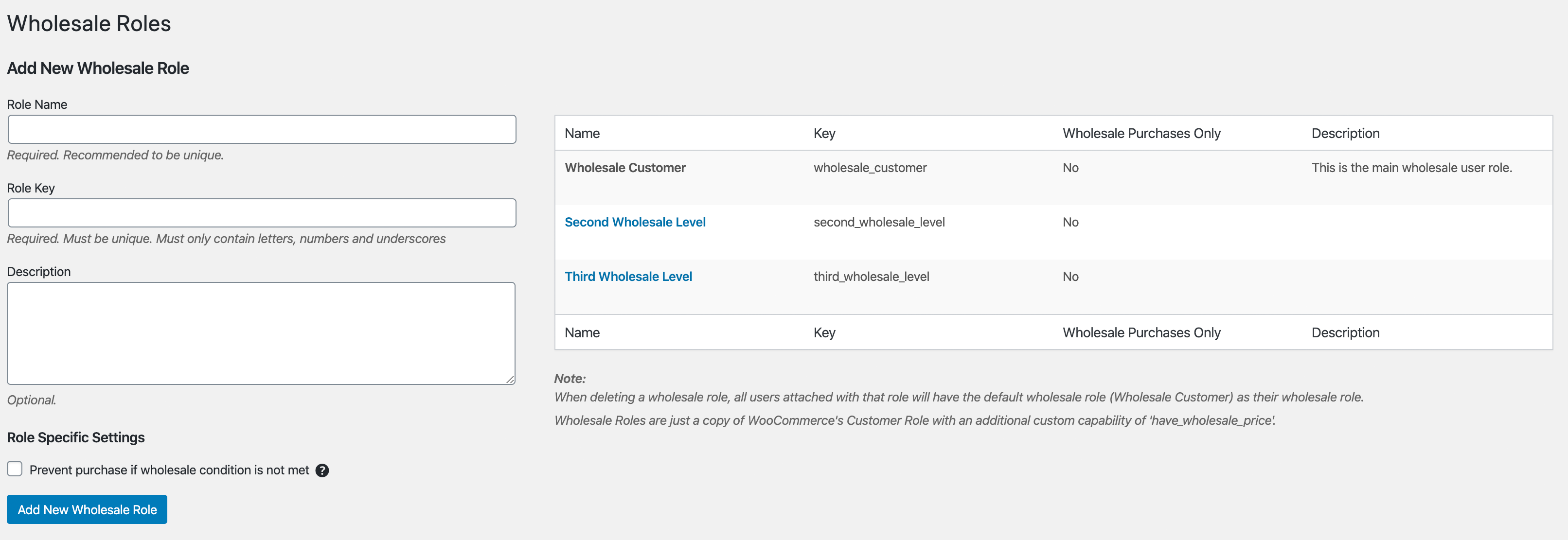
U kunt eenvoudig extra rollen toevoegen via het menu Wholesale -> Rollen. Het werkt een beetje als een WordPress categoriepagina, dus het zou bekend moeten voorkomen.
Voor elke rol die aan het systeem wordt toegevoegd, ziet u wholesale prijsvelden op uw producten.
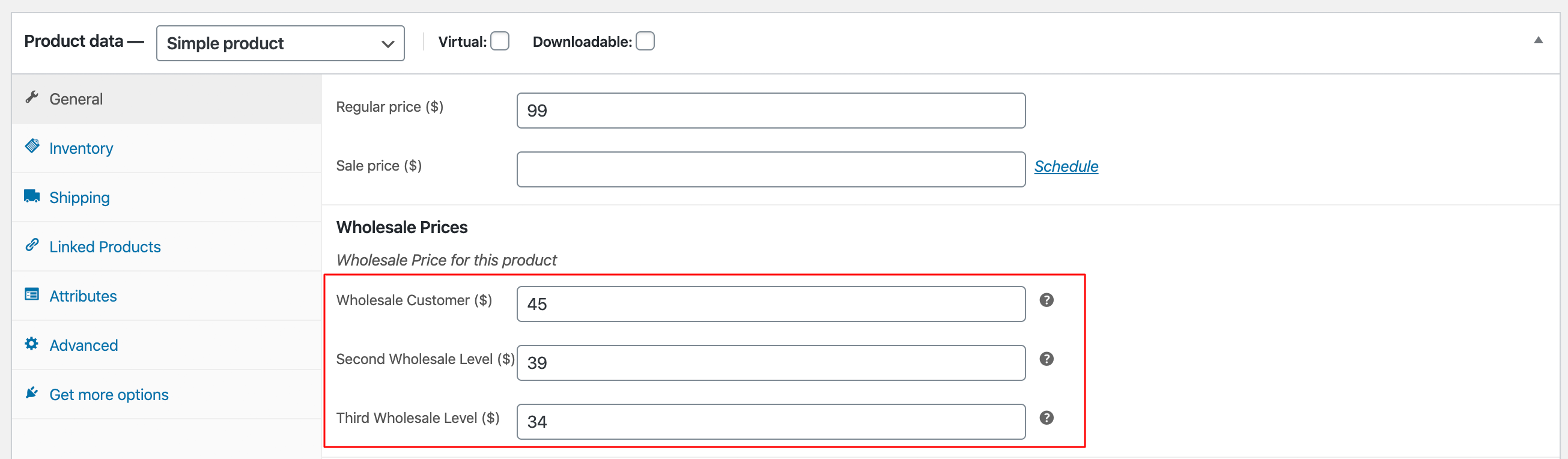
Er zijn twee belangrijke redenen waarom mensen extra rollen toevoegen:
- Ze willen lokale wholesale klanten scheiden van klanten uit andere landen, zodat ze verschillende prijzen, minimumniveaus, verzendmethoden, etc. voor die klanten kunnen hanteren.
- Ze willen verschillende "niveaus" van groothandelsrelaties creëren, zoals Brons, Zilver, Goud, Platina, waarbij de voordelen en prijzen beter worden naarmate ze hoger op de niveaus komen.
Ik moedig u aan om de structuur die u wilt voor uw groothandelsklanten te overwegen voordat u verdergaat met het instellen van prijzen.
Lees dit artikel voor meer gedetailleerde instructies over hoe u extra groothandelsrollen kunt toevoegen.
Prijsstelling op basis van percentage (%) & Prijsstelling op basis van hoeveelheid
In de gratis plugin kunt u groothandelsprijzen instellen via het productbewerkingsscherm en voor veel gevallen is dit prima voor veel winkels.
Maar in de Prices Premium plugin kunt u nu ook groothandelsprijzen instellen op categorieniveau en globaal niveau. U kunt ook prijsstelling op basis van hoeveelheid maken, waarbij de klant kortingen krijgt op de prijs naarmate ze meer kopen.
We hebben hier een zeer gedetailleerde handleiding over hoe groothandelsprijsstelling werkt in Wholesale Suite. In plaats van die gedetailleerde handleiding hier te herhalen, moedig ik u aan om naar dat artikel te gaan en uzelf bij te praten.
Ik zal echter slechts één concept snel uitleggen, omdat het belangrijk is. Groothandelsprijzen volgen regels van precedence, die er ongeveer zo uitzien:
Product Groothandelsprijs -> Korting % op categorieniveau -> Globale % Korting
Als de groothandelsprijs van het product niet is ingesteld, kijkt het systeem of er een korting % op categorieniveau is ingesteld. Zo niet, dan kijkt het of er een globale % korting is. Het begint altijd op het laagste niveau en stopt wanneer het vaststelt dat er een prijs is gedefinieerd.
Dus als u zowel een globale % korting hebt gedefinieerd die wereldwijd voor al onze producten zal worden gebruikt, maar als u een specifieke prijs op een bepaald product hebt ingesteld, zal die prijs voor dat product worden gebruikt.
Lees nogmaals de handleiding voor groothandelsprijzen en deze zal zowel dit concept uitleggen als ingaan op details over hoe u die % gebaseerde prijzen correct instelt.
Product Zichtbaarheid
In Prices Premium kunt u producten op een paar opwindende manieren tonen en verbergen voor klanten. Het geeft u veel flexibiliteit, zoals de mogelijkheid om alleen-groothandelsproducten te maken die niet aan detailklanten worden getoond, of omgekeerd, niet-groothandelsproducten te verbergen voor groothandelsklanten.
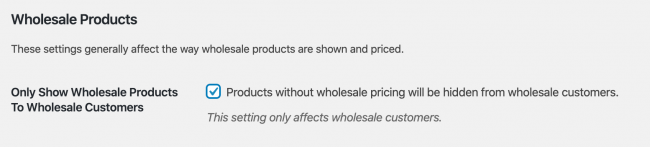
De eerste is een instelling genaamd "Alleen groothandelsproducten tonen aan groothandel" die in feite doet wat er staat. Eenmaal ingeschakeld, kunnen uw groothandelsklanten een product alleen zien als er groothandelsprijzen zijn gedefinieerd (en ja, dit omvat % gebaseerde prijzen).
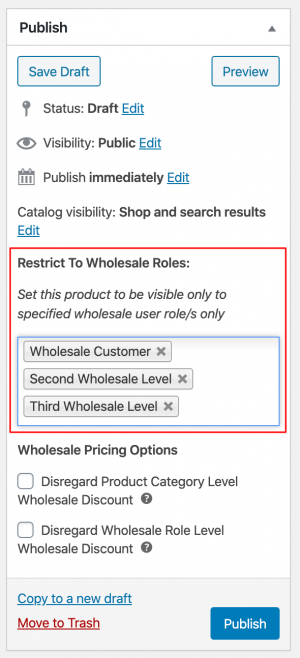
Vervolgens is er een productgebaseerde instelling die u vindt in de publicatiebox van producten, genaamd "Beperken tot groothandelsrollen". Hier kunt u de zichtbaarheid van een heel product beperken tot specifieke groothandelsniveaus. Dit kan handig zijn als u bepaalde producten alleen opent voor bepaalde klanten, zoals wanneer u klanten geografisch per rol hebt gescheiden.
Ten slotte kunt u ook de zichtbaarheid van individuele productvariaties op variabele producttypen beperken. Dit kan ook per rol worden gedaan, net als de functie "Beperken tot groothandelsrollen".

Nogmaals, we hebben hier een uitgebreide gids over productzichtbaarheid die je kunt bekijken.
Verzend- & Betaalpoort Koppeling
Een van de coole dingen aan het scheiden van gebruikers in gebruikersrollen is dat je dingen aan die rollen kunt "koppelen".
We doen dit op nogal wat plaatsen, waarvan de twee belangrijkste de verzendkoppeling en de betaalpoortkoppeling zijn.
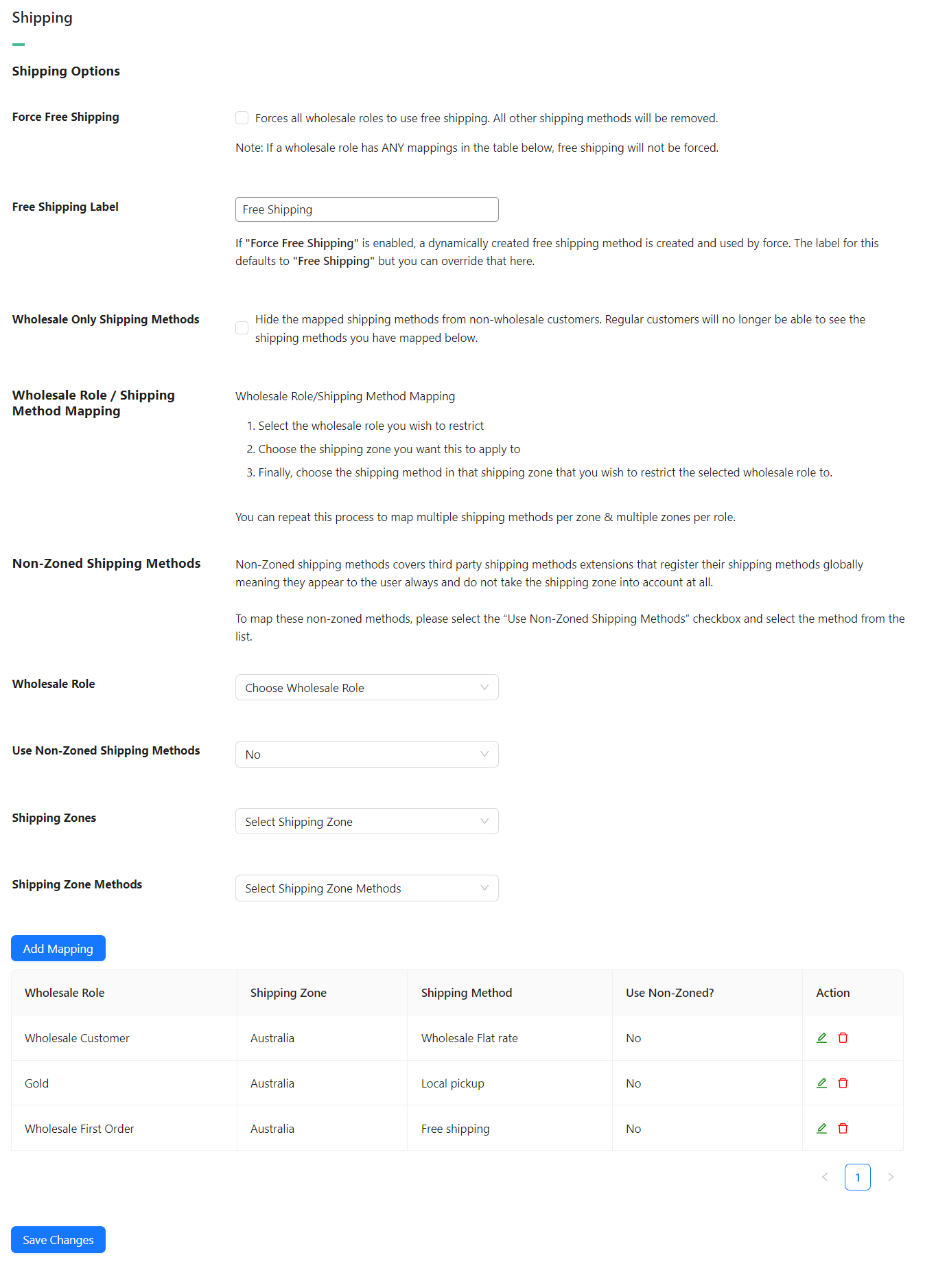
Verzendmethode Koppeling
Het koppelen van een verzendmethode betekent dat je het systeem zo kunt instellen dat alleen mensen met die groothandelsrol bepaalde verzendmethoden te zien krijgen. Je kunt die verzendmethoden ook verbergen, zodat ze alleen zichtbaar zijn voor die specifieke groothandelsrol.
WooCommerce zelf heeft uitstekende locatie-afhankelijke verzendcontroles. Je kunt dus een verzendmethode hebben voor slechts een specifiek gebied.
Die twee dingen samen betekenen dat je specifieke groothandels verzendprijzen per gebied per rol kunt maken.
Een goed voorbeeld hiervan zou kunnen zijn om een "Lokale Afhaling" verzendmethode te maken voor alleen je lokale gebied en deze ook alleen beschikbaar te maken voor groothandelsklanten.
Maak je geen zorgen, we hebben een volledige gids over hoe deze verzendkoppeling werkt hier. Als je het eenmaal onder de knie hebt, is het niet al te ingewikkeld, maar het kan even duren om in te stellen als je veel regio's hebt. Houd vol, het is de extra tijd waard, want op de lange termijn kun je groothandelsklanten nauwkeurige groothandels verzendtarieven bieden.
Betalingsgatewaykoppeling
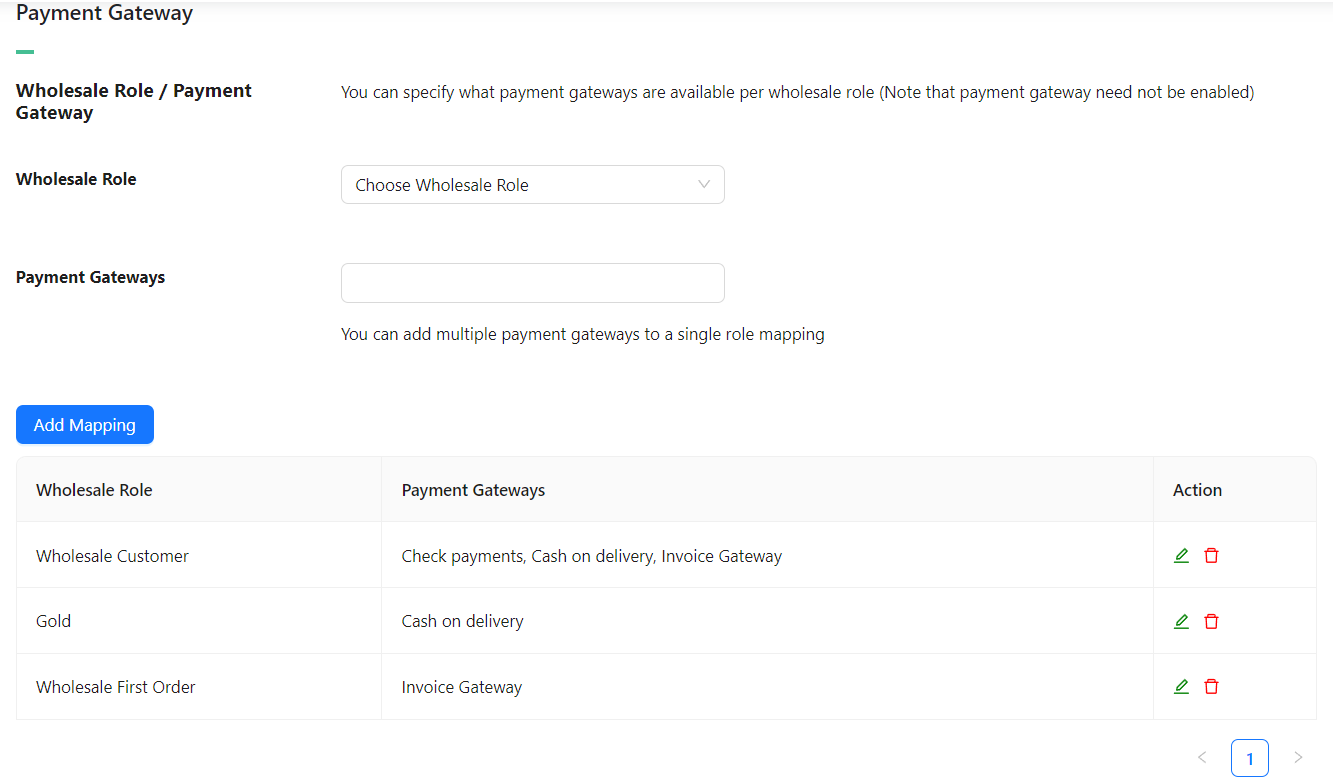
Niet zo complex als de koppeling van verzendmethoden, je kunt hetzelfde koppelingsconcept ook toepassen op betaalpoorten.
Eén ding om op te merken is dat je een uitgeschakelde betaalpoort kunt koppelen. WooCommerce zelf zorgt ervoor dat een uitgeschakelde betaalpoort niet aan klanten wordt getoond. Als je het echter koppelt aan een groothandelsrol, kun je ervoor kiezen om die betaalpoort alleen voor die groothandelsrol in te schakelen.
Je kunt betaalpoorten ook koppelen aan meerdere groothandelsrollen.
Een goed voorbeeld hiervan is dat je misschien de bankoverschrijvingsbetaalpoort wilt inschakelen voor groothandelsklantrollen, maar niet voor detailhandelklanten.
Minimale Bestelvereisten
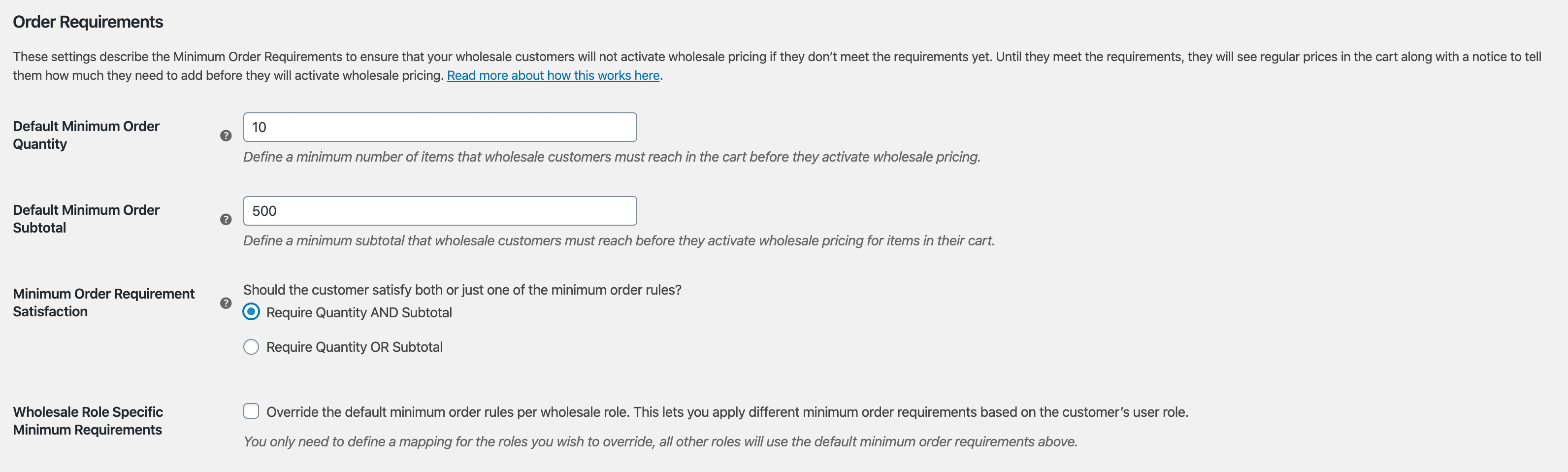
Een zeer populaire functie in Prices Premium is de mogelijkheid om minimale bestelvereisten in te stellen, zodat groothandelsprijzen niet worden geactiveerd, tenzij je groothandelsklant eerst voldoet aan een minimumbedrag in hun winkelwagen.
Hier ziet de instelling eruit:
En hier ziet het bericht er aan de voorkant uit wanneer ze nog niet aan hun vereisten hebben voldaan:

Je kunt hier ook het "koppelings"-concept gebruiken, zodat je de minimale bestelrestrictieregels per groothandelsrol kunt negeren.
Nog een extra opmerking, het kan nuttig zijn om te weten dat hoewel klanten nog steeds producten aan de winkelwagen kunnen toevoegen, de winkelwagen de groothandelsprijs voor die producten niet zal weergeven totdat ze aan het minimum voldoen.
Dit komt omdat in veel gevallen winkeleigenaren nog steeds willen dat groothandelsklanten een lagere hoeveelheid kunnen kopen als ze dat echt nodig hebben, maar ze zouden geen groothandelsprijzen moeten krijgen voor die kleine bestellingen. We gaan dieper in op waarom deze beslissing is genomen hier.
Indien gewenst kunt u ook de knop "Afrekenen" uitschakelen totdat ze aan de beperkingen voldoen, indien gewenst.
Geavanceerde belasting
Eindelijk bereiken we het favoriete onderwerp van elke wereldregering, belastingen!
Het begrijpen van uw zakelijke belastingverantwoordelijkheden is belangrijk wanneer u begint met verkopen aan groothandelsklanten. Sommige landen hebben specifieke regels die moeten worden gevolgd als het gaat om de weergave van prijzen en hun belastingcomponenten.
WooCommerce handelt belastingen af op basis van locatie en doet dit voor het grootste deel redelijk goed. Als het op belastingen aankomt, repliceert Prices Premium niets van wat WooCommerce doet, het bouwt er alleen op voort.
We spiegelen effectief de opties voor belastingweergave in WooCommerce zelf, alleen voor klanten op groothandelsniveau:
- Groothandelsprijzen in de winkel weergeven inclusief of exclusief belasting (vergelijkbaar met hetzelfde voor retailproducten)
- Toon een suffix voor groothandelsprijzen (vergelijkbaar met suffix voor retailprijzen)
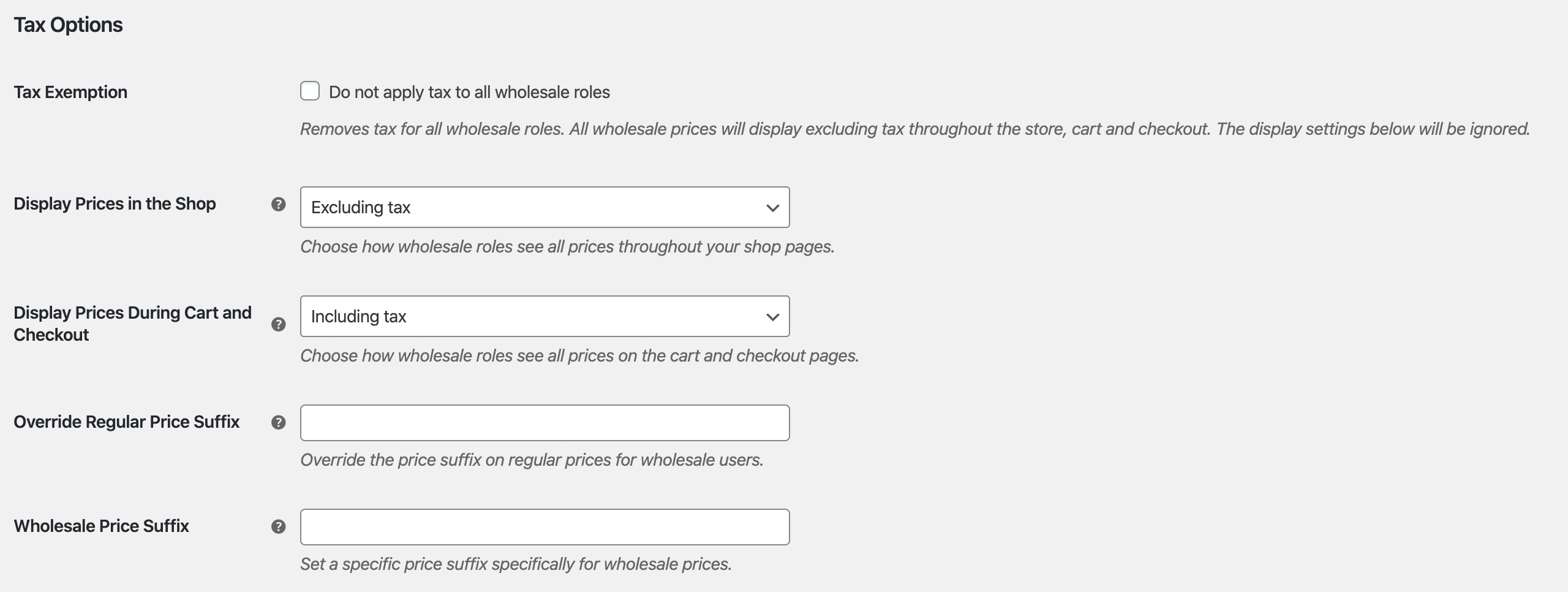
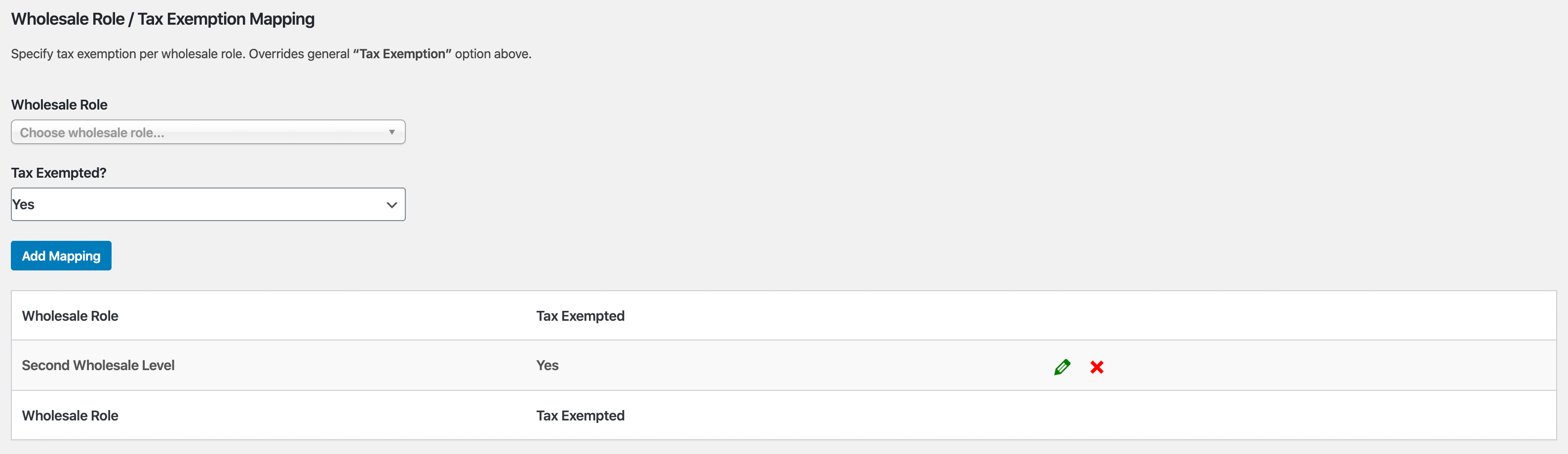
Een ander groot ding dat we hebben toegevoegd, is de mogelijkheid om belastingvrijstellingen te doen.
U kunt ervoor kiezen om dit wereldwijd te doen, wat betekent dat alle groothandelsklanten belastingvrij zijn. Of u kunt, zoals u misschien al geraden hebt, de groothandelsvrijstellingen toewijzen per groothandelsrol.
Geavanceerde functies
Als het gaat om het oplossen van groothandel voor WooCommerce, geloven we in een holistische aanpak. U moet alle drie de grote problemen oplossen:
- Het instellen van groothandelsprijzen, zichtbaarheid, belasting, enz. Dit wordt opgelost met Prices Premium, zoals u in deze handleiding hebt gezien.
- Efficiënte bestellingen – dit is erg belangrijk en heeft grote invloed op de tevredenheid van uw klanten wanneer ze zaken met u doen
- Werven en beheren van klanten op groothandelsniveau
WooCommerce Wholesale Order Form
De tijd die een groothandelsklant nodig heeft om een bestelling te plaatsen, is een van de grootste pijnpunten die u kunt elimineren.
Groothandelsklanten zijn niet zoals reguliere detailhandelklanten. Ze willen niet door uw normale winkelpagina's bladeren en producten aan de winkelwagen toevoegen op die manier. Ze hebben een tabelvormige interface nodig die het snel maakt om producten in de gewenste hoeveelheden aan de winkelwagen toe te voegen.
Hier komt de Order Form-plugin om de hoek kijken.
Belangrijkste functiehoogtepunten:
- Uw hele catalogus op één pagina – doorzoekbaar en gecategoriseerd
- Geen pagina-herladingen, volledige ajax ingeschakeld, zodat groothandelaars kunnen toevoegen aan de winkelwagen zonder de pagina te verlaten
- Gestroomlijnde getabelleerde interface die mobiel & tabletvriendelijk is
- Wildcard-zoekopdrachten voor trefwoorden & SKU's
- Hiërarchisch categorie filter
- Toegangscontrole zodat alleen degenen die gemachtigd zijn het formulier kunnen openen
Dit zijn slechts enkele van de belangrijkste functies die u uw groothandelsklanten biedt door de Order Form-plugin te gebruiken.
WooCommerce Wholesale Lead Capture
Het beheren van klanten op groothandelsniveau kan een beetje hoofdpijn zijn als u het handmatig doet. De Wholesale Lead Capture-plugin biedt u een groothandelspecifiek registratieformulier, een speciale groothandelsloginpagina, e-mailreeksen voor aanmeldingen en uw keuze uit handmatige of geautomatiseerde goedkeuringen.
Het neemt echt de pijn weg van het handmatig werven & registreren van groothandelsklanten, wat u tijd bespaart en u de werving van groothandel op de automatische piloot kunt zetten.
Belangrijkste functiehoogtepunten:
- Registratieformulierbouwer laat u alle informatie vastleggen die u nodig heeft tijdens de aanmelding
- Vul de afrekenvelden vooraf in met de informatie die u tijdens de aanmelding vastlegt om het eerste bestelproces voor uw nieuwe groothandelsklant te vergemakkelijken
- Ingebouwde spambeveiliging met honeypot-technologie en optioneel Google Recaptcha
- Geautomatiseerde e-mailsequenties voor goedkeurings- en notificatie-e-mails voor beheerders en klanten
- Volledig systeem voor gebruikersgoedkeuringen, dat gebaseerd kan zijn op handmatige goedkeuringen of 100% geautomatiseerd als u dat wenst
De Lead Capture-plugin maakt het werven en beheren van uw groothandelsklanten veel minder pijnlijk.
Veelgestelde vragen
Wat is WooCommerce Wholesale Prices Premium en wat doet het?
WooCommerce Wholesale Prices Premium is de betaalde add-on plugin voor de gratis WooCommerce Wholesale Prices plugin. Het breidt uw WooCommerce-winkel uit met geavanceerde groothandelsfuncties, waaronder extra groothandelsgebruikersrollen, prijsstelling op basis van percentage en hoeveelheid, productzichtbaarheidscontroles, mapping van groothandelsverzending en betaalgateways, minimale bestelvereisten en geavanceerde belastinginstellingen - waardoor u volledige controle hebt over hoe u online groothandel verkoopt.
Kan ik verschillende groothandelsprijsniveaus instellen voor verschillende soorten groothandelsklanten in WooCommerce?
Ja! WooCommerce Wholesale Prices Premium stelt u in staat om meerdere groothandelsgebruikersrollen te maken (bijv. Brons, Zilver, Goud, Platina), zodat u verschillende groothandelsprijzen, minimale bestelvereisten, verzendmethoden en betaalgateways aan elke groep kunt toewijzen. Dit maakt het eenvoudig om getrapte groothandelsprijzen te beheren voor verschillende klantsegmenten, zoals lokale versus internationale kopers.
Hoe werkt groothandelsprijzen in WooCommerce Wholesale Prices Premium?
Groothandelsprijzen in de Premium-plugin volgen een hiërarchie van prioriteit: een productspecifieke groothandelsprijs heeft eerst voorrang, gevolgd door een korting op categorieniveau en vervolgens een wereldwijde korting. Dit betekent dat u een winkelbrede groothandelskorting kunt instellen en toch prijzen kunt overschrijven voor specifieke producten of categorieën - waardoor u flexibele en schaalbare controle over groothandelsprijzen in WooCommerce hebt.
Kan ik beperken welke producten groothandelsklanten zien in mijn WooCommerce winkel?
Ja. WooCommerce Wholesale Prices Premium bevat krachtige productzichtbaarheidscontroles. U kunt de instelling “Alleen groothandelsproducten tonen aan groothandel” inschakelen, zodat groothandelsklanten alleen producten zien waaraan groothandelsprijzen zijn toegewezen. U kunt ook individuele producten of productvariaties beperken tot specifieke groothandelsrollen, waardoor het eenvoudig wordt om exclusieve groothandel-only producten aan te bieden aan bepaalde klantgroepen.
Ondersteunt WooCommerce Wholesale Prices Premium groothandelspecifieke verzend- en betaalgateways?
Absoluut. De functies voor het in kaart brengen van verzendmethoden en betaalgateways van de plugin laten u specifieke verzendmethoden en betalingsopties toewijzen aan individuele groothandelsgebruikersrollen. U kunt bijvoorbeeld een verzendmethode “Afhalen op locatie” exclusief aanbieden aan lokale groothandelsklanten, of bankoverschrijvingsbetalingen inschakelen, alleen voor groothandelskopers — waardoor uw B2B WooCommerce winkel een volledig aangepaste checkout-ervaring krijgt.
Help & Ondersteuning
We hebben een toegewijd ondersteuningsteam voor Wholesale Suite dat onze producten, WooCommerce en de branche zeer goed kent. U bent welkom om hun expertise op elk moment, wereldwijd, te benutten.
Als u een bestaande klant bent, ga dan naar het ondersteuningsticket aanvraagformulier en stuur ons een bericht.
Als u een gratis plugin-gebruiker bent, stuur ons dan een ondersteuningsverzoek op het forum, we houden de ondersteuningsforums van WordPress.org voor de gratis plugin actief in de gaten en helpen onze gebruikers daar zo goed mogelijk.

