Een van de grootste administratieve hoofdpijnen bij het runnen van een groothandelsbedrijf is het werven en beheren van klanten op groothandelsniveau. En naast de hoofdpijn, wilt u waarschijnlijk ook een 5-sterrenervaring bieden aan uw nieuwe groothandelsklanten. Ze zijn tenslotte belangrijk voor uw bedrijf, dus het is logisch om ervoor te zorgen dat ze een geweldige onboarding ervaren.
Dit is wat deze gids zal behandelen:
Overzicht – we beschrijven globaal wat de plugin precies doet
Belangrijke Pagina's Bekijken – We bekijken de belangrijke pagina's die de plugin aanmaakt
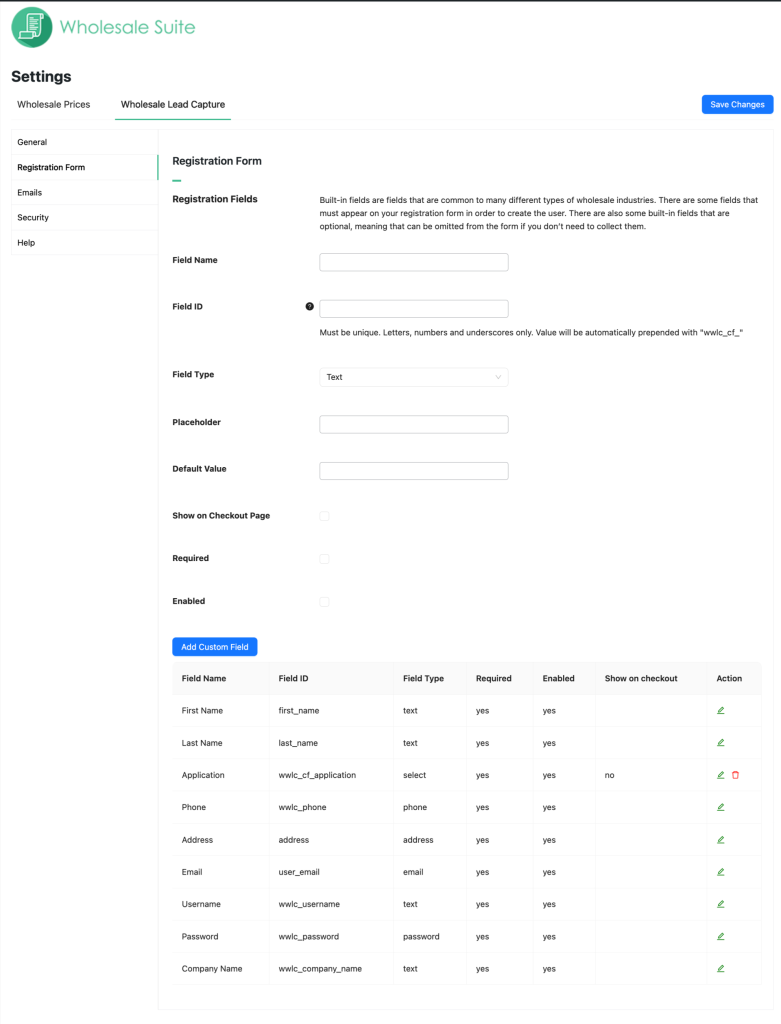
Registratieformulier – laten we het hebben over hoe u het standaard registratieformulier kunt aanpassen en hoe u aangepaste velden kunt toevoegen als u die nodig heeft
Acties na Registratie – deze functies vertellen het systeem wat te doen met klanten nadat ze zich hebben geregistreerd
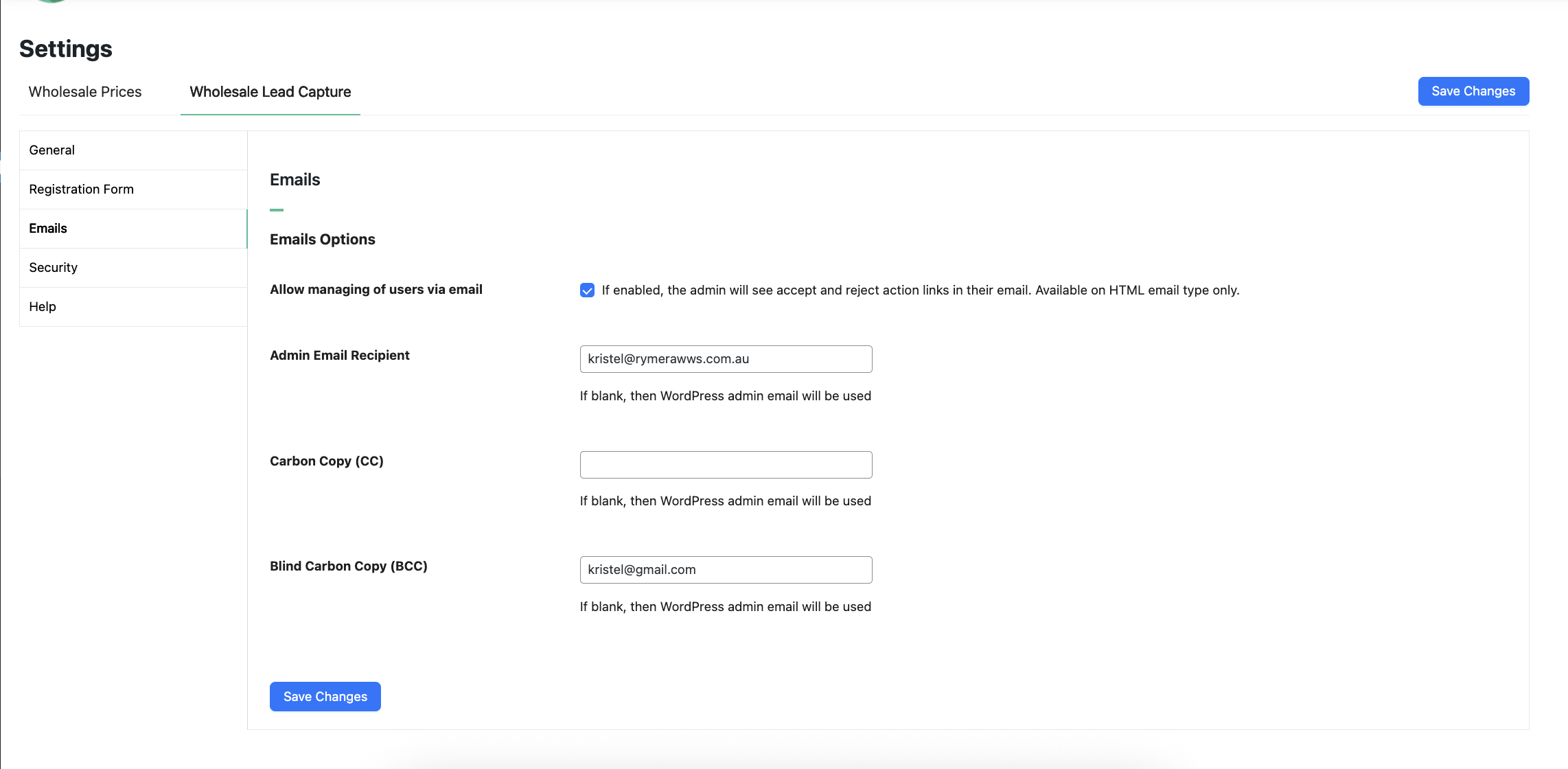
Goedkeuringen & E-mails – een kort overzicht van hoe het goedkeuringssysteem werkt en welke e-mails naar de klant worden verzonden
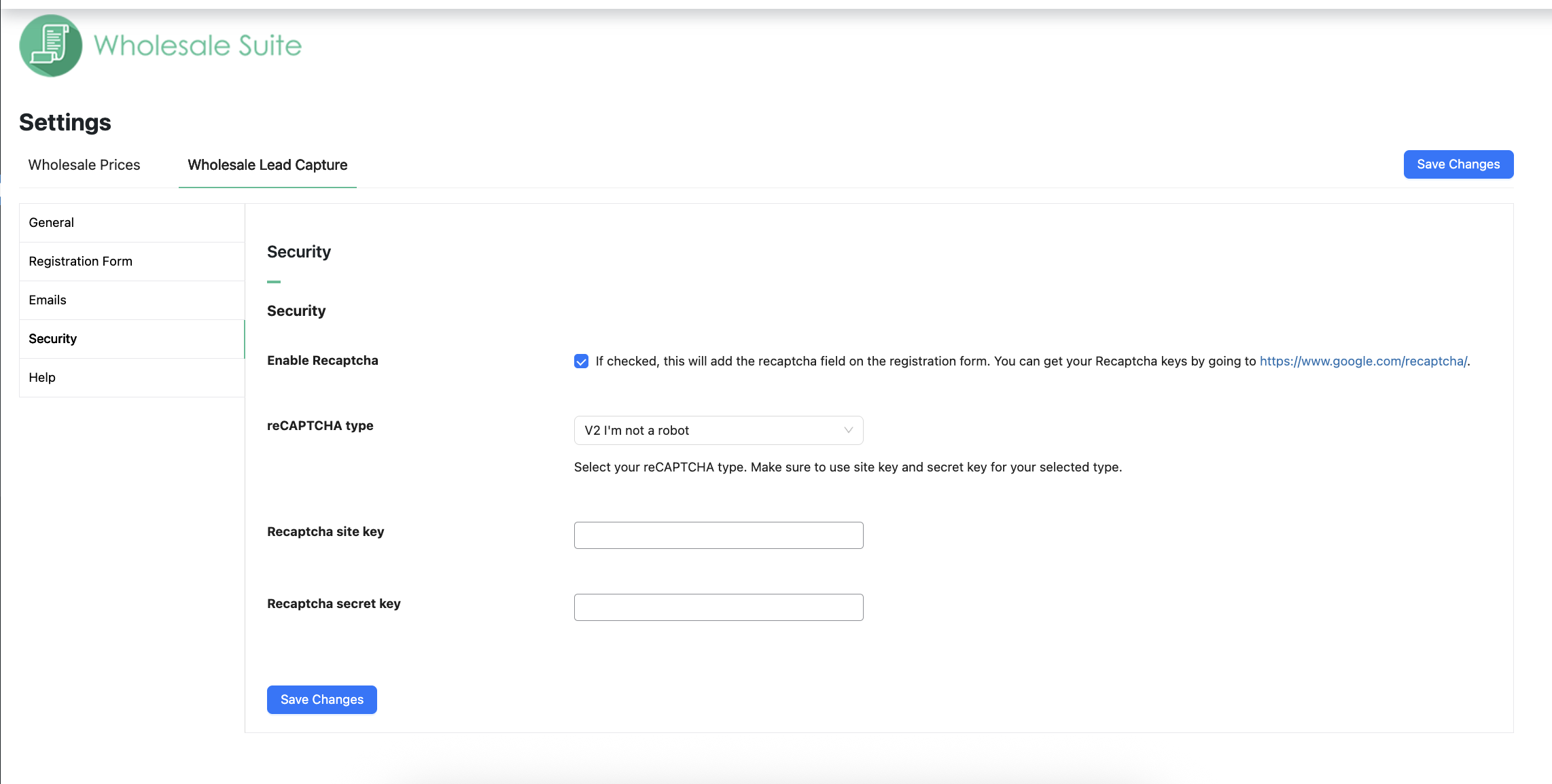
Spam Beveiliging – uw formulier heeft ingebouwde honeypot anti-spam beveiliging, maar we laten u ook zien hoe u Google Recaptcha kunt gebruiken als uw site extra beveiliging vereist
Andere Plugins in de Suite – we laten u zien waarom u zou moeten overwegen Wholesale Order Form en Wholesale Lead Capture toe te voegen
Hulp Krijgen – we begrijpen dat dit een ingewikkeld hulpmiddel kan zijn, we laten u zien waar u hulp kunt krijgen als u die nodig heeft
Overzicht
WooCommerce Wholesale Lead Capture is een volledig zelfstandige plugin voor WooCommerce die de registratie van groothandelsklanten, de inlog van groothandelsklanten, een volledig goedkeuringsproces en onboarding-e-mails beheert. Het is ontworpen om hand in hand te werken met de rest van onze suite van tools.
Er zijn tal van functies opgenomen in de Lead Capture-tool, u kunt hier een volledige lijst zien, en hoewel de tool veel van het zware werk voor u doet, het creëren van de benodigde formulieren en pagina's, zullen we ook een paar belangrijke dingen doornemen, zodat u zo snel mogelijk aan de slag kunt.
Abonneren op Wholesale Suite
Eerst bekijken we de belangrijke pagina's die de lead capture-tool aanmaakt wanneer u deze activeert.
Belangrijke Pagina's Bekijken
Direct bij de start maakt de lead capture-tool een aantal pagina's aan op uw website om u te helpen bij het beheren van groothandelsklanten.
Dit zijn:
https://[yoursiteurl]/wholesale-log-in-page/ – this is the Login page for wholesale customers
https://[yoursiteurl]/wholesale-registration-page/ – this is the Registration page for wholesale customers
https://[yoursiteurl]/wholesale-registration-thankyou-page/ – This is the default Registration Thank You page wholesale customers see after registering
U hoeft deze niet handmatig aan te maken, maar u kunt de shortcode van die pagina's pakken en deze indien gewenst op een andere pagina gebruiken.
In de instellingen ziet u ook dat er enkele paginainstellingen zijn, die u zullen verwijzen naar de huidige pagina die voor die pagina's is ingesteld.
U zult ook een paar andere pagina's op het instellingenscherm opmerken die ingesteld moeten worden, zoals de algemene voorwaarden (deze worden gelinkt wanneer u het veld Algemene voorwaarden inschakelt) en diverse bedankpagina's en doorverwijspagina's.
Zorg ervoor dat u voor elk van deze instellingen een pagina hebt geselecteerd.
Registratieformulier
Het registratieformulier is waar uw nieuwe leads zich registreren om een groothandelsaccount aan te vragen.
We raden u aan om alle benodigde informatie direct bij de registratie te verzamelen. Zo kunt u op basis van die informatie beslissen of u hen wilt goedkeuren of afwijzen, zonder te veel heen en weer te hoeven gaan om het uit te zoeken.
Ingebouwde velden
Het systeem wordt geleverd met een aantal standaardvelden die u naar wens kunt in- of uitschakelen.
Deze omvatten:
Voornaam (verplicht)
Achternaam (verplicht)
Telefoon (verplicht)
E-mail
Gebruikersnaam
Bedrijfsnaam
Adres
Wachtwoord
U kunt deze opnieuw rangschikken met behulp van de veldprioriteit en ze in- of uitschakelen. Verplichte velden kunnen niet worden uitgeschakeld.
Voor zover mogelijk worden de velden gebruikt om het gebruikersaccount van informatie te voorzien, zodat wanneer ze bij de kassa komen bij hun eerste bestelling, ze deze niet opnieuw hoeven in te vullen.
Aangepaste velden
Met aangepaste velden kunt u alle andere informatie verzamelen die u nodig hebt om te beslissen of u deze lead als groothandelsklant accepteert.
U kunt velden van verschillende typen toevoegen:
Tekst
Tekstvak
Getal
E-mail
URL
Selectie
Radio
Selectievakje
Verborgen
Bestand
Inhoud
Algemene voorwaarden
Mensen gebruiken deze om allerlei soorten informatie te verzamelen, zoals btw-nummers, bedrijfsregistratiedocumenten, website-URL's, communicatievoorkeuren, enz.
Acties na registratie
Acties na registratie zijn de dingen die gebeuren nadat de persoon het registratieformulier heeft ingediend. De twee belangrijkste dingen zijn het kiezen hoe gebruikersgoedkeuringen moeten werken en welke gebruikersrol de persoon na goedkeuring moet krijgen.
1. Gebruikersgoedkeuring
Moeten gebruikers worden goedgekeurd voordat ze toegang krijgen of niet? Dit is iets waar u de vrijheid heeft om volledig te automatiseren of handmatig te doen.
Als u ervoor kiest om goedkeuringen handmatig te doen, heeft u de meeste controle. Het systeem zal u per e-mail op de hoogte stellen wanneer iemand wacht op goedkeuring en een beheerder of winkelmanager moet die persoon goedkeuren.
Als u kiest voor geautomatiseerde goedkeuringen, krijgt de klant direct toegang en kan deze groothandelsprijzen zien en een bestelling plaatsen.
2. Automatisch toekennen van een gebruikersrol
Bij goedkeuring moet het systeem de klant een gebruikersrol toekennen.
Als u WooCommerce Groothandelsprijzen gebruikt, is de standaard hier de rol Groothandelsklant. Maar u kunt dit wijzigen naar een van de andere rollen op uw site.
Goedkeuringen & E-mails
Zoals vermeld, kunnen goedkeuringen volledig worden geautomatiseerd als u dat wenst.
Dit betekent dat de beheerder gebruikers niet hoeft goed te keuren voordat ze groothandelsprijzen kunnen zien en een bestelling kunnen plaatsen.
Sommige winkeleigenaren willen iets meer controle over hun groothandelsprogramma, dus de standaardinstelling is handmatige goedkeuringen.
Tijdens het onboardingproces van de gebruiker worden er verschillende e-mails verzonden naar de beheerder en naar de klant:
Scenario #1: Automatische goedkeuring is UITGESCHAKELD
Gebruiker registreert zich
Account ingesteld op inactief
Beheerder ontvangt een e-mail van een nieuwe registratie
Gebruiker ontvangt e-mail ter bevestiging van hun registratie
Beheerder keurt de nieuwe gebruiker handmatig goed
Account ingesteld op actief
Gebruiker ontvangt een e-mail dat hun account actief is, met daarin hun inloggegevens
Scenario #2: Automatische goedkeuring is INGESCHAKELD
Gebruiker registreert zich
Account ingesteld op actief
Beheerder ontvangt e-mail van nieuwe registratie en dat deze automatisch is goedgekeurd
Gebruiker ontvangt e-mail ter bevestiging van hun registratie
Gebruiker ontvangt een e-mail dat hun account actief is, met daarin hun inloggegevens
Uw registratieformulier is automatisch beschermd met honeypot anti-spam functionaliteit.
Echter, als u in het verleden een spamprobleem heeft gehad, wilt u misschien ook extra bescherming zoeken met een Google reCAPTCHA-veld.
U heeft deze vakjes waarschijnlijk al op het web gezien, waarbij de gebruiker een vakje moet aanvinken om aan te geven dat ze menselijk zijn en soms wordt u gevraagd om alle verkeerslichten of schoolbussen in een afbeelding te selecteren.
Dus hoewel er al een uitstekende anti-spam bescherming automatisch op uw registratieformulier staat, is Lead Capture volledig compatibel met de Recaptcha-technologie van Google voor sites die extra bescherming nodig hebben.
U kunt uw Recaptcha API-sleutels verkrijgen door zich hier aan te melden en deze kunnen worden geïnstalleerd onder het sub-menu Beveiliging in de plugininstellingen.
Geavanceerde functies
Als het gaat om het oplossen van groothandel voor WooCommerce, geloven we in een holistische aanpak. U moet alle drie de grote problemen oplossen:
Het instellen van groothandelsprijzen, zichtbaarheid, belasting, enz. Dit wordt opgelost met Prices Premium, zoals u in deze handleiding hebt gezien.
Efficiënte bestellingen – dit is erg belangrijk en heeft grote invloed op de tevredenheid van uw klanten wanneer ze zaken met u doen
Klanten op groothandelsniveau werven en beheren
WooCommerce Wholesale Prices Premium
Premium is de add-on voor de gratis plugin en opent onmiddellijk veel extra functies die u maximale flexibiliteit bieden.
Bovendien vereisen sommige landen dat bepaalde specifieke regels worden gevolgd bij het verkopen en adverteren van prijzen aan groothandelsklanten, en Prices Premium is ontworpen om aan ieders behoeften te voldoen.
Verzendingskoppeling waarbij u groothandelsklanten kunt dwingen bepaalde methoden te gebruiken en u bepaalde verzendopties kunt beperken tot alleen groothandelsklanten
Betaalgatewaykoppeling waarbij u groothandelsklanten kunt dwingen bepaalde gateways te gebruiken en op dezelfde manier bepaalde gateways kunt beperken tot alleen groothandelsklanten
Pas de zichtbaarheid van producten aan zodat ze alleen voor groothandel, alleen voor detailhandel of een mix zijn. Hiermee kunt u ook de zichtbaarheid van variaties aanpassen.
Voeg minimale aankoopregels toe, zodat u uw groothandelsafspraken op ordervolgeniveau kunt afdwingen en zinvolle minimums op productniveau kunt instellen.
Dit zijn slechts enkele van de honderden functies in de premium add-on.
WooCommerce Wholesale Order Form
De tijd die een groothandelsklant nodig heeft om een bestelling te plaatsen, is een van de grootste pijnpunten die u kunt elimineren.
Groothandelsklanten zijn niet zoals reguliere detailhandelklanten. Ze willen niet door uw normale winkelpagina's bladeren en producten aan de winkelwagen toevoegen op die manier. Ze hebben een tabelvormige interface nodig die het snel maakt om producten in de gewenste hoeveelheden aan de winkelwagen toe te voegen.
Hier komt de Order Form-plugin om de hoek kijken.
Belangrijkste functiehoogtepunten:
Uw hele catalogus op één pagina – doorzoekbaar en gecategoriseerd
Geen pagina-herladingen, volledige ajax ingeschakeld, zodat groothandelaars kunnen toevoegen aan de winkelwagen zonder de pagina te verlaten
Gestroomlijnde getabelleerde interface die mobiel & tabletvriendelijk is
Wildcard-zoekopdrachten voor trefwoorden & SKU's
Hiërarchisch categorie filter
Toegangscontrole zodat alleen degenen die gemachtigd zijn het formulier kunnen openen
Dit zijn slechts enkele van de belangrijkste functies die u uw groothandelsklanten biedt door de Order Form-plugin te gebruiken.
Help & Ondersteuning
We hebben een toegewijd ondersteuningsteam voor Wholesale Suite dat onze producten, WooCommerce en de branche zeer goed kent. U bent welkom om hun expertise op elk moment, wereldwijd, te benutten.
Als u een gratis plugin-gebruiker bent, stuur ons dan een ondersteuningsverzoek op het forum, we houden de ondersteuningsforums van WordPress.org voor de gratis plugin actief in de gaten en helpen onze gebruikers daar zo goed mogelijk.