
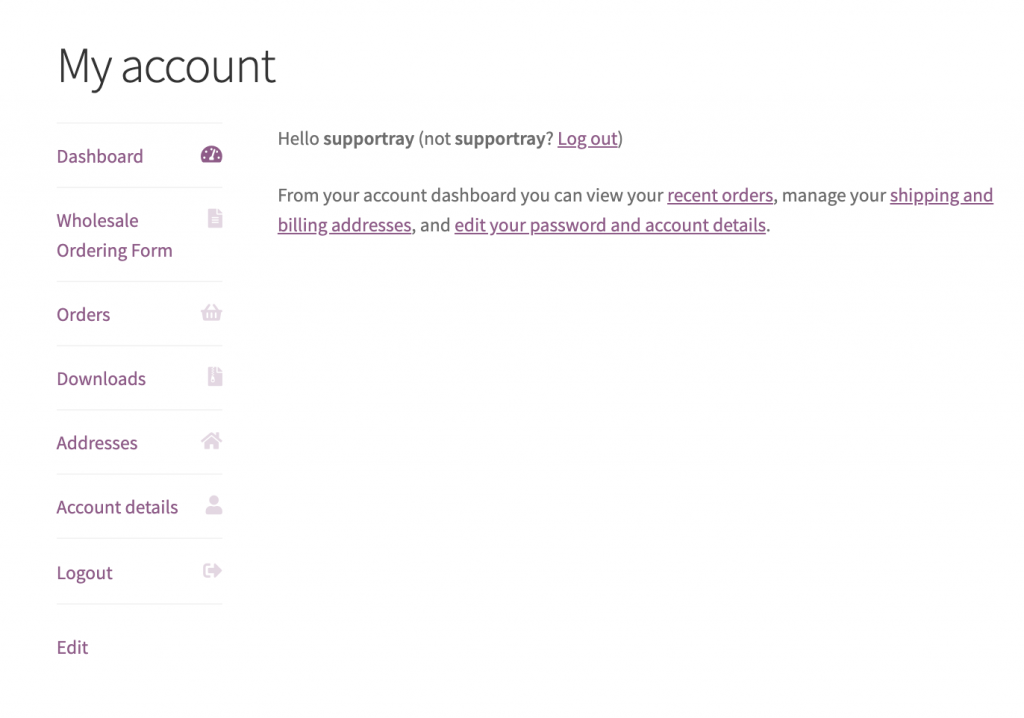
Se i tuoi clienti all'ingrosso atterrano sulla pagina Il mio account dopo l'accesso, puoi aggiungere un link diretto al tuo modulo d'ordine come nuova scheda in modo che lo raggiungano con un clic. Lo snippet seguente utilizza due filtri standard di WooCommerce per registrare una voce di menu personalizzata e puntarla alla tua pagina WooCommerce Wholesale Order Form.
Prerequisiti
- WooCommerce Wholesale Order Form installato e attivo, con almeno una pagina del modulo d'ordine pubblicata.
- Un tema figlio o un plugin per snippet di codice (come WPCode) per aggiungere in modo sicuro PHP personalizzato.
Come aggiungere il link per ordinare all'ingrosso
- Copia lo snippet qui sotto.
- Aggiorna l'URL sulla riga contrassegnata per corrispondere all'indirizzo della tua pagina del modulo d'ordine all'ingrosso.
- Aggiungi lo snippet al file
functions.phpdel tuo tema figlio o incollalo in un plugin per snippet di codice come WPCode.
add_filter ( 'woocommerce_account_menu_items', 'wholesale_ordering_link' );
function wholesale_ordering_link( $menu_links ){

  $new = array( 'wholesaleorderinglink' => 'Wholesale Ordering Form' );

  $menu_links = array_slice( $menu_links, 0, 1, true )
  + $new
  + array_slice( $menu_links, 1, NULL, true );

  return $menu_links;

}

add_filter( 'woocommerce_get_endpoint_url', 'wholesale_ordering_hook_endpoint', 10, 4 );
function wholesale_ordering_hook_endpoint( $url, $endpoint, $value, $permalink ){

  if( $endpoint === 'wholesaleorderinglink' ) {

    // Replace this URL with your wholesale order form page address
    $url = 'https://example.com/wholesale-ordering/';

  }
  return $url;

}
Dopo aver salvato, la tua pagina Il mio account visualizzerà una nuova scheda Modulo d'ordine all'ingrosso per tutti gli utenti connessi. Puoi confermare che funziona accedendo come cliente all'ingrosso.
Serve aiuto?
Se hai una domanda o riscontri problemi, siamo qui per aiutarti.
- Utenti Premium: Apri un ticket di supporto
- Utenti Gratuiti: Visita il nostro forum della community

