
A couple of the plugins in our suite require pages with particular shortcodes in order to provide the front-end interfaces to your wholesale customers.
In particular, the following plugins require front-end pages:
Once you activate the plugins all the required pages will be created on the site for you with the shortcodes in place.
Here’s what the default URLs will look like, feel free to adjust them as required:
- https://[yoursiteurl]/wholesale-ordering/ – this is the Order Form page
- https://[yoursiteurl]/wholesale-log-in-page/ – this is the Login page for wholesale customers
- https://[yoursiteurl]/wholesale-registration-page/ – this is the Registration page for wholesale customers
- https://[yoursiteurl]/wholesale-registration-thankyou-page/ – this is the default Registration Thank You page wholesale customers see after registering
What If My Website Didn’t Create Those Pages?
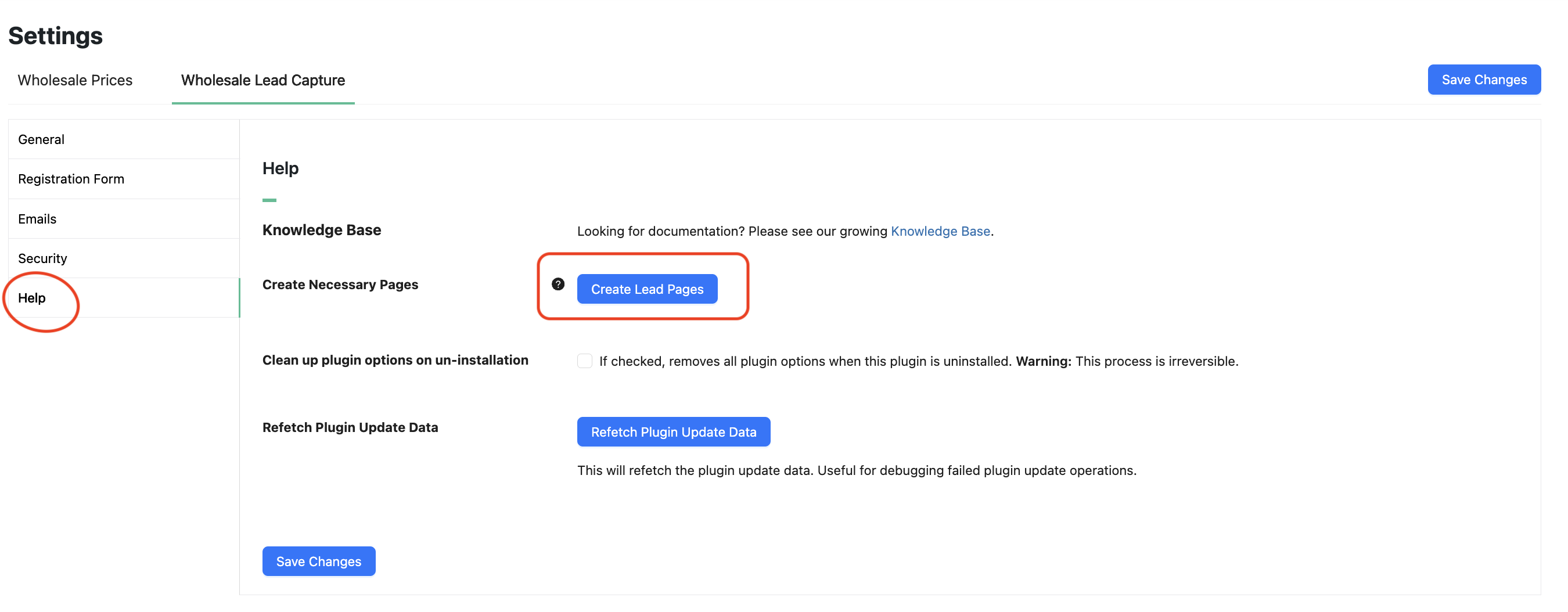
If your website didn’t create the pages automatically during plugin activation then you can try deactivating/reactivating the plugins again or create the pages using the tool in the Help area of the settings.
WooCommerce Wholesale Order Form:
Wholesale-> Order Forms > Add New to Create new form.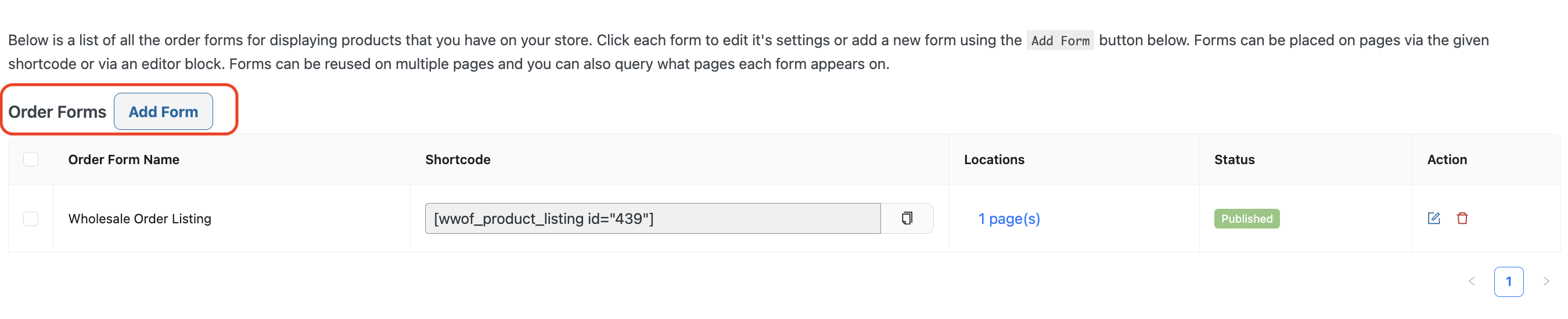
WooCommerce Wholesale Lead Capture:
Wholesale->Settings, Wholesale Lead tab, click on Help in the submenu, and then click Create Lead Pages:
Still unable to create the pages? You also can do it manually.
Create the following pages:
- Wholesale Log-In Page
Content: [wwlc_login_form] - Wholesale Registration Page
Content: [wwlc_registration_form] - Wholesale Registration Thank You Page
Content: Enter a thank you message for registering with your customers! You can customize it however you like. - Wholesale Ordering
Content: [wwof_product_listing id_”xxx”]
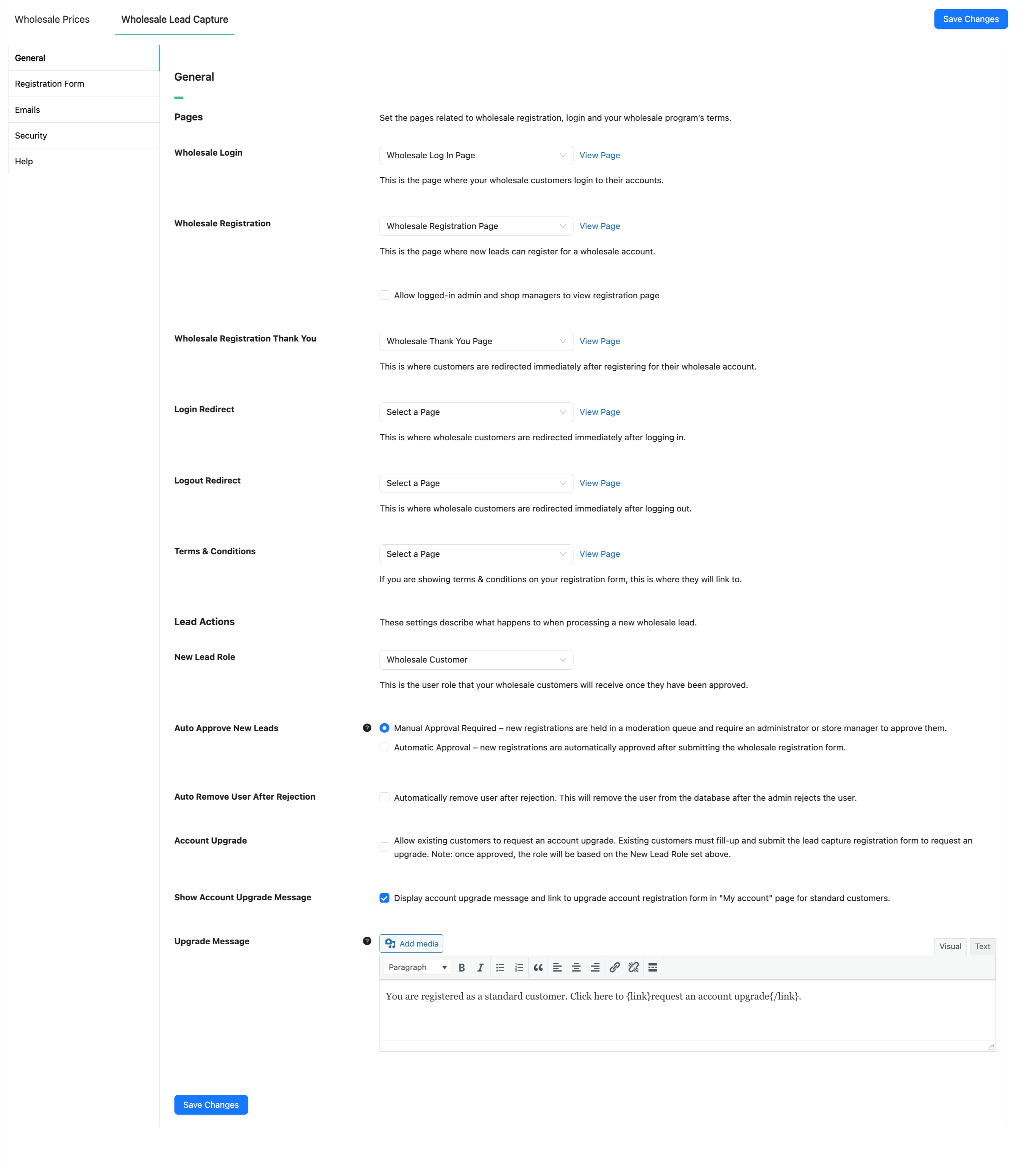
Once you’re done you will need to link up the WooCommerce Wholesale Lead Capture pages in the settings:
Frequently Asked Questions
Do wholesale pages get created automatically on plugin activation?
Yes, both WooCommerce Wholesale Order Form and Wholesale Lead Capture create all required front-end pages for you when they are first activated. Each page comes with the correct shortcode already inserted, so your wholesale customers can place orders, log in, and register without any extra setup on your part.
Does Wholesale Prices also need dedicated pages to function?
No, WooCommerce Wholesale Prices works entirely in the background — it adjusts product pricing for wholesale roles without requiring any front-end pages or shortcodes. Only Wholesale Order Form and Wholesale Lead Capture rely on dedicated pages to display their customer-facing interfaces.
What should I do if the wholesale pages were not generated after activation?
Typically, deactivating and reactivating the plugin is enough to trigger the automatic page creation again. Alternatively, each plugin includes a built-in tool inside its settings that lets you regenerate missing pages in one click, so you rarely need to build them by hand.
Can I place the shortcodes on custom pages I build myself?
Absolutely — if you prefer to use your own page structure, you can manually add [wwlc_login_form], [wwlc_registration_form], or [wwof_product_listing] to any WordPress page. After publishing those pages, make sure you link them inside the Lead Capture settings so the plugin knows where to direct wholesale visitors.
Why are my wholesale registration or login forms not appearing on the front end?
In most cases the shortcode is either missing from the page content or the page has not been assigned in the Lead Capture settings. Double-check that the correct shortcode is present in the page editor, then navigate to the plugin’s settings panel and confirm each page — login, registration, and thank-you — is mapped to the right URL.
Need Help?
If you have a question or run into any issues, we’re here to help.
- Premium users: Open a support ticket
- Free users: Visit our community forum

