
Si vous utilisez WPML pour traduire votre boutique dans plusieurs langues, vous constaterez peut-être que certains produits n'apparaissent pas pour vos clients de gros une fois qu'ils basculent vers une version traduite de votre site, même si les mêmes produits s'affichent correctement dans la langue par défaut.
Cela se produit car WooCommerce Wholesale Prices et WooCommerce Wholesale Prices Premium stockent les règles de tarification de gros et de visibilité des produits en tant que champs personnalisés sur chaque produit, et WPML ne copie pas automatiquement ces valeurs de champs personnalisés vers les produits traduits à moins qu'il ne soit configuré pour le faire.
Cela s'applique que vous utilisiez le plugin gratuit WooCommerce Wholesale Prices ou WooCommerce Wholesale Prices Premium. Certains des champs et l'outil de réparation ne sont disponibles que dans le plugin Premium.
Prérequis
- WooCommerce
- WPML, avec des versions traduites de vos produits déjà créées.
- WooCommerce Wholesale Prices installé et activé, avec au moins un rôle de gros configuré.
- WooCommerce Wholesale Prices Premium installé et activé, si vous utilisez le champ Restreindre aux rôles de gros ou l'outil de réparation Réinitialiser les métadonnées de visibilité du produit abordé dans cet article.
Pourquoi les produits disparaissent-ils après le changement de langue
WooCommerce Wholesale Prices et WooCommerce Wholesale Prices Premium stockent le prix de chaque rôle de gros pour un produit, et si un produit est restreint aux rôles de gros, sous forme de champs personnalisés WordPress attachés à ce produit. Lorsque WPML crée une version traduite d'un produit, il ne copie pas ces valeurs de champs personnalisés par défaut. Un produit traduit peut se retrouver sans prix de gros, ou avec un réglage de visibilité manquant, c'est pourquoi il peut sembler absent pour les clients de gros même si le produit d'origine est intact.
Définir la copie des champs personnalisés de WooCommerce Wholesale Prices dans WPML
WPML vous permet de contrôler le comportement de chaque champ personnalisé lors de la traduction. Définir les champs liés au commerce de gros sur Copier garantit que les valeurs du produit d'origine sont reportées sur chaque traduction.
- Allez dans WPML → Paramètres.
- Cliquez sur l'onglet Configuration du contenu multilingue.
- Faites défiler jusqu'à la section Traduction des champs personnalisés.
- Définir les champs liés au commerce de gros sur Copier.
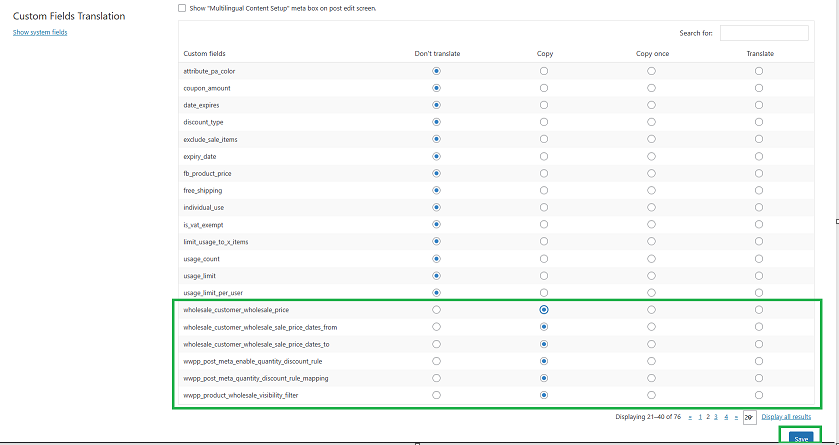
Pour en savoir plus sur la façon dont WPML gère ce paramètre, consultez la documentation de WPML sur la traduction des champs personnalisés. Vous pouvez également utiliser le champ de saisie Rechercher pour localiser n'importe quel champ lié à Wholesale Prices.
Réparer le paramètre de visibilité d’un produit
Si un produit est toujours manquant pour les clients de gros après avoir défini les champs personnalisés sur Copier, son réglage de visibilité peut être complètement manquant plutôt que simplement désynchronisé. WooCommerce Wholesale Prices Premium inclut un outil qui répare cela.
- Allez dans l'onglet WooCommerce → Paramètres → Prix de gros.
- Cliquez sur Aide dans le sous-menu sous les onglets.
- Cliquez sur le bouton Réinitialiser les métadonnées de visibilité du produit.
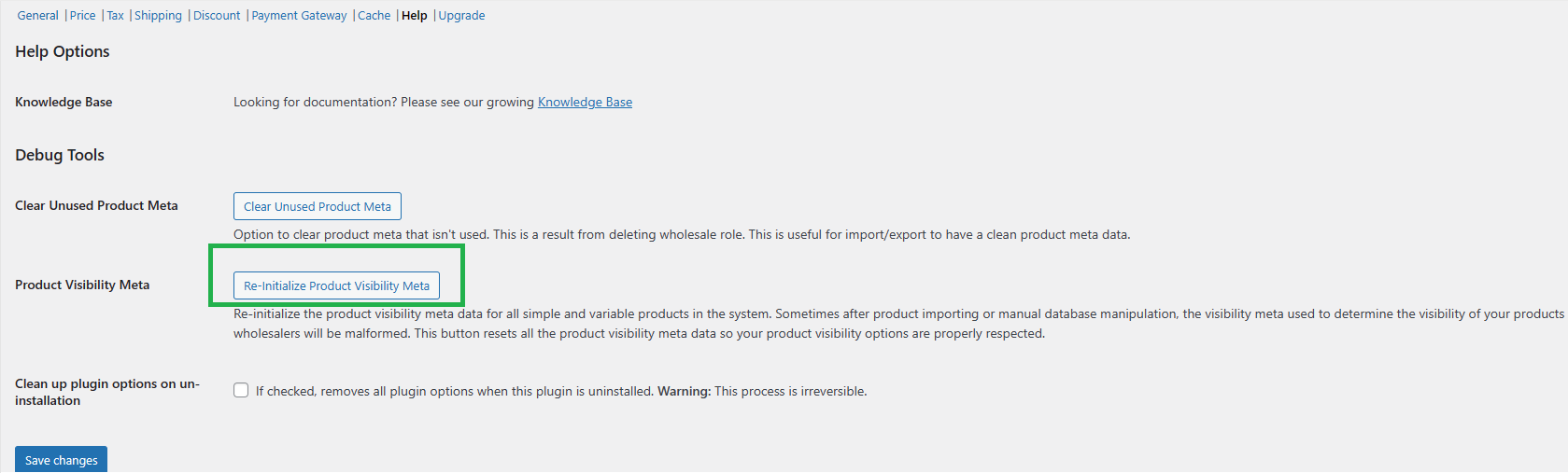
Cela analyse chaque produit pour un paramètre de visibilité manquant et le définit par défaut sur visible par tout le monde. Si un produit était destiné à être restreint à un rôle de gros spécifique, ouvrez ce produit par la suite et re-sélectionnez le rôle dans le champ Restreindre aux rôles de gros.
Dépannage
J'ai défini les champs personnalisés de gros sur Copier, mais un produit que j'ai traduit précédemment n'affiche toujours pas le prix de gros.
Le paramètre Copier s'applique uniquement aux actions futures. Une traduction créée avant que vous ne modifiiez le paramètre peut nécessiter une resynchronisation. Ouvrez la traduction dans l'éditeur de traduction de WPML et enregistrez-la à nouveau, ou retraduisez le produit, afin que le champ du prix de gros soit copié.
J'ai exécuté Réinitialiser les métadonnées de visibilité des produits et maintenant un produit est visible par des clients qui ne devraient pas l'être.
C'est attendu. L'outil définit toute valeur de visibilité manquante sur visible par tout le monde comme une valeur par défaut sûre, il ne sait pas à quel rôle le produit était initialement restreint. Ouvrez le produit concerné et re-sélectionnez le rôle correct dans le champ Restreindre aux rôles de gros.
Les comptes d'administrateur ou de responsable de boutique voient-ils le même problème de produit manquant ?
Non. Les comptes d'administrateur et de responsable de boutique voient toujours tous les produits, quel que soit le prix de gros ou le paramètre de visibilité d'un produit. Testez avec un compte client auquel le rôle de gros est attribué si vous souhaitez confirmer à quoi ressemble un produit traduit pour ce rôle.
Questions fréquemment posées
Quels champs personnalisés dois-je définir sur Copier dans WPML ?
Le champ de prix de chaque rôle de gros, et le champ de visibilité Restreindre aux rôles de gros si vous utilisez WooCommerce Wholesale Prices Premium. Taper wholesale dans la boîte Rechercher dans la section Traduction des champs personnalisés de WPML les fait apparaître tous en même temps.
Ai-je besoin de WooCommerce Wholesale Prices Premium pour résoudre ce problème ?
Seulement si vous utilisez le champ Restreindre aux rôles de gros ou si vous avez besoin de l'outil de réparation Réinitialiser les métadonnées de visibilité des produits. Si vous utilisez le plugin gratuit WooCommerce Wholesale Prices sans aucune restriction de visibilité, définir les champs de prix de gros sur Copier dans WPML est suffisant.
Définir les champs personnalisés sur Copier corrigera-t-il les produits que j'ai déjà traduits ?
Pas automatiquement. Le paramètre contrôle ce qui se passe à l'avenir. Les traductions existantes doivent généralement être resynchronisées, soit en les réenregistrant dans l'éditeur de traduction de WPML, soit en retraduisant le produit, avant que les champs de gros ne soient mis à jour.
Cela affecte-t-il le prix affiché aux clients de détail ?
Non. Les champs de prix de gros et le filtre de visibilité n'affectent que les rôles de gros. Les clients de détail continuent de voir le prix WooCommerce régulier sur chaque traduction, sans être affectés par ce paramètre.
Un produit traduit peut-il être restreint à un rôle de gros différent de l'original ?
Oui. Une fois que les champs personnalisés sont copiés correctement, vous pouvez toujours ouvrir une traduction spécifique et modifier son champ Restreindre aux rôles de gros indépendamment du produit d’origine.
Cela fonctionne-t-il avec WooCommerce Multilingual & Multicurrency (WCML) ?
Oui. WooCommerce Wholesale Prices Premium maintient le champ Restreindre aux rôles de gros synchronisé automatiquement pendant le processus de synchronisation des produits de WCML, tant que ce champ est défini sur Copier dans les paramètres de traduction des champs personnalisés de WPML.
Je ne vois pas du tout de champ personnalisé de gros dans la liste de WPML. Qu’est-ce qui ne va pas ?
WPML ne liste que les champs personnalisés qui ont déjà une valeur enregistrée. Assurez-vous que le produit a un prix de gros saisi et enregistré, ou qu’un rôle Restreindre aux rôles de gros est sélectionné, avant de le rechercher dans la liste de traduction des champs personnalisés.
Aide et Support
Nous avons une équipe de support dédiée pour Wholesale Suite qui connaît très bien nos produits, WooCommerce et le secteur. Vous êtes invité à utiliser leur expertise à tout moment, partout dans le monde.
Si vous êtes un client existant, veuillez vous rendre sur le formulaire de demande de ticket de support et envoyez-nous un message.
Si vous êtes un utilisateur de plugin gratuit, veuillez nous envoyer une demande de support sur le forum. Nous surveillons activement les forums de support de WordPress.org pour le plugin gratuit et aidons nos utilisateurs du mieux que nous pouvons.

