
Translations or availability of other languages is really important, especially for the Wholesale Registration Page. Fortunately, all of our Wholesale Suite plugins are optimized for translation. It contains translation strings that can be translated to any language that is supported by WordPress.
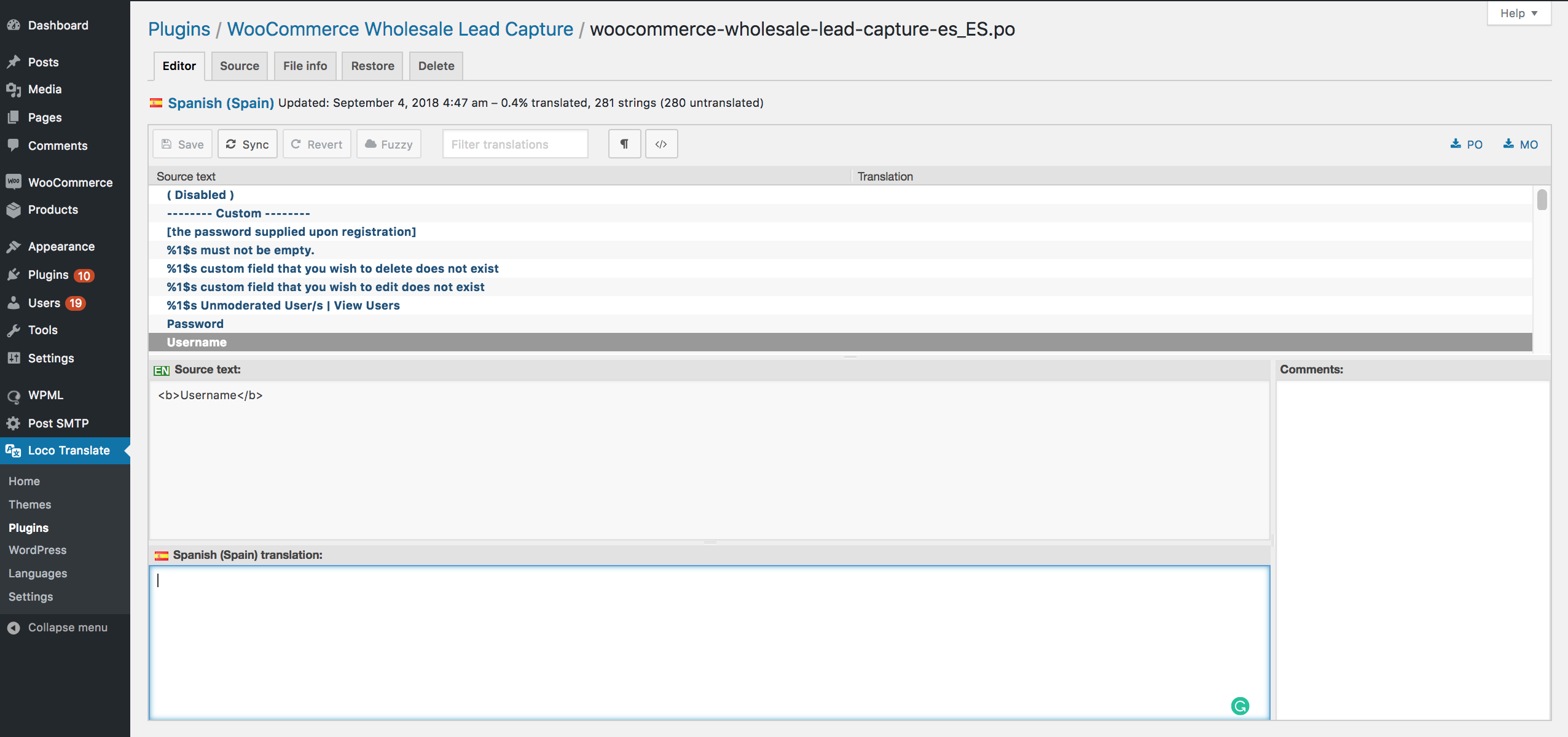
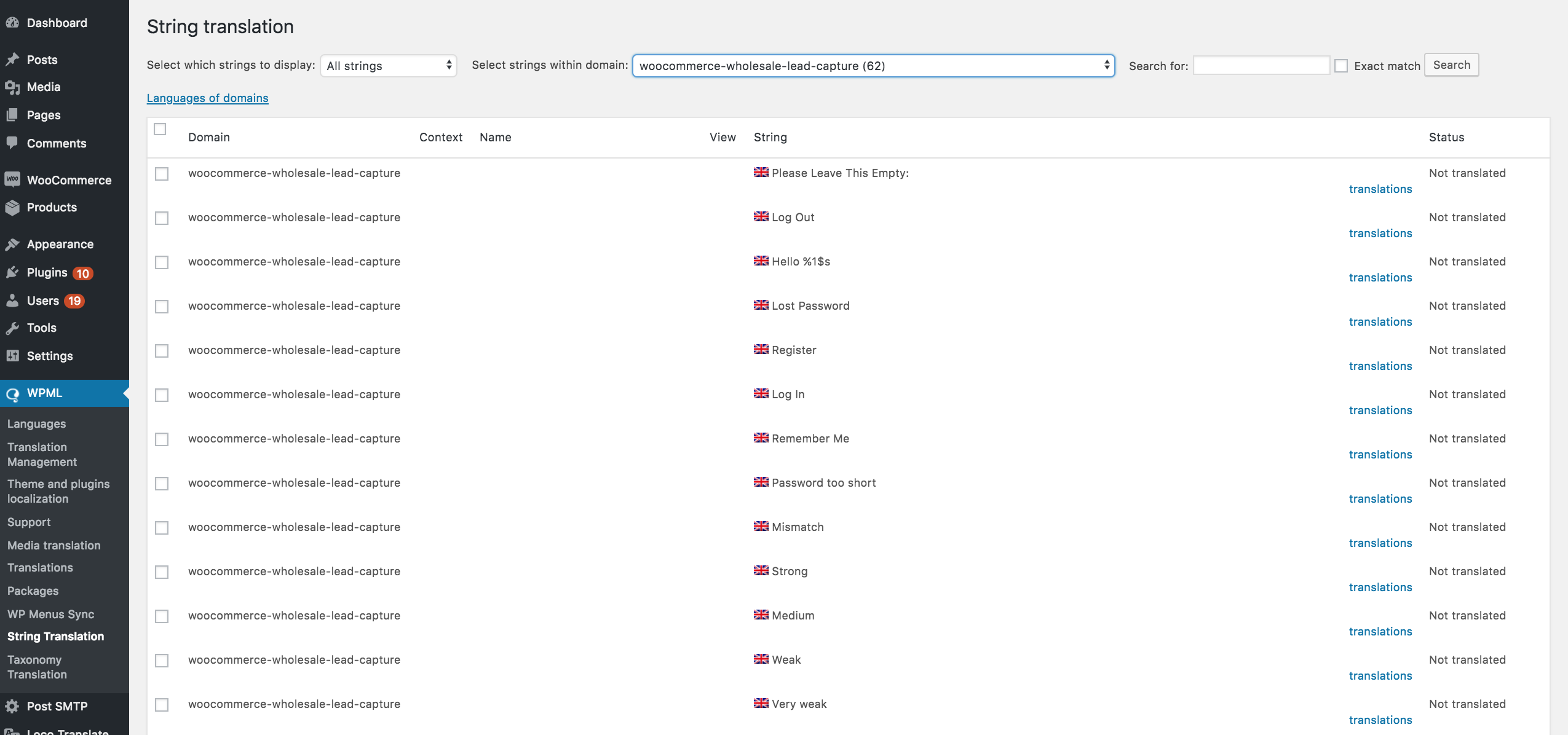
The easiest way to translate the built-in fields is by using Loco Translate, PoEdit or WPML.
In Loco Translate, you should be able to find the strings on Loco Translate > Plugins > WooCommerce Wholesale Lead Capture and translate it.
Using WPML, go to WPML > Theme and plugins localization > WooCommerce Wholesale Lead Capture > String Translation.
Translating Custom Fields
Since the custom fields are user-created fields, it must be translated manually by using custom hooks, then add it to your functions.php.
In the example below, you need to change the Field ID, language code, and translation.
add_filter("wwlc_registration_form_fields", function ($registration_form_fields) {

    $registration_form_fields2 = $registration_form_fields;

    foreach ($registration_form_fields as $key1 => $field) {
        // Target the field with ID 'wwlc_cf_store'
        if ($field['id'] == 'wwlc_cf_store') {
            switch (ICL_LANGUAGE_CODE) {
                case "en":
                    if (isset($field['default_value'])) {
                        $registration_form_fields2[$key1]['default_value'] = "Tell us about your business ";
                    }
                    break;
                case "fr":
                    if (isset($field['default_value'])) {
                        $registration_form_fields2[$key1]['default_value'] = "Your French Translation ";
                    }
                    break;
                // Add more cases for other languages if needed
            }
        }
    }

    return $registration_form_fields2;

}, 10, 90);
Translating Options Value
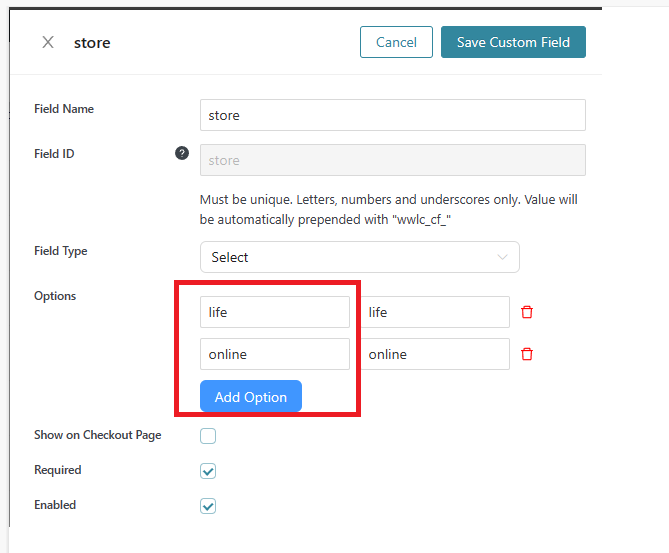
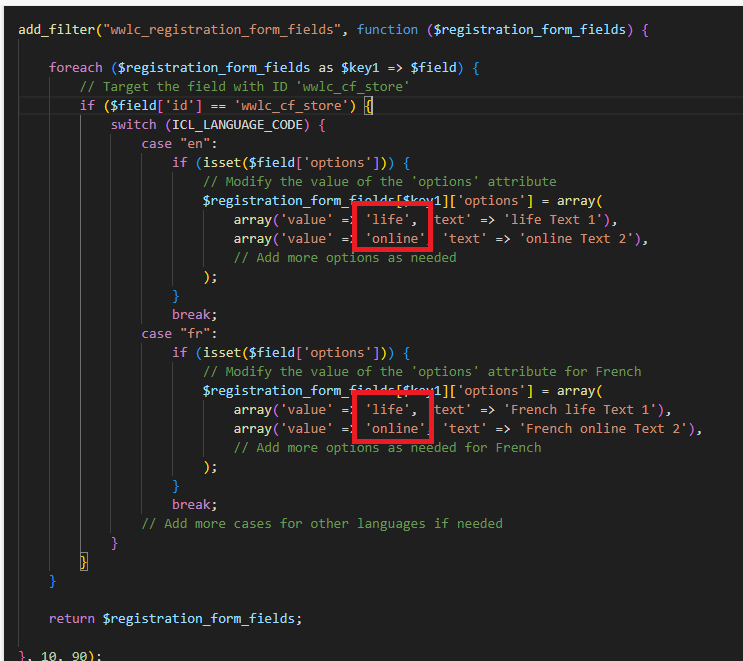
Same as above we’ll be referring to the field ID of the custom field and setting its options data. It’s important that the array values match the original custom field option value.
add_filter("wwlc_registration_form_fields", function ($registration_form_fields) {

    foreach ($registration_form_fields as $key1 => $field) {
        // Target the field with ID 'wwlc_cf_store'
        if ($field['id'] == 'wwlc_cf_store') {
            switch (ICL_LANGUAGE_CODE) {
                case "en":
                    if (isset($field['options'])) {
                        // Modify the value of the 'options' attribute
                        $registration_form_fields[$key1]['options'] = array(
                            array('value' => 'life', 'text' => 'life Text 1'),
                            array('value' => 'online', 'text' => 'online Text 2'),
                            // Add more options as needed
                        );
                    }
                    break;
                case "fr":
                    if (isset($field['options'])) {
                        // Modify the value of the 'options' attribute for French
                        $registration_form_fields[$key1]['options'] = array(
                            array('value' => 'life', 'text' => 'French life Text 1'),
                            array('value' => 'online', 'text' => 'French online Text 2'),
                            // Add more options as needed for French
                        );
                    }
                    break;
                // Add more cases for other languages if needed
            }
        }
    }

    return $registration_form_fields;

}, 10, 90);
Here’s my options custom field:
The full code should look like this:
Frequently Asked Questions
Which translation tools work with wholesale registration page fields?
Typically, Loco Translate, PoEdit, and WPML all support built-in Wholesale Lead Capture fields. For Loco Translate, go to Plugins > WooCommerce Wholesale Lead Capture. WPML users navigate to WPML > Theme and plugins localization > String Translation.
Does WPML support translating custom fields on the registration form?
Yes, WPML handles built-in registration fields through its String Translation screen. However, anything you created yourself won’t convert automatically — those require a manual hook in functions.php targeting each field ID.
Do custom registration fields translate automatically with a language plugin?
No, only built-in elements are picked up by those tools. Since these are user-created, you must add a filter to functions.php that targets each field’s identifier and returns the correct text for the visitor’s active locale.
Can I translate dropdown option values on the registration page?
Absolutely, dropdown options follow the same hook-based approach as other custom entries. In that same filter, match the original option values in an array and return localized display text for each language code you support.
Why aren’t my registration page translations showing on the front end?
If the localized text isn’t appearing, confirm the language code in your function matches what WordPress reports as active (e.g., “fr” for French). Also verify the snippet targets the exact identifier — a typo silently skips it.
Need Help?
If you have a question or run into any issues, we’re here to help.
- Premium users: Open a support ticket
- Free users: Visit our community forum

