
If you have configured minimum order requirements in WooCommerce Wholesale Prices Premium, you may have noticed that a wholesale customer who falls short of that minimum can still complete checkout, just at retail pricing instead of wholesale pricing. If you would rather block the purchase entirely until the requirement is met, WooCommerce Wholesale Prices Premium includes a setting for that.
Wholesale customers who add fewer items than your minimum requirement can still complete checkout by default — just at retail prices. If you need to block checkout entirely until the minimum is met, WooCommerce Wholesale Prices Premium has a per-role Prevent purchase if wholesale condition is not met setting that stops the order until the customer meets your quantity, subtotal, or per-product rules.
Requirements
- WooCommerce installed and active.
- WooCommerce Wholesale Prices Premium installed and activated. This setting is not available in the free WooCommerce Wholesale Prices plugin.
- At least one minimum order requirement configured for the wholesale role you want to restrict.
Why Wholesale Customers Can Still Check Out Below the Minimum by Default
By default, WooCommerce Wholesale Prices Premium does not block checkout when a wholesale customer’s cart falls below your configured minimum order quantity or subtotal. Instead, the cart shows retail prices for that customer along with a notice explaining what they need to add to qualify for wholesale pricing. The customer can still proceed to checkout, just without the wholesale discount.
If you want to prevent the customer from checking out at all until they meet the requirement, enable the Prevent purchase if wholesale condition is not met option for their wholesale role.
Set Up Minimum Order Requirements
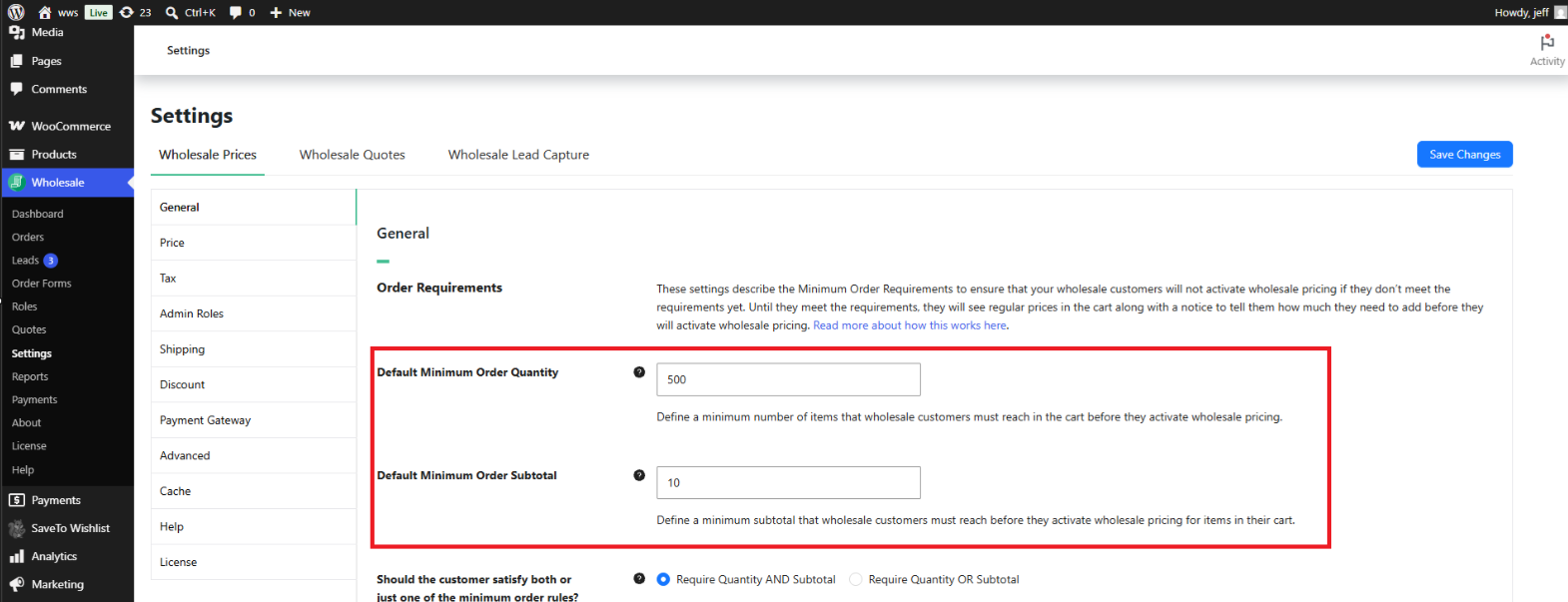
The prevent purchase setting only has an effect once a minimum order requirement exists for the role. Configure this first in Wholesale → Settings → Wholesale Prices → General, in the Order Requirements section.
- Default Minimum Order Quantity – the minimum total number of units a wholesale customer must add to their cart before wholesale pricing applies.
- Default Minimum Order Subtotal – the minimum cart value, calculated using wholesale prices rather than retail prices, that a wholesale customer must reach before wholesale pricing applies.
- Should the customer satisfy both or just one of the minimum order rules? – choose Require Quantity AND Subtotal if both minimums must be met, or Require Quantity OR Subtotal if meeting either one is enough. This setting has no effect if only one of the two minimums is configured.
Setting different minimums per role
To use different minimums for different wholesale roles, enable Wholesale Role Specific Minimum Requirements in the same Order Requirements section. This adds a table where you can add a row for each role, setting its own Minimum Order Quantity, Minimum Sub-total Amount ($), and Minimum Order Logic (AND or OR).
Overriding minimums for an individual customer
You can also override the minimum requirement for a specific customer. Open the customer’s profile under Users, scroll to the wholesale settings section, and set Override Minimum Order Quantity or Override Minimum Order Subtotal to enter values that apply to that customer only. A per-user override takes precedence over both the per-role and the global default settings.
Enable “Prevent purchase if wholesale condition is not met”
Once a minimum order requirement is in place for the role, enable purchase blocking for that role:
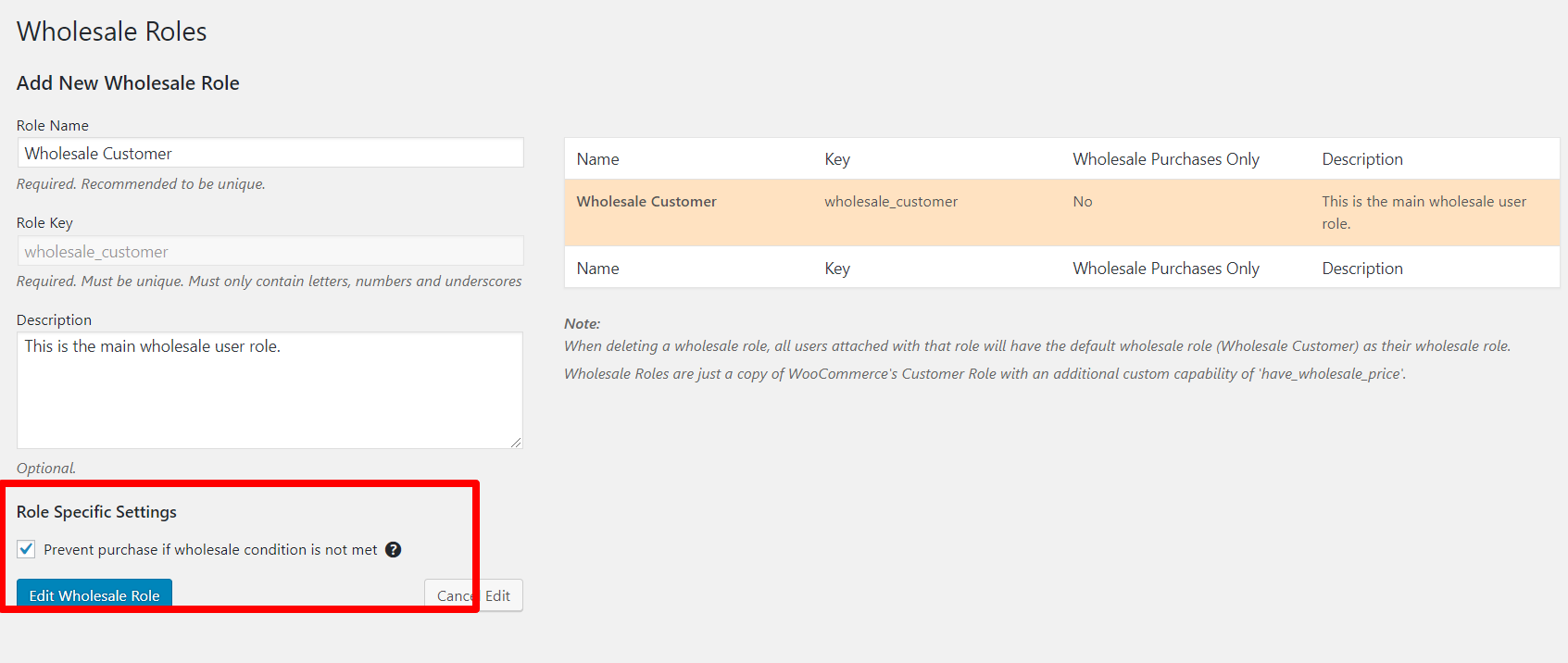
- Go to Wholesale → Roles.
- Click Edit on the wholesale role you want to restrict.
- Under Role Specific Settings, check Prevent purchase if wholesale condition is not met.
- Save the role.
With this option enabled, a customer assigned to that role cannot complete checkout until their cart meets the minimum order quantity or subtotal configured for their role.
How The Minimum Subtotal Is Calculated
The minimum order subtotal is calculated using the wholesale prices of the products in the cart, not the retail prices. This keeps the subtotal check aligned with what the customer actually pays once wholesale pricing applies. If a product has a retail price of $200 and a wholesale price of $100, the subtotal check counts $100 toward the minimum, not $200.
Per-product Minimum Order Quantity
Separately from the cart-level minimum described above, WooCommerce Wholesale Prices Premium also lets you set a minimum order quantity on individual products and product variations, for a specific wholesale role. This is configured in the product’s wholesale pricing settings, not in Wholesale → Settings, and works independently of the cart-level minimum quantity and subtotal. A customer can meet the cart-level minimum while still falling short of a per-product minimum on a specific item, and vice versa.
Troubleshooting
A wholesale customer can still check out even though I set a minimum order requirement
The minimum order requirement alone only changes the price shown, not whether checkout is available. Confirm that Prevent purchase if wholesale condition is not met is checked for that customer’s specific wholesale role in Wholesale → Roles.
I enabled Prevent purchase but the customer can still check out
Confirm the customer is assigned the wholesale role you edited, not a different wholesale role where the option is not enabled. Also check whether a per-user override on that customer’s profile has changed their required minimum, since a lower override could mean their cart already meets the requirement.
Does this restriction apply to administrator or shop manager accounts?
The restriction is tied to having a wholesale role assigned, not to a WordPress capability level. An administrator or shop manager account that does not have a wholesale role assigned is not affected by this setting. If you assign a wholesale role to an admin account for testing, the same minimum order requirement and purchase restriction applies to that account as well.
What happens if I enable Prevent purchase but have not set a minimum order quantity or subtotal?
If no minimum order quantity or subtotal is configured for the role, there is no requirement for the customer to fail, so checkout proceeds normally regardless of this setting. Configure at least one minimum in the Order Requirements section for this option to have an effect.
Frequently Asked Questions
Does this feature require WooCommerce Wholesale Prices Premium?
Yes. Minimum order requirements and the Prevent purchase if wholesale condition is not met setting are both part of WooCommerce Wholesale Prices Premium and are not available in the free WooCommerce Wholesale Prices plugin.
Is “Prevent purchase if wholesale condition is not met” a global setting?
No. It is enabled per wholesale role rather than globally. You can enable it for one wholesale role, such as Wholesale Customer, while leaving it off for another role, such as Distributor.
Does the minimum order subtotal use retail prices or wholesale prices?
It uses the wholesale prices assigned to the products in the cart, not the retail prices.
What is the difference between the cart-level minimum order quantity and a per-product minimum order quantity?
The Default Minimum Order Quantity in settings counts units across the entire cart. A per-product minimum order quantity is set on an individual product or variation and applies to that item only, independent of the cart-level total.
Can I set different minimum requirements for different wholesale roles?
Yes. Enable Wholesale Role Specific Minimum Requirements in the Order Requirements section, then add a row for each role with its own minimum quantity, subtotal, and AND/OR logic.
Can I override the minimum requirement for one specific customer?
Yes. Open the customer’s profile under Users and set Override Minimum Order Quantity or Override Minimum Order Subtotal to enter values for that customer only. This takes precedence over both role-level and global default settings.
Does the per-product minimum order quantity work with variable products?
Yes. A minimum order quantity can be set at the variation level or at the parent variable product level, in addition to the cart-level minimum that counts units across the entire cart.
Will a customer see an explanation when checkout is blocked?
Yes. When Prevent purchase if wholesale condition is not met is active and the requirement is not satisfied, the customer sees a notice describing what they still need to add to their cart, and the checkout option is unavailable until the requirement is met.
Need Support?
We have a dedicated support team for Wholesale Suite who knows our products, WooCommerce, and the industry very well. You’re welcome to make use of their expertise at any time, worldwide.
If you are an existing customer please go to the support ticket request form and send us a message.
If you are a free plugin user, please send us a support request on the forum. We actively monitor the WordPress.org support forums for the free plugin and help our users there as best as we can.

