
Si los clientes mayoristas de tu tienda necesitan ver un sufijo de precio diferente al de los clientes minoristas, por ejemplo, “Sin IVA” para los compradores mayoristas mientras que los compradores minoristas ven “Con IVA”, es posible que te preguntes si Wholesale Suite te permite configurarlo por separado del sufijo de precio normal de WooCommerce de tu tienda.
WooCommerce Wholesale Prices Premium incluye dos configuraciones de sufijo de precio dedicadas para roles mayoristas: una para el precio mayorista en sí y otra para el precio normal que ve un cliente mayorista. Ambas se encuentran en tu configuración mayorista, y los marcadores de posición {price_including_tax} y {price_excluding_tax} te permiten mostrar el importe ajustado por impuestos en línea.
Esta función solo está disponible en WooCommerce Wholesale Prices Premium. Si estás utilizando el plugin gratuito WooCommerce Wholesale Prices, estas configuraciones no están disponibles.
Requisitos
- WooCommerce instalado y activo, con Habilitar impuestos activado en WooCommerce → Ajustes → General.
- WooCommerce Wholesale Prices Premium instalado y activado. Esta función no está disponible en el plugin gratuito WooCommerce Wholesale Prices.
- Al menos un rol mayorista configurado en Mayorista → Roles.
Establecer un sufijo personalizado para el precio mayorista
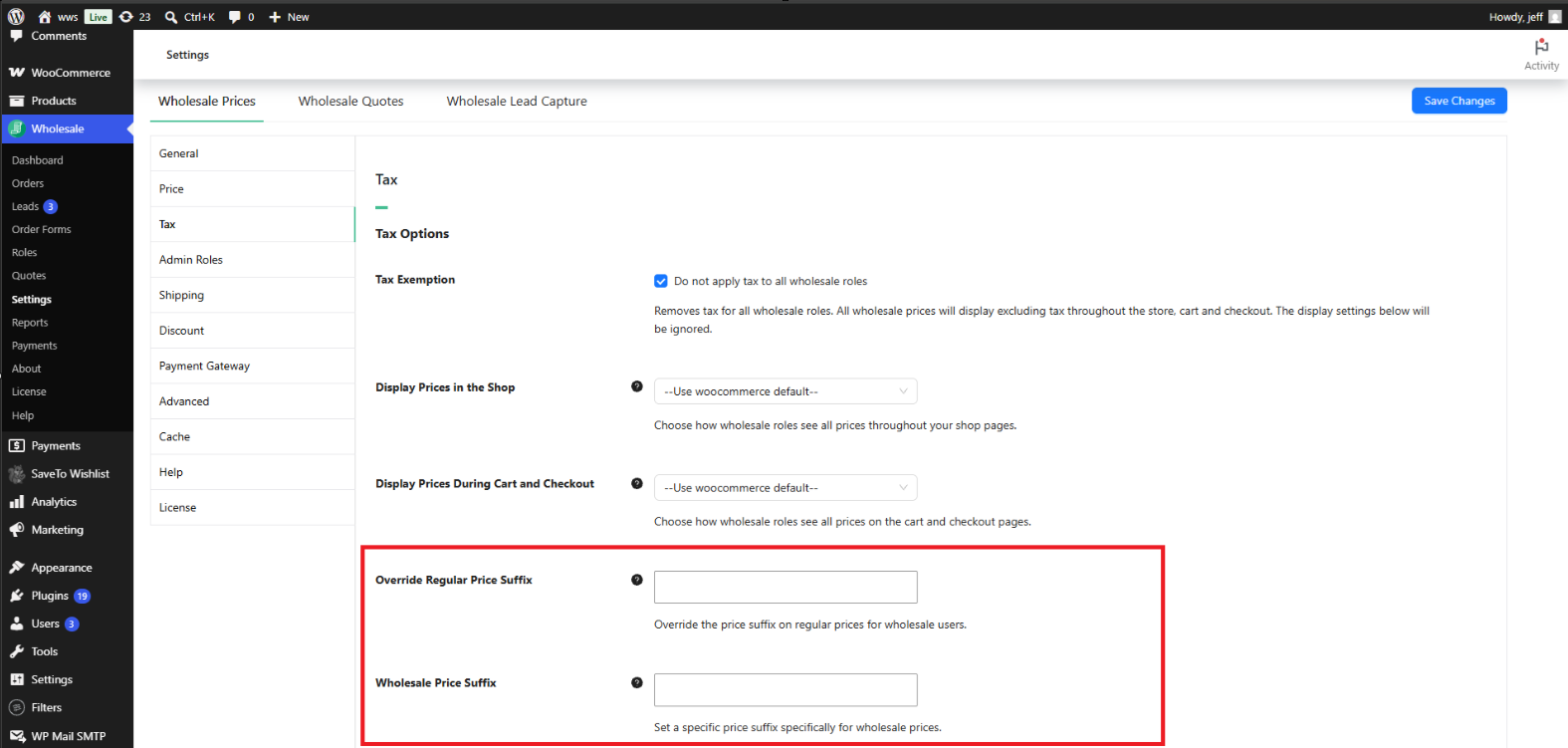
La configuración Sufijo de precio mayorista controla el texto que aparece después del precio mayorista para un cliente mayorista conectado.
- Ve a Mayorista → Ajustes.
- Haz clic en la pestaña Precios Mayoristas.
- Haz clic en la pestaña Impuestos.
- En Opciones de impuestos, busca el campo Sufijo de precio mayorista.
- Introduce el texto que deseas mostrar y, a continuación, haz clic en Guardar cambios.
Deja este campo en blanco para usar la configuración de Sufijo de visualización de precios de tu tienda, que se encuentra en WooCommerce → Ajustes → Impuestos. Establecer un valor aquí anula ese sufijo específicamente para los roles mayoristas, sin afectar a cómo los clientes minoristas ven los precios.
Establecer un sufijo personalizado para el precio normal
Un cliente mayorista aún puede ver el precio normal (no mayorista) de un producto en algunos casos, por ejemplo, un precio original tachado junto a un precio de oferta, o el precio de un producto para el que no se ha establecido un precio mayorista. La configuración Anular sufijo de precio normal controla el sufijo que se muestra después de ese precio normal, específicamente para los usuarios conectados con un rol mayorista.
- Ve a Mayorista → Ajustes → Precios Mayoristas → Impuestos.
- En Opciones de impuestos, busca el campo Anular sufijo de precio normal.
- Introduce el texto que deseas mostrar y, a continuación, haz clic en Guardar cambios.
Deja este campo en blanco para usar la misma configuración de Sufijo de visualización de precios de toda la tienda en WooCommerce → Ajustes → Impuestos. Esta configuración solo afecta al sufijo que se muestra a los clientes mayoristas; los clientes minoristas y los invitados continúan viendo el sufijo definido por esa configuración de toda la tienda.
Usar los marcadores de posición de precio en un sufijo
Ambos campos de sufijo aceptan dos marcadores de posición: {price_including_tax} y {price_excluding_tax}. Cuando cualquiera de los marcadores de posición está presente en el texto del sufijo, Wholesale Suite lo reemplaza con el precio real calculado del producto para ese tratamiento fiscal, formateado como una cantidad de moneda.
Por ejemplo, introducir Sin IVA ({price_excluding_tax}) en el campo Sufijo de precio mayorista se muestra como algo parecido a “Sin IVA (45,00 €)” junto al precio mayorista, utilizando el importe sin impuestos de ese producto.
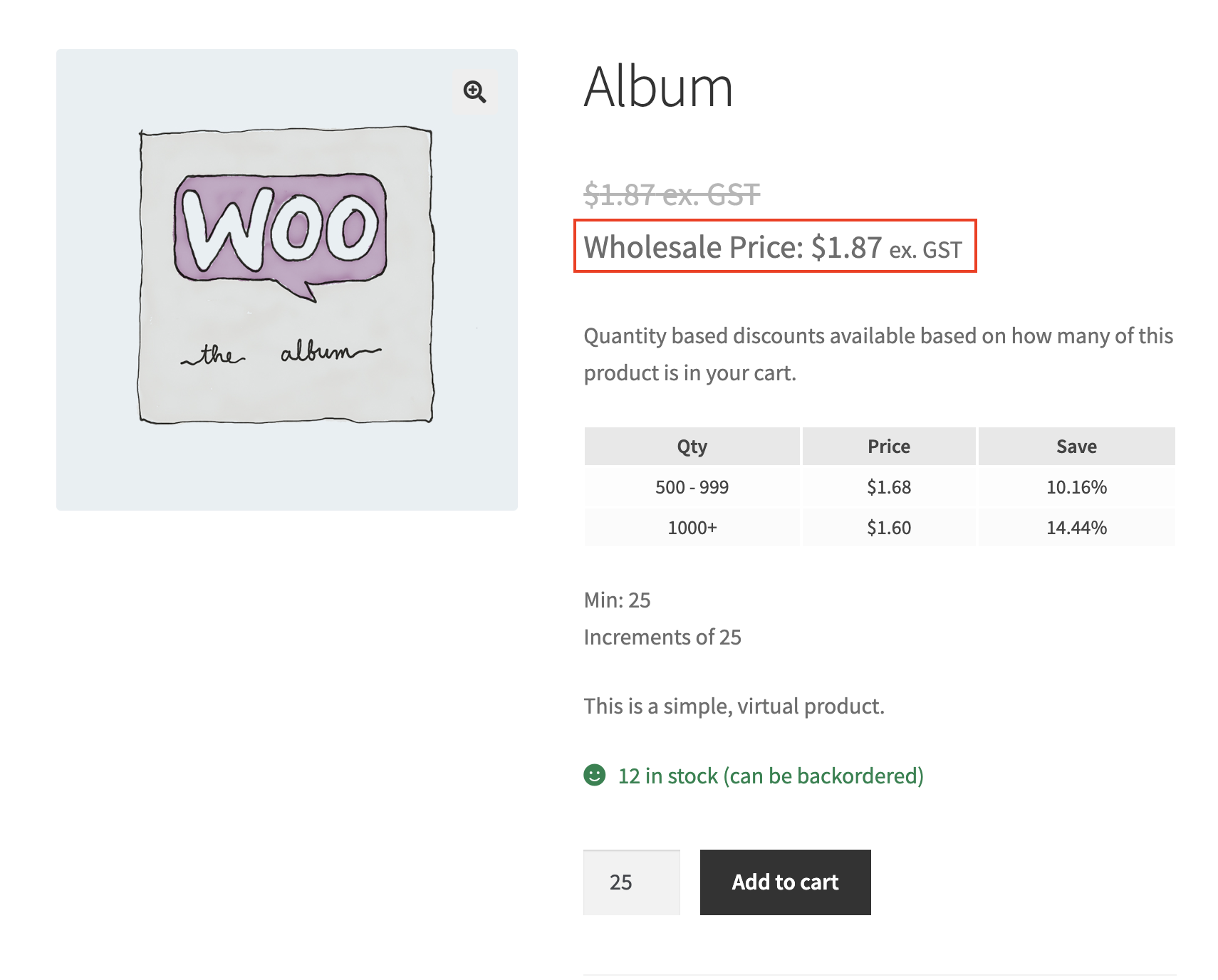
Cómo se ve en el front-end
Una vez guardado, el sufijo personalizado aparece junto al precio para cualquier cliente que haya iniciado sesión con un rol mayorista.
Solución de problemas
Establecí un sufijo de precio mayorista personalizado, pero el producto todavía muestra el sufijo predeterminado de WooCommerce. ¿Qué debo revisar?
Confirma que has iniciado sesión como un usuario asignado a un rol mayorista. Ambas configuraciones de sufijo solo se aplican a los roles mayoristas; los clientes minoristas y los invitados siempre ven el sufijo de WooCommerce → Ajustes → Impuestos → Sufijo de visualización de precios. Confirma también que Activar impuestos está activado en WooCommerce → Ajustes → General, ya que WooCommerce solo muestra un sufijo de precio cuando el cálculo de impuestos está activado.
¿Por qué el sufijo del precio original tachado se ve diferente del sufijo del precio mayorista?
Son dos configuraciones independientes. El precio mayorista en sí utiliza el Sufijo de precio mayorista, mientras que un precio normal (no mayorista) mostrado a un cliente mayorista, como el precio original de un artículo en oferta, utiliza el Sufijo de precio normal alternativo. Configura ambos en Wholesale → Ajustes → Precios mayoristas → Impuestos → Opciones de impuestos si deseas el mismo texto en ambos lugares.
Cambié una configuración de sufijo pero la página de la tienda no se ha actualizado. ¿Qué debo revisar?
Borra cualquier caché de página u objeto de tu sitio, incluyendo plugins de caché y caché a nivel de host, luego recarga la página de la tienda mientras has iniciado sesión como cliente mayorista. Confirma también que hiciste clic en Guardar cambios después de introducir el texto del sufijo.
¿Afecta esto a las cuentas de administrador o gerente de tienda?
No, a menos que esa cuenta también tenga asignado un rol mayorista. Ambas configuraciones de sufijo solo se aplican a los usuarios con un rol mayorista asociado a su cuenta. Una cuenta de administrador o gerente de tienda sin un rol mayorista continúa viendo el Sufijo de visualización de precios de toda la tienda.
Preguntas frecuentes
¿Esta función requiere WooCommerce Wholesale Prices Premium?
Sí. Tanto la configuración de Sufijo de precio mayorista como la de Sufijo de precio normal alternativo forman parte de WooCommerce Wholesale Prices Premium. No están disponibles en el plugin gratuito WooCommerce Wholesale Prices.
¿Qué sucede si dejo ambos campos de sufijo en blanco?
Los clientes mayoristas ven el mismo texto del Sufijo de visualización de precios definido en WooCommerce → Ajustes → Impuestos, el mismo sufijo que ven los clientes minoristas.
¿Este cambio afecta a cómo los clientes minoristas o invitados ven los precios?
No. Estas configuraciones solo afectan a los usuarios que han iniciado sesión con un rol mayorista. Los clientes minoristas y los invitados continúan viendo el sufijo definido en WooCommerce → Ajustes → Impuestos.
¿Puedo establecer un sufijo diferente para cada rol mayorista?
No. Las configuraciones de Sufijo de precio mayorista y Sufijo de precio normal alternativo se aplican a todos los roles mayoristas a la vez. No hay una opción de sufijo por rol.
¿Esto cambia el precio mayorista real o solo cómo se muestra?
Solo cómo se muestra. El precio mayorista subyacente y cualquier impuesto calculado sobre él permanecen iguales. Estas configuraciones solo controlan el texto que se muestra después del precio.
"
Sí. Cualquier texto introducido junto a un marcador se mantiene tal cual, y solo el marcador se reemplaza por el precio calculado. Por ejemplo, IVA incl. ({price_including_tax}) conserva la etiqueta “IVA incl.” y sustituye el importe real con IVA incluido.
¿Necesito configurar algo por separado en el Formulario de Pedido Mayorista?
No. WooCommerce Wholesale Order Form utiliza la visualización de precios estándar de WooCommerce, por lo que recoge automáticamente la misma configuración de Sufijo de precio mayorista y Sufijo de anulación de precio normal de WooCommerce Wholesale Prices Premium.
¿Qué sucede si aún no he configurado ningún rol mayorista?
Estas configuraciones no harán nada hasta que exista al menos un rol mayorista y un cliente haya iniciado sesión con ese rol. Configura tus roles mayoristas en Mayorista → Roles primero.
Ayuda y soporte
Contamos con un equipo de soporte dedicado para Wholesale Suite que conoce muy bien nuestros productos, WooCommerce y la industria. Le invitamos a aprovechar su experiencia en cualquier momento y en cualquier lugar del mundo.
Si ya es cliente, por favor, diríjase al formulario de solicitud de tickets de soporte y envíenos un mensaje.
Si eres un usuario de plugin gratuito, por favor envíanos una solicitud de soporte en el foro. Monitorizamos activamente los foros de soporte de WordPress.org para el plugin gratuito y ayudamos a nuestros usuarios allí lo mejor que podemos.

