
Chasing wholesale customers for invoice payments takes time you’d rather spend elsewhere. With auto-charge, Wholesale Payments bills a customer’s saved card automatically when each instalment is due, so payments collect themselves. This guide shows you how to turn it on.
Before you start
- Wholesale Payments version 1.0.7 or later, active and connected to Stripe. How to set up Stripe for wholesale payments
- At least one payment plan set up. How to create payment plans for wholesale customers
- Customers who will be auto-charged need a saved card on file, which they add when they first pay through Wholesale Payments.
Turn on automatic payment collection
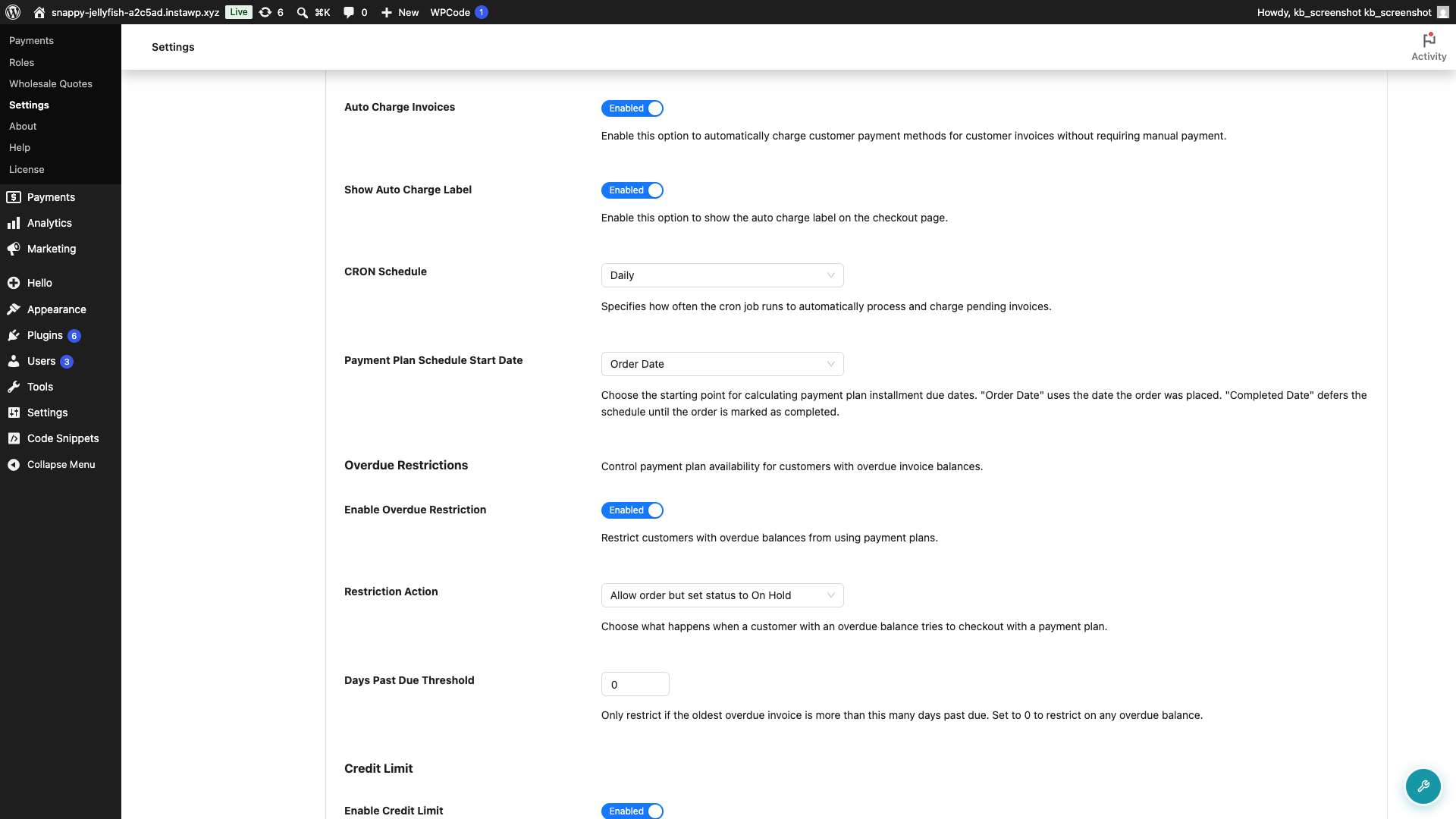
- Go to Wholesale → Settings → Wholesale Payments.
- Open the Checkout tab and find the Checkout Settings section.
- Turn on Auto Charge Invoices.
- Show Auto Charge Label is enabled by default and controls the auto-charge note shown to customers at checkout.
- Set the CRON Schedule to how often you want the plugin to check for and charge due invoices.
- Click Save Changes.
Check the plan itself
The Auto Charge Invoices setting is a default. Each payment plan also has its own switch. Go to Wholesale → Payments, open the plan, turn on Apply auto charge invoices, then save the plan.
A plan with that switch saved off stays off even when Auto Charge Invoices is on. A plan with it on is auto-charged even when the global setting is off.
How auto-charge works
At checkout, Wholesale Payments charges only the instalment due that day. Future-dated payment-plan steps remain scheduled until their own due dates.
For example, a plan with Day 0: No Payment Required and Day 15: 100% creates no card charge at checkout. The order stays On hold, and the full instalment becomes eligible for collection on Day 15.
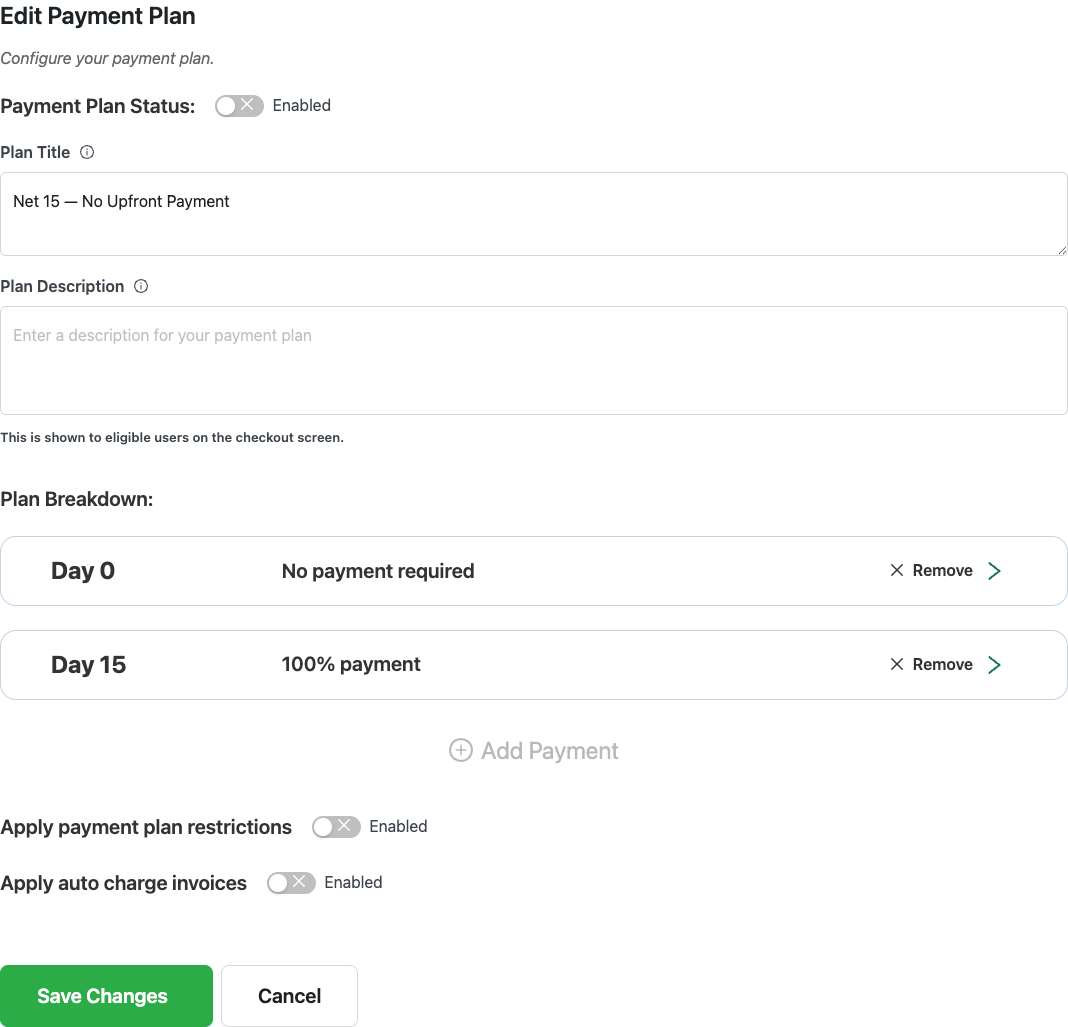
A due date makes an instalment eligible for collection. The plugin charges it during the next configured CRON Schedule check, so collection may happen after the exact due-date time rather than at that moment.
With auto-charge off, the plan is billed as one Stripe invoice for the full order total, due on the earliest date in the plan. The customer pays that invoice manually. Use auto-charge when you have ongoing terms with trusted buyers, and leave it off when you want the customer to pay a single invoice for the whole order.
Troubleshooting early or full-balance charges
Versions before 1.0.7 charge the full balance at checkout. Update WooCommerce Wholesale Payments to version 1.0.7 or later before testing the payment plan again. Current versions charge only the instalment due that day and leave future steps scheduled.
An existing order was charged too early. When you update, Wholesale Payments takes the instalments a pre-1.0.7 release already collected out of the chargeable queue, so the new schedule does not bill them again, and flags them for manual reconciliation. It does not refund a charge that already reached Stripe. Review the WooCommerce order notes and the Stripe payment before reconciling the invoice or issuing any refund.
After updating, create a new test order with a staggered payment plan and confirm that only the Day 0 amount is charged at checkout.
Frequently asked questions
Can checkout create an order without taking a payment?
Yes. If the payment plan has no amount due on Day 0, checkout creates no charge and keeps the order On hold until a later instalment is eligible.
Why was the full balance charged on the first day?
This can happen on Wholesale Payments versions before 1.0.7. Update to version 1.0.7 or later, then test with a new order. Review any already charged order separately because updating does not reverse the Stripe charge.
What if the customer has no saved card?
Checkout is blocked. Wholesale Payments shows an error asking the customer to add a payment method and place the order again. They can add a card in the Wholesale Payments card field at checkout, or under My Account, Payment methods.
How often are due invoices charged?
On the interval you pick in CRON Schedule. The plugin checks for due invoices on that schedule and charges them.
Does the customer know they’ll be auto-charged?
Yes. An auto-charge note is shown at checkout. Show Auto Charge Label is enabled by default.
Need Help?
If you have a question or run into any issues, we’re here to help.
- Premium users: Open a support ticket
- Free users: Visit our community forum

