If you offer shipping methods that only wholesale customers should see, such as Local Pickup or a freight service, you can hide them from retail and guest customers. This article shows you how to make shipping methods wholesale only in WooCommerce Wholesale Prices Premium, either all at once or one method at a time. It also covers a developer filter that shows selected methods to non-wholesale customers again.
Prerequisites
- WooCommerce Wholesale Prices Premium is installed and active.
- At least one shipping method is mapped to a wholesale role in the shipping mapping table. See How to restrict wholesale customers to using particular shipping methods.
- For the developer filter only: a way to add PHP code, such as your child theme’s
functions.phpfile or a code snippets plugin.
Two ways to make a shipping method wholesale only
Both options are on the same settings screen. Use the global setting to hide every mapped method, or use the per-method option to hide only the methods you choose.
Hide all mapped shipping methods
- Go to Wholesale > Settings > Wholesale Prices > Shipping.
- Tick Wholesale Only Shipping Methods.
- Click Save Changes.
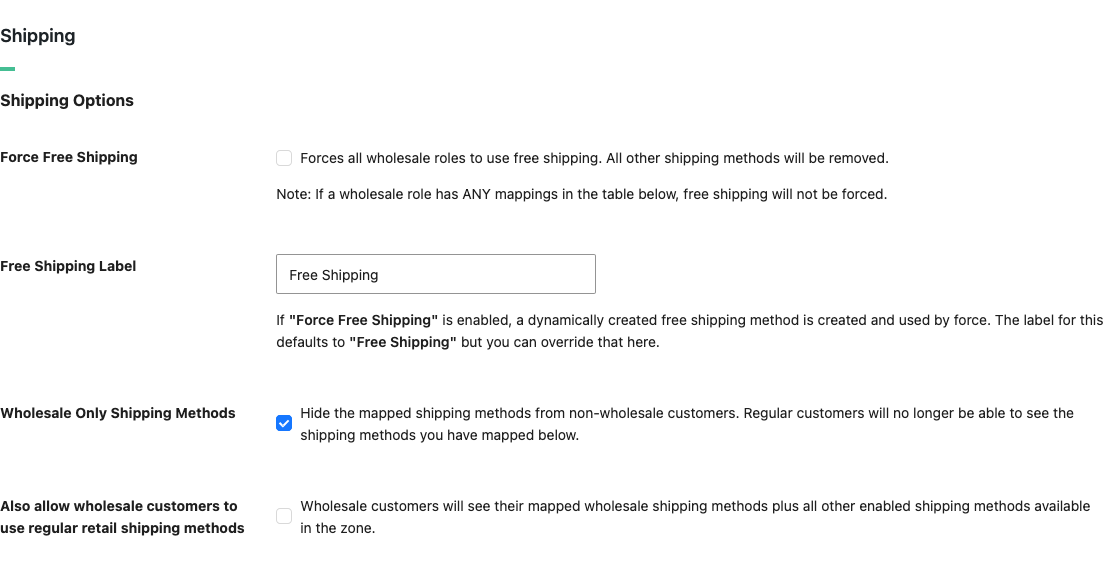
Every shipping method in your mapping table is now hidden from retail and guest customers. Wholesale customers still see the methods mapped to their role.
To also show the regular retail shipping methods to wholesale customers, tick Also allow wholesale customers to use regular retail shipping methods on the same screen. This option is available in WooCommerce Wholesale Prices Premium 2.1.3 and later.
Hide a single mapped shipping method
Available in WooCommerce Wholesale Prices Premium 2.1.0 and later.
- Go to Wholesale > Settings > Wholesale Prices > Shipping.
- Under Non-Zoned Shipping Methods, choose the Wholesale Role, Shipping Zones and Shipping Zone Methods.
- For a non-zoned shipping method, set Use Non-Zoned Shipping Methods to Yes and pick the method in Non-Zoned Shipping Zone Methods instead.
- Set Wholesale Only? to Yes.
- Click Add Mapping.
To change an existing mapping, click the edit icon in the Action column, set Wholesale Only? to Yes, then click Save Custom Field.
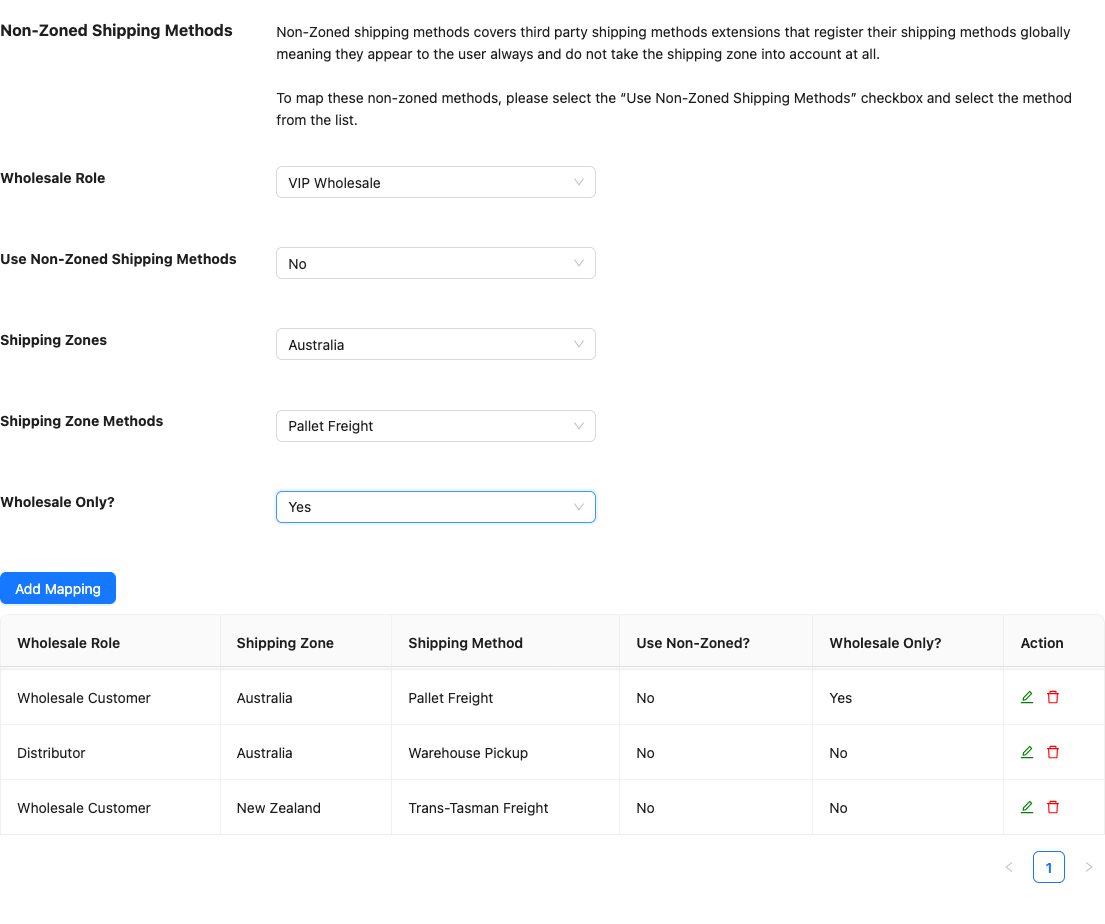
That shipping method is now hidden from retail and guest customers, even if the global Wholesale Only Shipping Methods setting is turned off. Wholesale customers still see it. Other mapped methods with Wholesale Only? set to No stay visible to retail and guest customers, unless the global setting is on. You can check each mapping’s status in the Wholesale Only? column of the table.
Show selected wholesale-only methods to non-wholesale customers (developers)
Sometimes you want most mapped methods to stay wholesale only, with a few exceptions. The wwpp_force_allow_mapped_shipping_method_for_non_wholesale filter lets you show specific shipping methods to non-wholesale and guest customers. It overrides both the global Wholesale Only Shipping Methods setting and the per-method Wholesale Only? option.
The filter passes three arguments:
| Argument | Description |
|---|---|
$allow | Boolean. Defaults to false. Return true to show the shipping method to non-wholesale customers. |
$shipping_method | The WooCommerce shipping method object being checked. Use $shipping_method->id to match a method by its ID. |
$wholesale_zone_mapping | Array of your saved wholesale role / shipping method mappings. |
Add one of the following snippets to your child theme’s functions.php file or a code snippets plugin. The function names are examples, so you can rename them to suit your project.
To make all non-zoned shipping methods available:
// Allow all non-zoned shipping methods to be available to regular users
function allowMappedNonZonedMethodsForRegularUsers( $allow, $shipping_method, $wholesale_zone_mapping ) {

if ( ! $shipping_method->supports( 'shipping-zones' ) )
$allow = true;

return $allow;

}

add_filter( 'wwpp_force_allow_mapped_shipping_method_for_non_wholesale' , 'allowMappedNonZonedMethodsForRegularUsers', 10, 3 );
Or for a specific non-zoned shipping method:
// Allow non-zoned shipping method "Advanced Free Shipping" only to be available to regular users
function allowAdvancedFreeShippingForNonWholesale( $allow, $shipping_method, $wholesale_zone_mapping ) {

if ( ! $shipping_method->supports( 'shipping-zones' ) && $shipping_method->id == 'advanced_free_shipping' )
$allow = true;

return $allow;

}

add_filter( 'wwpp_force_allow_mapped_shipping_method_for_non_wholesale' , 'allowAdvancedFreeShippingForNonWholesale', 10, 3 );
To allow a different shipping method, replace advanced_free_shipping with that method’s ID. For example, a UPS shipping plugin might use ups and a USPS plugin might use usps.
Contact your developer to find out the ID of the shipping method you need.
Troubleshooting
Retail customers still see a shipping method you set as wholesale only. Check that the method is in the mapping table on the Shipping tab. The Wholesale Only Shipping Methods setting and the Wholesale Only? option only hide mapped methods. Also check your site for a snippet that uses the wwpp_force_allow_mapped_shipping_method_for_non_wholesale filter, because it shows a method to non-wholesale customers again.
Your change doesn’t show in a cart that already has products. Remove the product from the cart and add it again, or test with a new cart. WooCommerce saves the shipping rates for each cart, so a cart that existed before your change can still show the old shipping methods.
Need help?
If you have questions or run into issues, open a support ticket (premium customers) or post in the free community forum.