
Curious how tiered pricing counts quantities across a category? This guide explains the two rules that determine quantity thresholds, then walks through three worked examples covering the most common scenarios your customers will hit at checkout.
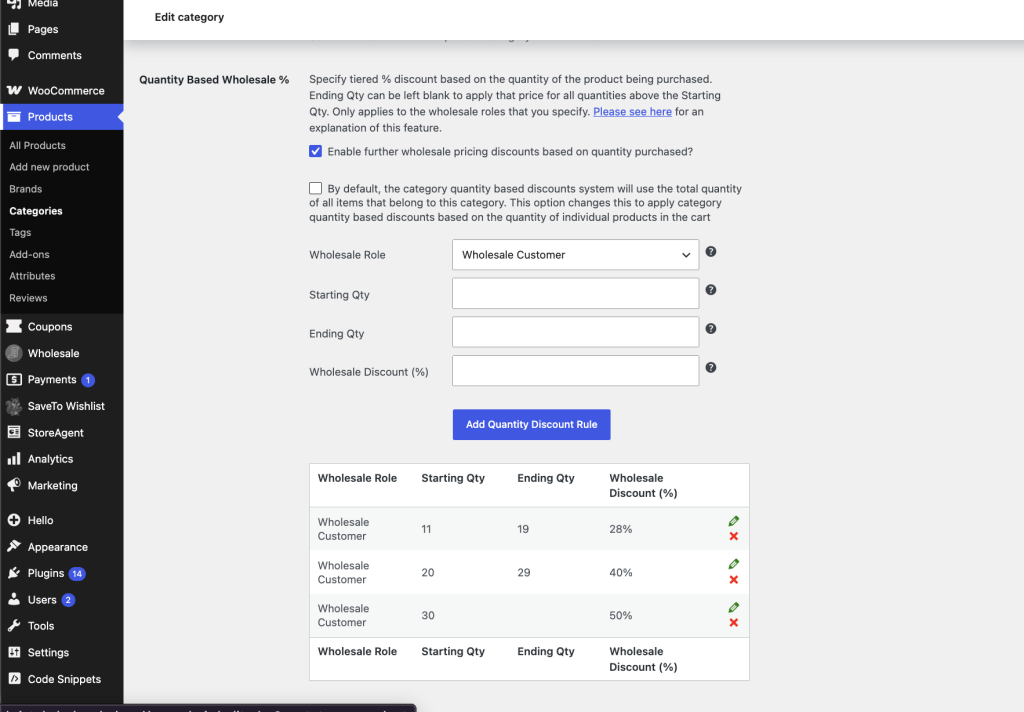
Product categories can apply a quantity-based tiered percentage discount in addition to the base wholesale percentage discount. The discount applies to all eligible products in the cart that belong to that category.
The system calculates the tier using the combined quantity of all products in the category. This includes products that also belong to other categories or use product-level wholesale pricing.
For a detailed explanation of how WooCommerce Wholesale Prices applies pricing, refer to the pricing hierarchy guide.
How it Works
Two rules determine how category tiered pricing works.
First, the system calculates the quantity threshold using the total number of products in the category. This total includes products with fixed wholesale prices. Although those products do not receive the category percentage discount, they still count toward the quantity required to unlock it.
Second, some products belong to more than one category. In that case, the global Category Wholesale Discount setting decides which category discount applies. Depending on your configuration, the product uses either the highest or the lowest available category discount.
Example #1: Tiered Pricing Uses the Total Quantity in the Category
Category 1 has a base wholesale discount of 20%.
It also includes a quantity-based tier. Customers receive 50% off when they purchase 10 to 100 items.
Product A and Product B both belong to Category 1.
Product A has a retail price of $100. Product B has a retail price of $150.
Neither product has a product-level wholesale price. Therefore, both use category percentage pricing.
If the cart contains Product A × 6 and Product B × 3, the category total is 9. Because the total does not reach the tier, only the base discount applies. Product A costs $80 each, while Product B costs $120 each.
However, if the cart changes to Product A × 6 and Product B × 5, the category total becomes 11. The cart now qualifies for the tiered discount. As a result, Product A costs $50 each, and Product B costs $75 each.
Example #2: Fixed-price Products still Count Toward the Tier
Category 1 has a base wholesale discount of 20%.
It also includes a quantity-based tier that gives customers 50% off when they purchase 10 to 100 items.
Product A and Product B both belong to Category 1.
Product A has a retail price of $100. Product B has a retail price of $150.
Product A uses category percentage pricing because it has no product-level wholesale price.
However, Product B has a fixed wholesale price of $125.
If the cart contains Product A × 6 and Product B × 3, the category total is 9. Therefore, only the base discount applies. Product A costs $80 each, while Product B remains $125.
Next, update the cart to Product A × 6 and Product B × 5. The category total becomes 11, which activates the tiered discount.
Product A now costs $50 each.
However, Product B remains $125 because product-level wholesale pricing takes priority over category percentage discounts.
Even so, Product B still counts toward the category quantity. As a result, it can help unlock tiered pricing for other eligible products in the same category.
Example #3: Products in Multiple Categories Count in Each Category
Category 1 has a base wholesale discount of 20%.
Category 2 has a base wholesale discount of 10%.
Category 1 also includes a quantity-based tier that gives customers 50% off when they purchase 10 to 100 items.
Product A belongs only to Category 1.
Product B belongs to both Category 1 and Category 2.
Product A has a retail price of $100. Product B has a retail price of $150.
Neither product has a product-level wholesale price. Therefore, both use category percentage pricing.
The global Category Wholesale Discount setting is configured to use the Lowest percentage discount.
If the cart contains Product A × 6 and Product B × 3, Category 1 contains 9 items. Since the tier is not reached, only the base discounts apply.
Product A receives Category 1’s 20% discount and costs $80 each.
Product B receives Category 2’s 10% discount because it is the lower rate. It costs $135 each.
Next, update the cart to Product A × 6 and Product B × 5. Category 1 now contains 11 items, so the tier activates.
Product A receives the 50% category discount and costs $50 each.
However, Product B still costs $135 because it continues to use Category 2’s base wholesale discount.
Even though Product B does not receive Category 1’s tiered discount, it still counts toward the total quantity in every category it belongs to. Therefore, it can help trigger tiered pricing for other eligible products in those categories.
Frequently Asked Questions
How do I enable tiered pricing for a product category?
Once you’ve set up your wholesale categories in WooCommerce Wholesale Prices Premium, open the category settings and define your quantity thresholds with a percentage discount for each tier. The discount applies automatically when buyers reach the minimum quantity.
Does tiered category pricing work with product-level wholesale prices?
Yes, products with a fixed wholesale price still count toward the category quantity total, so they can help unlock tiered discounts for other items. Their own price still stays at the defined rate rather than receiving the percentage adjustment.
Is there a limit to how many tiers I can set per category?
Generally, you can add as many quantity thresholds as your pricing strategy requires. Each tier needs a minimum quantity and a discount percentage, and the highest threshold a buyer’s cart qualifies for is the one applied at checkout.
Can a product belong to multiple categories and earn tiered discounts?
Yes. Items assigned to several categories contribute to the quantity total for each one. Depending on your preference rule (lowest or highest discount), the most favourable or most conservative rate from all qualifying categories is applied to that product.
Why isn’t my category tiered discount applying at checkout?
If the discount isn’t triggering, check that the cart total for that category meets the minimum threshold. Keep in mind that only products using the category percentage pricing count toward the qualifying sum. Products with fixed wholesale prices are excluded from receiving the tier adjustment.
Need Help?
If you have a question or run into any issues, we’re here to help.
- Premium users: Open a support ticket
- Free users: Visit our community forum

