
When wholesale customers view your store, they see the regular retail price displayed alongside their discounted wholesale price. By default, that retail figure appears with a strikethrough and no additional context, so it may not be immediately clear to your buyers whether it represents your Manufacturer’s Suggested Retail Price (MSRP) or Minimum Advertised Price (MAP).
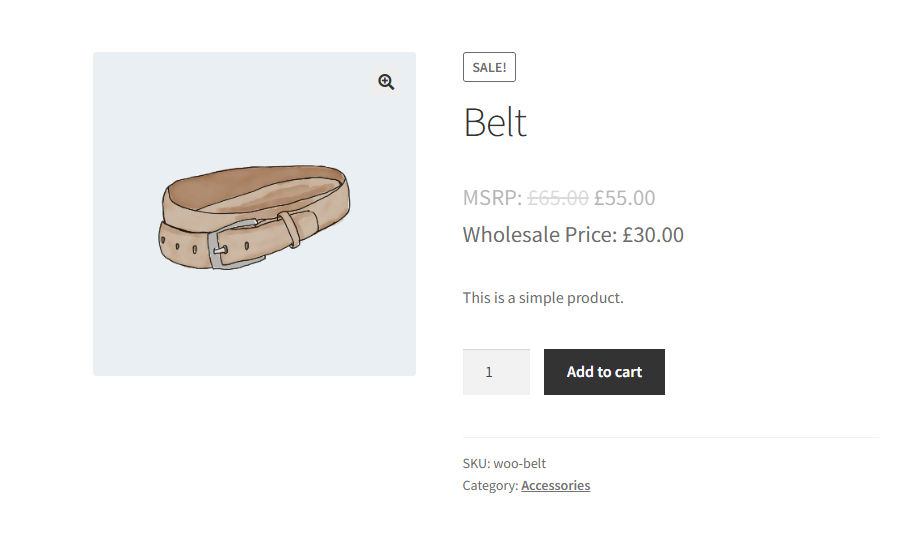
The code snippet in this guide injects a small block of CSS into your store only when a wholesale customer is logged in. It adds a plain-text label, such as “MSRP: ” or “MAP: ”, directly before the struck-through regular price, and optionally removes the strikethrough so the label reads cleanly as a reference price. Retail visitors and guest shoppers are completely unaffected.
Requirements
- WooCommerce Wholesale Prices Premium installed and activated.
- At least one wholesale role configured in your store. The label only appears for logged-in wholesale customers. If no wholesale role is assigned to a user, the CSS is never injected.
- A way to add custom PHP code to your site, either your theme’s
functions.phpfile or a dedicated code snippets plugin such as WPCode. Using a snippets plugin is recommended so your customisation survives theme updates.
Add the MSRP or MAP label to the regular price
Copy the snippet below and add it to your site via your theme’s functions.php file or through the WPCode plugin.
How the snippet works
When WordPress loads a page, the snippet checks whether the current visitor has a wholesale role assigned. The role check returns an array of the visitor’s wholesale role keys, and an empty array means the visitor is not a wholesale customer. So if you adapt the snippet, treat an empty array as “not wholesale” and only output the CSS when the array is not empty. When a wholesale role is present, the snippet outputs a small block of inline CSS that does two things:
- Adds the label text. The rule
del .amount::before { content: "MSRP: "; }inserts “MSRP: ” immediately before the price amount inside the struck-through regular price element. WooCommerce Wholesale Prices Premium wraps the regular retail price in a struck-through element when displaying it alongside the wholesale price, so this targets exactly the right element. - Removes the strikethrough. The rule
del.original-computed-price { text-decoration: none; }removes the default line-through styling. The regular price then reads cleanly as “MSRP: $55.00” rather than appearing struck through.
Customise the label text
To use a different label, change the text inside content: "MSRP: "; to whatever you need, for example content: "MAP: "; or content: "RRP: ";. Keep the trailing space inside the quotes so the label and the price amount do not run together.
Keep the strikethrough (optional)
If you want the label but prefer to keep the strikethrough on the regular price, remove the del.original-computed-price rule from the snippet. The price displays as struck-through text with your label prepended, for example, MSRP: $100.00 with a line through it.
Troubleshooting
The label is not showing
If you added the snippet but the label is not appearing, work through these checks in order:
- Confirm you are browsing the store while logged in as a user who has a wholesale role assigned. The CSS is only injected for wholesale customers, so admin users and retail customers will not see the label.
- Confirm WooCommerce Wholesale Prices Premium is installed and activated.
- Check that the snippet was saved and is active in your code snippets plugin, or that it was added to the correct
functions.phpfile (your active theme’s file, not a parent theme). - Clear any page caching or object caching on your site and reload the product page.
- Inspect the page source and search for the injected
<style>block. If it is not present, PHP is not outputting it, so revisit steps 1 to 3. If it is present but the label still does not appear, a theme or plugin may be overriding the CSS. Check your browser’s developer tools for conflicting rules.
Frequently asked questions
Can I use “MAP: ” instead of “MSRP: ”?
Yes. In the snippet, find the line content: "MSRP: "; and replace MSRP with any text you like, such as MAP, RRP, List Price, and so on. The only requirement is that the value remains a valid CSS content string enclosed in double quotes.
Where does the label appear on the storefront?
The CSS is injected globally whenever a wholesale customer is logged in, so the label appears wherever WooCommerce Wholesale Prices Premium renders the regular price inside a struck-through element. This includes single product pages, shop and category archive pages, and the cart and checkout pages.
Will retail customers or guest visitors see the label?
No. The snippet checks for a wholesale role before outputting any CSS. If the current visitor is not logged in as a wholesale customer, no styles are injected and the storefront is unchanged for them.
Does the snippet work on variable products?
Yes. The CSS targets the struck-through element that WooCommerce Wholesale Prices Premium uses to display the regular price, which is the same element across simple, variable, and grouped products. The label appears on all supported product types.
What is the difference between this snippet and the Override Regular Price Suffix setting?
WooCommerce Wholesale Prices ships with a built-in Override Regular Price Suffix field at Wholesale → Settings → Wholesale Prices → Tax. This field is available in the free plugin, so you do not need the Premium version to use it. Entering a value there appends text after the regular price, for example, $100.00 MSRP. The CSS snippet in this guide instead prepends the label before the price amount and can also remove the strikethrough styling, giving a cleaner presentation. Use the built-in setting when a simple suffix is enough. Use the snippet when you need the label to appear before the price or want to suppress the strikethrough.
Can I also add a label to the wholesale price itself?
Yes. The Wholesale Price Suffix field, found directly below Override Regular Price Suffix at Wholesale → Settings → Wholesale Prices → Tax, lets you append text after the wholesale price. For example, entering Your Price displays the wholesale price as $60.00 Your Price. This built-in setting applies globally to all products and wholesale roles.
Does the label affect price calculations or taxes?
No. The snippet only injects presentational CSS. It does not modify any price values, tax calculations, or order totals. It is purely a visual change.
Help & support
We have a dedicated support team for Wholesale Suite who knows our products, WooCommerce, and the industry very well. You’re welcome to make use of their expertise at any time, worldwide.
If you are an existing customer please go to the support ticket request form and send us a message.
If you are a free plugin user, please send us a support request on the forum. We actively monitor the WordPress.org support forums for the free plugin and help our users there as best as we can.

