
If you want your wholesale customers to use different shipping options than your regular customers, for example a wholesale-only flat rate, a bulk freight method, or a Local Pickup option reserved for account holders, you need a way to tie specific shipping methods to specific wholesale roles.
WooCommerce Wholesale Prices Premium lets you map a wholesale role directly to a shipping method, so that role only sees the shipping options you’ve assigned to it for each shipping zone.
You can also hide a mapped method from retail and guest customers, either for every mapping at once using the plugin-wide Wholesale Only Shipping Methods setting, or one row at a time using the mapping table’s own Wholesale Only? toggle.
Requirements
- WooCommerce, with at least one shipping zone and shipping method already configured. See WooCommerce’s documentation on setting up shipping zones.
- WooCommerce Wholesale Prices installed and activated, with at least one wholesale role set up.
- This feature requires WooCommerce Wholesale Prices Premium. Shipping method mapping isn’t available in the free plugin.
Map a Wholesale Role to a Shipping Method
Before adding a mapping, create the shipping zone and load the shipping method you want to restrict. To do this, go to WooCommerce → Settings → Shipping and confirm the shipping zone and shipping method you want to map already exist.
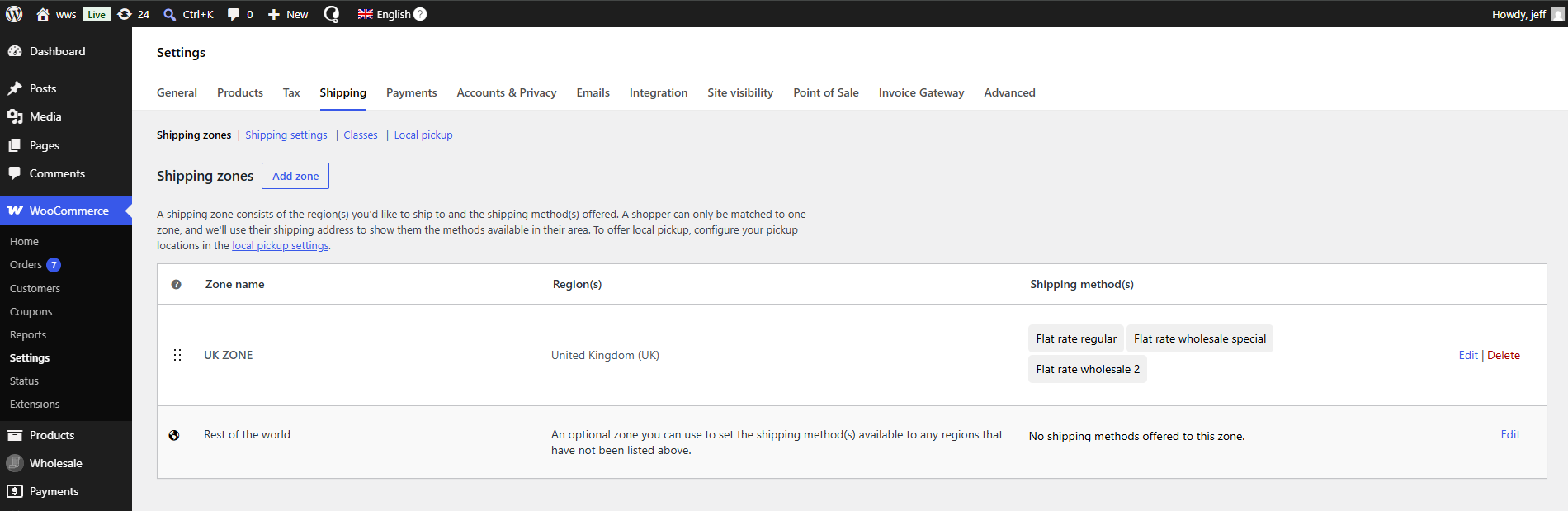
With the shipping zone and method ready, map them to a wholesale role:
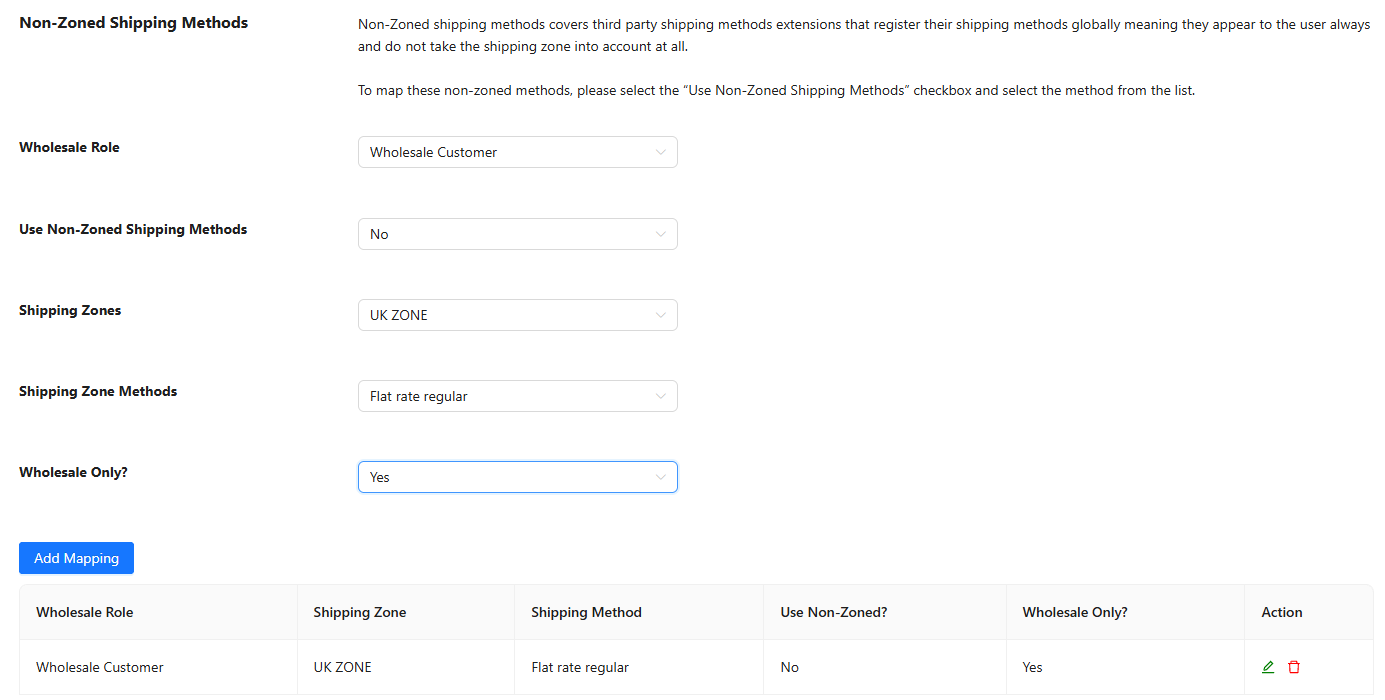
- Go to Wholesale → Settings → Wholesale Prices → Shipping.
- Select the Wholesale Role you want to restrict.
- Leave Use Non-Zoned Shipping Methods set to No, then choose the Shipping Zone the method belongs to.
- Choose the method from the Shipping Zone Methods field.
- Set Wholesale Only? to Yes if you also want this specific method hidden from retail and guest customers, or leave it at No to only restrict which methods the wholesale role can use.
- Click Add Mapping.
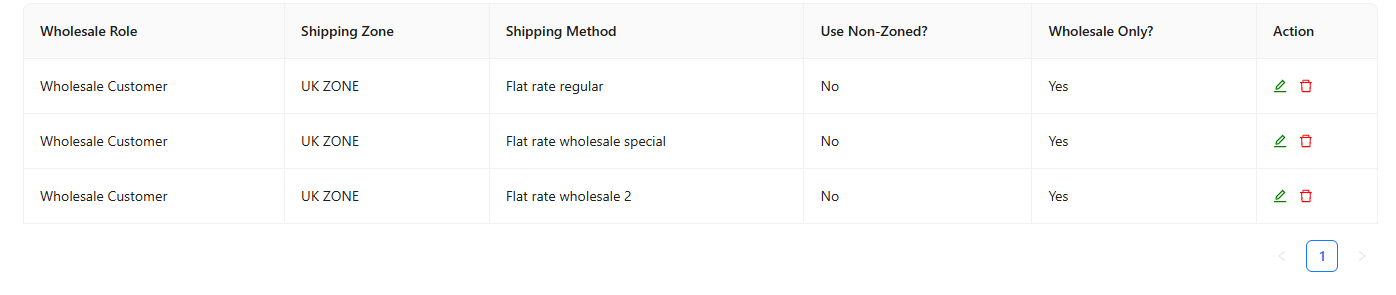
Any shipping method you map for a role becomes the only method that role sees for that shipping zone. You can repeat this process to map multiple methods per zone and multiple zones per role.
Mapping a Non-zoned Shipping Method
Some shipping methods, typically added by certain third-party shipping plugins, don’t support WooCommerce shipping zones and won’t appear in the Shipping Zone Methods list. Map these separately on the same Shipping screen:
- Select the Wholesale Role.
- Set Use Non-Zoned Shipping Methods to Yes.
- Choose the method from the Non-Zoned Shipping Zone Methods field that appears.
- Click Add Mapping.
Hide Mapped Shipping Methods from other Customers
Mapping a shipping method to a wholesale role restricts which methods that role can use. It doesn’t, by itself, stop retail or guest customers from seeing and using the same method. To hide a mapped method from everyone except wholesale customers, use one of the two settings below on the same Shipping screen.
Hide Every Mapped Method
- Go to Wholesale → Settings → Wholesale Prices → Shipping.
- Check Wholesale Only Shipping Methods.

This hides every method you’ve mapped in the table from retail and guest customers. Regular customers will no longer be able to see the shipping methods you have mapped.
Hide a Single Mapped Method
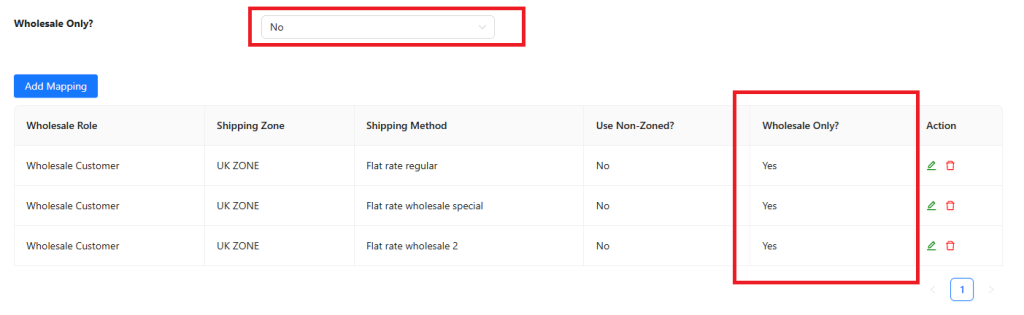
To hide only one specific mapping rather than all of them, leave Wholesale Only Shipping Methods unchecked. Instead, set that row’s Wholesale Only? field to Yes when you add or edit the mapping. This hides just that method from retail and guest customers, while wholesale customers with the mapped role still see it.
Force Free Shipping for Wholesale Roles
The same Shipping screen includes a Force Free Shipping option, which forces all wholesale roles to use free shipping and removes every other shipping method for them. You can change the label shown at checkout in the Free Shipping Label field.
If a wholesale role has any mappings in the table, free shipping isn’t forced for that role. Its mapped methods take priority instead.
Troubleshooting
I mapped a shipping method, but the wholesale customer still sees all the regular shipping options.
The most common cause is overlapping shipping zones. WooCommerce matches a customer’s address to the first zone in your list that fits, from top to bottom, and stops there. If you’ve created a separate zone for wholesale customers within the same region as your general zone, and the general zone sits above it in the list, WooCommerce always matches the general zone first and your wholesale mapping never gets a chance to apply. See the KB article on mapping multiple shipping methods within the same region to fix the zone order.
Do administrator or shop manager accounts bypass this restriction?
No. Shipping method mapping doesn’t have a built-in bypass for administrator or shop manager accounts. It applies based on whichever WordPress role is assigned to the account, the same as any other wholesale role check. An administrator account without a wholesale role assigned is treated the same as a guest or retail customer. An administrator account with a wholesale role assigned is treated the same as any other wholesale customer with that role. Test with an account that has the specific wholesale role you’re checking.
I updated a mapping, but the cart still shows the old shipping options.
WooCommerce caches calculated shipping rates in the customer’s session for performance. Changing the shipping address or reloading the cart page forces WooCommerce to recalculate rates and pick up the updated mapping.
Frequently Asked Questions
Can I map more than one shipping method to the same wholesale role?
Yes. Add a separate mapping row for each additional method or zone you want that role to have access to. All of them become available to the role, in addition to any other mappings already saved for it.
What happens if a wholesale role has no shipping mapping at all?
That role sees the same shipping methods available to any other customer in its matched shipping zone, unless Force Free Shipping is enabled for wholesale roles.
Does mapping a shipping method automatically hide it from retail customers?
No. A mapping only controls which methods the wholesale role can use. Retail and guest customers keep seeing that method unless you also enable Wholesale Only Shipping Methods, or set that row’s Wholesale Only? field to Yes.
Can I set different shipping restrictions for one specific wholesale customer instead of their whole role?
Yes. Open that customer’s user profile page in wp-admin and use the Override Shipping Options section. It lets you force free shipping or specify shipping methods for that individual account, independent of whatever is mapped for their wholesale role.
What happens if a customer is assigned more than one wholesale role?
The plugin matches the shipping mapping against the first wholesale role found on the account. If you assign more than one wholesale role to the same user, map the shipping methods for whichever role you expect to take priority, and avoid relying on a second wholesale role’s mapping for that account.
Does hiding a mapped method also affect customers who aren’t logged in?
Yes. Logged-out guests are treated the same as retail customers for this feature. If Wholesale Only Shipping Methods is enabled, or a mapping’s Wholesale Only? field is set to Yes, guests won’t see that method either.
I deleted a shipping method or zone in WooCommerce that was mapped. What happens to the mapping?
The mapping row stays in the table, but its shipping zone or method column shows a message stating that the zone or method no longer exists. Delete the outdated row and create a new mapping against the current zone or method.
Does this feature work with the free WooCommerce Wholesale Prices plugin?
No. Shipping method mapping, the wholesale-only visibility settings, and the free shipping override are all part of WooCommerce Wholesale Prices Premium and require it to be installed and activated alongside the free plugin.
Help & Support
Wholesale Suite has a dedicated support team who knows the products, WooCommerce, and the industry very well. You’re welcome to make use of their expertise at any time, worldwide.
If you are an existing customer please go to the support ticket request form and send a message.
If you are a free plugin user, please send a support request on the forum. The WordPress.org support forums for the free plugin are actively monitored.

