Eine der größten administrativen Belastungen bei der Führung eines Großhandelsgeschäfts ist die Gewinnung und Verwaltung von Großhandelskunden. Und abgesehen von der Belastung möchten Sie Ihren neuen Großhandelskunden wahrscheinlich auch ein 5-Sterne-Erlebnis bieten. Schließlich sind sie für Ihr Geschäft wichtig, daher ist es sinnvoll, sicherzustellen, dass sie ein großartiges Onboarding erleben.
Hier erfahren Sie, was dieser Leitfaden abdeckt:
Übersicht – wir beschreiben auf hoher Ebene, was das Plugin genau tut
Wichtige Seiten überprüfen – Wir werden die wichtigen Seiten überprüfen, die das Plugin erstellt
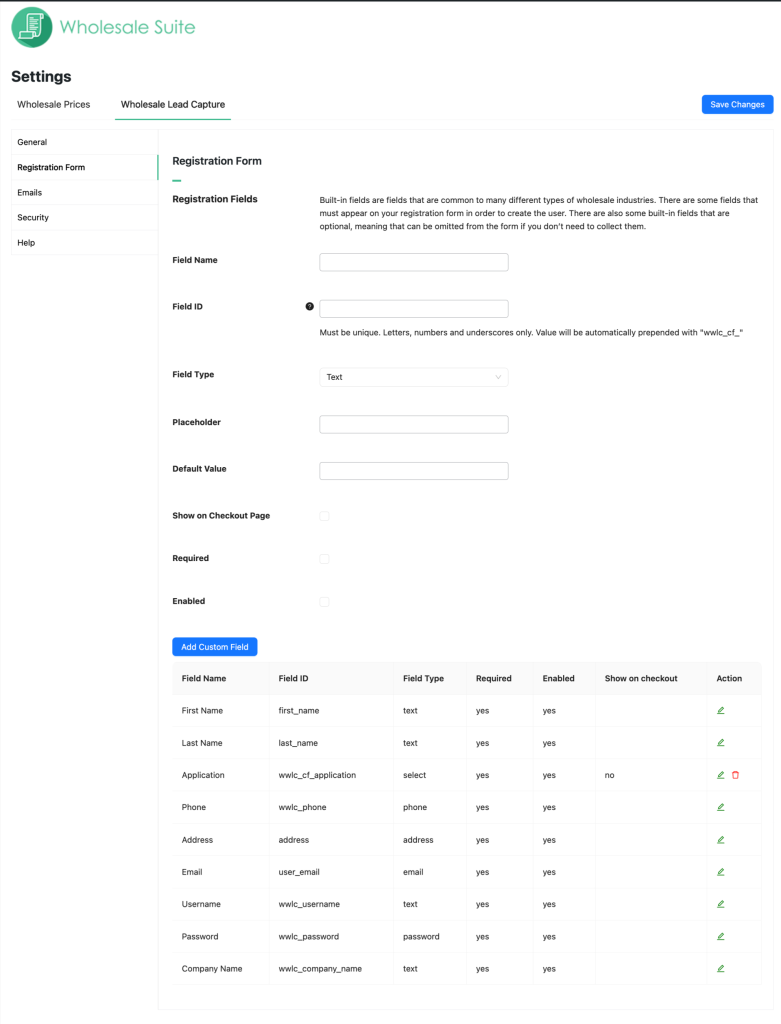
Registrierungsformular – Lassen Sie uns darüber sprechen, wie das Standard-Registrierungsformular geändert werden kann und wie benutzerdefinierte Felder hinzugefügt werden können, falls Sie diese benötigen
Aktionen nach der Registrierung – Diese Funktionen teilen dem System mit, was mit Kunden nach ihrer Registrierung geschehen soll
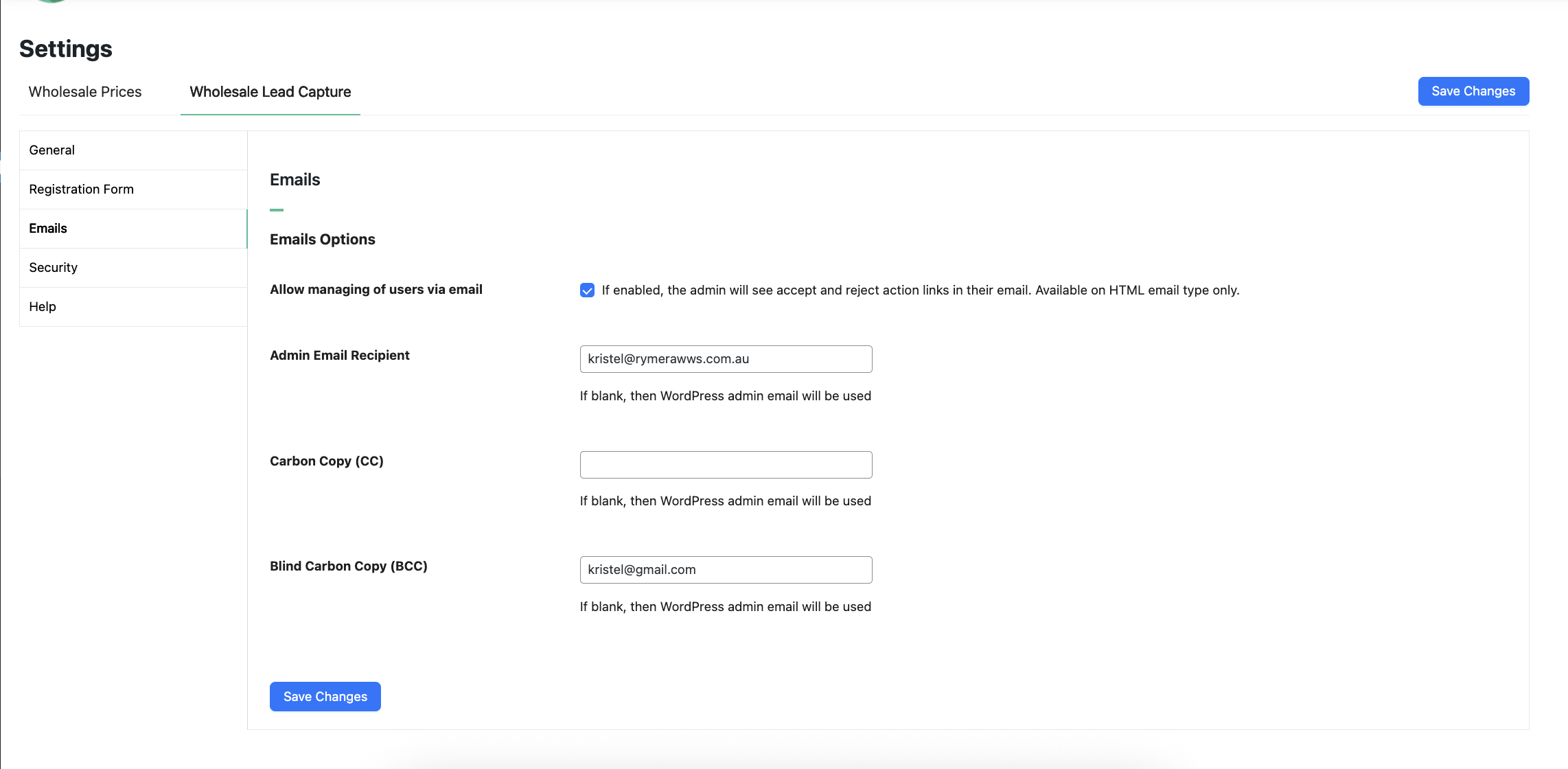
Genehmigungen & E-Mails – Ein kurzer Überblick darüber, wie das Genehmigungssystem funktioniert und welche E-Mails an den Kunden gesendet werden
Spam-Schutz – Ihr Formular verfügt über einen integrierten Honeypot-Spam-Schutz, aber wir zeigen Ihnen auch, wie Sie Google Recaptcha verwenden können, falls Ihre Website zusätzlichen Schutz benötigt
Andere Plugins in der Suite – Wir zeigen Ihnen, warum Sie in Erwägung ziehen sollten, Wholesale Order Form und Wholesale Lead Capture hinzuzufügen
Hilfe erhalten – wir verstehen, dass dies ein komplexes Werkzeug sein kann. Wir zeigen Ihnen, wo Sie Hilfe bekommen, wenn Sie sie brauchen
Übersicht
WooCommerce Wholesale Lead Capture ist ein völlig eigenständiges Plugin für WooCommerce, das die Registrierung von Großhandelskunden, die Anmeldung von Großhandelskunden, einen vollständigen Genehmigungsprozess und Onboarding-E-Mails verwaltet. Es ist darauf ausgelegt, Hand in Hand mit dem Rest unserer Tool-Suite zu arbeiten.
Das Lead-Capture-Tool enthält unzählige Funktionen. Eine vollständige Liste finden Sie hier. Obwohl das Tool viel von der schweren Arbeit für Sie erledigt, indem es die notwendigen Formulare und Seiten erstellt, werden wir auch nur einige wichtige Dinge durchgehen, damit Sie so schnell wie möglich einsatzbereit sind.
Wholesale Suite abonnieren
Zuerst werden wir die wichtigen Seiten überprüfen, die das Lead-Capture-Tool beim Aktivieren erstellt.
https://[yoursiteurl]/wholesale-log-in-page/ – this is the Login page for wholesale customers
https://[yoursiteurl]/wholesale-registration-page/ – this is the Registration page for wholesale customers
https://[yoursiteurl]/wholesale-registration-thankyou-page/ – This is the default Registration Thank You page wholesale customers see after registering
Sie müssen diese nicht manuell erstellen, aber Sie können den Shortcode von diesen Seiten kopieren und ihn bei Bedarf auf einer anderen Seite verwenden.
Die verwendeten Shortcodes sind:
Seite für Großhandelsanmeldung [wwlc_login_form]
Seite für Großhandelsregistrierung [wwlc_registration_form]
In den Einstellungen sehen Sie auch, dass es einige Seiteneinstellungen gibt, die auf die aktuell für diese Seiten festgelegte Seite verweisen.
Sie werden auch feststellen, dass es auf dem Einstellungsbildschirm einige andere Seiten gibt, die festgelegt werden müssen, wie z. B. die Allgemeinen Geschäftsbedingungen (diese werden verknüpft, wenn das Feld „Allgemeine Geschäftsbedingungen“ aktiviert ist) und verschiedene Dankesseiten und Weiterleitungsseiten.
Stellen Sie sicher, dass für jede dieser Einstellungen eine Seite ausgewählt ist.
Registrierungsformular
Das Registrierungsformular ist, wo sich Ihre neuen Leads registrieren, um ein Großhandelsbenutzerkonto zu beantragen.
Wir empfehlen Ihnen, alle benötigten Informationen direkt bei der Registrierung zu erfassen. So können Sie entscheiden, ob Sie sie basierend auf diesen Informationen genehmigen oder ablehnen, ohne zu viel hin und her gehen zu müssen, um sie herauszufinden.
Integrierte Felder
Das System verfügt über eine Reihe von Standardfeldern, die Sie nach Belieben aktivieren/deaktivieren können.
Dazu gehören:
Vorname (erforderlich)
Nachname (erforderlich)
Telefon (erforderlich)
E-Mail
Benutzername
Firmenname
Adresse
Passwort
Sie können diese durch die Feldpriorität neu anordnen und ein-/ausschalten. Erforderliche Felder können nicht ausgeschaltet werden.
Die Felder werden so weit wie möglich verwendet, um das Benutzerkonto mit Informationen zu versehen, damit der Benutzer beim Auschecken seiner ersten Bestellung diese nicht erneut ausfüllen muss.
Benutzerdefinierte Felder
Benutzerdefinierte Felder ermöglichen es Ihnen, alle anderen Informationen zu sammeln, die Sie benötigen, um zu entscheiden, ob Sie diesen Lead als Großhandelskunden akzeptieren.
Sie können Felder verschiedener Typen hinzufügen:
Text
Textbereich
Nummer
E-Mail
URL
Auswählen
Radio
Kontrollkästchen
Versteckt
Datei
Inhalt
AGB
Leute nutzen diese, um alle möglichen Informationen zu sammeln, einige Beispiele sind Steuer-/Umsatzsteuernummern, Handelsregisterauszüge, Website-URLs, Kommunikationspräferenzen usw.
Aktionen nach der Registrierung
Aktionen nach der Registrierung sind die Dinge, die passieren, nachdem die Person das Registrierungsformular abgeschickt hat. Die beiden wichtigsten Dinge sind die Wahl, wie die Benutzergenehmigungen funktionieren sollen und welche Benutzerrolle die Person nach der Genehmigung erhalten soll.
1. Benutzergenehmigung
Sollen Benutzer genehmigt werden, bevor sie Zugang erhalten oder nicht? Dies ist etwas, das Sie nach Belieben vollständig automatisieren oder manuell durchführen können.
Wenn Sie sich für die manuelle Genehmigung entscheiden, haben Sie die meiste Kontrolle. Das System wird Sie per E-Mail benachrichtigen, wenn jemand auf Genehmigung wartet, und ein Administrator oder Shop-Manager muss diese Person genehmigen.
Wenn Sie sich für die automatische Genehmigung entscheiden, erhält der Kunde sofort Zugang und kann Großhandelspreise sehen und eine Bestellung aufgeben.
2. Automatische Zuweisung einer Benutzerrolle
Nach der Genehmigung muss das System dem Kunden eine Benutzerrolle zuweisen.
Wenn Sie WooCommerce Wholesale Prices verwenden, ist die Standardeinstellung hier die Rolle Großhandelskunde. Sie können dies aber auch in eine andere Rolle auf Ihrer Website ändern.
Genehmigungen & E-Mails
Wie bereits erwähnt, können Genehmigungen auf Wunsch vollständig automatisiert werden.
Das bedeutet, dass der Administrator Benutzer nicht genehmigen muss, bevor sie Großhandelspreise sehen und eine Bestellung aufgeben können.
Einige Shopbesitzer möchten mehr Kontrolle über ihr Großhandelsprogramm haben, daher ist die Standardeinstellung die manuelle Genehmigung.
Während des Benutzer-Onboarding-Prozesses werden mehrere E-Mails an den Administrator und den Kunden gesendet:
Szenario Nr. 1: Automatische Genehmigung ist deaktiviert
Benutzer registriert sich
Konto auf inaktiv gesetzt
Administrator erhält eine E-Mail über eine neue Registrierung
Benutzer erhält eine E-Mail, die seine Registrierung bestätigt
Administrator genehmigt den neuen Benutzer manuell
Konto auf aktiv gesetzt
Benutzer erhält eine E-Mail, dass sein Konto aktiv ist, die seine Anmeldedaten enthält
Szenario Nr. 2: Automatische Genehmigung ist aktiviert
Benutzer registriert sich
Konto auf aktiv gesetzt
Administrator erhält eine E-Mail über die neue Registrierung und dass diese automatisch genehmigt wurde
Benutzer erhält eine E-Mail, die seine Registrierung bestätigt
Benutzer erhält eine E-Mail, dass sein Konto aktiv ist, die seine Anmeldedaten enthält
Ihr Registrierungsformular ist standardmäßig automatisch mit der Honeypot-Anti-Spam-Funktionalität geschützt.
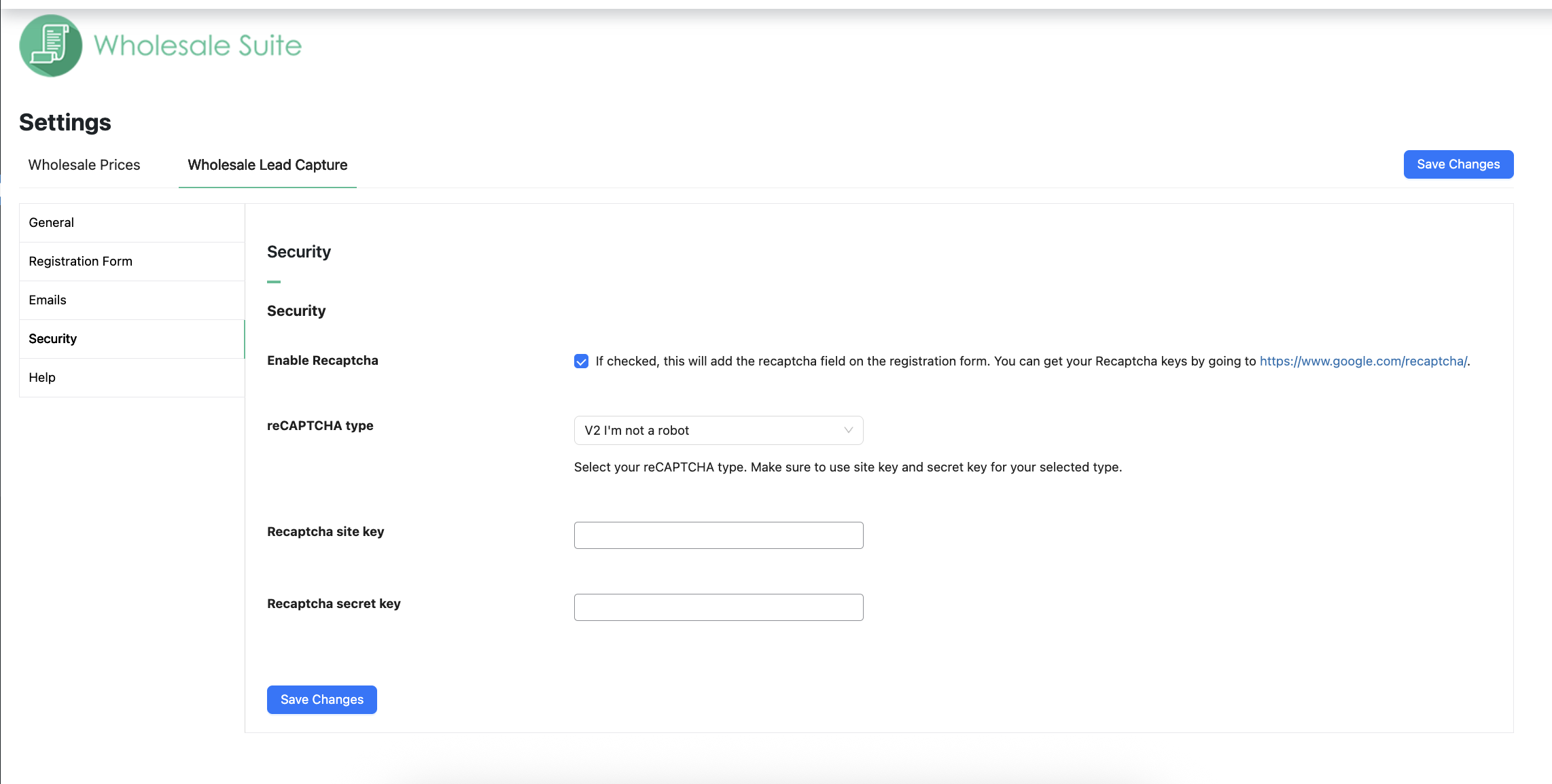
Wenn Sie jedoch in der Vergangenheit Spam-Probleme hatten, möchten Sie vielleicht auch zusätzlichen Schutz mit einem Google reCAPTCHA-Feld in Betracht ziehen.
Sie haben diese Kästchen wahrscheinlich schon im Web gesehen, wo der Benutzer ein Kästchen ankreuzen muss, um anzuzeigen, dass er ein Mensch ist, und manchmal werden Sie gebeten, alle Ampeln oder Schulbusse auf einem Bild auszuwählen.
Obwohl Ihr Registrierungsformular bereits über einen hervorragenden automatischen Spamschutz verfügt, ist Lead Capture vollständig mit der reCAPTCHA-Technologie von Google kompatibel, auch für Websites, die zusätzlichen Schutz benötigen.
Sie können Ihre reCAPTCHA-API-Schlüssel erhalten, indem Sie sich hier dafür registrieren. Diese können im Untermenü Sicherheit in den Plugin-Einstellungen installiert werden.
Erweiterte Funktionen
Wenn es darum geht, Großhandel für WooCommerce zu lösen, glauben wir an einen ganzheitlichen Ansatz. Sie müssen alle drei großen Probleme lösen:
Festlegen von Großhandelspreisen, Sichtbarkeit, Steuern usw. Dies wird mit Prices Premium gelöst, wie Sie in dieser Anleitung gesehen haben.
Effiziente Bestellung – dies ist sehr wichtig und wirkt sich stark auf die Zufriedenheit Ihrer Kunden aus, wenn sie Geschäfte mit Ihnen machen
Rekrutierung und Verwaltung von Kunden auf Großhandelsebene
WooCommerce Wholesale Prices Premium
Premium ist das Add-on für das kostenlose Plugin und eröffnet sofort viele zusätzliche Funktionen, die Ihnen maximale Flexibilität bieten.
Zusätzlich erfordern einige Länder die Einhaltung bestimmter spezifischer Regeln beim Verkauf und der Preiswerbung für Großhandelskunden, und Prices Premium wurde entwickelt, um allen gerecht zu werden.
Versandzuordnung , bei der Sie Großhandelskunden zwingen können, bestimmte Methoden zu verwenden, und Sie können bestimmte Versandoptionen nur für Großhandelskunden einschränken
Zahlungs-Gateway-Zuordnung , bei der Sie Großhandelskunden zwingen können, bestimmte Gateways zu verwenden, und umgekehrt bestimmte Gateways nur für Großhandelskunden einschränken können
Passen Sie die Sichtbarkeit von Produkten so an, dass sie nur für den Großhandel, nur für den Einzelhandel oder eine Mischung sind. So können Sie auch die Sichtbarkeit von Variationen anpassen.
Fügen Sie Mindestbestellregeln hinzu, damit Sie Ihre Großhandelsvereinbarungen auf Bestell-Ebene durchsetzen und sinnvolle Mindestmengen auf Produktebene festlegen können.
Dies sind nur einige der Hunderte von Funktionen, die im Premium-Add-on enthalten sind.
WooCommerce Wholesale Order Form
Die Zeit, die ein Großhandelskunde für die Aufgabe einer Bestellung benötigt, ist einer der größten Schmerzpunkte, die Sie beseitigen können.
Großhandelskunden sind keine normalen Einzelhandelskunden. Sie möchten nicht Ihre normalen Shop-Seiten durchsuchen und Produkte auf diese Weise in den Warenkorb legen. Sie benötigen eine tabellarische, formularbasierte Oberfläche, die es ihnen ermöglicht, schnell Produkte in den gewünschten Mengen in den Warenkorb zu legen.
Hier kommt das Bestellformular-Plugin ins Spiel.
Top-Funktions-Highlights:
Ihr gesamter Katalog auf einer Seite – durchsuchbar und kategorisiert
Keine Seitenneuladungen, vollständiges Ajax aktiviert, sodass Großhändler Produkte in den Warenkorb legen können, ohne die Seite zu verlassen
Schlanke tabellarische Oberfläche, die für Mobilgeräte und Tablets geeignet ist
Wildcard-Schlüsselwort- und SKU-Suche
Hierarchischer Kategorie-Filter
Berechtigungssteuerung, sodass nur Berechtigte auf das Formular zugreifen können
Dies sind nur einige High-Level-Funktionen, die Sie Ihren Großhandelskunden mit dem Bestellformular-Plugin bieten.
Hilfe & Support
Wir haben ein engagiertes Support-Team für Wholesale Suite, das unsere Produkte, WooCommerce und die Branche sehr gut kennt. Sie können seine Expertise jederzeit und weltweit nutzen.
Wenn Sie ein kostenloser Plugin-Benutzer sind, senden Sie uns bitte eine Supportanfrage im Forum. Wir überwachen aktiv die Supportforen von WordPress.org für das kostenlose Plugin und helfen unseren Benutzern dort so gut wir können.