
Changing wholesale prices, discounts and roles usually means clicking through one settings screen at a time. If you work with an AI assistant like Claude or ChatGPT, you can ask it to do that work for you. This article shows the AI abilities in WooCommerce Wholesale Prices, WooCommerce Wholesale Prices Premium, WooCommerce Wholesale Order Form and WooCommerce Wholesale Quotes, who can use them, and how to connect your assistant.
What you’ll need
- WordPress 6.9 or newer, or WooCommerce 10.9 or newer. Either one provides the WordPress Abilities API that AI abilities are built on.
- WooCommerce Wholesale Prices 2.3.0 or newer. This free plugin turns on AI abilities for every Wholesale Suite plugin and adds 3 abilities.
- Optional: WooCommerce Wholesale Prices Premium 2.1.3 or newer. This adds 15 more abilities.
- Optional: WooCommerce Wholesale Order Form 3.1.2 or newer. This adds 8 more abilities.
- Optional: WooCommerce Wholesale Quotes 1.0.3 or newer. This adds 21 more abilities.
- A connection between your AI assistant and your store. The easiest route is StoreAgent 1.1.9 or newer, which the AI / MCP tab sets up for you. You can also use an MCP adapter plugin (see the WordPress MCP adapter guide).
- An AI assistant that supports MCP, such as Claude, ChatGPT or Cursor.
- An Administrator or Shop Manager account. Your assistant acts as that signed-in user.
What AI abilities are
AI abilities are the actions an AI assistant can take in your store, like “look up a wholesale price” or “set a quantity discount”. Some abilities only read your store data. Others make changes, such as updating a price or creating a wholesale role.
Your assistant reaches these abilities through MCP (Model Context Protocol), the connection that lets an AI assistant talk to your store. StoreAgent, or an MCP adapter plugin, provides that connection. Wholesale Suite adds the wholesale abilities to it.
Read abilities are available as soon as your assistant is connected. With StoreAgent, abilities that change data stay blocked until you turn on write access in Step 4.
Connect your AI assistant
Step 1: Open the AI / MCP tab
- Go to Wholesale > Settings.
- Click the Wholesale Prices tab.
- Click the AI / MCP sub-tab. It has a New badge.
With Wholesale Prices Premium active, the AI / MCP tab sits after Advanced. Without Premium, it sits before Help.
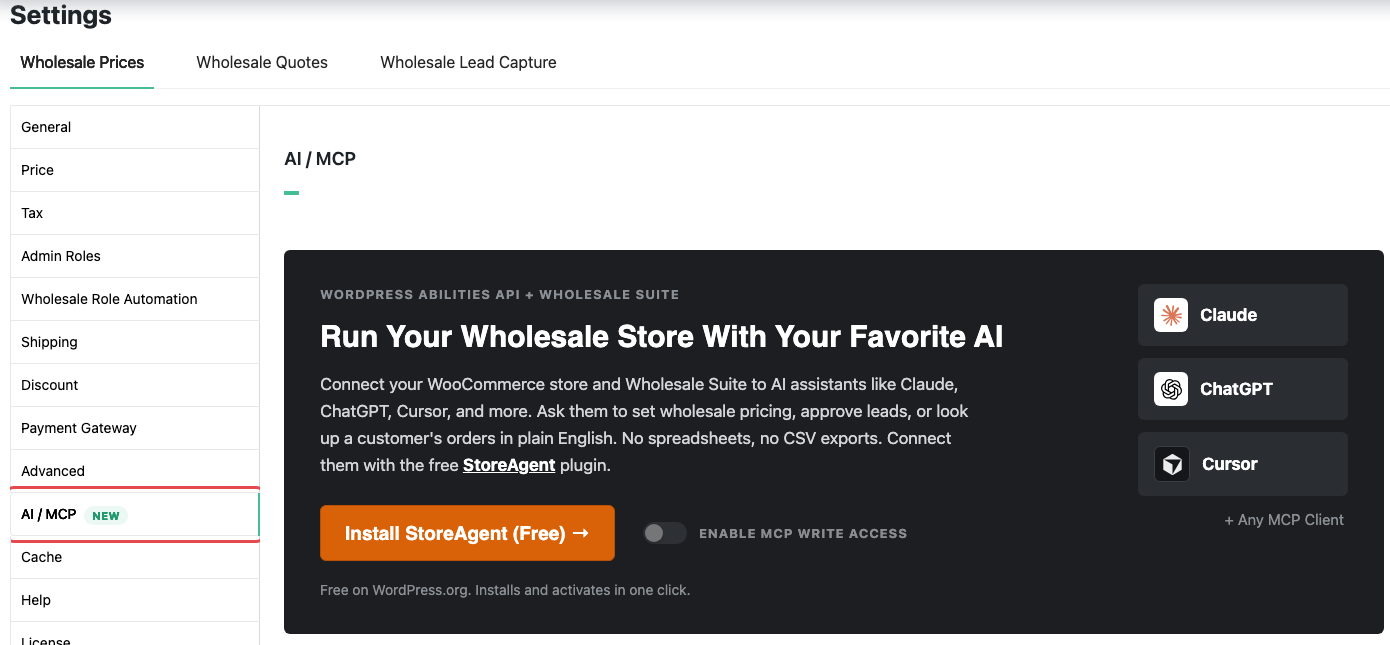
Step 2: Connect StoreAgent
The button on the AI / MCP tab changes depending on StoreAgent’s status. Click it and follow the prompts until the button reads Manage StoreAgent Connection.
| Button you see | What it means | What to do |
|---|---|---|
| Install StoreAgent (Free) | StoreAgent isn’t installed. | Click it. StoreAgent installs and activates in one click. |
| Install from WordPress.org | Your site doesn’t allow plugin installs from the dashboard, or your user can’t install plugins. | Install StoreAgent from WordPress.org yourself, or ask an Administrator, your host or your developer. |
| Activate StoreAgent | StoreAgent is installed but not active. | Click it to activate StoreAgent. |
| Update StoreAgent | Your StoreAgent version is older than 1.1.9. | Click it to go to the Plugins page, then update StoreAgent. |
| Set Up StoreAgent MCP | StoreAgent is active, but your account isn’t connected or MCP is off. | Click it, connect your StoreAgent account and turn on MCP. |
| Manage StoreAgent Connection | MCP is ready for your store. | You’re done with this step. |
If you see no button and the message “Ask a site administrator to activate it”, your WordPress user can’t activate plugins. Ask an Administrator to do this step.
For the full StoreAgent connection walk-through, see connecting ChatGPT or Claude to your store with MCP.
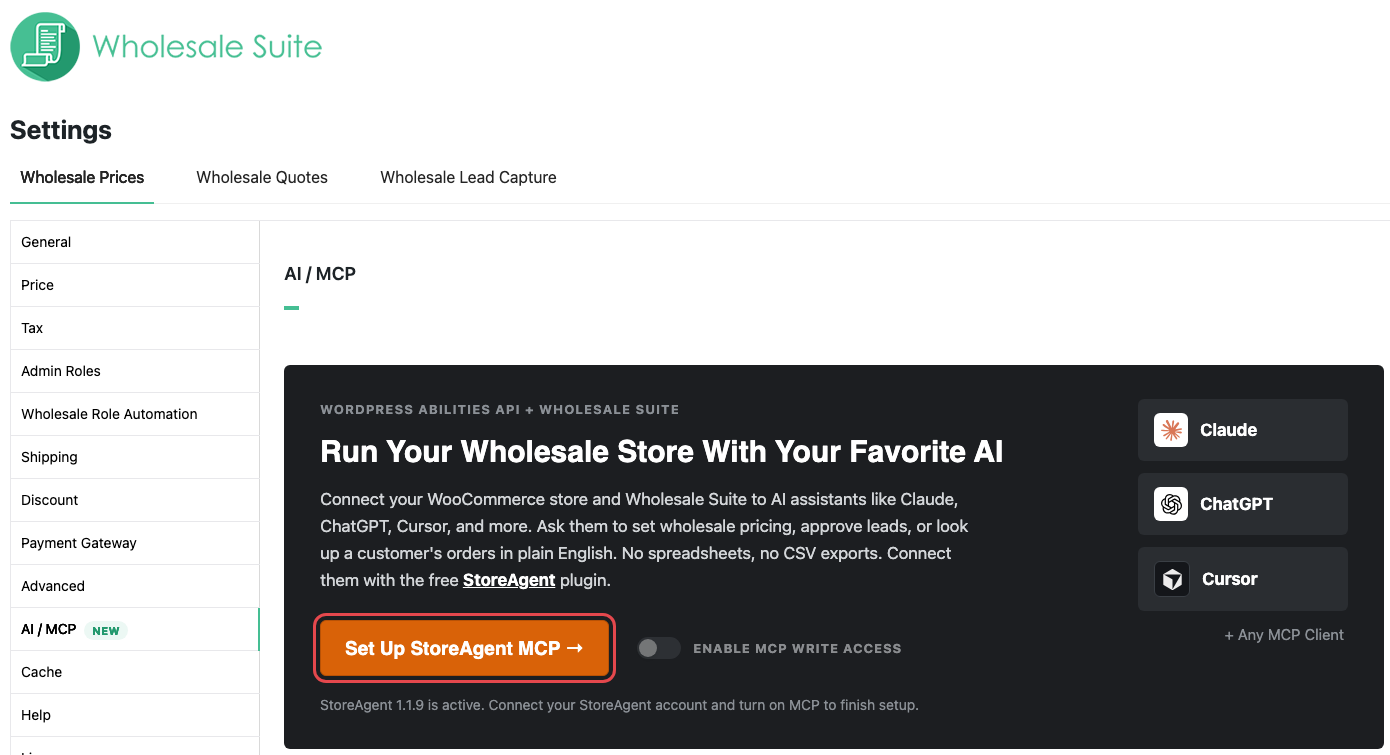
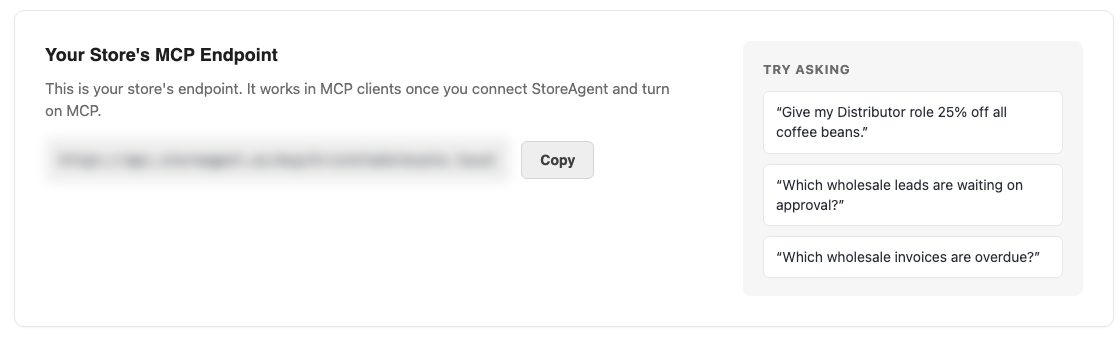
Step 3: Connect the assistant to your store
- Scroll to the Your Store’s MCP Endpoint card on the AI / MCP tab.
- Click Copy to copy your endpoint URL.
- Paste the URL into your AI assistant’s MCP or connector settings.
- Approve the connection when StoreAgent asks.
Copy is grayed out until StoreAgent 1.1.9 or newer is installed and active. The endpoint only works in your assistant once your StoreAgent account is connected and MCP is on.
When you approve the connection, you choose whether it gets read-only access or read and write access. The assistant acts as the WordPress user who approved the connection, so it can only do what that user can do. See who can use each ability below.
If you use an MCP adapter plugin instead of StoreAgent, follow that adapter’s own connection steps. The AI / MCP tab and its Enable MCP write access switch work only with StoreAgent.
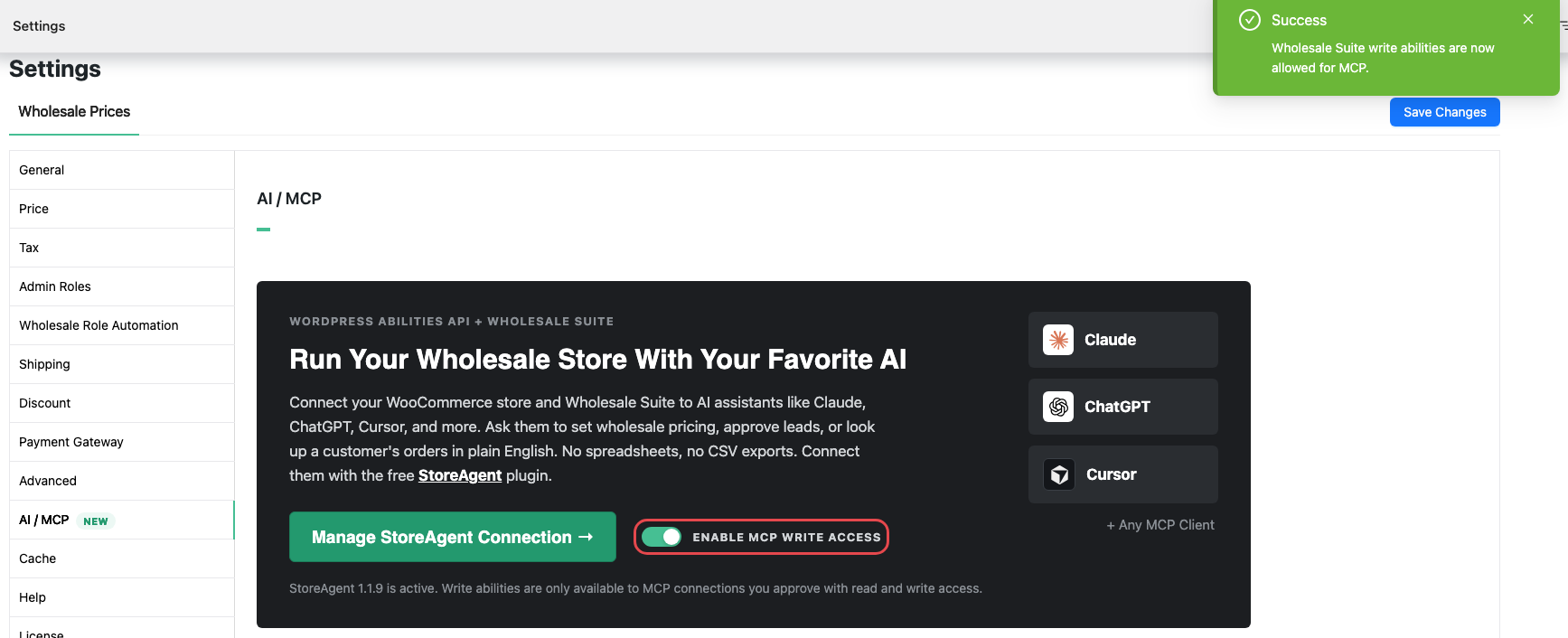
Step 4 (optional): Let the assistant make changes
By default, your assistant can only read wholesale data. To let it make changes, turn on write access.
Important: write access lets your assistant change live store data, including prices, discounts, customer roles, order forms and quotes. Some changes, like deleting an order form or a quote, can’t be undone. Start with read-only access and review what your assistant plans to do before you approve a change.
- On the AI / MCP tab, switch on Enable MCP write access.
- Wait for the message “Wholesale Suite write abilities are now allowed for MCP.”
Two separate settings control whether your assistant can make changes. Both must allow it:
The Enable MCP write access switch. On allows every Wholesale Suite ability that changes data. Off blocks them all again, including abilities from Wholesale Suite plugins that are inactive at the moment.
The connection’s access level. A connection you approved as read-only can’t make changes, even with the switch on. To change it, click Manage StoreAgent Connection and check your connections.
The switch is grayed out until your StoreAgent account is connected. If only some Wholesale Suite write abilities are allowed (for example, you changed them in StoreAgent’s own settings), the switch shows how many are allowed out of the total.
What your assistant can do
Wholesale Suite plugins register 47 abilities: 17 are Read only and 30 make changes. Your assistant may show an ability by its technical name, shown under each ability.
The AI / MCP tab also lists lead and invoice tasks. Wholesale Lead Capture and Wholesale Payments don’t add AI abilities yet, so your assistant can’t do those tasks today.
WooCommerce Wholesale Prices
| Ability | What it does | Type | Who can use it |
|---|---|---|---|
Get wholesale pricewholesale-suite/get-wholesale-price | Shows the wholesale price saved on a product or variation for a wholesale role. It doesn’t apply category, global, quantity or cart discounts. | Read only | Shop Managers and Administrators. Wholesale customers can read their own role’s price. |
Set wholesale pricewholesale-suite/set-wholesale-price | Sets or clears a wholesale role’s price on a simple product or variation. Clearing it reverts the product to its retail price. | Makes changes | Shop Managers and Administrators |
List wholesale customerswholesale-suite/list-wholesale-customers | Lists customers with a wholesale role, with each one’s last order date and lifetime spend. | Read only | Shop Managers and Administrators |
WooCommerce Wholesale Prices Premium
| Ability | What it does | Type | Who can use it |
|---|---|---|---|
List wholesale roleswholesale-suite/list-wholesale-roles | Lists every wholesale role with its member count and tax-exempt status. | Read only | Shop Managers and Administrators |
Get pricing overviewwholesale-suite/get-pricing-overview | Counts the wholesale pricing rules set up at each level (product, category, role, user and quantity). | Read only | Shop Managers and Administrators |
Get effective pricewholesale-suite/get-effective-price | Works out the wholesale price a specific customer pays for a product after product, category and role rules. | Read only | Shop Managers and Administrators |
Set global wholesale discountwholesale-suite/set-global-wholesale-discount | Sets or removes a role’s percentage discount off the regular price of every product. | Makes changes | Administrators only |
Set quantity discount rulewholesale-suite/set-quantity-discount-rule | Adds, updates or removes a role’s cart quantity discount tier (percentage only). | Makes changes | Administrators only |
Set cart subtotal discountwholesale-suite/set-cart-subtotal-discount | Adds, updates or removes a role’s discount that applies above a cart subtotal. | Makes changes | Administrators only |
Map shipping methodswholesale-suite/map-shipping-methods | Sets which shipping method a role sees when you don’t use shipping zones. | Makes changes | Administrators only |
Map payment gatewayswholesale-suite/map-payment-gateways | Sets which payment gateways a role can use at checkout. | Makes changes | Administrators only |
Map tax exempt roleswholesale-suite/map-tax-exempt-roles | Sets whether a role is tax exempt on wholesale-priced products. | Makes changes | Administrators only |
Set minimum order rulewholesale-suite/set-minimum-order-rule | Sets or removes a role’s minimum order quantity or subtotal. | Makes changes | Administrators only |
Set category wholesale discountwholesale-suite/set-category-wholesale-discount | Sets or removes a role’s percentage discount on every product in a category. | Makes changes | Administrators only |
Create wholesale rolewholesale-suite/create-wholesale-role | Creates a new wholesale role. It doesn’t set a discount for the role. | Makes changes | Administrators only |
Assign user to wholesale rolewholesale-suite/assign-user-to-role | Moves a user into a wholesale role, or out of wholesale onto your default role. | Makes changes | Administrators only |
Set product visibility rulewholesale-suite/set-product-visibility-rule | Sets which wholesale roles can see a product. | Makes changes | Administrators only |
Set role wholesale pricewholesale-suite/set-role-wholesale-price | Sets or clears a role’s price on a simple product or variation. | Makes changes | Administrators only |
Get effective price doesn’t include cart quantity discounts, cart subtotal discounts or a scheduled wholesale sale price. The price a customer pays at checkout can be lower than the result.
Assign user to wholesale role replaces every role the user has, including roles like Shop Manager or Editor. Check the user before you ask your assistant to move them. It won’t change the role of your last Administrator.
WooCommerce Wholesale Order Form
| Ability | What it does | Type | Who can use it |
|---|---|---|---|
List order formswholesale-suite/list-order-forms | Lists your order forms with their status and role visibility. | Read only | Shop Managers and Administrators |
Get order formwholesale-suite/get-order-form | Shows an order form’s full setup: columns, filters, sorting and settings. | Read only | Shop Managers and Administrators |
Get order form analyticswholesale-suite/get-order-form-analytics | Shows orders, revenue and average order value across all order forms combined for a date range. | Read only | Shop Managers and Administrators |
Get order form embedwholesale-suite/get-order-form-embed | Gives you the shortcode for adding an order form to a page or post. | Read only | Shop Managers and Administrators |
Create order formwholesale-suite/create-order-form | Creates a new order form. | Makes changes | Shop Managers and Administrators |
Duplicate order formwholesale-suite/duplicate-order-form | Copies an order form as a new draft. | Makes changes | Shop Managers and Administrators |
Update order formwholesale-suite/update-order-form | Changes an existing order form. Anything you don’t mention stays the same. | Makes changes | Shop Managers and Administrators |
Delete order formwholesale-suite/delete-order-form | Permanently deletes one or more order forms. | Makes changes | Shop Managers and Administrators |
Order form analytics are totals for all forms together. They can’t be split by individual form.
WooCommerce Wholesale Quotes
| Ability | What it does | Type | Who can use it |
|---|---|---|---|
List quoteswholesale-suite/list-quotes | Lists quotes, filtered by status, customer, date range or a search. | Read only | Shop Managers and Administrators. A logged-in customer sees their own quotes only. |
Get quotewholesale-suite/get-quote | Shows one quote with its items, status history and messages. | Read only | Shop Managers and Administrators. A logged-in customer can use it on their own quotes only. |
List quote messageswholesale-suite/list-quote-messages | Lists the messages on a quote. | Read only | Shop Managers and Administrators. A logged-in customer can use it on their own quotes only. |
List quote historywholesale-suite/list-quote-history | Lists a quote’s status changes, newest first. | Read only | Shop Managers and Administrators. A logged-in customer can use it on their own quotes only. |
Get quote public linkwholesale-suite/get-quote-public-link | Gives the public link of a quote that you already shared. It never creates a new link. | Read only | Shop Managers and Administrators. A logged-in customer can use it on their own quotes only. |
Get quote statswholesale-suite/get-quote-stats | Shows quote totals, counts per status, converted value and the approved-to-converted rate, for a date range or a customer. | Read only | Shop Managers and Administrators |
Get guest rate limit statuswholesale-suite/get-guest-rate-limit-status | Shows the guest quote rate limit for an IP address or email address. | Read only | Shop Managers and Administrators |
Get quote settingswholesale-suite/get-quote-settings | Shows your Wholesale Quotes settings. | Read only | Administrators only |
Update quotewholesale-suite/update-quote | Changes the items, addresses and notes on a pending or expired quote. The items you send replace the items on the quote. | Makes changes | Shop Managers and Administrators |
Set quote numberwholesale-suite/set-quote-number | Changes a quote’s quote number. | Makes changes | Shop Managers and Administrators |
Add item to quotewholesale-suite/add-item-to-quote | Adds a product or variation to a pending or expired quote. If the product is already on the quote, its quantity goes up. | Makes changes | Shop Managers and Administrators |
Remove item from quotewholesale-suite/remove-item-from-quote | Removes a line item from a pending or expired quote. | Makes changes | Shop Managers and Administrators |
Approve quotewholesale-suite/approve-quote | Approves a pending quote and sends the customer the approval email. | Makes changes | Shop Managers and Administrators |
Decline quotewholesale-suite/decline-quote | Declines a pending quote, with an optional reason, and sends the customer the decline email. | Makes changes | Shop Managers and Administrators |
Cancel quotewholesale-suite/cancel-quote | Cancels a quote that is not converted yet, with an optional reason. It sends no email. | Makes changes | Shop Managers and Administrators |
Convert quote to orderwholesale-suite/convert-quote-to-order | Turns an approved quote into a WooCommerce order. If the quote is already converted, it returns the existing order. | Makes changes | Shop Managers and Administrators |
Bulk update quote statuswholesale-suite/bulk-update-quote-status | Approves, declines or cancels up to 50 quotes at once. | Makes changes | Shop Managers and Administrators |
Send quote messagewholesale-suite/send-quote-message | Sends a message to the customer on a quote. | Makes changes | Shop Managers and Administrators |
Delete quotewholesale-suite/delete-quote | Permanently deletes a quote with its items, history and messages. | Makes changes | Shop Managers and Administrators |
Reset guest rate limitwholesale-suite/reset-guest-rate-limit | Clears the guest quote rate limit for an IP address or email address. | Makes changes | Shop Managers and Administrators |
Update quote settingswholesale-suite/update-quote-settings | Changes one or more Wholesale Quotes settings. | Makes changes | Administrators only |
Delete quote can’t be undone. Approve quote and Decline quote send the customer the same email as when you do it in the admin. Cancel quote sends no email.
Update quote replaces the whole item list. Ask your assistant to include every item you want to keep.
You can ask your assistant things like “what’s the wholesale price of the Classic Hoodie for the Wholesale Customer role?”, “who are my top 10 wholesale customers by lifetime spend?”, “set a minimum order of $250 for the Distributor role” “create a draft copy of my Bulk Coffee order form” or “which quotes are waiting for approval?”. It uses the matching ability to answer or act. Pricing rules like minimum orders need Wholesale Prices Premium.
Who can use each ability
Your assistant acts as the WordPress user who approved its StoreAgent connection. It gets exactly the permissions that user has in your store.
Shop Managers and Administrators can use every read ability, the free Set wholesale price ability, every Order Form ability and most Quotes abilities. The 12 Premium write abilities and the two Quotes settings abilities are for Administrators only, because they change store-wide rules, settings and user roles.
If a Shop Manager approved the connection, the assistant can read your Premium pricing but can’t change it. To use the Premium write abilities, have an Administrator approve the connection.
A logged-in customer, wholesale or not, can use five Quotes abilities on their own quotes only: List quotes, Get quote, List quote messages, List quote history and Get quote public link.
Troubleshooting
The assistant does not list any Wholesale Suite abilities
Update WooCommerce Wholesale Prices to 2.3.0 or newer. Earlier versions register no abilities, and Premium and Order Form depend on it. Then check that you run WordPress 6.9 or newer, or WooCommerce 10.9 or newer. One of them must provide the Abilities API. If they still do not appear, ask your developer to check that no disable switch is set. See “Turn abilities off (for developers)” below.
The AI / MCP tab is missing
Update WooCommerce Wholesale Prices to 2.3.0 or newer, then reload Wholesale > Settings.
The tab says to update StoreAgent
Update StoreAgent to 1.1.9 or newer from your Plugins page. Earlier versions don’t support MCP.
The Enable MCP write access switch is grayed out
Connect your StoreAgent account first. Click Set Up StoreAgent MCP and follow the prompts.
The assistant cannot create or change anything
Check these three things in order:
- Enable MCP write access is switched on.
- The connection was approved with read and write access, not read-only.
- For Premium changes, the user who approved the connection is an Administrator.
You see “The StoreAgent MCP allowlist is full”
Remove some entries in StoreAgent > Settings > MCP, then switch on Enable MCP write access again.
You see “The setting was saved, but StoreAgent could not sync it”
Your choice is saved. Retry the sync from StoreAgent > Settings > MCP.
The Premium, Order Form or Quotes abilities are missing
Check that the plugin is active and up to date: Wholesale Prices Premium 2.1.3 or newer, Wholesale Order Form 3.1.2 or newer, Wholesale Quotes 1.0.3 or newer. Each one also needs Wholesale Prices 2.3.0 or newer.
The assistant says the usage limit has been reached
Your StoreAgent plan has run out of AI actions for now. Check your plan on the StoreAgent pricing page.
Frequently asked questions
Will the assistant change prices without asking me?
Wholesale Suite marks abilities that overwrite or remove data as destructive, which tells your assistant to ask you before it runs them. Your assistant decides how it asks, so check its settings. For full control, keep write access off until you need it.
Can I see what the assistant changed?
On WordPress 7.1 or newer, Wholesale Suite logs every AI ability call. Go to WooCommerce > Status > Logs and pick the wwp-abilities-audit source.
Do I need StoreAgent?
No. StoreAgent is the easiest route, and the AI / MCP tab is built for it. You can also connect through an MCP adapter plugin. With an adapter, the Enable MCP write access switch has no effect, because it only changes StoreAgent’s settings. The adapter decides what your assistant can do.
Can wholesale customers use AI abilities?
A wholesale customer can read their own role’s wholesale price. Any logged-in customer can also list and read their own quotes, with their messages, history and public link. Every other ability needs a Shop Manager or Administrator.
Turn abilities off (for developers)
Each plugin has its own switch. Add the constant to wp-config.php, or use the filter in code. You need only one of the two.
WooCommerce Wholesale Prices: this switch turns off the abilities of every Wholesale Suite plugin, not only its own.
define( 'WWP_DISABLE_ABILITIES', true );

// Or use the filter:
add_filter( 'wwp_disable_abilities', '__return_true' );
WooCommerce Wholesale Prices Premium: turns off the Premium abilities only.
define( 'WWPP_DISABLE_ABILITIES', true );

// Or use the filter:
add_filter( 'wwpp_disable_abilities', '__return_true' );
WooCommerce Wholesale Order Form: turns off the Order Form abilities only.
define( 'WWOF_DISABLE_ABILITIES', true );

// Or use the filter:
add_filter( 'wwof_disable_abilities', '__return_true' );
WooCommerce Wholesale Quotes: turns off the Quotes abilities only.
define( 'WWQ_DISABLE_ABILITIES', true );

// Or use the filter:
add_filter( 'wwq_disable_abilities', '__return_true' );
Audit log only: to keep the abilities but stop the wwp-abilities-audit log, use this switch.
define( 'WWP_DISABLE_ABILITIES_AUDIT', true );

// Or use the filter:
add_filter( 'wwp_disable_abilities_audit', '__return_true' );
Need help?
If you have a question or run into any issues, we’re here to help.
- Premium users: Open a support ticket
- Free users: Visit our community forum

