
Your Wholesale Suite license renews once a year, and almost everything about it is yours to change from your own account. This article covers how the subscription works, how to switch off auto-renewal, and how to move to a bigger plan partway through the year. By the end, you know which changes you can make yourself and which ones need our support team.
Prerequisites
- A Wholesale Suite account.
- An active subscription on that account.
How subscriptions work
When you buy any Wholesale Suite plugin, your account is activated with an annual subscription. It auto-renews each year at the standard rate, which keeps your plugin updates, new features, and premium support running without a gap.
What the All Access Bundle includes
The All Access Bundle covers five plugins: Wholesale Prices Premium, Wholesale Payments, Wholesale Order Form, Wholesale Lead Capture and Wholesale Quotes.
Each plugin has its own license key, listed separately under My Account, then Downloads. A key activates only its own plugin, so install each one and activate it with its matching key. For the steps, see How to retrieve and activate your Wholesale Suite license keys.
How to cancel your subscription
Cancelling switches off automatic renewal. You keep access until the end of the period you have already paid for.
- Log in to your account.
- Open the Subscription tab.
- Click View next to the subscription you want to stop. This opens that subscription’s own page.
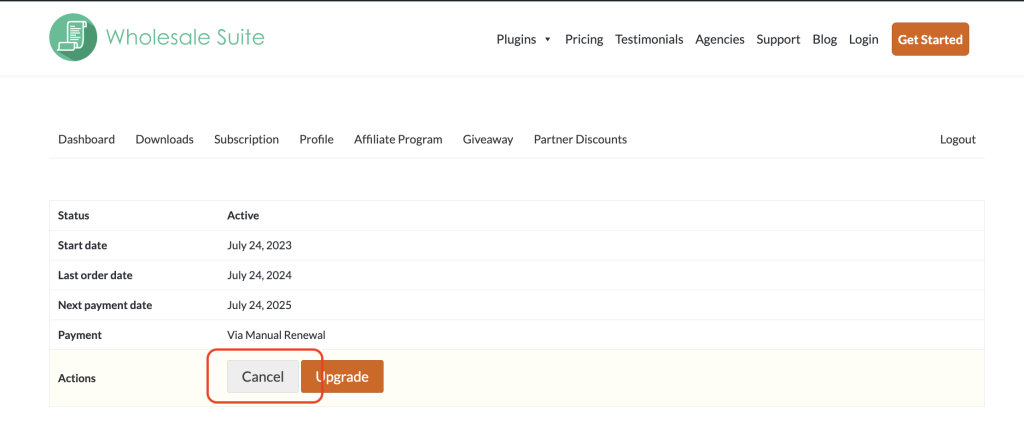
- Click Cancel in the actions on that page.
Your access doesn’t stop straight away. Your subscription shows Pending Cancellation, and you can keep using the plugin until the end of the current billing period. After that the license expires, and updates and support stop.
Changed your mind? Open the subscription from the Subscription tab and click Reactivate before the expiry date. On the expiry date, the subscription changes to Cancelled automatically. A cancelled subscription can’t be renewed, so to get updates and support again you need to buy a new license from our pricing page.
How to upgrade your license
You can move to a bigger plan yourself at any point in the year. You don’t need to open a ticket for this.
- Log in to your account.
- Open the Subscription tab.
- Click View next to the subscription you want to change. This opens that subscription’s own page.
- Click Upgrade in the actions on that page.
- In the Upgrade Your Subscription window, choose your new plan.
- Click PROCEED.
The window lists the individual plans you can move up to, and any bundle that includes your current plugin. The cost is prorated against the time left on your current plan, so you only pay the difference. For the full walkthrough, see How To Upgrade Plugin License?
If you don’t see an Upgrade option, there is nothing above your current plan to move to. That happens when you are already on the largest license or bundle for that plugin.
Troubleshooting
An unexpected charge appeared on my account. Open a support ticket so we can check your transaction history. A charge can land if it was processed before your cancellation took effect. Cancelling stops future renewals. It doesn’t reverse a payment that already went through.
I want to move down from Unlimited to Single-site. License changes that go down a level need our help. Open a support ticket and we will process it for you.
I want to move from the All Access Bundle down to a single plugin. Open a support ticket and we will make the change for you.
My license expired and the plugin stopped updating. That is expected. The plugin keeps working, but updates and support stop at expiry. Once the license has expired, the subscription shows Cancelled and can’t be renewed, so buy a new license from our pricing page to start updates and support again. To avoid this, open the subscription from the Subscription tab and click Reactivate before the expiry date.
Frequently Asked Questions
How do I disable auto-renewal?
Cancel the subscription. Open the Subscription tab, click View next to the subscription, then click Cancel. Your access continues to the end of the current billing period and then stops. Until that date, you can click Reactivate on the same page to undo it. After it, the subscription is cancelled and can’t be renewed.
Can I switch to monthly billing?
No. Wholesale Suite offers annual plans only, so every subscription renews yearly.
Does my WooCommerce store break if my license expires?
No. The plugin keeps working normally. You stop receiving updates and support, so your store stays on the last version you installed.
Can I upgrade partway through the year?
Yes, and you can do it yourself from the Subscription tab. See the upgrade steps above. The cost is prorated, so you only pay the difference.
Need Help?
If you have a question or run into any issues, we’re here to help.
- Premium users: Open a support ticket
- Free users: Visit our community forum

