
When you buy a Wholesale Suite plugin you get a license key, and you need it in two places: your account on our site, where the key lives, and your own WordPress admin, where you enter it. This guide covers finding your keys, entering them on your site, and what to do when an activation does not go through. By the end you will have every plugin you have bought activated and receiving updates.
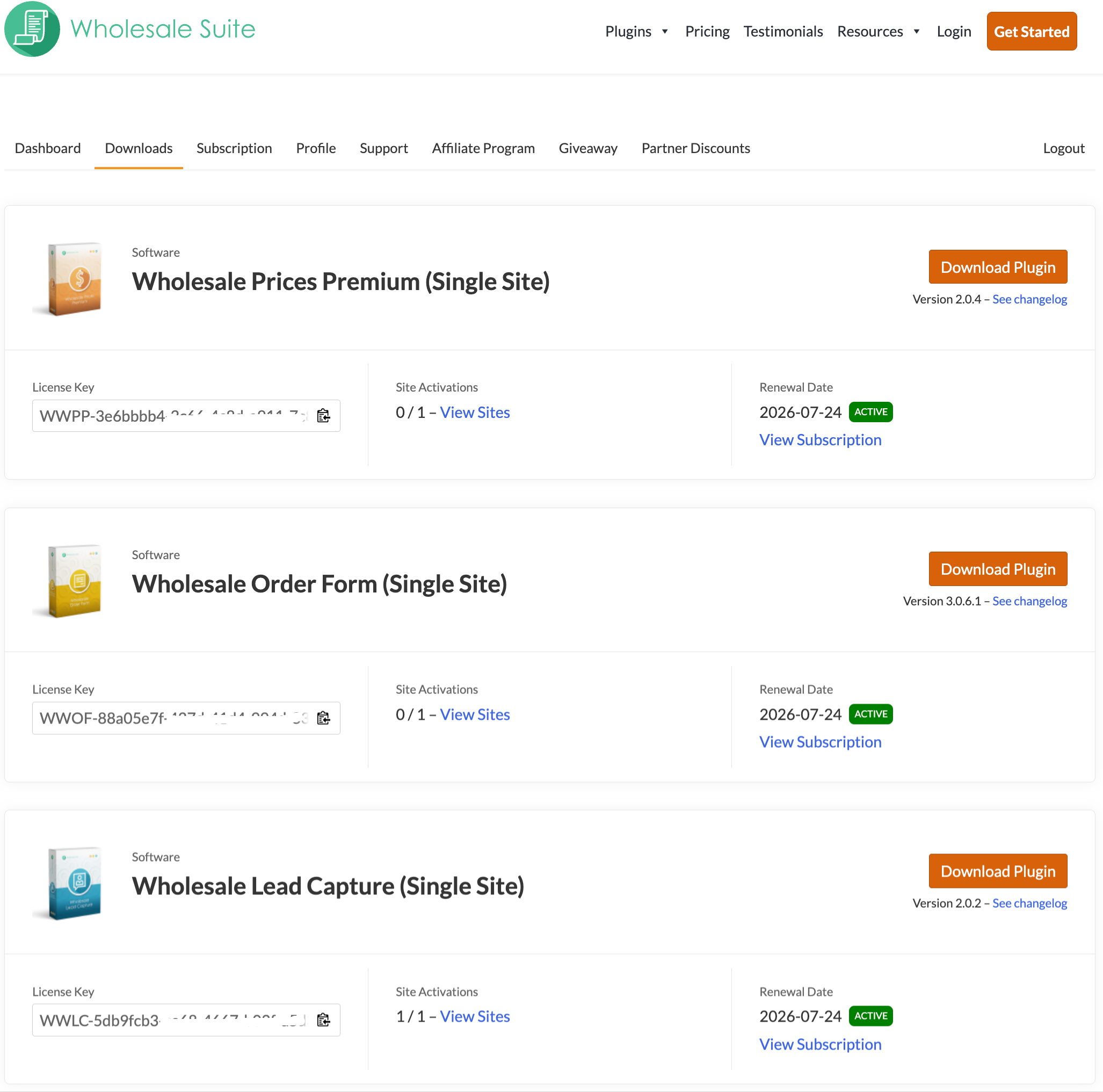
Retrieve your license keys anytime
Your keys live in the Downloads section of your account on our site, and you can go back to them at any time.
- Sign in to My Account on wholesalesuiteplugin.com.
- Open the Downloads tab.
- Find the plugin you want to activate in the list.
- Copy its license key.
The Downloads page also shows:
- All active licenses are tied to your account
- License key expiry dates
- A list of websites currently using your license
- Subscription information
- Access to plugin changelogs and more
This ensures that you’re always up to date with the latest plugin versions and features.
Enter your license key on your site
Once you have the key, you enter it in your own WordPress admin. The license screen is shared by every Wholesale Suite premium plugin, and each plugin has its own tab on it.
- In your WordPress admin, go to Wholesale > License.
- Open the tab for the plugin you are activating: Wholesale Prices, Wholesale Ordering, Wholesale Lead Capture, Wholesale Payments or Wholesale Quotes.
- Enter the license email into License Email.
- This is the email the license is registered to, which is often the billing email on the order and is sometimes a different address.
- Paste your key into License Key.
- Click Save Changes.
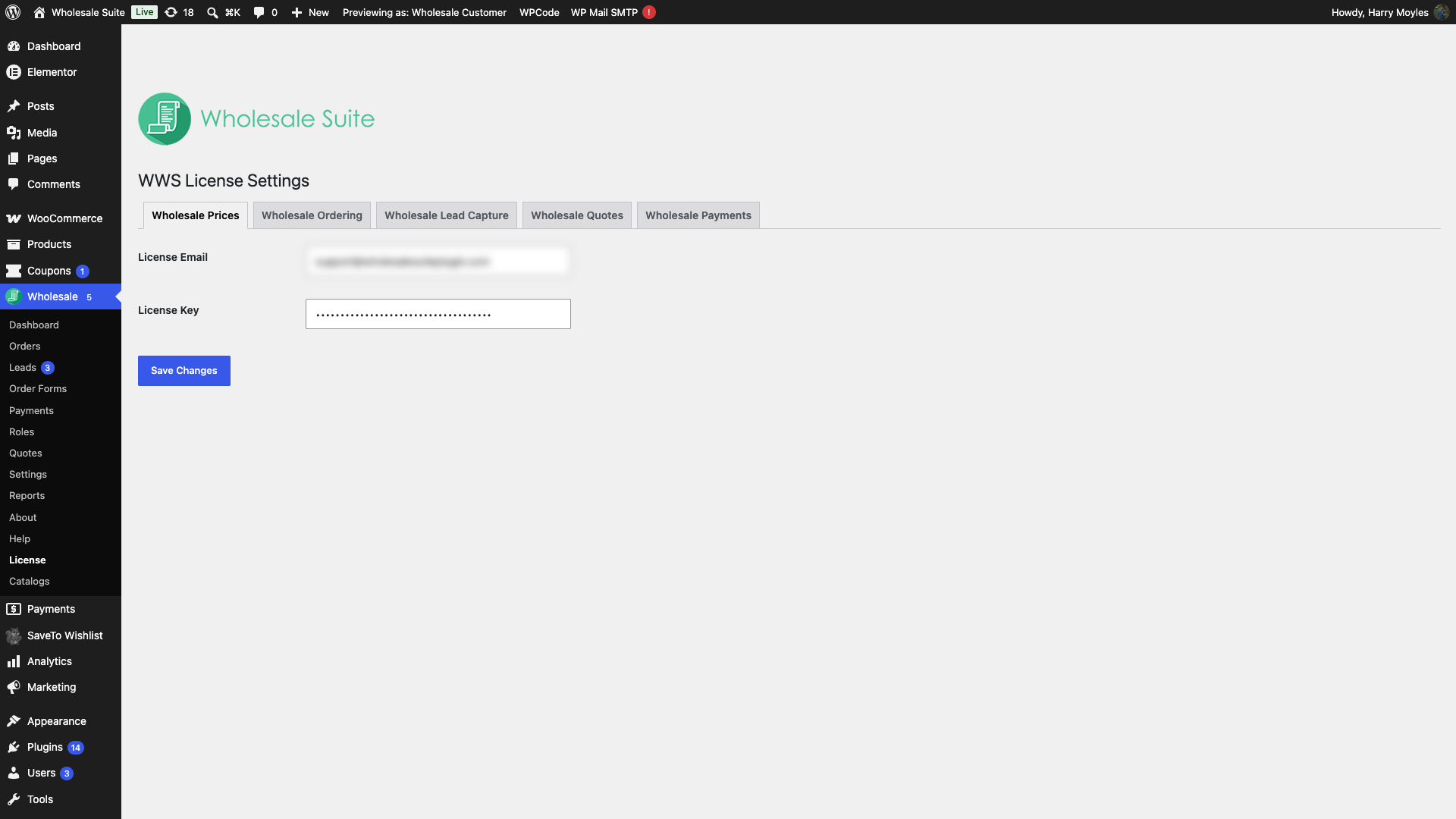
If you bought a bundle, repeat this on each plugin’s tab. A key activated on one tab does not activate the others, so a plugin can still report itself as unlicensed while the rest are active.
Activate your license on all sites, including staging sites
To use Wholesale Suite on your WooCommerce store, a valid and non-expired license key must be activated on every website where the plugin is installed. This includes live websites, staging environments, and development sites. An active license is required to:
- Receive automatic plugin updates
- Access premium support
- Unlock all features of your purchased plugin
Without an active license key, you won’t be able to download updates or receive assistance from our support team.
If your license key will not save
The plugin stores the key and the email before it contacts the licensing server, so a failed activation can look like a failed save. The key is saved. The activation is what did not complete.
Two causes account for most of these.
- The screen shows “Invalid activation email”. The address you entered does not match the license email. Each license carries its own email, often the billing email from the order and sometimes a different one. Capitalisation does not matter, so a capital letter is never the cause. If Downloads shows no plugins, the address you sign in with is not the license email, and the page cannot show you the license email either. Check the purchase confirmation or invoice email for that order, or ask support.
- The screen shows “Failed to activate license. Failed to connect to license server.” The site could not reach the licensing server. The request gives up after 10 seconds, which usually points at a firewall or a security plugin blocking outbound requests.
Send us the exact message shown on screen. Each message points at a different cause, so the wording is what tells us where to look.
Managing email addresses on your account
If you need to update the email address associated with your Wholesale Suite account, please contact our Support team directly. While you’re able to change your login email on your end, the activation email (used to validate and display plugin licenses) must be updated by our team.
⚠️ Important: If your login email and activation email are different, you may experience issues seeing your plugin files or license details in your account.
Stay in control of your Wholesale Suite plugin licenses
Whether you’re managing one site or multiple client stores, our account dashboard gives you full control over your Wholesale Suite plugin licenses. You can:
- Remove licenses from old or inactive sites
- Reassign licenses to new domains
- View plugin changelogs before updating
- Manage your subscription billing details
By keeping your licenses active and account information updated, you ensure uninterrupted access to the latest features, performance improvements, and expert support from the Wholesale Suite team.
Frequently asked questions
Where do I find my Wholesale Suite license key?
First, log in to your account. Then, head to the Downloads section inside your My Account area. There, you’ll find all your active keys, along with expiration dates, the sites using each one, subscription details, and plugin changelogs.
Does one Wholesale Suite purchase cover staging and development sites?
Yes, but keep in mind that you must activate a valid license on every site where it’s installed. This includes staging and development environments. As a result, each installation counts toward your limit, so it’s important to track where your activations are deployed.
Which email do I use to activate my license?
Use the license email, which is the address attached to the license itself. It is often the billing email from the order, but the two can be different. Capitalisation does not matter. Downloads shows the license email beside each license it lists, but it only lists licenses that match the address you signed in with. So when the list is empty it cannot tell you the license email either. Look for the address on the purchase confirmation or invoice email for that order, or ask the support team and we can align the two addresses.
What happens if my login email and activation email differ?
Your plugins will not appear under Downloads, because the account lists licenses against the license email. If you sign in with a different address, the list comes up empty even though the license is valid. Contact the support team and we can align the two addresses.
Can I reassign my license key to a new domain?
Yes, you can. Deactivate the license from the old installation and reassign it to a new domain. This means you won’t need to purchase a replacement when moving or rebuilding your store.
Why aren’t my plugin updates coming through automatically?
Typically, automatic updates only work when your license is active and not expired. So, check the Downloads section to confirm its status. If your subscription has expired, updates and premium support will be paused until you renew.
Need help?
If you have a question or run into any issues, we’re here to help.
- Premium users: Open a support ticket
- Free users: Visit our community forum

