
If you want wholesale customers to pay extra for using certain payment methods, such as covering the processing cost of credit card payments, you can configure this per payment gateway.
This article covers how to set up payment gateway surcharges in WooCommerce Wholesale Prices Premium, either for a whole wholesale role or for an individual customer.
Requirements
- WooCommerce Wholesale Prices Premium installed and activated.
- At least one WooCommerce payment gateway enabled in your store.
- Wholesale roles configured at Wholesale → Roles.
Setting a surcharge by wholesale role
Configure a surcharge that applies to every customer assigned to a wholesale role.
- Go to Wholesale → Settings → Wholesale Prices → Payment Gateway.
- Scroll to the Wholesale Role / Payment Gateway Surcharge section.
- Configure the following fields:
- Wholesale Role: the role this mapping applies to.
- Payment Gateway: the payment method that triggers the fee.
- Surcharge Title: the label the customer sees on the cart and checkout totals.
- Surcharge Type: Fixed Price or Percentage.
- Surcharge Amount: the value to charge.
- Taxable?: whether the amount is taxed using the customer’s wholesale tax class.
- Click Add Surcharge.
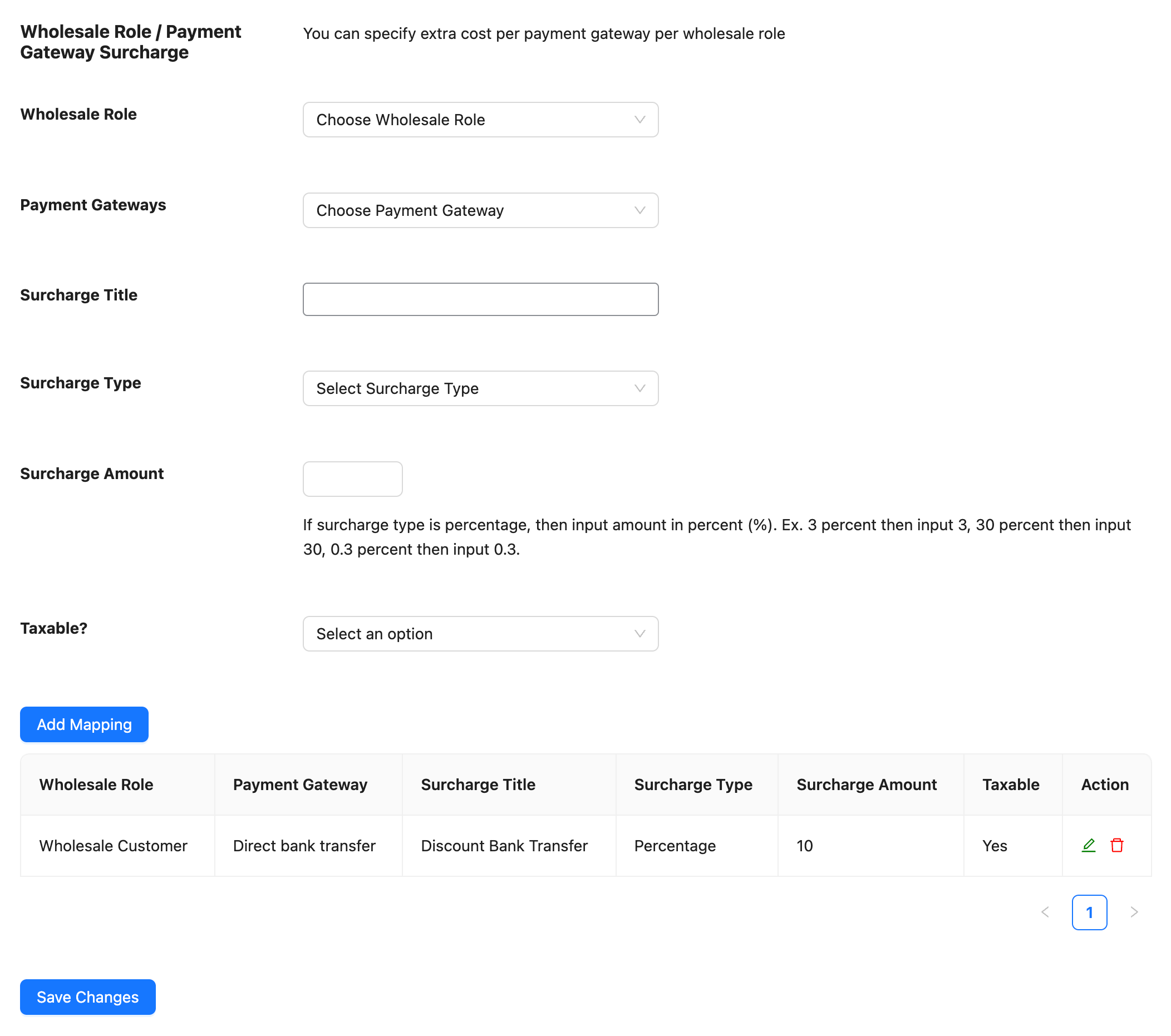
To edit an existing mapping, click the edit icon in its row, update the fields, then click Save Surcharge. To remove a mapping, click the delete icon in its row.
How the Percentage surcharge type is calculated
When Surcharge Type is set to Percentage, the amount charged is calculated against the cart subtotal plus the shipping total, not the order total. For example, a customer with a $200 cart and $10 shipping who has a 10 Percentage mapping is charged a $21 surcharge.
Overriding settings for individual users
Override the role-level mapping for a specific customer without changing it for the rest of their wholesale role.
- Go to Users → All Users and click Edit on the customer’s account.
- Scroll to the Per User Wholesale Prices Settings section.
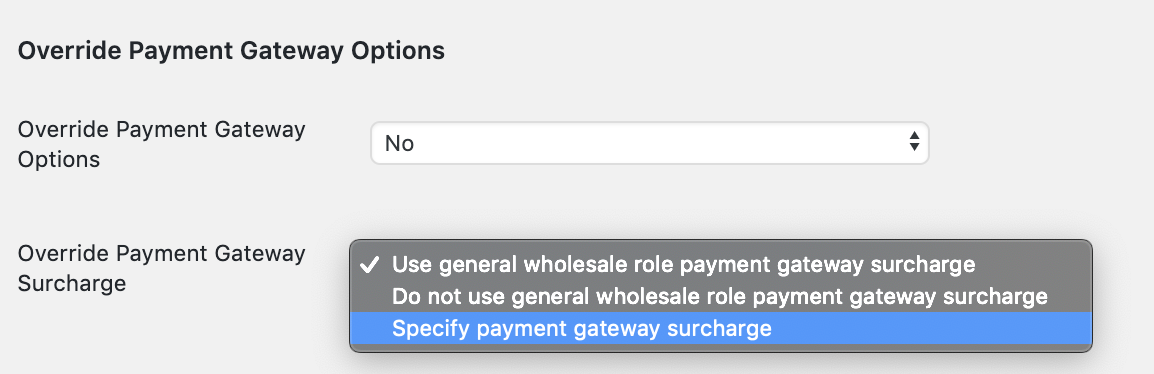
- Set the Override Payment Gateway Surcharge field to one of:
- Use general wholesale role payment gateway surcharge: applies the role-level mapping configured above. This is the default.
- Do not use general wholesale role payment gateway surcharge: exempts this customer from any surcharge.
- Specify payment gateway surcharge: reveals a separate mapping table scoped to this customer only, using the same Wholesale Role, Payment Gateway, Surcharge Title, Surcharge Type, Surcharge Amount and Taxable? fields described above.
- Click Update User to save.
Applying surcharges and discounts to manual orders
When you create or recalculate a manual wholesale order in WooCommerce admin, Wholesale Prices Premium reproduces the same cart-level adjustments as fee lines on the order. A payment gateway surcharge appears as a positive fee, while a subtotal-based wholesale discount appears as a negative fee.
The surcharge uses the payment method saved on the order and the mapping for the customer’s wholesale role or individual override. Reapplying wholesale pricing refreshes these fee lines without stacking duplicates.
- Select the wholesale customer for the order.
- Add the products to the order.
- Choose the order’s Payment method.
- Enable Apply Wholesale Pricing.
- Click Update to save the payment method and refresh the order adjustments.
- Review the fee lines and order total before sending order details or a payment request to the customer.
Troubleshooting
Why isn’t a surcharge showing at checkout?
Confirm the customer is logged in with a wholesale role that has a mapping for the payment gateway they have selected. The mapping only applies to the currently selected payment method, or the store’s default gateway if none has been chosen yet, so ask the customer to select their payment method again if the cart totals do not update.
I set a role-level mapping but a specific customer isn’t getting it. What should I check?
Check that customer’s Override Payment Gateway Surcharge setting on their user profile. If it is set to Do not use general wholesale role payment gateway surcharge, the mapping is intentionally excluded for them. If it is set to Specify payment gateway surcharge, their own mapping table is used instead of the role-level one.
The Percentage amount looks wrong. What is it being calculated from?
Percentage surcharges are calculated against the cart subtotal plus the shipping total, not the order total after tax. Recalculate the expected value using that base before assuming the setting is incorrect.
Frequently asked questions
Does this work for guest checkouts?
No. Payment gateway mappings apply only to logged-in customers who have a wholesale role assigned.
Can I set a different surcharge for more than one payment gateway?
Yes. Add a separate mapping row for each payment gateway you want to configure.
Does the surcharge apply on the WooCommerce order-pay page, such as when a customer pays a pending order from an email link?
Yes. It recalculates automatically if the customer switches payment method on that screen.
Is the surcharge taxed?
Only if Taxable? is set to Yes on that mapping, in which case the customer’s wholesale tax class is applied.
Does a Fixed Price amount convert correctly if I use a multi-currency plugin?
Fixed Price surcharges convert automatically when the Aelia Currency Switcher plugin is active and the customer is shopping in a different currency than the store’s base currency. Percentage amounts don’t need conversion because they are calculated from the already-converted cart total.
What happens if a customer is assigned more than one wholesale role?
The mapping is matched against the customer’s primary wholesale role. Assign customers to a single role if you need role-specific payment gateway pricing. Please note giving a wholesale customer different wholesale roles may cause them to conflict one another.
Will an administrator or shop manager account trigger a mapping when testing an order?
Only if that account also has a wholesale role assigned. An administrator account without a wholesale role does not trigger any mapping.
Help & support
We have a dedicated support team for Wholesale Suite who knows our products, WooCommerce, and the industry very well. You’re welcome to make use of their expertise at any time, worldwide.
If you are an existing customer please go to the support ticket request form and send us a message.
If you are a free plugin user, please send us a support request on the forum. We actively monitor the WordPress.org support forums for the free plugin and help our users there as best as we can.

