

Merci d'avoir acheté l'extension Premium de notre plugin gratuit Prix de gros !
Ce document est un guide de démarrage pour le plugin WooCommerce Prix de gros Premium pour WooCommerce.
Le plugin Premium vous permet de réduire davantage votre dépendance aux feuilles de calcul peu pratiques afin que tous vos clients de gros puissent profiter de commander via votre boutique en ligne. Il vous offre une multitude de fonctionnalités supplémentaires qui vous aideront à être plus avancé dans la façon dont vous proposez des produits de gros à vos clients.
Voici ce que ce guide couvrira :
- Aperçu – nous décrivons ce que fait le plugin en plus du plugin gratuit
- Rôles supplémentaires de clients de gros – nous vous montrerons comment ajouter plus de niveaux de rôles utilisateur afin que vous puissiez séparer vos clients de gros en groupes
- Plus de fonctionnalités de prix de gros – nous montrons toutes les nouvelles façons flexibles supplémentaires dont vous pouvez appliquer les prix de gros à vos produits
- Visibilité des produits – afficher et masquer les produits aux clients de détail et de gros et par leur rôle également
- Correspondance des expéditions – cette fonctionnalité importante vous permettra de configurer des expéditions spécifiques pour les grossistes
- Correspondance des passerelles de paiement – apprenez comment donner à vos clients de gros l'accès à des passerelles de paiement spécifiques
- Exigences de commande minimum – définissez un minimum pour activer les prix de gros que vos clients de gros doivent respecter
- Taxes avancées – la taxation est une partie importante de la vente en gros et nous vous montrerons à quel point vous pouvez la rendre flexible
- Autres plugins de la suite – nous vous montrerons pourquoi vous devriez envisager d'ajouter Wholesale Order Form et Wholesale Lead Capture
- Obtenir de l'aide – nous comprenons que cela peut être un outil complexe, nous vous montrerons où obtenir de l'aide si vous en avez besoin
Vue d'ensemble
WooCommerce Wholesale Prices Premium est le plugin d'extension premium pour le plugin gratuit WooCommerce Wholesale Prices. Il nécessite que le plugin gratuit soit installé et activé pour fonctionner.
Il y a des centaines de fonctionnalités incluses dans l'extension premium, vous pouvez voir ici pour une liste complète, mais aujourd'hui nous allons passer en revue seulement quelques-unes des fonctionnalités majeures afin que vous puissiez être opérationnel le plus rapidement possible.
Tout d'abord, nous parlerons de la possibilité d'ajouter plus de rôles de gros et pourquoi vous voudriez le faire.
Rôles supplémentaires de gros
Dans le guide de démarrage du plugin de prix de gros gratuit, nous avons discuté pourquoi les prix sont attachés aux rôles des utilisateurs.
Dans Prices Premium, vous pouvez ajouter des rôles utilisateur supplémentaires afin de pouvoir faire des choses comme :
- Créer des groupes distincts de clients de gros
- Définir des niveaux de prix supplémentaires
- Fournir des exigences de commande minimum différentes
- Et bien plus encore…
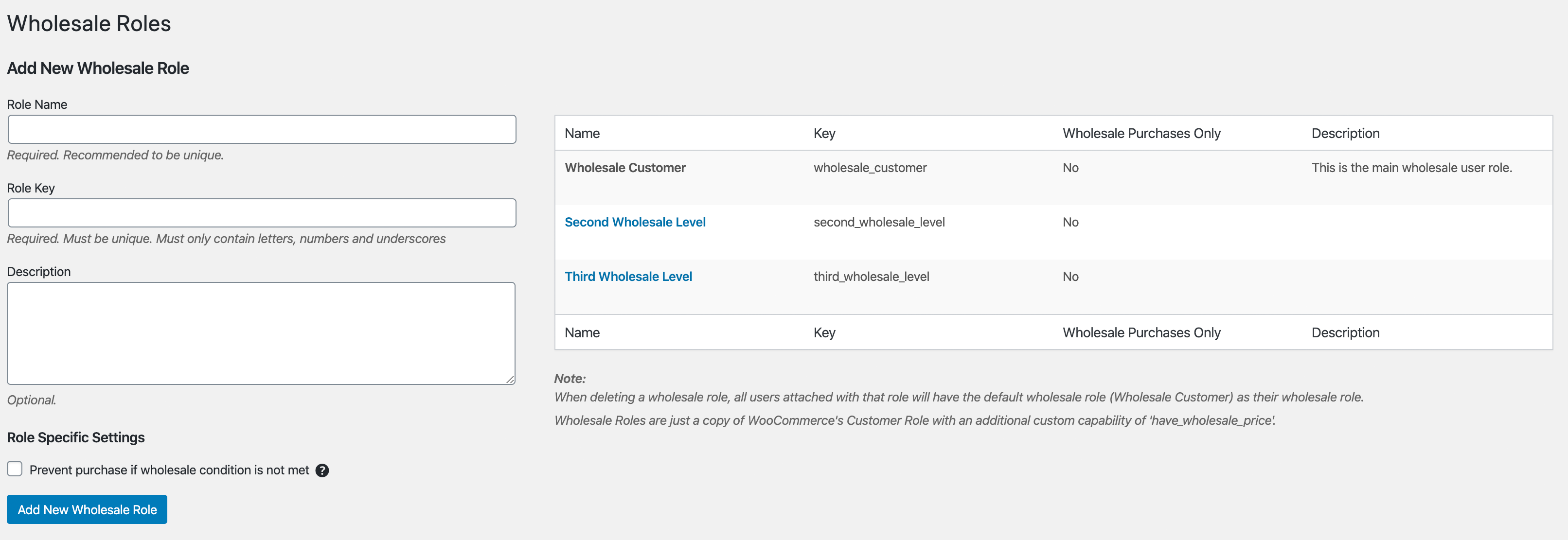
Vous pouvez ajouter facilement des rôles supplémentaires via le menu Gros -> Rôles. Cela fonctionne un peu comme une page de catégories WordPress, donc cela devrait vous sembler familier.
Pour chaque rôle ajouté au système, vous verrez des champs de prix de gros sur vos produits.
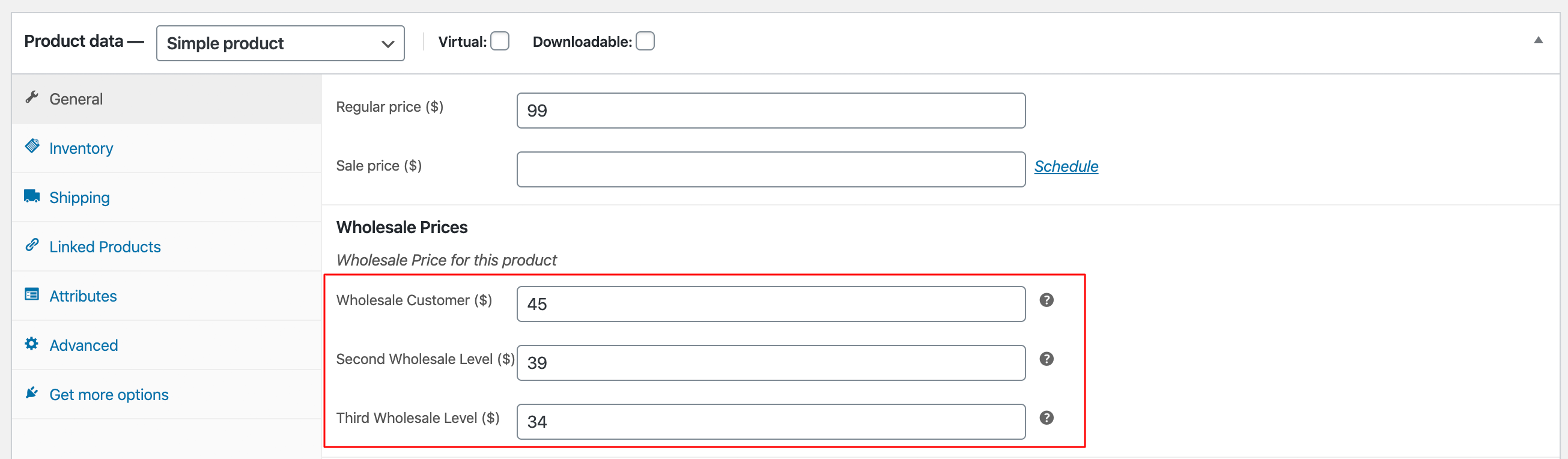
Il y a deux raisons principales pour lesquelles nous avons constaté que les gens ajoutent des rôles supplémentaires :
- Ils veulent séparer les clients de gros locaux de ceux qui viennent d'autres pays afin de pouvoir appliquer des prix, des niveaux minimums, des méthodes d'expédition, etc. différents pour ces clients.
- Ils veulent créer des « niveaux » distincts de relations de gros, comme Bronze, Argent, Or, Platine, où les avantages et les prix s'améliorent à mesure qu'ils montent dans les niveaux.
Je vous encourage à réfléchir à la structure que vous souhaitez pour vos clients de gros avant de passer à la définition des prix.
Lisez cet article pour des instructions plus détaillées sur la façon d'ajouter des rôles de gros supplémentaires.
Prix basés sur un pourcentage (%) et prix basés sur la quantité
Dans le plugin gratuit, vous pouvez définir les prix de gros via l'écran de modification du produit et, dans de nombreux cas, cela convient à de nombreux magasins.
Mais dans le plugin Prices Premium, vous pouvez désormais également définir les prix de gros au niveau de la catégorie et au niveau global. Vous pouvez également créer des prix basés sur la quantité où le client bénéficie de réductions sur le prix plus il achète.
Nous avons un guide très détaillé sur le fonctionnement des prix de gros dans Wholesale Suite ici. Plutôt que de répéter ce guide détaillé ici, je vous encourage à consulter cet article pour vous mettre à jour.
Je vais juste expliquer rapidement un concept, car il est important. Les prix de gros suivent des règles de précédence qui sont à peu près les suivantes :
Prix de gros du produit -> Remise % au niveau de la catégorie -> Remise % globale
Si le prix de gros du produit n'a pas été défini, le système vérifiera s'il existe une remise % au niveau de la catégorie, sinon il vérifiera s'il existe une remise % globale. Il commence toujours au niveau le plus bas et s'arrête lorsqu'il trouve qu'un prix a été défini.
Donc, si vous avez défini une remise % globale qui sera utilisée pour tous nos produits globalement, mais si vous avez défini un prix spécifique sur un certain produit, ce prix sera utilisé pour ce produit.
Encore une fois, lisez le guide des prix de gros et il expliquera ce concept et entrera dans les détails sur la façon de définir correctement ces prix basés sur des %.
Visibilité des produits
Dans Prices Premium, vous pouvez afficher et masquer des produits aux clients de plusieurs manières intéressantes. Cela vous offre beaucoup de flexibilité, comme la possibilité de créer des produits réservés aux grossistes qui ne sont pas montrés aux clients de détail ou, de même, la possibilité de masquer les produits non réservés aux grossistes aux clients de détail.
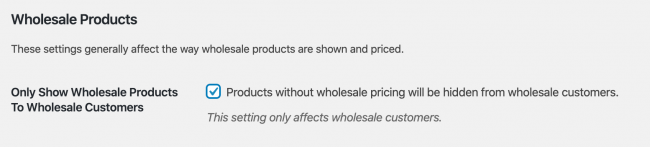
La première est un paramètre appelé « Afficher uniquement les produits de gros aux grossistes » qui fait essentiellement ce qu'il dit. Une fois activé, vos clients de gros ne pourront voir un produit que s'il a des prix de gros définis (et oui, cela inclut les prix basés sur des %).
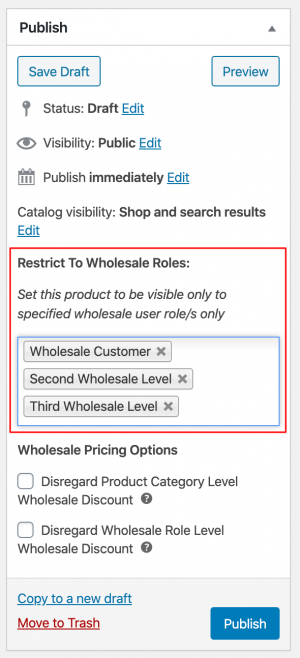
Ensuite, il y a un paramètre basé sur le produit que vous trouverez dans la boîte de publication des produits appelé « Restreindre aux rôles de gros ». Ici, vous pouvez restreindre la visibilité d'un produit entier à des niveaux de gros spécifiques. Cela peut être utile si vous n'ouvrez que certains produits à certains clients, par exemple lorsque vous avez séparé les clients par rôle géographique.
Enfin, vous pouvez également restreindre la visibilité des variations individuelles de produits sur les produits de type variable. Cela peut être fait par rôle également, tout comme la fonctionnalité de restriction aux rôles de gros.

Encore une fois, nous avons un guide approfondi sur la visibilité des produits ici que vous pouvez consulter.
Mappage des passerelles d'expédition et de paiement
L'un des avantages d'avoir des utilisateurs séparés en rôles est que vous pouvez « mapper » des éléments à ces rôles.
Nous faisons cela dans pas mal d'endroits, dont deux principaux sont le mappage d'expédition et le mappage de passerelle de paiement.
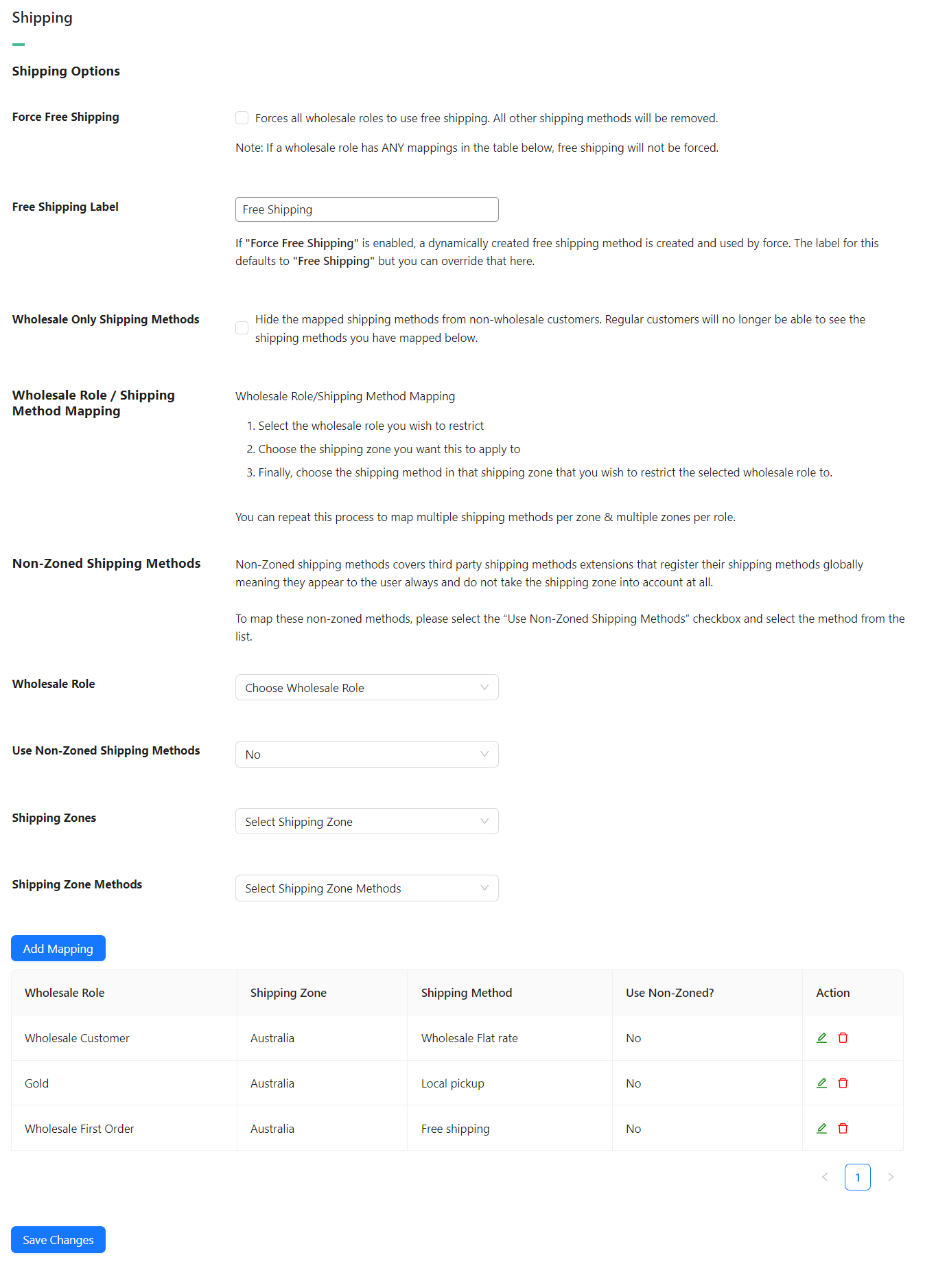
Mappage des méthodes d'expédition
Mapper une méthode d'expédition signifie que vous pouvez configurer le système pour n'afficher à certaines personnes de ce rôle de vente en gros que certaines méthodes d'expédition. Vous pouvez également masquer ces méthodes d'expédition afin qu'elles ne soient visibles que pour ce rôle de vente en gros particulier.
WooCommerce lui-même dispose d'excellents contrôles d'expédition basés sur la localisation. Vous pouvez donc avoir une méthode d'expédition pour une zone spécifique uniquement.
Ces deux éléments combinés signifient que vous pouvez créer des prix d'expédition de vente en gros spécifiques par zone et par rôle.
Un bon exemple d'utilisation serait de créer une méthode d'expédition « Retrait local » pour votre zone locale uniquement et de ne la rendre disponible qu'aux clients en gros.
Ne vous inquiétez pas, nous avons un guide complet sur le fonctionnement de ce mappage d'expédition ici. Une fois que vous aurez pris le coup de main, ce n'est pas trop compliqué, mais cela peut prendre un peu de temps à configurer si vous avez beaucoup de régions. Tenez bon, cela vaut le temps supplémentaire car à long terme, vous serez en mesure de donner aux clients en gros des tarifs d'expédition de gros précis.
Mappage des passerelles de paiement
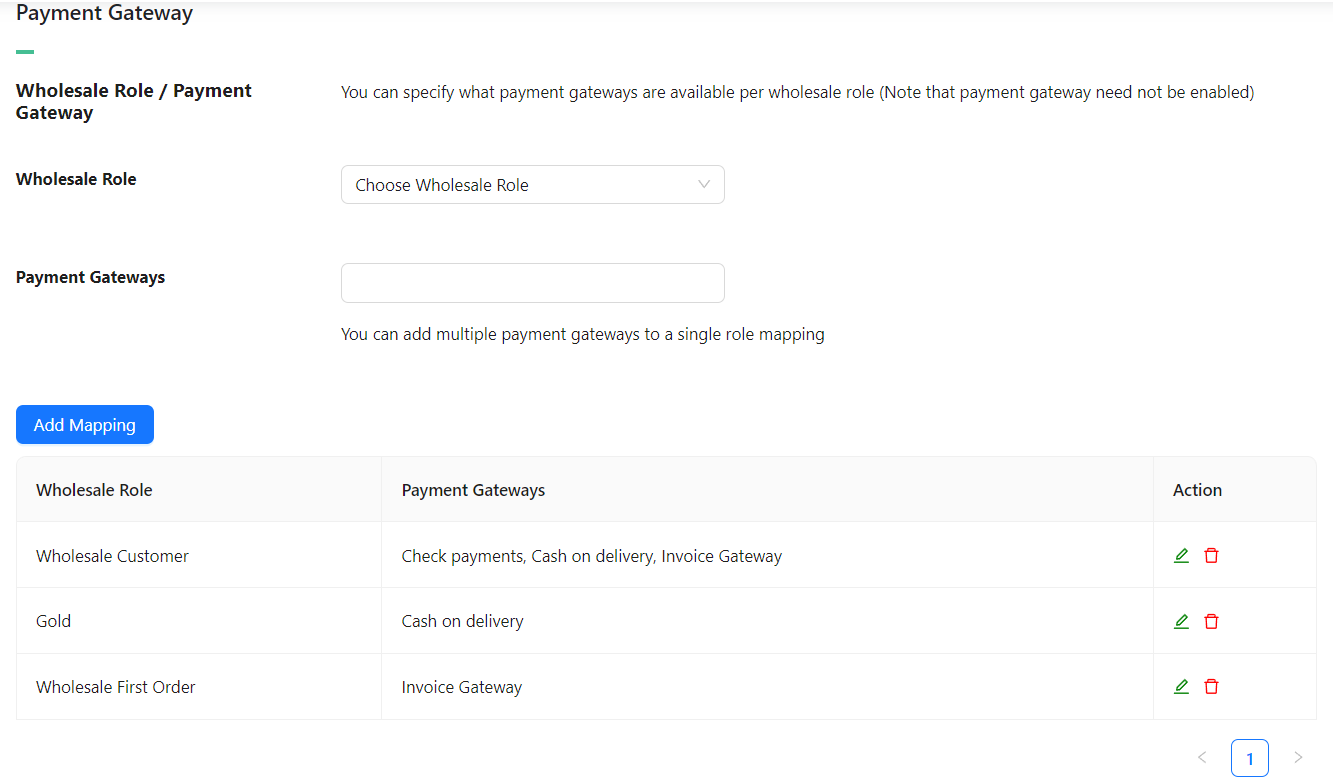
Pas tout à fait aussi complexe que le mappage des méthodes d'expédition, vous pouvez également appliquer le même concept de mappage aux passerelles de paiement.
Une chose à noter est que vous pouvez mapper une passerelle de paiement désactivée. WooCommerce lui-même garantit qu'une passerelle de paiement désactivée ne s'affichera pas pour les clients. Cependant, si vous la mappez à un rôle de vente en gros, vous pouvez choisir d'activer cette passerelle de paiement uniquement pour ce rôle de vente en gros.
Vous pouvez également mapper des passerelles de paiement à plusieurs rôles de vente en gros.
Un bon exemple d'utilisation est que vous pourriez vouloir activer la passerelle de paiement par virement bancaire pour les rôles de clients en gros, mais pas pour les clients de détail.
Exigences de commande minimum
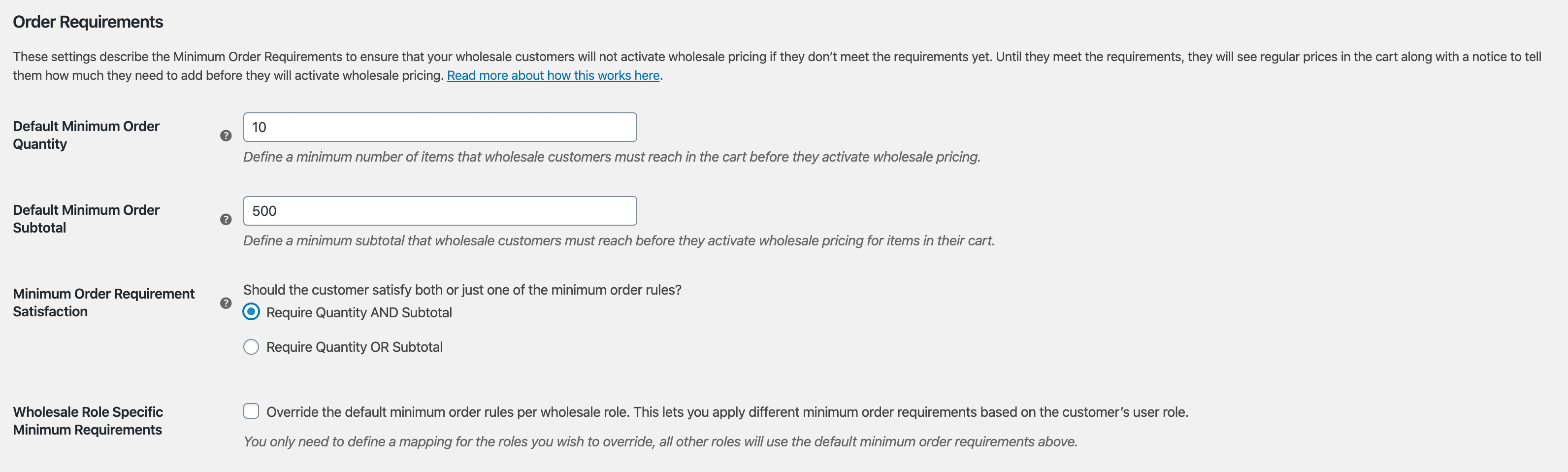
Une fonctionnalité très populaire dans Prices Premium est la possibilité de définir des exigences de commande minimum afin que les prix de gros ne soient pas activés à moins que votre client en gros ne satisfasse d'abord un montant minimum dans son panier.
Voici à quoi ressemblent les paramètres :
Et voici à quoi ressemble le message sur le front-end lorsqu'ils n'ont pas encore satisfait à leurs exigences :

Vous pouvez également utiliser le concept de « mappage » ici aussi afin de pouvoir remplacer les règles de restriction de commande minimum par rôle de vente en gros.
Une note supplémentaire, il peut être utile de savoir que bien que les clients puissent toujours ajouter des produits au panier, le panier ne reflétera pas le prix de gros de ces produits tant qu'ils n'auront pas atteint le minimum.
C'est parce que dans de nombreux cas, les propriétaires de magasins souhaitent toujours que les clients en gros puissent acheter une plus petite quantité s'ils en ont vraiment besoin, mais ils ne devraient pas bénéficier des prix de gros pour ces petites commandes. Nous expliquons en détail pourquoi cette décision a été prise ici.
Si vous le souhaitez, vous pouvez également désactiver le bouton de paiement jusqu’à ce qu’ils répondent aux restrictions si vous le souhaitez.
Taxes avancées
Enfin, nous abordons le sujet favori de tous les gouvernements du monde, la fiscalité !
Comprendre vos responsabilités fiscales est important lorsque vous commencez à vendre à des clients de gros. Certains pays ont des règles spécifiques qui doivent être suivies en ce qui concerne l’affichage des prix et leurs composantes fiscales.
WooCommerce gère les taxes en fonction de la localisation et, pour la plupart, il le fait assez bien. En ce qui concerne les taxes, Prices Premium ne reproduit rien de ce que fait WooCommerce, il s’appuie simplement dessus.
Nous reproduisons efficacement les options d’affichage des taxes dans WooCommerce lui-même, mais uniquement pour les clients de gros :
- Afficher les prix de gros dans la boutique, taxes comprises ou exclues (similaire aux produits de détail)
- Afficher un suffixe de prix de gros (similaire au suffixe de prix de détail)
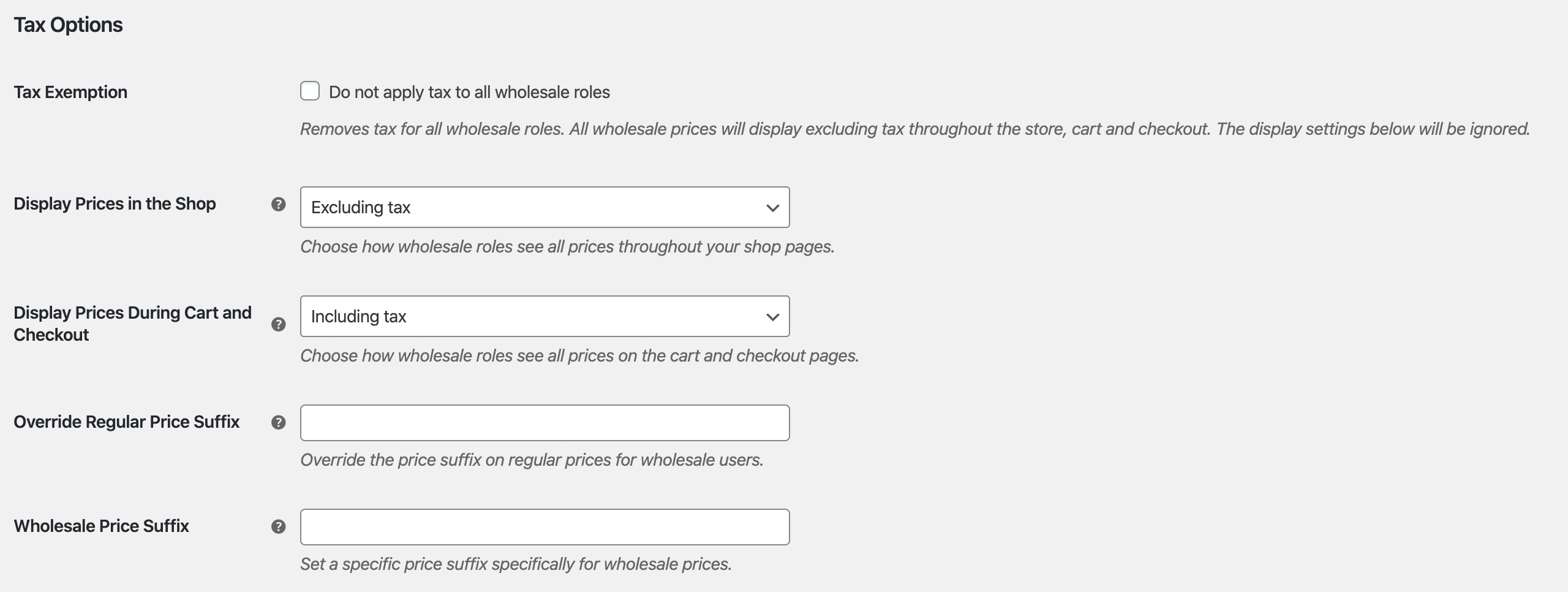
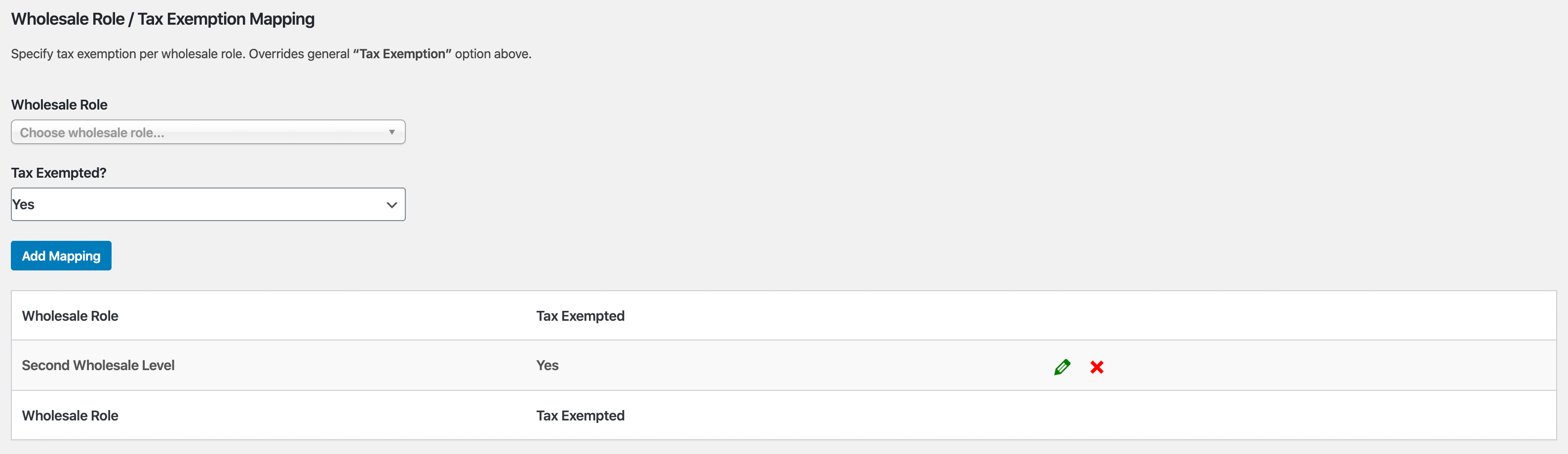
Une autre chose importante que nous avons ajoutée est la possibilité d’effectuer des exonérations fiscales.
Vous pouvez choisir de le faire globalement, ce qui signifie que tous les clients de gros sont exonérés de taxes. Ou vous pouvez, comme vous l’avez peut-être déjà deviné, mapper les exonérations de gros par rôle de gros.
Fonctionnalités avancées
En matière de solutions pour le commerce de gros avec WooCommerce, nous croyons en une approche holistique. Vous devez résoudre les trois grands problèmes :
- Définition des prix de gros, de la visibilité, des taxes, etc. Ceci est résolu avec Prices Premium, comme vous l'avez vu dans ce guide.
- Commande efficace – c'est très important et affecte grandement la satisfaction de vos clients lorsqu'ils font affaire avec vous
- Recruter et gérer des clients de gros
WooCommerce Wholesale Order Form
Le temps nécessaire à un client de gros pour passer une commande est l'un des plus grands points de friction que vous puissiez éliminer.
Les clients de gros ne sont pas comme les clients de détail ordinaires. Ils ne veulent pas parcourir vos pages de magasin normales en ajoutant des produits au panier de cette façon. Ils ont besoin d’une interface tabulaire basée sur des formulaires qui permet d’ajouter rapidement des produits au panier dans les quantités souhaitées.
C'est là qu'intervient le plugin Order Form.
Principaux points forts des fonctionnalités :
- Votre catalogue entier sur une seule page – consultable et catégorisé
- Pas de rechargement de page, Ajax complet activé pour que les grossistes puissent ajouter au panier sans quitter la page
- Interface tabulaire épurée, adaptée aux mobiles et tablettes
- Recherche par mot-clé générique et SKU
- Filtre de catégorie hiérarchique
- Contrôle des permissions pour que seules les personnes autorisées puissent accéder au formulaire
Ce ne sont là que quelques fonctionnalités de haut niveau que vous offrirez à vos clients de gros en utilisant le plugin Order Form.
WooCommerce Wholesale Lead Capture
La gestion des clients de gros peut être un peu compliquée si vous la faites manuellement. Le plugin Wholesale Lead Capture vous offre un formulaire d’inscription spécifique pour les grossistes, une page de connexion dédiée aux grossistes, des séquences d’e-mails d’inscription et votre choix d’approbations manuelles ou automatisées.
Cela élimine vraiment la douleur du recrutement et de l’enregistrement manuels des clients de gros, ce qui vous fera gagner du temps et vous permettra de mettre le recrutement de gros en pilote automatique.
Principaux points forts des fonctionnalités :
- Le constructeur de formulaires d'inscription vous permet de capturer toutes les informations dont vous avez besoin lors de l'inscription
- Pré-remplissez les champs de paiement avec les informations que vous capturez lors de l’inscription pour faciliter le processus de première commande pour votre nouveau client grossiste
- Protection anti-spam intégrée avec technologie honeypot et optionnellement Google Recaptcha
- Séquences d'e-mails automatisées pour les e-mails d'approbation et de notification destinés à l'administrateur et au client
- Système complet d'approbation des utilisateurs qui peut être basé sur des approbations manuelles ou 100% automatisé si vous le souhaitez
Le plugin Lead Capture rendra le recrutement de vos clients de gros et leur gestion beaucoup moins pénibles.
Questions fréquemment posées
Qu’est-ce que WooCommerce Wholesale Prices Premium et que fait-il ?
WooCommerce Wholesale Prices Premium est le plugin complémentaire payant du plugin gratuit WooCommerce Wholesale Prices. Il étend votre boutique WooCommerce avec des fonctionnalités avancées pour les grossistes, notamment des rôles d’utilisateurs supplémentaires pour les grossistes, des prix basés sur un pourcentage et une quantité, des contrôles de visibilité des produits, le mappage des passerelles de paiement et de livraison pour les grossistes, des exigences de commande minimale et des paramètres fiscaux avancés — vous donnant un contrôle total sur la façon dont vous vendez en gros en ligne.
Puis-je définir différents niveaux de prix de gros pour différents types de clients de gros dans WooCommerce ?
Oui ! WooCommerce Wholesale Prices Premium vous permet de créer plusieurs rôles d’utilisateurs de gros (par exemple, Bronze, Argent, Or, Platine) afin que vous puissiez attribuer différents prix de gros, exigences de commande minimale, méthodes de livraison et passerelles de paiement à chaque groupe. Cela facilite la gestion des prix de gros échelonnés pour différents segments de clientèle, tels que les acheteurs locaux ou internationaux.
Comment fonctionnent les prix de gros dans WooCommerce Wholesale Prices Premium ?
Les prix de gros dans le plugin Premium suivent une hiérarchie de priorité : un prix de gros spécifique au produit a la priorité en premier, suivi d’une remise en pourcentage au niveau de la catégorie, puis d’une remise en pourcentage globale. Cela signifie que vous pouvez définir une remise de gros à l’échelle du magasin tout en modifiant les prix de produits ou de catégories spécifiques — vous donnant un contrôle flexible et évolutif des prix de gros WooCommerce.
Puis-je restreindre les produits que les clients de gros voient dans ma boutique WooCommerce ?
Oui. WooCommerce Wholesale Prices Premium inclut de puissants contrôles de visibilité des produits. Vous pouvez activer le paramètre « Afficher uniquement les produits de gros aux clients de gros » afin que les clients de gros ne voient que les produits auxquels des prix de gros sont attribués. Vous pouvez également restreindre des produits individuels ou des variations de produits à des rôles de gros spécifiques, ce qui facilite l'offre de produits exclusifs réservés aux grossistes à certains groupes de clients.
WooCommerce Wholesale Prices Premium prend-il en charge les passerelles de paiement et d'expédition spécifiques aux grossistes ?
Absolument. Les fonctionnalités de mappage des méthodes d'expédition et de mappage des passerelles de paiement du plugin vous permettent d'attribuer des méthodes d'expédition et des options de paiement spécifiques à des rôles d'utilisateurs grossistes individuels. Par exemple, vous pouvez offrir une méthode d'expédition « Retrait en magasin » exclusivement aux clients grossistes locaux, ou activer les paiements par virement bancaire uniquement pour les acheteurs grossistes — offrant à votre boutique WooCommerce B2B une expérience de paiement entièrement personnalisée.
Aide et Support
Nous avons une équipe de support dédiée pour Wholesale Suite qui connaît très bien nos produits, WooCommerce et le secteur. Vous êtes invité à utiliser leur expertise à tout moment, partout dans le monde.
Si vous êtes un client existant, veuillez vous rendre sur le formulaire de demande de ticket de support et envoyez-nous un message.
Si vous êtes un utilisateur du plugin gratuit, veuillez nous envoyer une demande de support sur le forum, nous surveillons activement les forums de support de WordPress.org pour le plugin gratuit et aidons nos utilisateurs du mieux que nous pouvons.

