L'un des plus grands casse-têtes administratifs pour gérer une entreprise de vente en gros est de recruter et de gérer des clients de niveau de gros. Et au-delà de l'aspect casse-tête, vous souhaitez probablement également offrir une expérience 5 étoiles à vos nouveaux clients de gros. Après tout, ils sont importants pour votre entreprise, il est donc logique de vous assurer qu'ils bénéficient d'un excellent parcours d'intégration.
Voici ce que ce guide couvrira :
Aperçu – nous décrivons à un niveau élevé ce que fait exactement le plugin
Examiner les pages importantes – Nous examinerons les pages importantes créées par le plugin
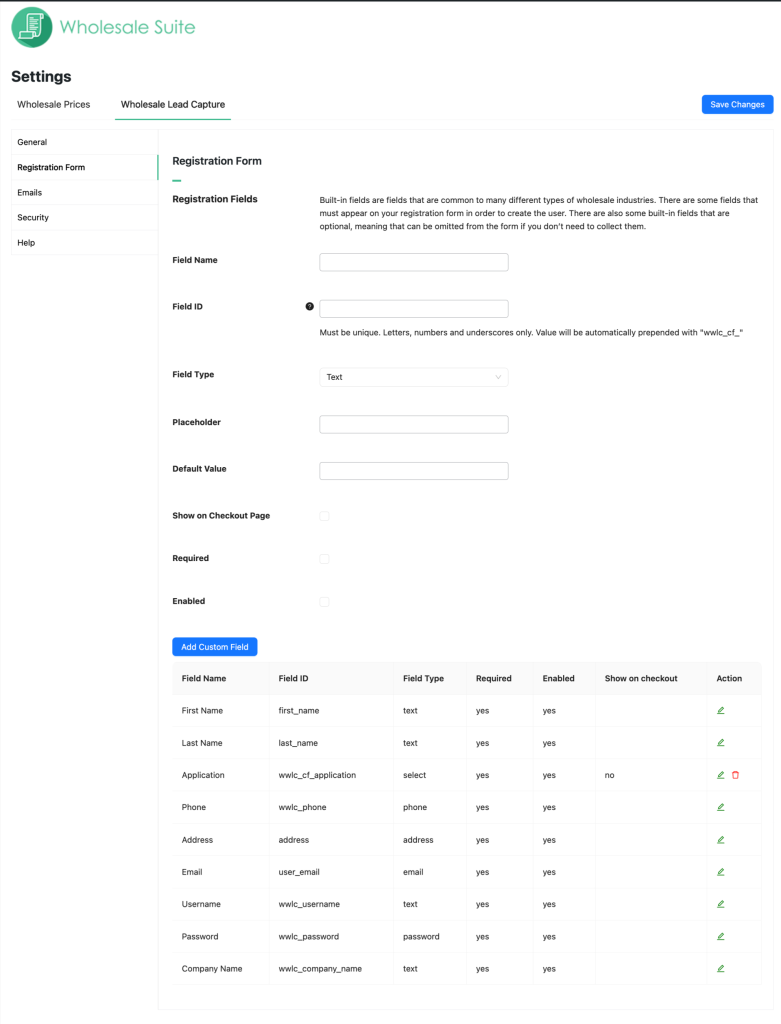
Formulaire d'inscription – parlons de la façon de modifier le formulaire d'inscription par défaut et de la façon d'ajouter des champs personnalisés si vous en avez besoin
Actions post-inscription – ces fonctionnalités indiqueront au système quoi faire des clients après leur inscription
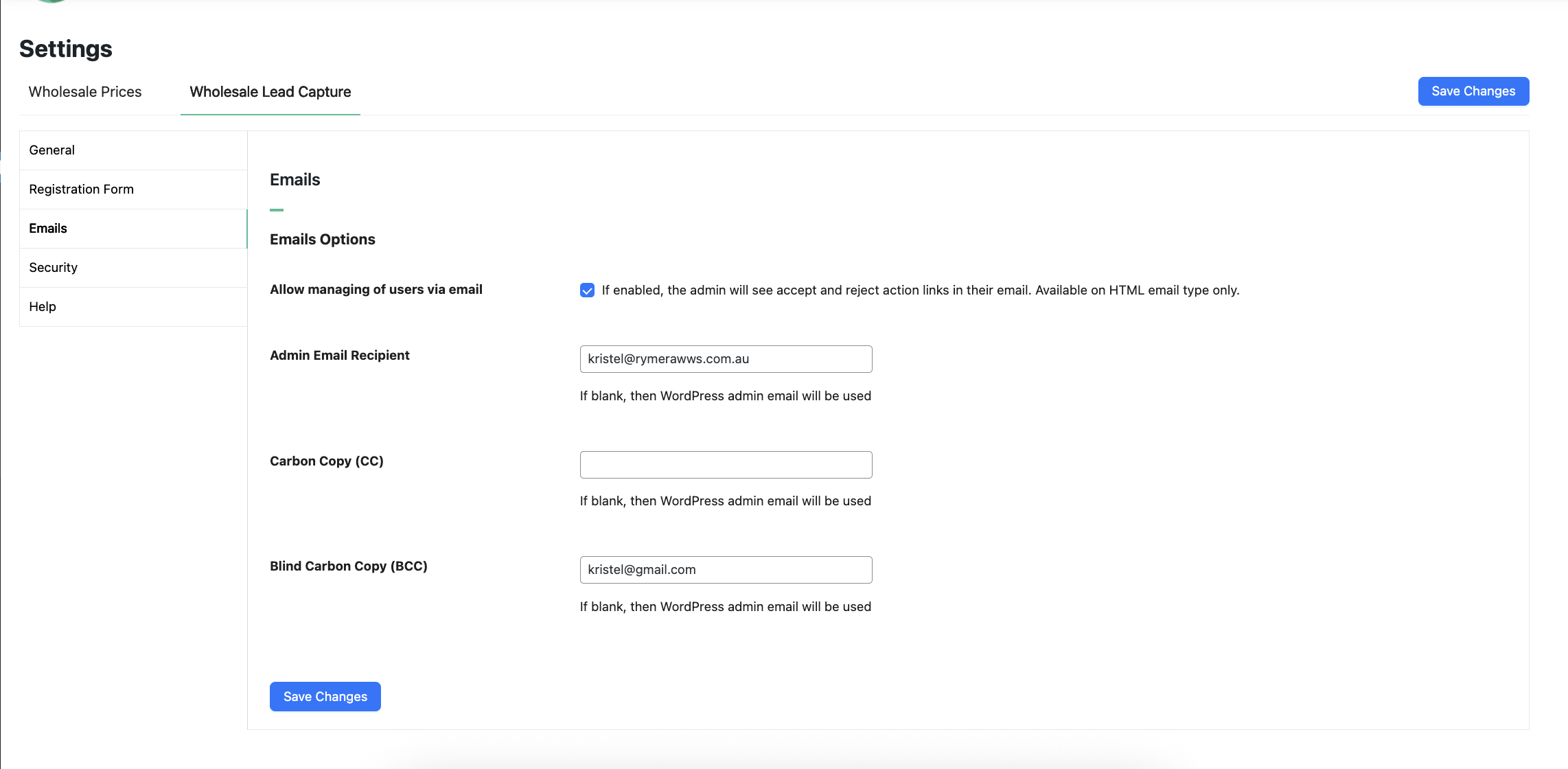
Approbations & E-mails – un bref aperçu du fonctionnement du système d'approbation et des e-mails envoyés au client
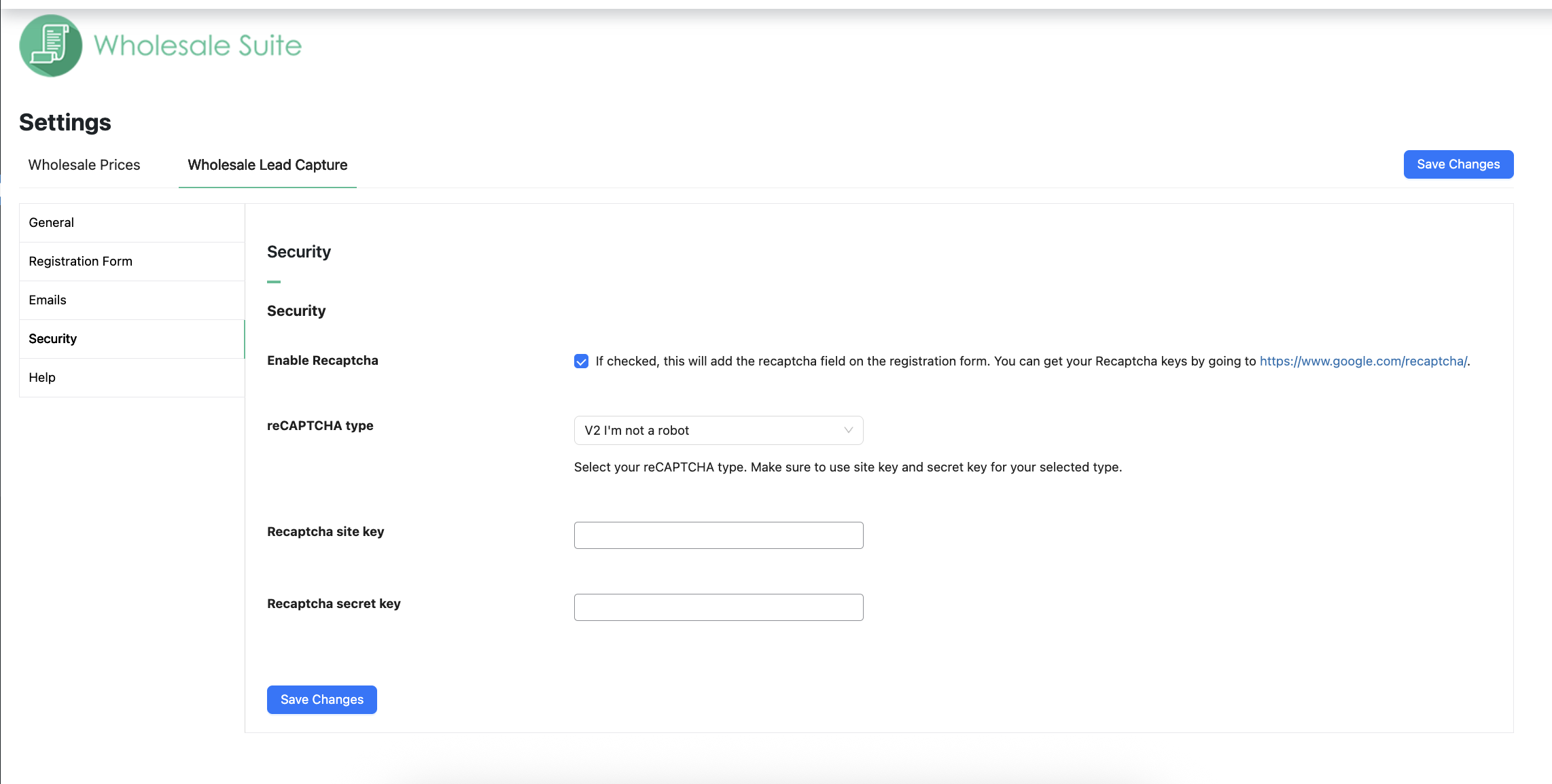
Protection anti-spam – votre formulaire dispose d'une protection anti-spam intégrée de type honeypot, mais nous vous montrerons également comment utiliser Google Recaptcha si votre site nécessite une protection supplémentaire
Autres plugins de la suite – nous vous montrerons pourquoi vous devriez envisager d'ajouter Wholesale Order Form et Wholesale Lead Capture
Obtenir de l'aide – nous comprenons que cela peut être un outil complexe, nous vous montrerons où obtenir de l'aide si vous en avez besoin
Vue d'ensemble
WooCommerce Wholesale Lead Capture est un plugin entièrement autonome pour WooCommerce qui gère l'enregistrement des clients de gros, la connexion des clients de gros, un processus d'approbation complet et les e-mails d'intégration. Il est conçu pour fonctionner main dans la main avec le reste de notre suite d'outils.
Il existe des tonnes de fonctionnalités incluses dans l'outil de capture de prospects, vous pouvez voir ici pour une liste complète, et même si l'outil fait une grande partie du travail à votre place, en créant les formulaires et les pages nécessaires, nous allons également passer en revue quelques points majeurs afin que vous puissiez être opérationnel le plus rapidement possible.
Abonnez-vous à Wholesale Suite
Tout d'abord, nous allons examiner les pages importantes que l'outil de capture de prospects crée lors de son activation.
Examiner les pages importantes
Dès le départ, l'outil de capture de prospects crée un certain nombre de pages sur votre site Web pour vous aider à gérer les clients de gros.
Ce sont :
https://[yoursiteurl]/wholesale-log-in-page/ – this is the Login page for wholesale customers
https://[yoursiteurl]/wholesale-registration-page/ – this is the Registration page for wholesale customers
https://[yoursiteurl]/wholesale-registration-thankyou-page/ – This is the default Registration Thank You page wholesale customers see after registering
Vous n'avez pas besoin de les créer manuellement, mais vous pouvez récupérer le shortcode de ces pages et l'utiliser sur une autre page si vous le souhaitez.
Les shortcodes utilisés sont :
Page de connexion de gros [wwlc_login_form]
Page d'inscription de gros [wwlc_registration_form]
Dans les paramètres, vous verrez également qu'il existe des paramètres de page, qui vous indiqueront la page actuellement définie pour ces pages.
Vous remarquerez également quelques autres pages dans l'écran des paramètres à définir, telles que les conditions générales (celles-ci sont liées lorsque le champ Conditions générales est activé) et diverses pages de remerciement et pages de redirection.
Assurez-vous d'avoir une page sélectionnée pour chacun de ces paramètres.
Formulaire d'inscription
Le formulaire d'inscription est l'endroit où vos nouveaux prospects s'inscrivent pour demander un compte utilisateur de gros.
Nous vous recommandons de collecter toutes les informations dont vous avez besoin au moment de l'inscription. Ainsi, vous pourrez choisir de les approuver ou de les refuser en fonction de ces informations, sans avoir à faire trop d'allers-retours pour les obtenir.
Champs intégrés
Le système est livré avec un certain nombre de champs par défaut que vous pouvez activer/désactiver à votre guise.
Ceux-ci incluent :
Prénom (requis)
Nom (requis)
Téléphone (obligatoire)
E-mail
Nom d'utilisateur
Nom de l’entreprise
Adresse
Mot de passe
Vous pouvez les réorganiser en utilisant la priorité des champs et les activer/désactiver. Les champs obligatoires ne peuvent pas être désactivés.
Dans la mesure du possible, les champs sont utilisés pour pré-remplir le compte utilisateur avec des informations afin que, lorsqu'ils passeront à la caisse lors de leur première commande, ils n'aient pas à les remplir à nouveau.
Champs personnalisés
Les champs personnalisés vous permettent de collecter toute autre information dont vous avez besoin pour décider d'accepter ou non ce prospect en tant que client de gros.
Vous pouvez ajouter des champs de différents types :
Texte
Zone de texte
Nombre
E-mail
URL
Sélection
Radio
Case à cocher
Caché
Fichier
Contenu
Termes et conditions
Les gens les utilisent pour collecter toutes sortes d'informations, par exemple les numéros de taxe/TVA, les documents d'immatriculation d'entreprise, les URL de sites Web, les préférences de communication, etc.
Actions post-inscription
Les actions post-inscription sont les choses qui se produisent après que la personne a soumis le formulaire d'inscription. Les deux principales sont le choix du mode d'approbation des utilisateurs et le rôle utilisateur que la personne doit obtenir après approbation.
1. Approbation des utilisateurs
Les utilisateurs doivent-ils être approuvés avant d'avoir accès ou non ? C'est quelque chose que vous avez la liberté d'automatiser entièrement ou de faire manuellement.
Si vous choisissez de faire les approbations manuellement, vous aurez le plus de contrôle. Le système vous enverra un e-mail lorsqu'une personne sera en attente d'approbation et qu'un administrateur ou un responsable de boutique devra approuver cette personne.
Si vous choisissez d'avoir des approbations automatisées, le client obtiendra un accès immédiat et pourra voir les prix de gros et passer une commande.
2. Attribution automatique d'un rôle utilisateur
Lors de l'approbation, le système devra attribuer un rôle utilisateur au client.
Si vous utilisez WooCommerce Wholesale Prices, le rôle par défaut ici est le rôle Client de gros. Mais vous pouvez le changer pour n'importe lequel des autres rôles de votre site.
Approbations et e-mails
Comme mentionné, les approbations peuvent être entièrement automatisées si vous le souhaitez.
Cela signifie que l'administrateur n'aura pas à approuver les utilisateurs avant qu'ils ne puissent voir les prix de gros et passer une commande.
Certains propriétaires de magasins aiment avoir un peu plus de contrôle sur leur programme de vente en gros, c'est pourquoi l'approbation manuelle est la valeur par défaut.
Pendant le processus d'intégration de l'utilisateur, plusieurs e-mails sont envoyés à l'administrateur et au client :
Scénario n° 1 : L'approbation automatique est désactivée
L'utilisateur s'inscrit
Le compte est défini sur inactif
L'administrateur reçoit un e-mail d'une nouvelle inscription
L'utilisateur reçoit un e-mail confirmant son inscription
L'administrateur approuve manuellement le nouvel utilisateur
Le compte est défini sur actif
L'utilisateur reçoit un e-mail indiquant que son compte est actif, contenant ses informations d'identification
Scénario n° 2 : L'approbation automatique est activée
L'utilisateur s'inscrit
Le compte est défini sur actif
L'administrateur reçoit un e-mail de nouvelle inscription indiquant qu'elle a été approuvée automatiquement
L'utilisateur reçoit un e-mail confirmant son inscription
L'utilisateur reçoit un e-mail indiquant que son compte est actif, contenant ses informations d'identification
Si vous rencontrez des problèmes avec des e-mails non envoyés, nous vous recommandons vivement de consulter notre guide de dépannage des e-mails.
Protection anti-spam
Votre formulaire d'inscription est automatiquement protégé dès le départ grâce à la fonctionnalité anti-spam honeypot.
Cependant, si vous avez déjà rencontré un problème de spam, vous souhaiterez peut-être également envisager une protection supplémentaire avec un champ Google reCAPTCHA.
Vous avez probablement vu ces cases sur le Web où l'utilisateur doit cocher une case pour indiquer qu'il est humain et parfois on vous demande de sélectionner tous les feux de circulation ou les bus scolaires sur une image.
Ainsi, bien qu'il existe déjà une excellente protection anti-spam automatique sur votre formulaire d'inscription, Lead Capture est entièrement compatible avec la technologie Recaptcha de Google pour les sites qui ont besoin d'une protection supplémentaire.
Vous pouvez obtenir vos clés API Recaptcha en vous inscrivant ici et celles-ci peuvent être installées sous le sous-menu Sécurité dans les paramètres du plugin.
Fonctionnalités avancées
En matière de solutions pour le commerce de gros avec WooCommerce, nous croyons en une approche holistique. Vous devez résoudre les trois grands problèmes :
Définition des prix de gros, de la visibilité, des taxes, etc. Ceci est résolu avec Prices Premium, comme vous l'avez vu dans ce guide.
Commande efficace – c'est très important et affecte grandement la satisfaction de vos clients lorsqu'ils font affaire avec vous
Recrutement et gestion des clients de niveau de gros
WooCommerce Wholesale Prices Premium
Premium est le module complémentaire du plugin gratuit et il ouvre immédiatement de nombreuses fonctionnalités supplémentaires qui vous donneront une flexibilité maximale.
De plus, certains pays exigent que certaines règles spécifiques soient suivies lors de la vente et de la publicité des prix aux clients de gros, et Prices Premium a été conçu pour répondre à tout le monde.
Mappage des expéditions, où vous pouvez obliger les clients de gros à utiliser certaines méthodes et restreindre certaines options d'expédition aux seuls clients de gros
Mappage des passerelles de paiement, où vous pouvez obliger les clients de gros à utiliser certaines passerelles et, de même, restreindre certaines passerelles aux seuls clients de gros
Ajustez la visibilité des produits pour qu'ils soient réservés à la vente en gros, à la vente au détail ou un mélange des deux. Cela vous permet également d'ajuster la visibilité des variations.
Ajoutez des règles d'achat minimum afin de pouvoir appliquer vos accords de vente en gros au niveau de la commande et de définir des minimums raisonnables au niveau du produit.
Le temps nécessaire à un client de gros pour passer une commande est l'un des plus grands points de friction que vous puissiez éliminer.
Les clients de gros ne sont pas comme les clients de détail ordinaires. Ils ne veulent pas parcourir vos pages de magasin normales en ajoutant des produits au panier de cette façon. Ils ont besoin d’une interface tabulaire basée sur des formulaires qui permet d’ajouter rapidement des produits au panier dans les quantités souhaitées.
C'est là qu'intervient le plugin Order Form.
Principaux points forts des fonctionnalités :
Votre catalogue entier sur une seule page – consultable et catégorisé
Pas de rechargement de page, Ajax complet activé pour que les grossistes puissent ajouter au panier sans quitter la page
Interface tabulaire épurée, adaptée aux mobiles et tablettes
Recherche par mot-clé générique et SKU
Filtre de catégorie hiérarchique
Contrôle des permissions pour que seules les personnes autorisées puissent accéder au formulaire
Ce ne sont là que quelques fonctionnalités de haut niveau que vous offrirez à vos clients de gros en utilisant le plugin Order Form.
Aide et Support
Nous avons une équipe de support dédiée pour Wholesale Suite qui connaît très bien nos produits, WooCommerce et le secteur. Vous êtes invité à utiliser leur expertise à tout moment, partout dans le monde.
Si vous êtes un utilisateur du plugin gratuit, veuillez nous envoyer une demande de support sur le forum, nous surveillons activement les forums de support de WordPress.org pour le plugin gratuit et aidons nos utilisateurs du mieux que nous pouvons.