
If you have percentage-based wholesale discounts configured for a wholesale role or product category, they apply across your full catalogue by default. There are times when you need a specific product to stay at its regular price: a low-margin item, a product currently on sale elsewhere, or one you want to keep outside your discount structure for any reason.
WooCommerce Wholesale Prices Premium includes two per-product checkboxes in the Wholesale Pricing Options section that let you exclude any individual product from category-level or role-level percentage discounts. You can disable one type, the other, or both, without changing your global discount settings or affecting other products.
Requirements
- WooCommerce Wholesale Prices Premium installed and activated. The Wholesale Pricing Options checkboxes are exclusive to the Premium plugin and do not appear in the free version.
- At least one percentage-based wholesale discount configured: either a wholesale role level discount or a product category level discount. If no percentage discounts are active, these checkboxes have no effect.
How to Exclude a Product from Percentage Discounts
- Open the product you want to exclude in the WordPress editor.
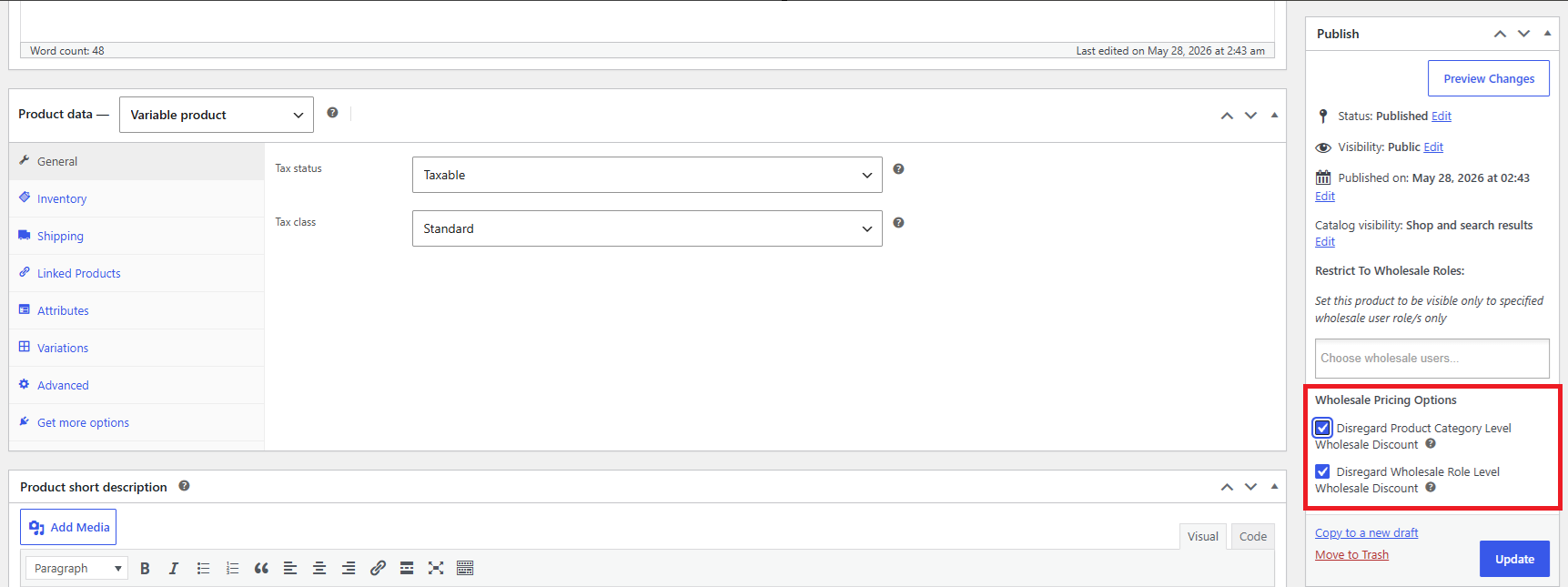
- Find the Wholesale Pricing Options section in the Publish box.
- To prevent category-level percentage discounts, check Disregard Product Category Level Wholesale Discount.
- To prevent role-level percentage discounts, check Disregard Wholesale Role Level Wholesale Discount.
- Click Update (or Publish) to save the product.
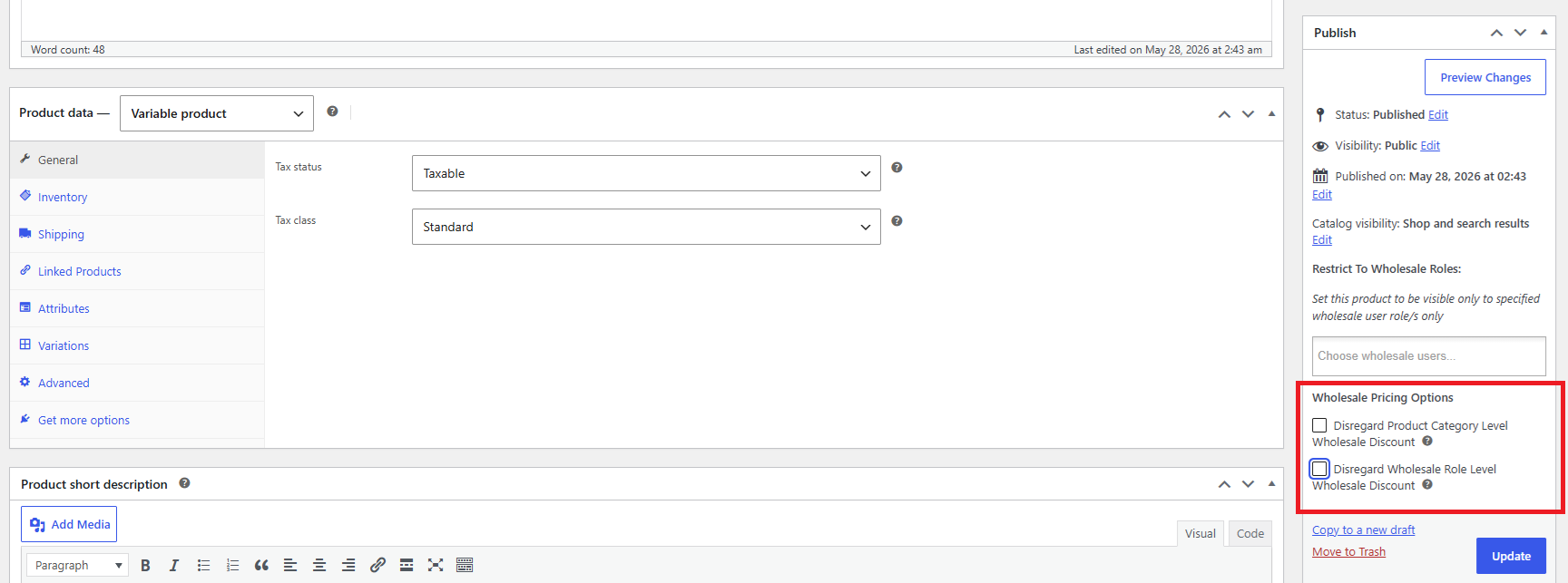
Disregard Product Category Level Wholesale Discount
Check Disregard Product Category Level Wholesale Discount to prevent any category-level percentage discount from applying to this product. Use this when the product belongs to a discounted category but should be sold at its full price regardless.
When checked, wholesale customers will not receive the percentage discount that would otherwise be applied through the product’s category. Any wholesale price set directly on the product is unaffected.
Disregard Wholesale Role Level Wholesale Discount
Check Disregard Wholesale Role Level Wholesale Discount to prevent role-based percentage discounts from applying to this product. Role-level discounts are set per wholesale role in the plugin settings and normally apply across all products for that role.
When checked, the role-level percentage discount is ignored for this specific product. The product will be sold at its regular price (or any directly-set wholesale price) for all wholesale roles.
Frequently Asked Questions
What is the difference between the two checkboxes?
Disregard Product Category Level Wholesale Discount targets discounts applied through product categories (for example, a 10% discount on everything in the “Accessories” category). Disregard Wholesale Role Level Wholesale Discount targets discounts applied through the wholesale role itself (for example, a 15% discount given to all customers with the “Wholesale Customer” role). You can disable either or both independently.
Do I need to check both boxes to fully exclude a product from all percentage discounts?
It depends on which discount types are configured. If you have both category-level and role-level percentage discounts active, you need to check both boxes to prevent the product from being discounted by either. Checking only one box disables only that discount type.
Will wholesale customers still see a wholesale price if I check these boxes?
Yes, if you have set a wholesale price directly on the product (in the Wholesale Prices section of the product data tabs), that price still applies. These checkboxes only prevent percentage-based discounts from being calculated on top of the regular price. A manually entered wholesale price is not affected.
What happens if a product has both a direct wholesale price and a percentage discount configured?
A wholesale price set directly on the product takes precedence over percentage discounts. In that case, checking these boxes would have no visible effect, since the direct wholesale price is already being used. The checkboxes are most relevant when a product does not have a direct wholesale price and would otherwise inherit a discount from its category or the customer’s role.
Can I exclude an entire product category from percentage discounts at once?
Not through these checkboxes. They work on a per-product basis only. To exclude a full category, you would need to remove the percentage discount from that category in the plugin settings, or set direct wholesale prices on the products in that category instead.
Does this work for variable products?
Yes. The Wholesale Pricing Options checkboxes appear on variable products as well as simple products. When checked on a variable product, the discount exclusion applies to all variations of that product.
I checked the box and saved the product, but the wholesale customer is still seeing the discounted price. What should I check?
First, confirm the product was saved successfully after checking the box by opening it again and verifying the checkbox is still checked. Then clear any page or object cache on your site. Also confirm which type of discount is being applied: if both a category-level and a role-level discount are active, you may need to check both boxes. Test with a fresh browser session logged in as a wholesale user to rule out cached prices.
The Wholesale Pricing Options section does not appear on my product. Why?
This section is only added by WooCommerce Wholesale Prices Premium. If you are using only the free WooCommerce Wholesale Prices plugin, the checkboxes will not appear. Verify that the Premium plugin is installed and activated under Plugins → Installed Plugins.
Does checking these boxes affect the price shown to retail (non-wholesale) customers?
No. These settings only affect how percentage discounts are applied for wholesale customers. Retail customers always see the regular WooCommerce price regardless of these options.
Help & Support
We have a dedicated support team for Wholesale Suite who knows our products, WooCommerce, and the industry very well. You’re welcome to make use of their expertise at any time, worldwide.
If you are an existing customer please go to the support ticket request form and send us a message.
If you are a free plugin user, please send us a support request on the forum. We actively monitor the WordPress.org support forums for the free plugin and help our users there as best as we can.

