
If you’re enabling HPOS on your store or WooCommerce has already prompted you to migrate, you may be wondering whether Wholesale Suite will keep working. It will. Both WooCommerce Wholesale Prices (free) and WooCommerce Wholesale Prices Premium explicitly declare HPOS compatibility using WooCommerce’s official compatibility API.
This article confirms the compatibility status, minimum version requirements, how to enable HPOS in WooCommerce, and any caveats to be aware of. Key features, including the Wholesale Dashboard, recent order listings, and the admin order type filter, have dedicated HPOS-aware code paths that ensure correct behaviour when custom order tables are active.
Requirements
- WooCommerce Wholesale Prices (free) 2.1.8 or later – WooCommerce Wholesale Prices declared HPOS incompatibility in 2.1.7, then declared full HPOS compatibility from 2.1.8. Full HPOS-aware order queries (Dashboard, order listing filter) were also added in 2.1.8
- WooCommerce Wholesale Prices Premium 1.30.3 or later – HPOS compatibility declared from this version
- WooCommerce 7.1 or later – this is the WooCommerce version where HPOS first became available and the custom order tables migration was introduced. It is a WooCommerce requirement for HPOS itself, not a Wholesale Suite requirement (Wholesale Suite supports earlier WooCommerce versions when HPOS is not in use)
What is WooCommerce HPOS?
HPOS or High-Performance Order Storage is a WooCommerce feature that stores order data in dedicated custom database tables rather than the default WordPress wp_posts and wp_postmeta tables. This improves performance on stores with large order counts, provides more reliable concurrency handling, and aligns WooCommerce’s order storage with its long-term platform direction.
When HPOS is active, WooCommerce reads and writes order data using the custom order tables rather than the post type. Plugins that display order data or run order queries must use WooCommerce’s wc_get_orders() and OrderUtil class rather than WP_Query directly. Both WooCommerce Wholesale Prices (WWP) and WooCommerce Wholesale Prices Premium (WWPP) have been updated to follow this approach.
How to enable HPOS in WooCommerce
Before enabling HPOS, ensure you are running at least WooCommerce Wholesale Prices 2.1.8 and WooCommerce Wholesale Prices Premium 1.30.3 (if installed). Then follow these steps:
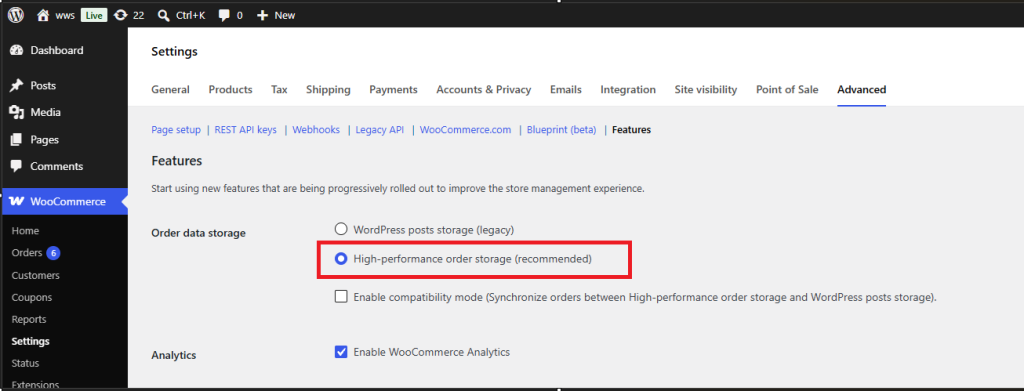
- Go to WooCommerce → Settings → Advanced → Features in your WordPress admin.
- Under Order data storage, select High-performance order storage (recommended).
- Click Save changes.
- If you have existing orders, WooCommerce will prompt you to synchronise your order data before the switch takes effect. Follow the on-screen migration prompt and allow it to complete before continuing.
Frequently asked questions
Will WooCommerce show a compatibility warning for Wholesale Suite when HPOS is enabled?
No. Both WooCommerce Wholesale Prices (from 2.1.8) and WooCommerce Wholesale Prices Premium (from 1.30.3) declare HPOS compatibility using WooCommerce’s official API. WooCommerce displays a compatible status badge rather than a warning on the Plugins screen in your WordPress admin when these versions are installed.
Can I enable HPOS without updating Wholesale Suite first?
Update to at least WooCommerce Wholesale Prices 2.1.8 and WooCommerce Wholesale Prices Premium 1.30.3 before enabling HPOS. Enabling HPOS with an older version of WooCommerce Wholesale Prices may cause the Wholesale Dashboard to display incorrect order data — showing all orders instead of wholesale-only orders — until you update.
Does HPOS affect wholesale pricing shown to customers on the front end?
No. Wholesale pricing is stored on product meta, not order records, so HPOS has no effect on the prices your wholesale customers see on product pages, the cart, or checkout. HPOS only changes how completed order records are stored and queried in the database.
Does WooCommerce Wholesale Order Form need any updates for HPOS compatibility?
WooCommerce Wholesale Order Form is fully HPOS-compatible and explicitly declares that compatibility using WooCommerce’s official API (the custom_order_tables feature). It is safe to use with HPOS enabled, so you do not need to make any changes when you switch your store to HPOS. Just keep WooCommerce Wholesale Order Form updated to the current version.
Can I roll back from HPOS to legacy order storage?
Yes. You can switch back to WordPress posts storage (legacy) in WooCommerce → Settings → Advanced → Features at any time. WooCommerce will re-sync order data back to the post tables. Wholesale Suite works correctly under both storage modes.
Does the order type filter on the WooCommerce Orders screen work with HPOS?
Yes, from WooCommerce Wholesale Prices 2.1.8. The filter options Show all order types, All Wholesale Orders, All Retail Orders, and individual wholesale role filters all work correctly under HPOS using WooCommerce’s dedicated custom order tables query hook.
Do I need to run the WooCommerce HPOS data sync before enabling HPOS?
Yes. When you switch to HPOS on a store with existing orders, WooCommerce prompts you to synchronise order data from the legacy post tables to the custom order tables. Allow this to complete before using your store under HPOS. Unsynchronised orders may not appear in order lists until the sync is done.
Does enabling HPOS affect the Wholesale Dashboard stats and analytics?
No. The Wholesale Dashboard’s quick stats, wholesale order count, revenue, and top customers use wc_get_orders() with HPOS-aware meta queries from version 2.1.8. No data loss or reporting gaps should occur after the HPOS migration.
How do I check which version of WooCommerce Wholesale Prices I have installed?
Go to WordPress Admin → Plugins → Installed Plugins and look for WooCommerce Wholesale Prices. The version number is shown below the plugin name. You can also check WooCommerce → Status → System Status under the Active Plugins section.
Help & support
We have a dedicated support team for Wholesale Suite who knows our products, WooCommerce, and the industry very well. You’re welcome to make use of their expertise at any time, worldwide.
If you’re an existing customer please go to the support ticket request form and send us a message.
If you’re a free plugin user, please send us a support request on the forum. We actively monitor the WordPress.org support forums for the free plugin and help our users there as best as we can.

