
If you want your wholesale customers to see a quick link to your order form or registration page in your site’s main navigation, but don’t want that link visible to retail shoppers, you need a way to show a menu item to a specific user role only.
You can do this with the free Nav Menu Roles plugin, matched against the wholesale role that WooCommerce Wholesale Prices creates on your site.
Hiding a menu item only affects its visibility in the navigation. It does not restrict access to the page or form itself, so anyone with the direct URL can still open it.
Requirements
- WooCommerce Wholesale Prices installed and activated.
- The free Nav Menu Roles plugin installed and activated.
- The page you want to link to already set up, for example an order form created in Wholesale Order Form, or the Wholesale Registration Page created by Wholesale Lead Capture.
- A test account assigned to your wholesale role, so you can confirm the menu item shows and hides as expected.
Find Your Wholesale Role Name
Nav Menu Roles restricts a menu item by WordPress user role, so you need the exact role that WooCommerce Wholesale Prices assigns to your wholesale customers.
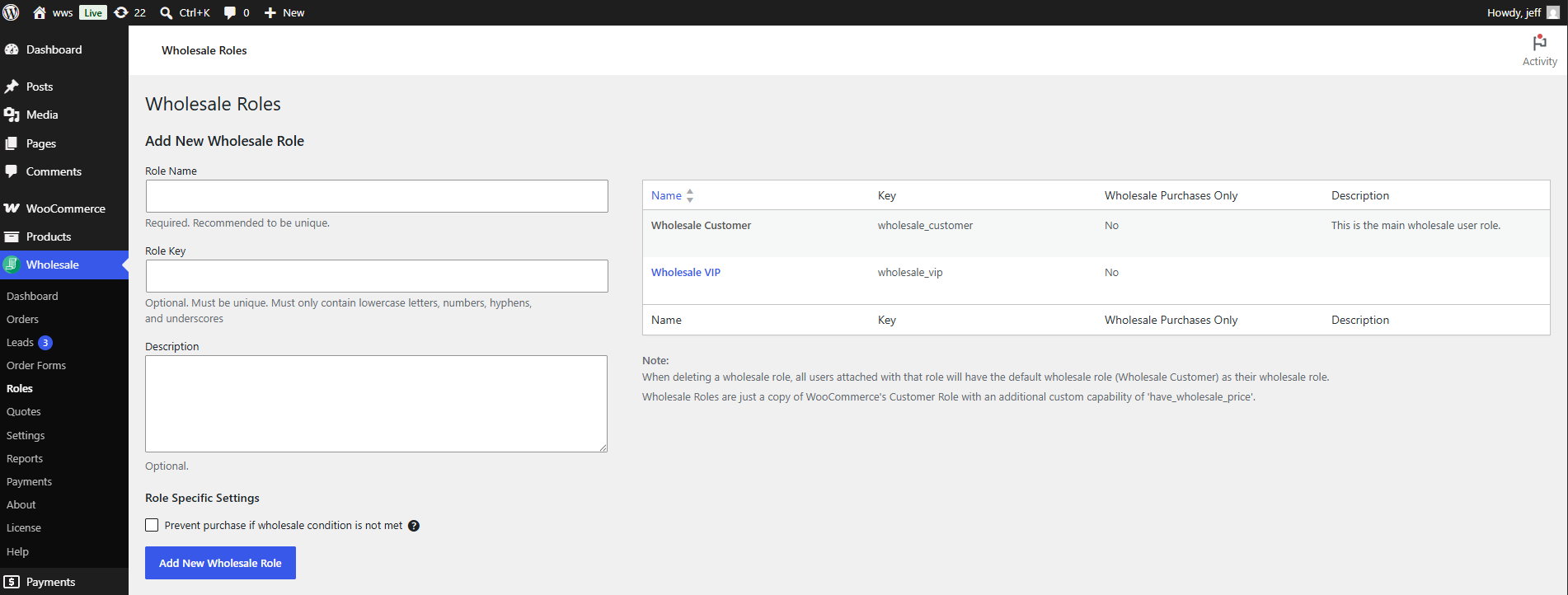
- Go to Wholesale → Roles.
- Check the Name column for the role you want to use. By default this is Wholesale Customer, but it may have been renamed on your site.
Install and Activate Nav Menu Roles
- Go to Plugins → Add New Plugin.
- Search for Nav Menu Roles.
- Click Install Now, then click Activate.
Add the Wholesale-Only Menu Item
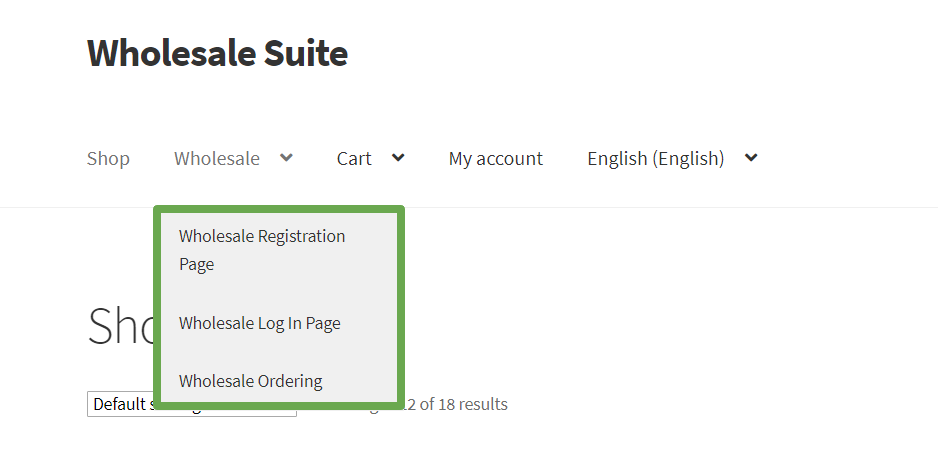
- Go to Appearance → Menus.
- Add a link to your order form or registration page to the menu, the same way you would add any other menu item.
- Click Save Menu.
Restrict the Menu Item to Your Wholesale Role
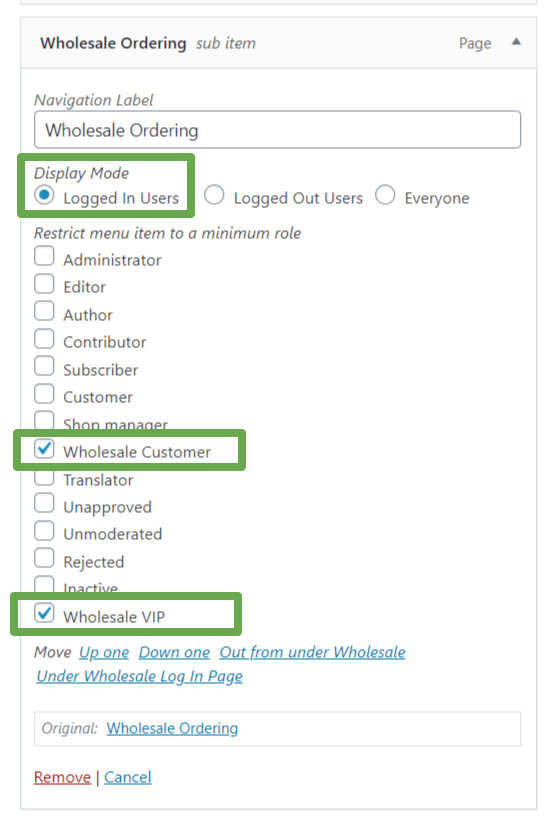
- In Appearance → Menus, click the menu item you just added to expand its settings.
- Under the Roles section added by Nav Menu Roles, check the box for your wholesale role, for example Wholesale Customer.
- Click Save Menu.
Confirm What Each Visitor Sees
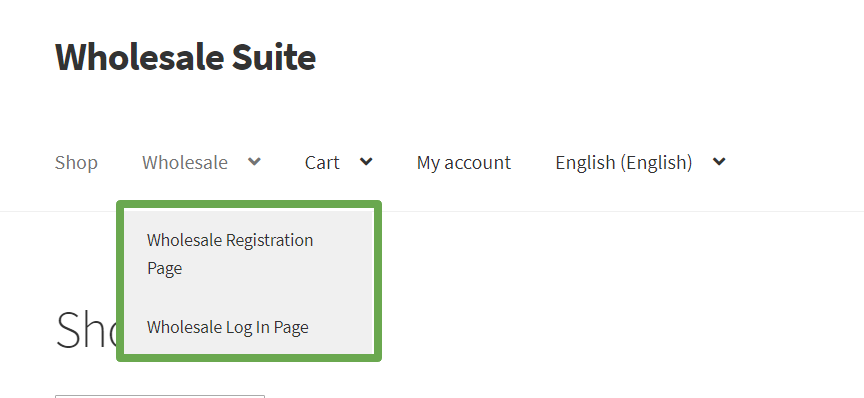
A customer logged in with the wholesale role you selected sees the link in the main navigation. A logged-out visitor, or a customer logged in with a different role, does not see it.
Troubleshooting
The wholesale-only link is still showing for logged-out visitors. What should I check?
Confirm you clicked Save Menu after checking the role box, not just navigated away from the screen. If the setting was saved, clear any page or object cache on your site, then reload the page in a private or incognito browser window to rule out a local browser cache.
The link isn’t showing for a customer who has the wholesale role. What could be wrong?
Go back to Wholesale → Roles and confirm the role name has not changed since you set up the menu item. Then check the customer’s account to confirm the wholesale role is currently assigned to it. If both are correct, clear your site’s page cache and have the customer reload the page.
I’m logged in as an administrator, but I can’t see the wholesale-only link. Is that expected?
Yes. Nav Menu Roles checks the roles assigned to your account, not whether you are an administrator. To preview the menu the way a wholesale customer sees it, log in with an account that has the wholesale role, or use a private browser window logged in as that customer.
Frequently Asked Questions
Can I link the menu item to a page other than an order form or registration page?
Yes. Nav Menu Roles restricts any menu item, so you can link to any page or URL on your site, such as a wholesale-only catalog page or a pricing FAQ.
Can I restrict the menu item to more than one wholesale role?
Yes, if you check more than one role box in the menu item’s Roles section. Having more than one wholesale role available requires WooCommerce Wholesale Prices Premium, which lets you create additional wholesale roles at Wholesale → Roles.
Does hiding the menu item stop non-wholesale customers from opening the order form or registration page directly?
No. Hiding the menu item only removes the navigation link. The page it points to is still reachable by anyone who has the direct URL, so this setting is a navigation convenience rather than an access restriction.
Is there a way to hide page content, rather than a menu item, from wholesale or non-wholesale customers?
Yes. WooCommerce Wholesale Prices Premium includes the [wholesale_content] and [hide_from_wholesale] shortcodes, which show or hide the content wrapped inside them based on whether the visitor has a wholesale role. This is separate from the navigation menu setup covered in this article. Wholesale Suite does not include a built-in way to restrict a navigation menu item by role, so Nav Menu Roles (or a similar menu-visibility plugin) is still required for that specific case.
Do I need Wholesale Order Form or Wholesale Lead Capture installed to use Nav Menu Roles?
No. Those plugins are only needed if you want to link to an order form or a wholesale registration page. Nav Menu Roles can restrict a menu item pointing to any page, with or without those plugins installed.
What happens if I rename my wholesale role after setting up the menu item?
Renaming a role in Wholesale → Roles only changes its display name. Nav Menu Roles continues to target the same underlying role, so your existing selection keeps working. Check the role label in your menu item’s Roles section afterward to confirm you’re looking at the renamed role.
Do I need to log a customer out and back in after assigning them the wholesale role for the link to appear?
No. WordPress checks a visitor’s current role on each page load, so a page refresh after the role change is enough. Logging out and back in is not required.
Can I use this on more than one menu, such as a header menu and a footer menu?
Yes. Nav Menu Roles restricts individual menu items, so you can add and restrict a wholesale-only link in any menu location your theme supports.
Help & Support
We have a dedicated support team for Wholesale Suite who knows our products, WooCommerce, and the industry very well. You’re welcome to make use of their expertise at any time, worldwide.
If you are an existing customer please go to the support ticket request form and send us a message.
If you are a free plugin user, please send us a support request on the forum. We actively monitor the WordPress.org support forums for the free plugin and help our users there as best as we can.

