Listing each variation as its own product makes it easier for wholesale buyers to find exactly the size or colour they need. If you use Products By Attributes & Variations for WooCommerce to do this, this article explains how WooCommerce Wholesale Prices Premium keeps your wholesale visibility rules working on those variation listings. You’ll learn what happens automatically, what your customers see, and what to check when a listing is missing.
What is Products By Attributes & Variations for WooCommerce?
Products By Attributes & Variations for WooCommerce is a third-party plugin by Addify. It shows the variations of a variable product as separate items on your shop, category and search results pages. It can also hide the main variable product, so customers only see the individual variations. You can apply it to all variable products, or only to specific products and categories.
Products By Attributes & Variations for WooCommerce has two features. The first shows variations as single products on listing pages. The second shows attribute selection boxes on listing pages. The Wholesale Prices Premium integration covers the first one only. For the Addify settings, see the Addify documentation.
How the integration works
The integration is built into WooCommerce Wholesale Prices Premium. It turns on automatically when both plugins are active, and there’s no setting to enable or disable it.
Wholesale Prices Premium decides which products each customer can see on your shop, category, tag and search results pages. Normally that list only includes main products. With the Addify plugin active, Wholesale Prices Premium changes the list as follows.
Variations are added to the list. When Products By Attributes & Variations for WooCommerce is set to show variations as single products, the variations of the products it applies to are added to the list. If you limited the Addify plugin to specific products or categories, only the variations of those products are added. If you did not, the variations of every product the customer can see are added.
Main products are removed when you hide them. When the Addify plugin is also set to hide the main product, Wholesale Prices Premium removes those main products from the list, so they do not come back on wholesale listings. The same product and category limits apply.
Prices are not changed. The integration only controls which products and variations are listed. It does not change how wholesale prices are calculated.
Wholesale settings that affect variation listings
You don’t need to configure anything extra for the integration. But two Wholesale Prices Premium settings change which variations wholesale customers see.
Only show wholesale products to wholesale customers
This setting hides products without wholesale pricing from wholesale customers. With the Addify plugin active, it also controls which variations are listed.
- Go to Wholesale > Settings.
- Open the Wholesale Prices tab, then the General sub-tab.
- In the Wholesale Products section, find Only Show Wholesale Products To Wholesale Customers.

When this setting is on, a wholesale customer only sees variations of products that have wholesale pricing for their role. Variations of retail-only products are hidden from them. If the customer’s wholesale role has a General Discount, every product counts as having wholesale pricing, so this setting hides nothing.
Product ID caching
To speed up large catalogs, Wholesale Prices Premium can cache the list of visible products for each role. The cached list includes the variations added by the integration.
- Go to Wholesale > Settings.
- Open the Wholesale Prices tab, then the Cache sub-tab.
- In Cache Options, check whether Enable product ID caching is turned on.
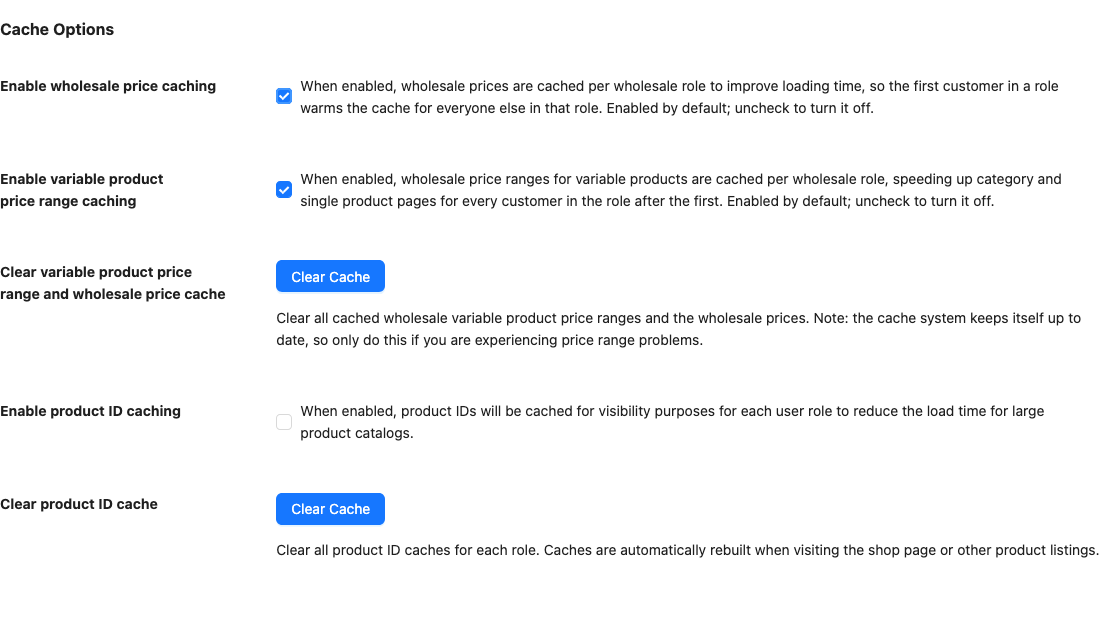
If caching is on, clear the cache whenever you change which products or categories the Addify plugin applies to. Click Clear Cache next to Clear product ID cache. The cache rebuilds the next time someone visits your shop page.
What wholesale customers see
A logged-in wholesale customer browsing your shop, a category or search results sees the variations that the Addify plugin lists as separate products. If you’ve hidden main products in the Addify plugin, the parent variable product doesn’t appear alongside them.
In the example below, the main product is not hidden, so the parent Hoodie still shows. Its Color and Logo menus come from the Addify attribute selection feature. Each Hoodie variation shows as a separate product with its wholesale price.
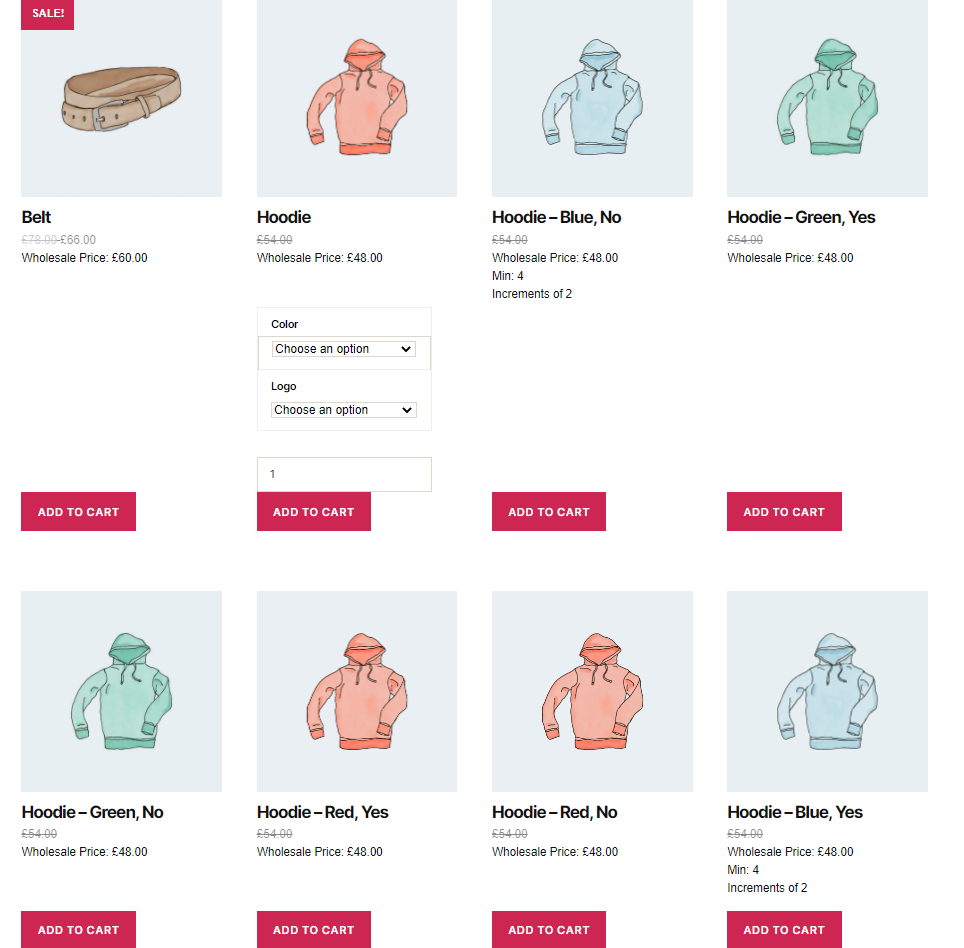
Administrators and shop managers aren’t affected by wholesale visibility rules. To check what a customer sees, log in with a wholesale customer test account in a private browser window.
To set wholesale prices on the variations themselves, see the wholesale pricing guide. Setting up prices for variable products works the same with or without the Addify plugin.
Troubleshooting
Variations aren’t showing for wholesale customers
Clear the product ID cache under Wholesale > Settings > Wholesale Prices > Cache, then reload the shop as the wholesale customer. If they’re still missing, check that the main product is visible to the customer’s role under Restrict To Wholesale Roles. If Only Show Wholesale Products To Wholesale Customers is on, also check that the product has wholesale pricing for that role.
The main variable product still appears next to its variations
Check that the Addify plugin’s hide main product option is turned on, and that the product is in one of the products or categories the Addify plugin applies to.
Wholesale customers see variations from products you didn’t select
Check the Addify plugin’s product and category limits. When neither limit is set, variations of all variable products are listed.
Everything looks right when you’re logged in as an admin, but not for customers
Wholesale visibility rules don’t apply to administrators and shop managers. Test as a wholesale customer instead.
Frequently asked questions
Do I need to turn on the integration?
No. It switches on automatically when both WooCommerce Wholesale Prices Premium and the Addify plugin are active.
Does this integration work with the free Wholesale Prices plugin?
No. The integration is part of WooCommerce Wholesale Prices Premium.
Does this work with WooCommerce Product Add-Ons?
Product Add-Ons is a separate integration. See how to set up wholesale pricing with WooCommerce Product Add-Ons.
Related articles
- Wholesale pricing guide
- How to set up wholesale pricing with WooCommerce Product Add-Ons
- How to adjust visibility of wholesale products
Need help?
If you have a question or run into any issues, we’re here to help.
- Premium users: Open a support ticket
- Free users: Visit our community forum