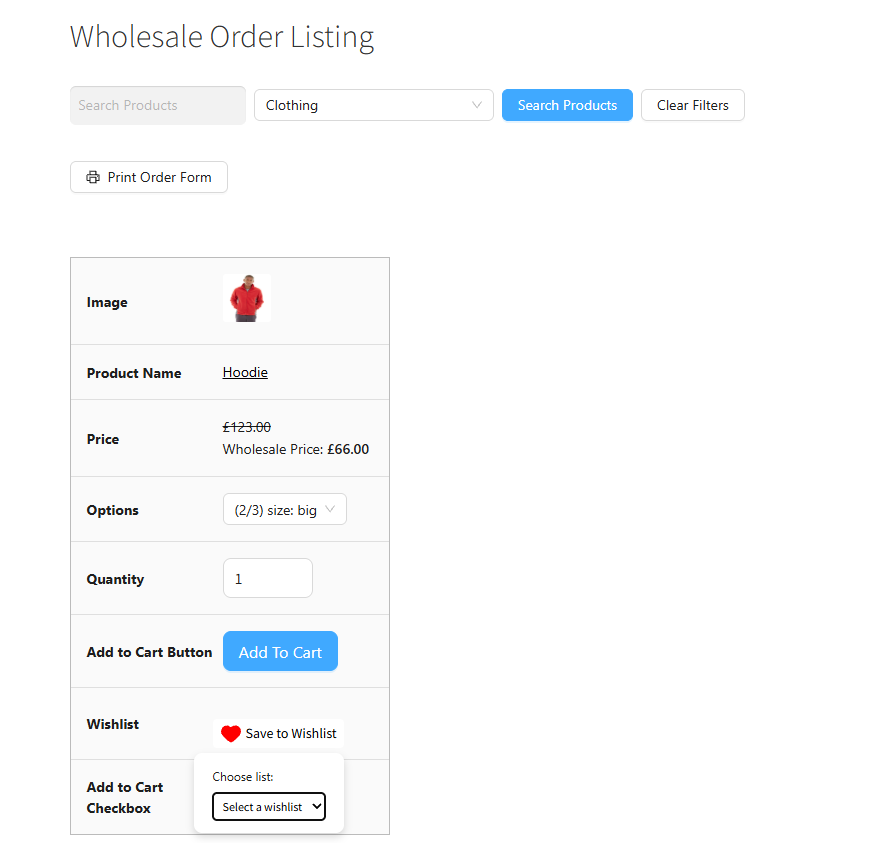
SaveTo Wishlist lets your customers save products they’re interested in for later, without committing to a cart right away. It’s a simple way for shoppers to build a list of items they want to come back to, whether they’re comparing options or just not ready to order yet.
Because wholesale customers often browse a lot of products in one sitting, this integration adds the same Save to Wishlist button right into the Wholesale Order Form. Now your wholesale buyers can save products while working through the order form, just as easily as they could on your normal product pages, no need to switch screens to build their wishlist.
What you can do with this integration?
Wishlist button on the Wholesale Order Form (SaveTo Wishlist)
SaveTo Wishlist adds a simple heart icon to your single product pages, letting shoppers save items they’re interested in without committing to a cart. Since the Wholesale Order Form pulls in the same product data as your regular store, this integration carries that same wishlist button through to the order form too. That means:
- The wishlist heart icon that shows up on your single product pages also appears next to each product row in the Wholesale Order Form.
- It looks and behaves exactly the same way — clicking it saves the product to the customer’s wishlist instantly, with no page reload.
- The button reflects your actual SaveTo Wishlist settings (icon style, color, placement), so it fits right in alongside your wholesale pricing and quantity fields rather than looking bolted on.