If your store runs Advanced Dynamic Pricing for WooCommerce next to Wholesale Suite, you might wonder which discount a wholesale customer gets. This article explains which price wins, who is affected, and what you can and cannot change.
Short answer: for wholesale customers, the wholesale price wins. There is nothing to set up. WooCommerce Wholesale Prices handles this on its own when both plugins are active.
What you need
- WooCommerce Wholesale Prices, version 2.3.0 or higher, installed and active.
- Advanced Dynamic Pricing for WooCommerce, installed and active.
- At least one wholesale role on your store. The free plugin includes the Wholesale Customer role.
What changes when both plugins are active
WooCommerce Wholesale Prices adds two small rules that only apply to wholesale customers. Both rules use filters that Advanced Dynamic Pricing provides for other plugins to use.
| What the customer sees | What WooCommerce Wholesale Prices does | Advanced Dynamic Pricing filter used |
|---|---|---|
| The price in the cart | Tells Advanced Dynamic Pricing to turn its pricing rules off for this customer. The wholesale price stays as the cart price. | adp_rules_suppression |
| The price on the shop and product pages | Tells Advanced Dynamic Pricing not to rewrite the price display for this customer. The wholesale price display stays as it is. | adp_get_price_html_is_mod_needed |
Who is affected
The rules apply to any logged-in customer who holds a wholesale role. This includes the Wholesale Customer role and any extra wholesale roles you create with WooCommerce Wholesale Prices Premium.
Everyone else is not affected. Retail customers and logged-out visitors keep getting your Advanced Dynamic Pricing rules as normal. If Advanced Dynamic Pricing is not active, nothing changes for anyone.
Which price wins
| Customer | Which price applies |
|---|---|
| Wholesale customer | The wholesale price from WooCommerce Wholesale Prices, where one is set. Advanced Dynamic Pricing rules are turned off for this customer. |
| Retail customer | Your Advanced Dynamic Pricing rules, as set up in that plugin. |
| Logged-out visitor | Your Advanced Dynamic Pricing rules, as set up in that plugin. |
Things to know
It is all or nothing for wholesale customers. The rules are turned off for the customer, not for single products. Wholesale customers get no Advanced Dynamic Pricing discounts at all, even on a product where you did not set a wholesale price.
There is no setting for this. You cannot choose a different winner or turn the behavior off in WooCommerce Wholesale Prices. You also cannot let one Advanced Dynamic Pricing rule apply to wholesale customers.
The check is based on the logged-in user. If you test as an admin, you only see the wholesale behavior when your own account holds a wholesale role. Use a separate wholesale test account instead.
Advanced Dynamic Pricing is a third-party plugin. This article only describes what WooCommerce Wholesale Prices does. For how Advanced Dynamic Pricing rules are built, see that plugin’s own documentation.
What you will see in your store
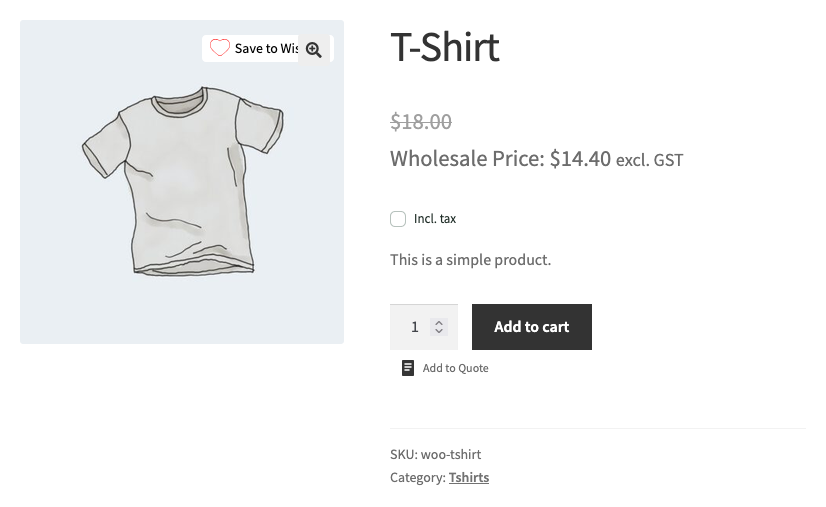
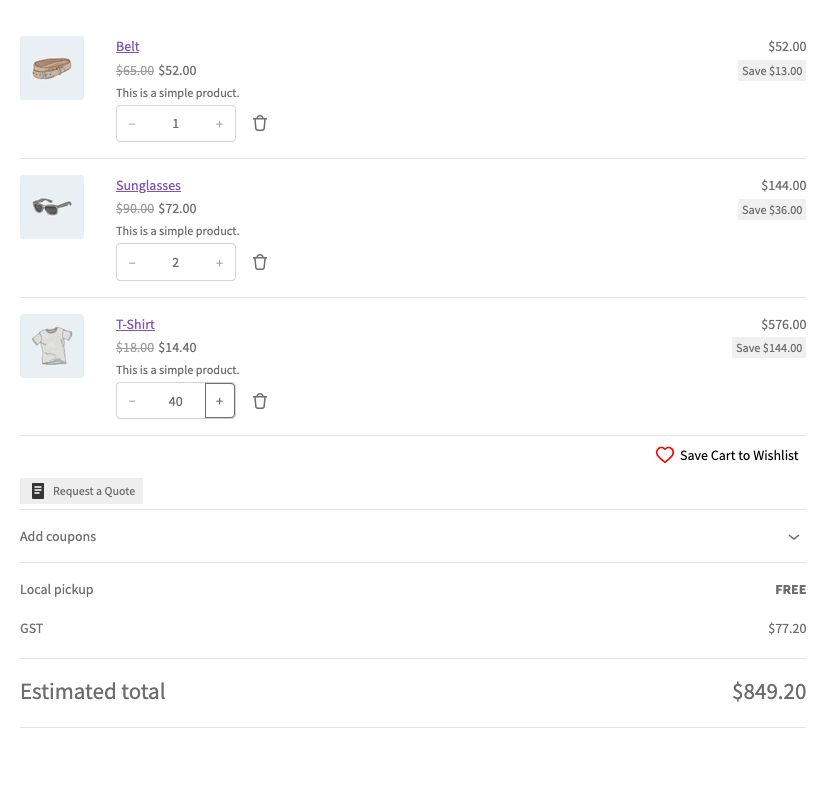
Log in as a wholesale customer and add a product to the cart. The product page and the cart show the wholesale price, even when a rule in Advanced Dynamic Pricing would match that product.
Related articles
- Wholesale Pricing Guide – How Wholesale Pricing Works in Wholesale Suite
- How Can I Test Wholesale Pricing? I’m Logged In As Admin And Only See Retail Prices
- Getting started with the free WooCommerce Wholesale Prices plugin
Frequently asked questions
Do I need to turn anything on?
No. The behavior starts when both plugins are active.
Will my retail customers lose their Advanced Dynamic Pricing discounts?
No. Only customers with a wholesale role are affected.
Does this need WooCommerce Wholesale Prices Premium?
No. It is part of the free WooCommerce Wholesale Prices plugin. Extra wholesale roles from WooCommerce Wholesale Prices Premium are covered too.
Need help?
If you have a question or run into any issues, we’re here to help.
- Premium users: Open a support ticket
- Free users: Visit our community forum