
An office manager emails you in October. They need 60 gifts for clients, and they have a budget per head. Then a second email arrives with a revised list. Then a third, asking whether you can invoice rather than pay by card.
Email threads are where most corporate gift orders happen, but they’re not the best tool for the job. You can’t see prices or clear lists of items. Plus, you have to type out the order by hand every time the list changes.
A WooCommerce gift registry fixes the list-keeping half of that problem. Your wholesale tools fix the pricing and payment half. We’ve seen stores get these big orders just because they made buying easy, even if they didn’t have the biggest product list.
This guide covers what a gift registry gives you. It also covers how to run one alongside Wholesale Suite.
Table of Contents
- What Is A Corporate WooCommerce Gift Registry?
- Where Corporate Gifting Breaks Down In A Wholesale Store
- Setting Up A WooCommerce Gift Registry With The SaveTo Wishlist Addon
- How The Gift Registry Addon And Wholesale Suite Work Together
- How To Handle Bulk Registry Orders With Wholesale Quotes
- Pricing And Payment Terms For Corporate Gift Buyers
- What To Track On Corporate Registry Orders
- Start Taking WooCommerce Gift Registry Orders From Businesses
- Frequently Asked Questions
What Is A Corporate WooCommerce Gift Registry?
A corporate gift registry is a shared, itemised gift list. A company builds it in your store and returns to it over time. It works like a consumer registry, with one difference. The buyer is shopping for a business instead of a family.
You’ll see these same examples in almost every wholesale store:
- Client gifting: An agency sending a special gift to 40 clients before the holidays.
- Staff onboarding kits: A fixed bundle a company reorders every time they hire.
- Event and conference gifting: A list built once, ordered in bulk, repeated annually.
- Departmental gifting: Several managers chipping in to buy from one shared list.
The registry itself isn’t the final sale. Instead, it’s the tool that makes it easy for the buyer to order again later. The list survives after the order, so the buyer can return to it next year.
Why a list beats an email thread
A registry keeps everyone on the same page. The buyer can add and remove items without sending new emails. Meanwhile, you can see exactly what they want without having to piece together three different messages.
There’s a reorder benefit, too. Companies give gifts at the same times every year. When you save their list, the buyer can easily order from it again next time.
Where Corporate Gifting Breaks Down In A Wholesale Store
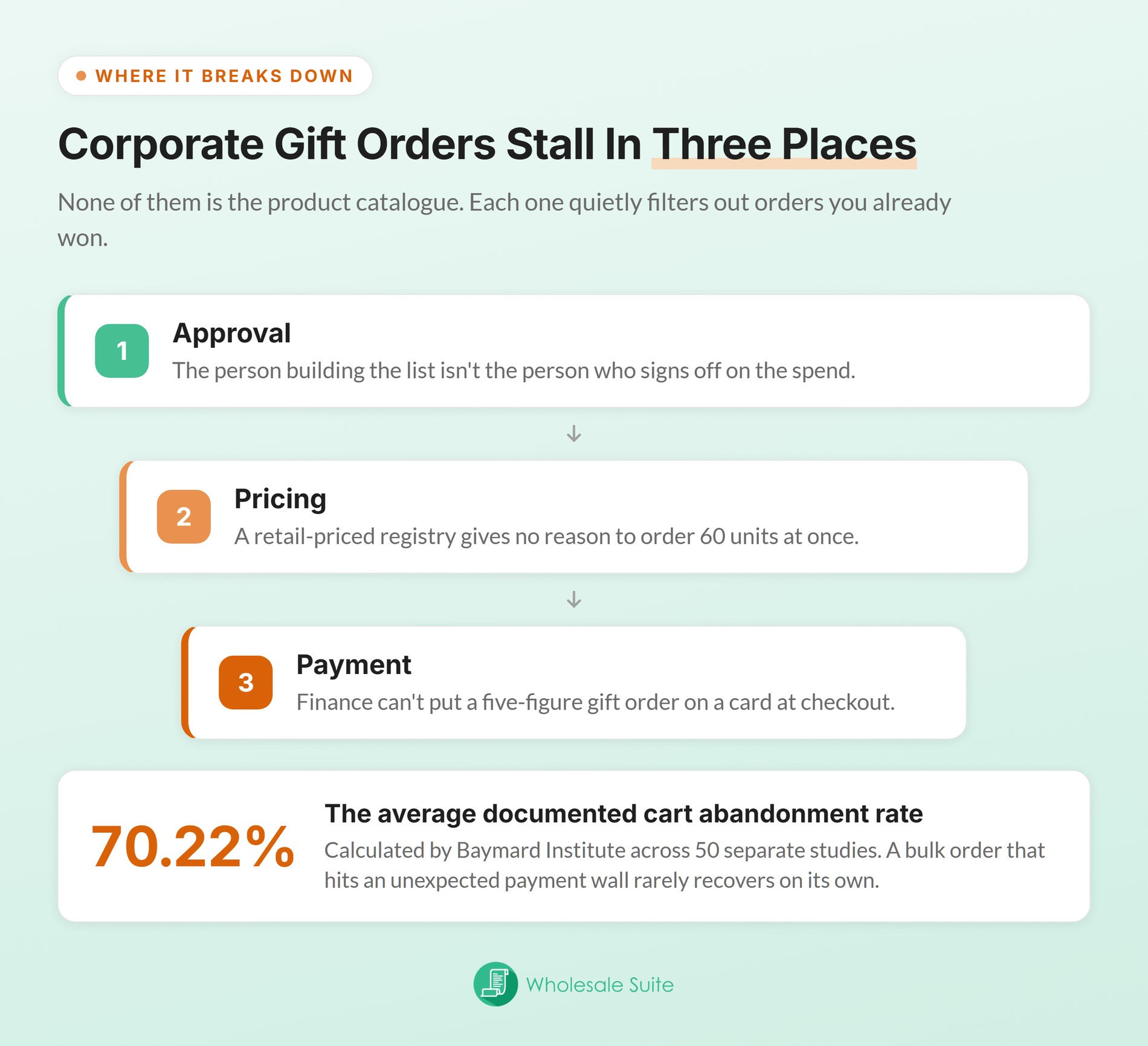
Corporate gift orders usually slow down for one of three reasons. None of them is the product catalogue.
Approval. The person making the list often isn’t the one who approves the budget. But, they can share the list with their team, review it, and then submit it. That’s exactly how companies buy.
Pricing. Business buyers expect bulk discounts. If your registry only shows regular prices, they won’t have a reason to buy 60 items at once.
Payment. Businesses frequently need to be invoiced on terms. Asking a company to pay for a massive order on a credit card will often stop the sale.
A difficult checkout process is a huge problem here. Baymard Institute puts the average documented cart abandonment rate at 70.22%, calculated across 50 different studies. When a huge business order runs into payment issues, the buyer will rarely come back.
You should know how big this chance is. Business buyers are ready to buy, and they’ll place massive orders without ever talking to a salesperson.
A recent McKinsey survey shows that 39% of business buyers will happily spend over $500,000 per order. That includes people who buy online by themselves and people who talk to a sales rep.
🔍️ One thing we commonly see: Many stores build a great wholesale product list, but then they ask corporate buyers to use a basic contact form. Because the system doesn’t save the buyer’s list, your team has to update the order by hand every time it changes.
Setting Up A WooCommerce Gift Registry With The SaveTo Wishlist Addon
The SaveTo Wishlist Gift Registry Addon lets customers turn any wishlist into a shareable registry. It handles everything about the list itself: making it, sharing it, tracking what people buy, and following up. It runs on top of SaveTo Wishlist Lite. There’s no separate registry product type, so it reuses the products you already sell.
The parts that matter most for a wholesale store
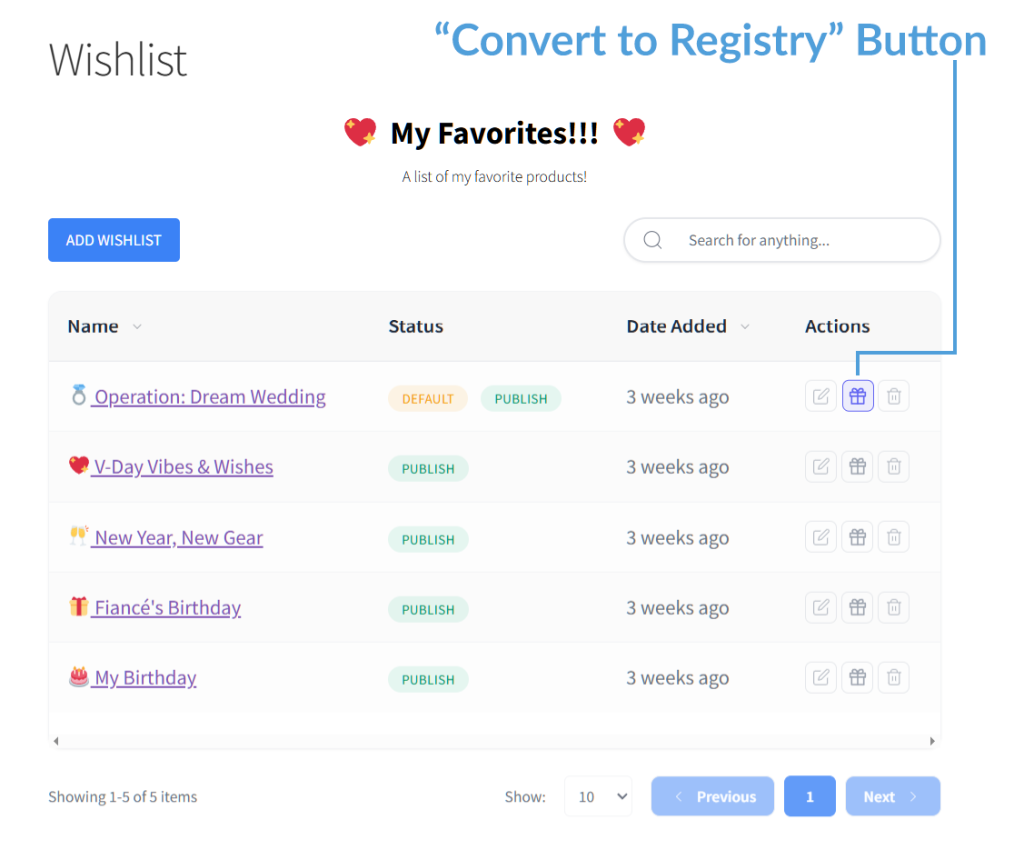
- Convert any wishlist to a registry: Buyers get a Convert to Registry action. They then set an event type, a date, registrant names, and an optional message. Only the owner of a wishlist can convert it.
- A shareable link: Each registry gets its own address. An owner-only Share button offers a copy link, a pre-filled email, and social sharing. That’s how buyers will share the list with their bosses to get approval.
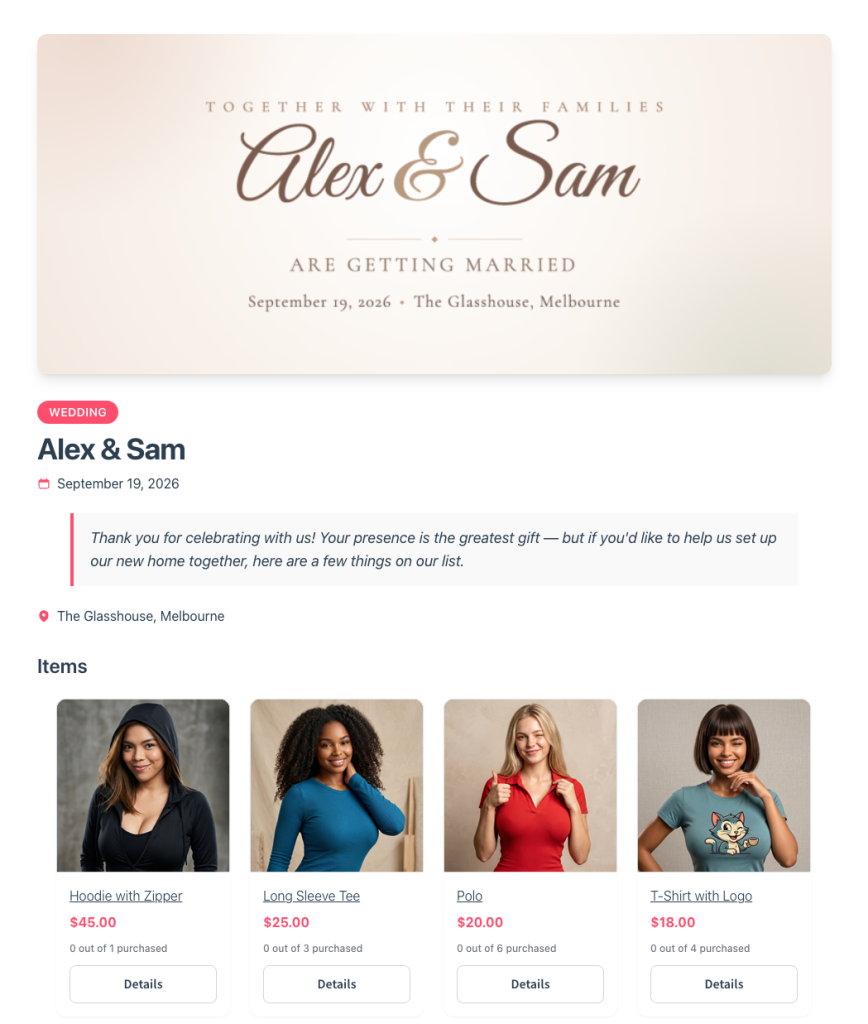
- Per-item quantity tracking: Guests see how many of each item were requested, bought, and still needed. Once an item is fully bought, a Fully purchased badge replaces the add-to-cart control.
- A registry search page: When you turn this on, it creates a “Find a Registry” page. Co-workers can search for the list maker’s name and filter by the type of event.
- Store owner tools: A dashboard lists every registry, including its owner, status, and item details. You can view, edit, or archive registries as needed. Deleting hides the registry from view, but it keeps all the purchase records safe.
- A thank-you tracker: The owner sees one row per purchase. Each row shows the item, quantity, buyer name and email, date, and order number. A tick box marks the thank-you as sent.
- Email notifications: The owner is alerted when items are purchased or refunded. Admins are alerted when a new registry is created.
You can set up your own event types. That’s what makes this tool so great for businesses. A “client gifting 2026” or “new hire kit” registry behaves the same as a wedding one.
Privacy considerations and pricing tiers
Here’s one thing to think about before you share this tool with corporate buyers. Registries are public pages, not password-protected. Anyone with the link can view the list and buy from it. That said, buyer identities, purchase records, and the owner’s email are never shown publicly.
If a buyer makes a list that shows the names of their clients, you’ll want to make sure they’re okay with that information being public.
The addon is available on the SaveTo Wishlist Plus and Business plans. Plus is $99.50 for the first year, then renews at $199. Business is $199.50 for the first year, then renews at $399. There’s also a free Lite tier and a Growth plan at $49.50, renewing at $99.
Neither Lite nor Growth includes the Gift Registry Addon. Check the SaveTo Wishlist pricing page for current figures.
How The Gift Registry Addon And Wholesale Suite Work Together
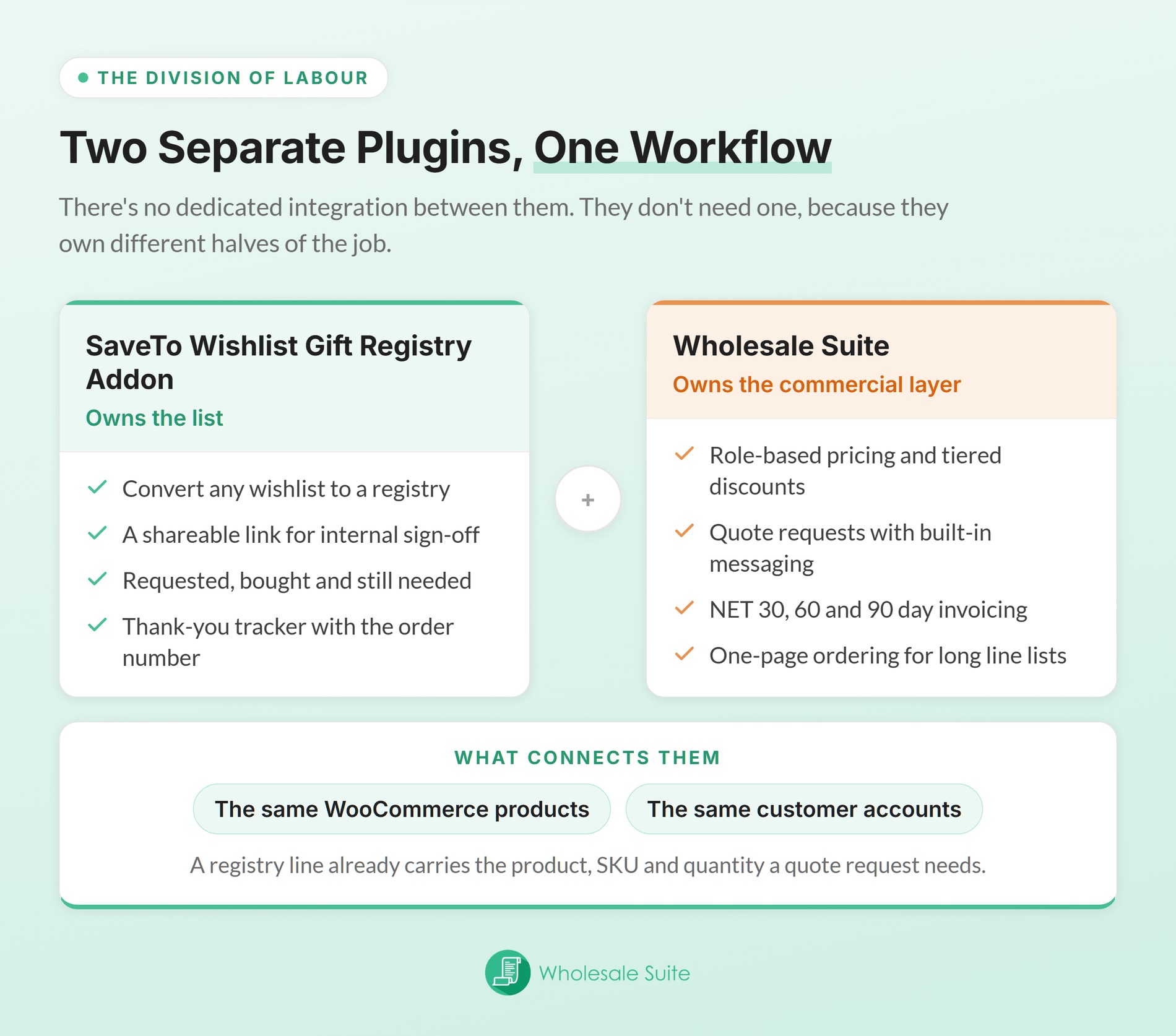
These are two separate plugins, with no dedicated integration between them. That’s fine, because they own different halves of the job. This WooCommerce gift registry plugin extension owns the list, while Wholesale Suite owns pricing, quoting, and payment terms.
What connects them is simpler than an integration. Both run on the same WooCommerce products and the same customer accounts.
- One catalogue, not two. Registry items are your existing products. So you don’t build or maintain a separate gifting catalogue.
- One customer account. A buyer approved into a wholesale role keeps that role across your store. You’ll approve the buyer and set their prices before they even start making their gift list.
- The list is the specification for the quote. A registry gives you a product, a SKU, and a quantity on every line. That’s exactly what a quote request needs.
- Saved items will stay on the list even if you change your store. Each item on the registry keeps its own name, product code, and picture. The list will still look right even if you delete the product later.
There’s one behavior worth testing on your own store. The system updates the registry list as soon as an order is processing, instead of waiting until the order is completely finished. That’s why payment methods like bank transfers and checks work well here.
Orders paid with invoices often stay in the ‘Processing’ status while waiting for payment. You’ll want to run a complete test with your own payment setup to make sure everything tracks correctly. Confirm that a paid-on-terms order ticks items off the list.
Keep in mind that the system won’t copy a registry into a quote automatically. Either you re-enter the lines, or the buyer rebuilds the list in your order form. Still, that’s a few minutes of work against a list that’s already agreed.
How To Handle Bulk Registry Orders With Wholesale Quotes
Once a corporate buyer has a registry, the order should run through a quote. A regular checkout page isn’t the best choice here. Wholesale Quotes is made exactly for this kind of big order.
The workflow is short:
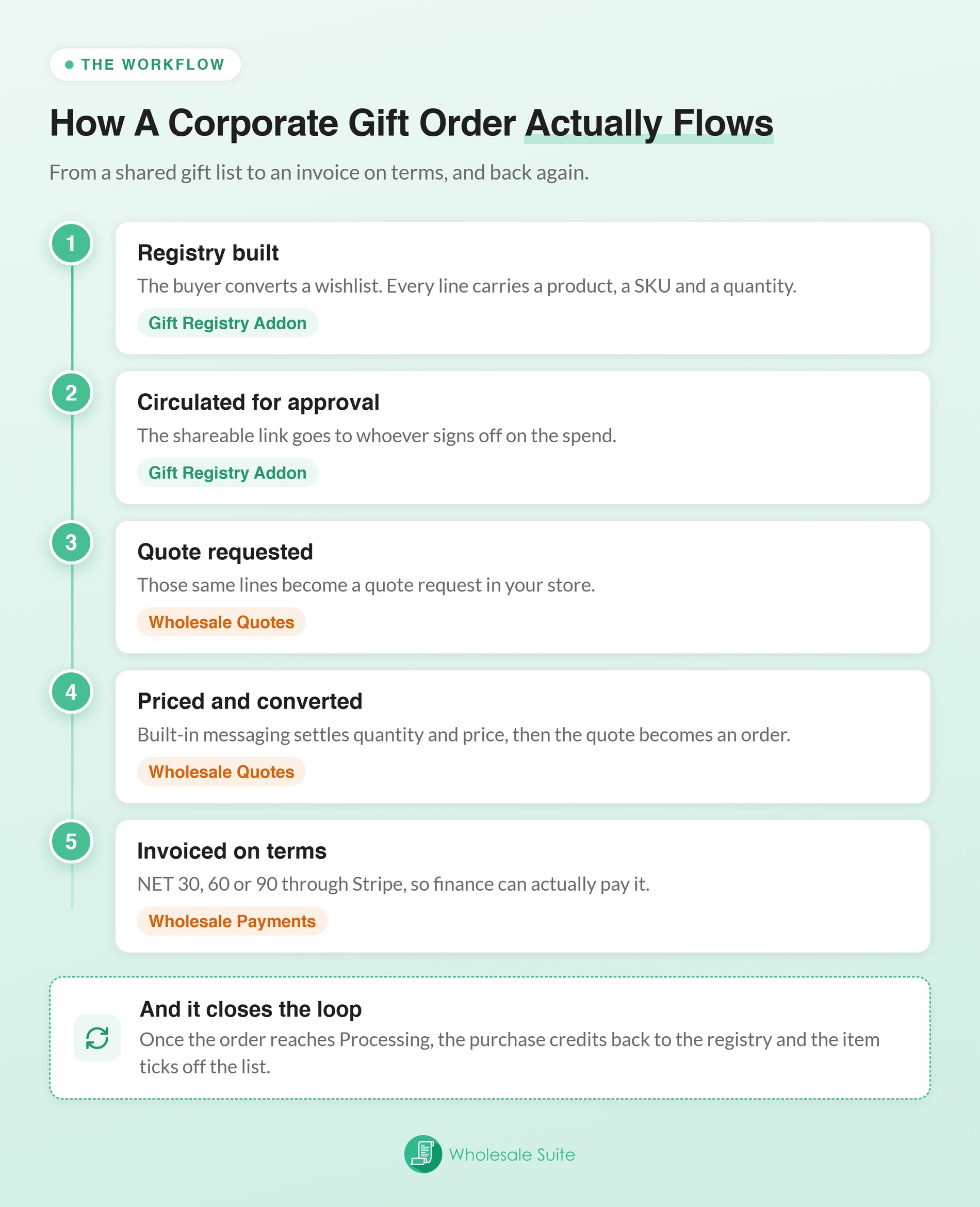
- The buyer submits a wholesale quote request from your store, with the items and quantities they need.
- You review it in your admin and either approve or decline it. Built-in messaging lets both sides discuss price and quantity inside the quote. Message notifications go out by email, so the negotiation stays attached to the record.
- You convert the approved quote into a WooCommerce order, using the items and quantities already agreed.
This gives you a clear, priced list with a solid record of every step. It’s a huge upgrade from tracking things through email.
Two details matter more for gifting than for ordinary wholesale orders. Quotes include a safe, public link to view them. That’s how buyers will share the priced list with their team to get approval. In other words, it helps the buyer get the fast approval they need.
Quotes also have expiration dates. This protects your profits if your prices change between the first question and the final order.
There’s one more situation that business buyers will run into all the time. An out of stock quote button lets a buyer request a quote on a temporarily unavailable product. It’s off by default, so switch it on under Wholesale > Settings > Wholesale Quotes > General. For seasonal gifting, where lists get built weeks early, that keeps the conversation alive.
Pricing And Payment Terms For Corporate Gift Buyers
When you offer bulk discounts and send invoices, you’ll turn a one-time gift buyer into a loyal customer. Two of the plugins in the bundle handle this.
- Wholesale Prices Premium lets you set specific prices and bulk discounts for different types of customers. It also lets you hide certain products, shipping methods, or taxes from them.
- Wholesale Payments covers invoicing with NET 30, 60, and 90 day terms, powered by Stripe. This is often the single factor that decides whether a finance department can buy.
Two more are worth knowing about. Wholesale Order Form gives buyers one-page catalogue ordering with search and filtering. That suits someone entering 60 line items far better than clicking through product pages. It’s also the fastest way to rebuild a registry list as an order.
Wholesale Lead Capture helps you sign up new buyers. A new buyer can apply for an account, and you can check their details before you let them see your wholesale prices.
All five plugins come in the Wholesale Suite All Access Bundle. It’s $299 per year as an introductory price, half off the regular $598. The licence covers unlimited sites, and over 25,000 stores run the suite.
What To Track On Corporate Registry Orders
First, you’ll want to track how many price quotes turn into real orders. This tells you if buyers like your prices and rules. You can divide your won orders by the total quotes you’ve sent. Then, look at the lost quotes to see if the price or the number of items stopped them from buying.
Four other measures are worth watching:
- Average quote value: corporate gift orders should sit well above your standard wholesale order value.
- Time from quote to approval: If you take too long to approve a quote, you’ll often lose the sale completely.
- Registry reorder rate: how many corporate registries generate a second order in a later season.
- Registry creation rate: whether corporate buyers are finding the feature at all.
The quote numbers come from your Wholesale Quotes admin. Meanwhile, the registry numbers come from the addon’s Registries screen. It shows the item and purchase count for each registry. Visser Labs has a guide on exporting gift registry order data if you need more detail.
Start Taking WooCommerce Gift Registry Orders From Businesses
The best part of a corporate gift registry is the second order, because it’s so easy to get. The buyer already made their list, they know your prices, and you both agree on the rules. When they order next year, they just copy their old order instead of starting over.
Here’s the short version of what to do:
- What Is A Corporate WooCommerce Gift Registry? Decide which corporate use cases you’ll support.
- Where You Can Improve Corporate Gifting In Your Wholesale Store. Focus on making approvals, pricing, and payments easier, rather than just changing your products.
- How The Gift Registry Addon And Wholesale Suite Work Together. Test that a paid-on-terms order credits the registry.
- How To Handle Bulk Registry Orders With Wholesale Quotes. Route bulk gift orders through a quote, not checkout.
- What To Track On Corporate Registry Orders. Watch quote-to-order conversion above everything else.
If you’ve already set up your wholesale pricing, the only missing piece’s the gift list itself. That’s the part the SaveTo Wishlist Gift Registry Addon handles. It’s worth a look before the corporate enquiries start arriving.
Get the Gift Registry Addon today!
Frequently Asked Questions
Can a WooCommerce gift registry work for business buyers, not just consumers?
Yes. It works the exact same way, and you’re able to change the types of events. A registry can represent a client gifting round or a staff onboarding kit. What changes is the business side: lower prices for buying a lot at once, approval steps, and how you’ll handle invoices.
How do I turn a registry list into a wholesale quote?
The registry gives you the product, SKU, and quantity for every line. Those lines get entered into a quote request. Either the buyer rebuilds the list in your Wholesale Order Form, or your team enters it. The two plugins don’t pass data to each other, so this step is manual.
Should corporate gift orders go through checkout or a quote?
A quote, in almost every case. Bulk gift orders usually need a negotiated price, an internal approval, and payment on terms. A standard checkout handles none of those. Wholesale Quotes lets you review the order, approve or decline it, and then easily turn it into a real order.
Can I invoice a company for a large gift order?
Wholesale Payments supports invoicing with NET 30, 60, and 90 day terms through Stripe. For many corporate buyers this is the deciding factor. Their finance process often cannot pay a large order by card.
What happens if two guests buy the last unit of a registry item?
Both purchases go through. Adding a gift to a cart doesn’t reserve it, and items count as bought once the order goes through. So a popular item can occasionally be over-bought. We’ve chosen to do it this way, because the other option is stopping a customer’s payment at checkout.
The registry owner is emailed either way, and a refund puts the item back on the list.
What happens if a registry item is out of stock when the buyer is ready?
Wholesale Quotes includes an out of stock quote button, added in version 1.0.2. Once you enable it, the button stays visible on sold-out items. A buyer can then request a quote instead of hitting a dead end. It’s off by default, so nothing changes in your store until you switch it on.