
If customers build their own kits, the final price needs to reflect their wholesale rate and selected components. This guide explains how WooCommerce Wholesale Prices Premium works with WooCommerce Composite Products, and what to check before offering kits to wholesale buyers.
What you’ll need
- WooCommerce Wholesale Prices and WooCommerce Wholesale Prices Premium, installed and active.
- WooCommerce Composite Products, installed and active.
- A configured composite product and wholesale prices for the relevant role.
- A wholesale customer account for testing.
This guide focuses on wholesale pricing. For component configuration and pricing modes, use the official Composite Products setup guide.
How the base price and components work
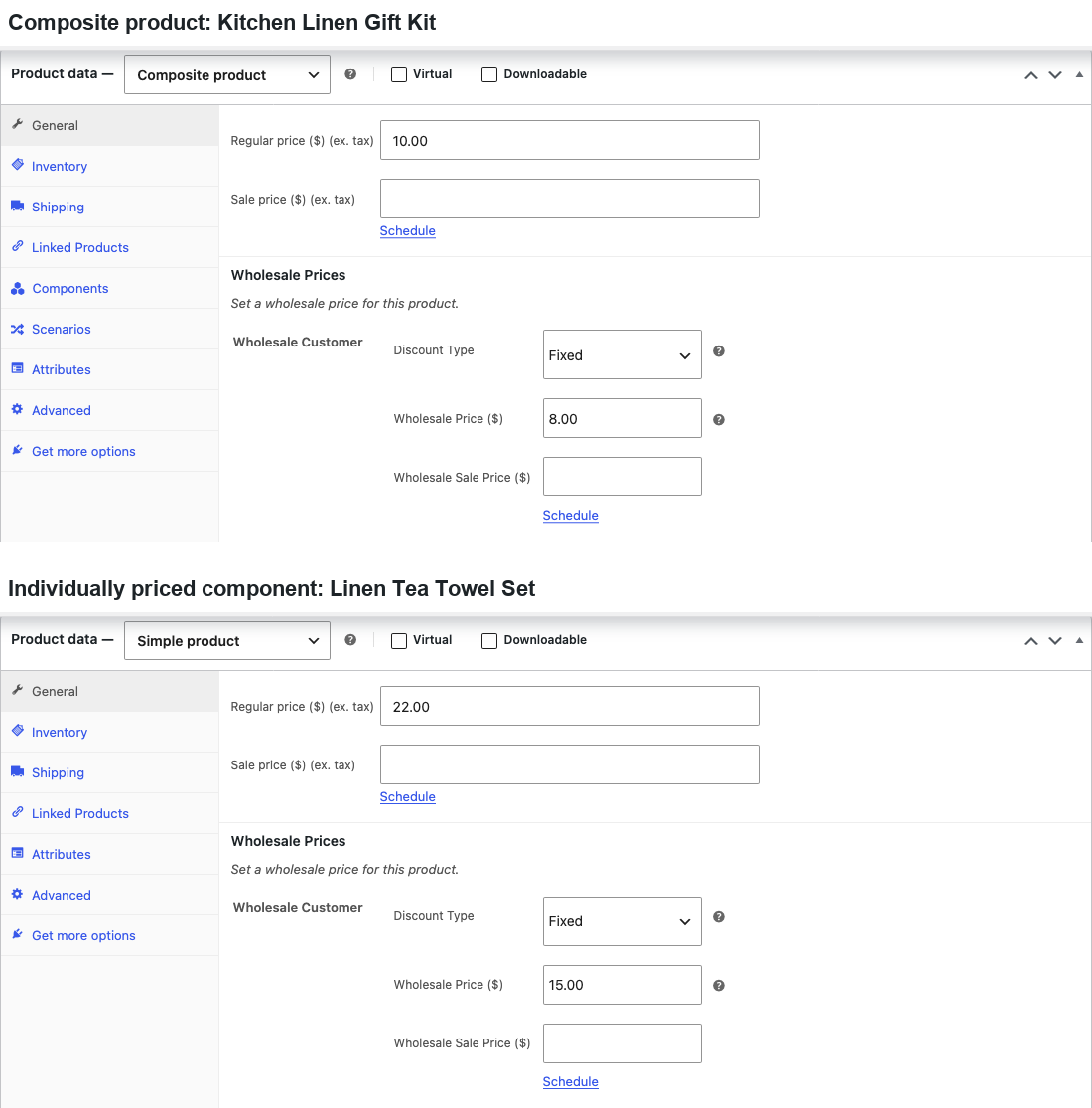
A composite can have its own base price. Premium supports a wholesale price on that composite product. Components configured as Priced Individually contribute their selected product prices in addition to the base amount.
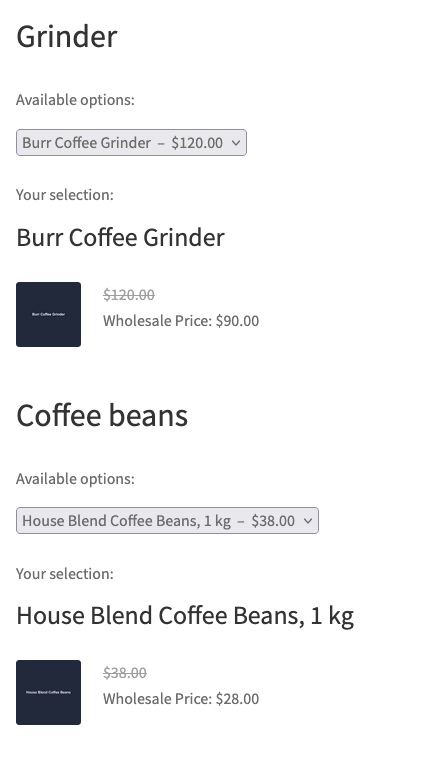
For an individually priced component, the integration looks up the selected product’s wholesale price for the customer’s role. For variable component products, it looks up the selected variation. Where no applicable wholesale price is available, the component uses its current retail price, including an active sale price.
Components that are not priced individually do not add their product price to the kit total. Setting a wholesale price on one of those component products does not turn it into an extra charge. This distinction matters when you compare the kit’s total with standalone product prices.
Where to set the wholesale prices
- Go to Products → All Products.
- Open the composite product.
- Review its wholesale base price in Product data.
- Open each product used in an individually priced component.
- Set the wholesale price for the relevant role.
- Save the product changes.
For a variable component product, set the wholesale price on each applicable variation. Use the pricing guide for the broader pricing rules.
What your wholesale customer sees
The integration supplies wholesale component prices to the configurator for a logged-in wholesale customer. The final amount depends on the base price, chosen components, component quantities and any relevant pricing settings. A kit with mixed wholesale-priced and regular-priced components can therefore contain both types of price.
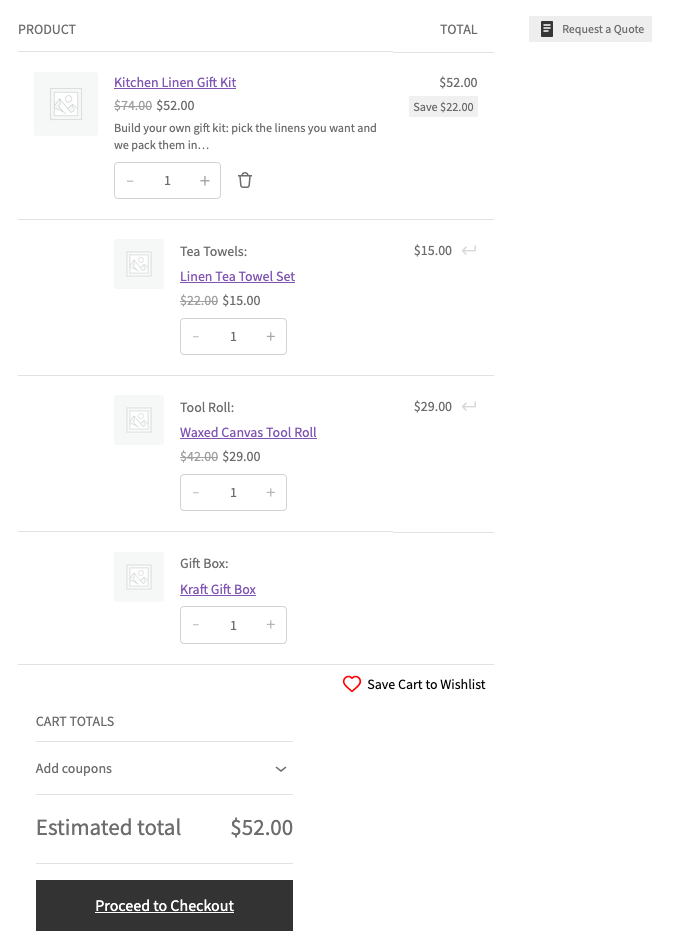
In the cart, confirm that every selected component is present and that the combined total matches the configuration. WooCommerce Wholesale Prices 2.2.9 lists improvements for composite cart totals and missing components. Update the free plugin as well as Premium before troubleshooting an older installation.
Check quantities and minimum requirements
A minimum quantity can be configured for the composite parent. Component quantities are also governed by the composite’s configuration. From Premium 2.1.1, Premium does not apply a product’s own wholesale minimum to a component’s quantity box. The composite controls those quantities.
A minimum quantity on the composite product checks how many kits the customer buys. Its component quantities follow the kit configuration; a component’s standalone wholesale minimum does not force the customer to buy extra kits.
An order-wide minimum quantity uses WooCommerce’s cart item count. With the standard Composite Products count, one kit counts as one item and two kits count as two, regardless of the number of components shown as separate cart rows. For example, with an order minimum of two items and no other products in the cart, one kit is below the minimum and two kits reach it. Customized counting or product exclusions can change that result. See WooCommerce’s composite cart-count explanation.
A minimum order subtotal tests the product amount at the applicable wholesale prices rather than counting components. Tax and shipping do not count toward that product subtotal. For configuring the thresholds, see the minimum order requirements guide.
To test a kit against your minimums:
- Sign in as a wholesale test customer.
- Choose a complete kit configuration.
- Add one kit to the cart.
- Check the selected components and their quantities.
- Increase the kit quantity.
- Check your minimum requirements and totals again.
Troubleshooting
A component remains at its retail price. Check whether it is priced individually and whether the selected product or variation has a wholesale price for this customer’s role.
The total differs from your expectation. Compare the composite base amount, individually priced components, selected quantities and tax display. Compare equivalent configurations rather than a kit total with a single component’s price.
Components are missing from the cart. Update WooCommerce Wholesale Prices to 2.2.9 or later and Premium to 2.1.3 or later. Premium 2.1.3 fixed a wholesale cart that left out individually priced components. Update Composite Products too, then re-test before you change your kit configuration.
Related guides
- How to configure Wholesale Suite for WooCommerce Product Bundles
- How to set minimum order requirements for wholesale customers
Frequently asked questions
Is a grouped product the same as a composite?
No. A composite lets the customer configure a kit. A grouped product presents separately purchasable child products. See How to set wholesale prices for grouped products.
Does every component need a wholesale price?
Set one on each individually priced product or variation that should receive a wholesale rate. Otherwise, that component can contribute its current retail price, including an active sale price.
Need help?
If you have a question or run into any issues, we’re here to help.
- Premium users: Open a support ticket
- Free users: Visit our community forum

