


An SKU (Stock-Keeping Unit) in WooCommerce is a unique alphanumeric code you assign to each product or variant — for example, SHIRT-BLU-MED-001 for a medium blue shirt. WooCommerce uses SKUs to identify products internally, link them to inventory tracking, and (with the right plugin) let buyers search and reorder by SKU. They aren’t created automatically; you assign them in the product’s Inventory tab. Setting them up well is one of the cheapest investments you can make in inventory accuracy and wholesale order speed.
This guide covers what an SKU is, how to design a naming pattern that scales as your catalog grows, how to add SKUs in WooCommerce step by step, and the SKU patterns that work best for wholesale operations.
Quick Answer: SKUs In WooCommerce In 5 Points
- What it is: Stock-Keeping Unit — a unique short code per product (or per variant of a product).
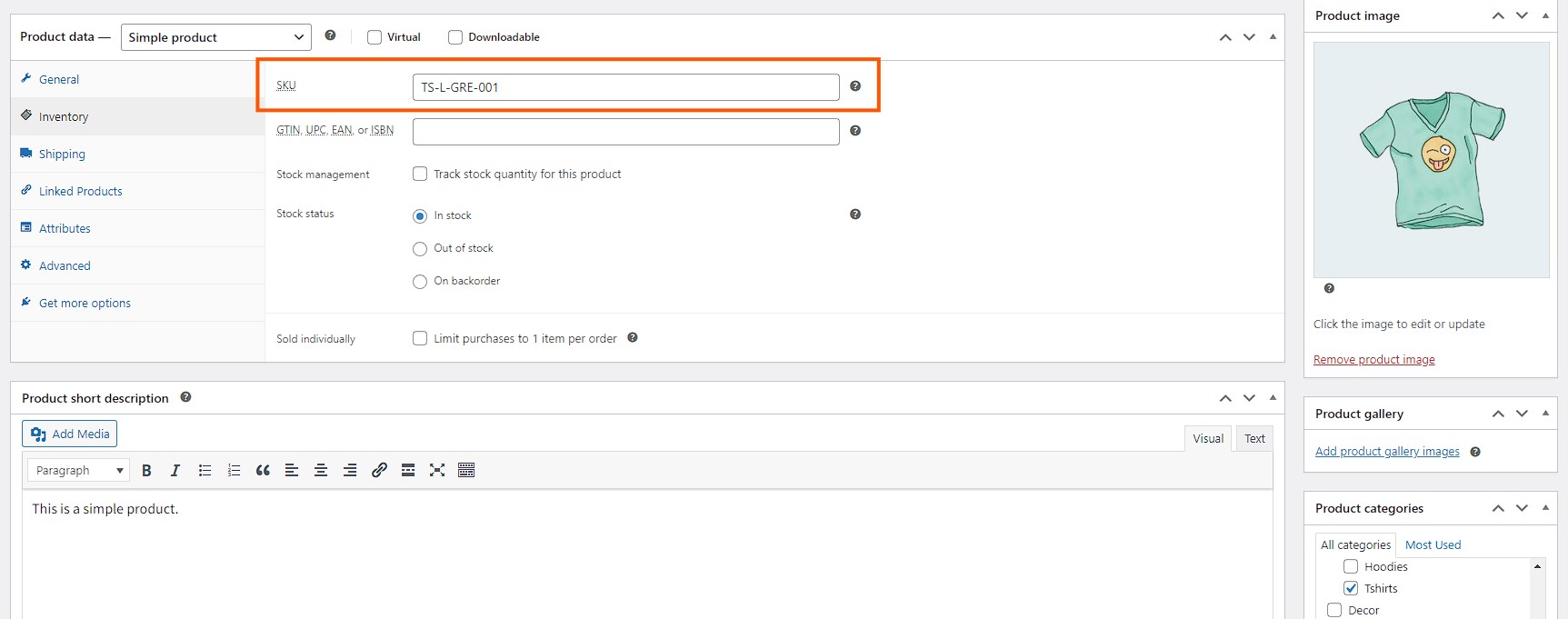
- Where to add it: Products → All Products → [your product] → Inventory tab → SKU field.
- What it’s used for: Inventory tracking, internal product search, accounting/ERP integration, supplier reorders, and (with a wholesale order form) fast bulk reordering by buyers.
- Format that works:
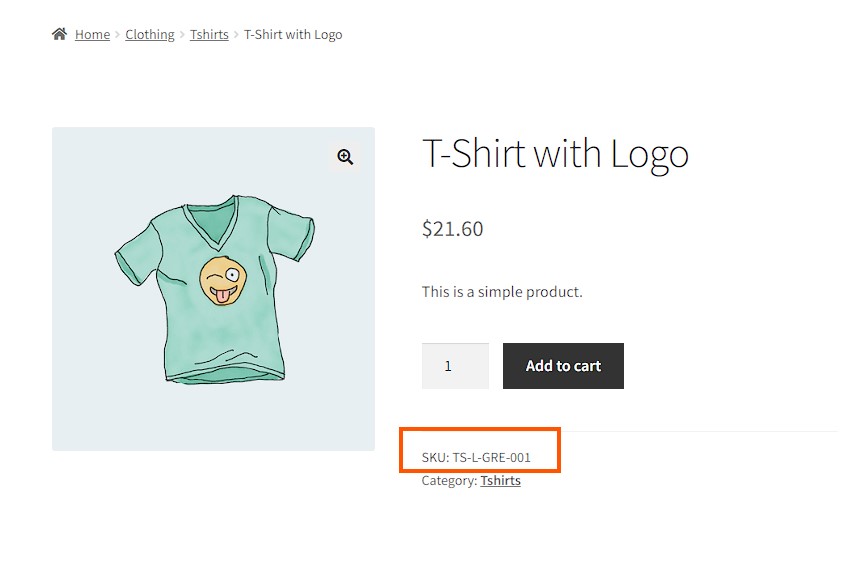
CATEGORY-ATTRIBUTES-SEQUENCE— e.g.,TS-L-GRE-001for a Large Green T-Shirt, item 001. - Common mistakes: reusing the same SKU across variants, baking the price into the SKU, or relying on auto-generated supplier SKUs that change without warning.
What Is SKU And What It Actually Does In WooCommerce
WooCommerce stores two identifiers per product: a system-generated product ID (an integer that WordPress uses internally) and the SKU (which you set). The product ID is for the system. The SKU is for humans, suppliers, and integrations.
SKUs do work in five places:
- Stock tracking — when stock management is enabled, each SKU has its own quantity. Variants count as separate SKUs.
- Admin search — searching the WooCommerce product list by SKU finds the matching product instantly. Searching by product name fuzzy-matches; searching by SKU is exact.
- Front-end search (with a plugin) — native WooCommerce doesn’t let buyers search by SKU on the storefront. SKU search has to be enabled via a plugin like Wholesale Order Form or a search-tool plugin.
- Accounting and ERP integration — when WooCommerce syncs to Xero, QuickBooks, NetSuite, or a warehouse system, the SKU is the join key between systems. Inconsistent SKUs cause sync errors.
- Wholesale buyer ordering — wholesale buyers reorder the same products repeatedly. A clean SKU system lets them paste a list of SKUs into an order form and check out in seconds.
How To Structure A WooCommerce SKU
A workable SKU has three parts: a category identifier, attribute codes, and a sequential or unique suffix. Format:
CATEGORY-ATTRIBUTE1-ATTRIBUTE2-SEQ
- Category identifier (2–4 chars) — broad type.
TSfor T-Shirt,HOODfor Hoodie,MUGfor Mug. - Attribute codes (one block per attribute) — colour, size, material, gender. Use 3-letter abbreviations consistently.
BLU,BLK,GREfor colours;SML,MED,LRG,XLRfor sizes. - Sequential or unique suffix (3–4 digits) — so two products with otherwise-identical attributes still get unique SKUs. Pad with zeros (
001,002) to keep alphabetical sorting working at scale.
Worked example for a clothing range:
TS-BLU-MED-001— T-Shirt, Blue, Medium, item 001TS-BLU-LRG-001— T-Shirt, Blue, Large, item 001 (same design, different size)TS-BLK-MED-002— T-Shirt, Black, Medium, item 002 (different design)HOOD-GRE-LRG-001— Hoodie, Green, Large, item 001
Each variant is its own SKU — that’s the rule WooCommerce expects, and it’s what makes inventory tracking work properly. Treat the parent product as a label; the variants are the real SKUs.
What we’ve seen: The fastest way to break an SKU system is to bake the price into the code (
SHIRT-25for “$25 shirt”). The day you raise prices you’re stuck with thousands of legacy SKUs that no longer mean what they say. Keep prices out of SKUs entirely. Same goes for promo names, supplier-of-the-month codes, or anything else that changes faster than the product itself.
SKU Patterns Specific To Wholesale Operations
Wholesale stores have a few SKU concerns retail stores don’t:
- Supplier-side SKUs vs. your SKUs — your suppliers have their own SKUs for the products they sell you. Don’t use the supplier’s SKU as your storefront SKU; suppliers change codes without notice. Keep your own SKU and store the supplier code as a separate metadata field.
- Pack and case SKUs — if you sell single units to retail and case quantities to wholesale, the case is a different SKU.
SOAP-LAV-001for a single bar;SOAP-LAV-CASE12-001for a 12-pack. Don’t try to model “buy 12 of SOAP-LAV-001” as a wholesale rule — make the case its own SKU with its own stock count. - Multi-location stock — if you ship from multiple warehouses, the SKU stays the same; the location is a separate axis. WooCommerce by itself doesn’t model multi-warehouse cleanly — most wholesale stores at scale add a multi-location stock plugin or sync to a WMS.
- Wholesale-only SKUs — bulk-only or trade-only products shouldn’t show on the retail catalog at all. Use role-based product visibility via Wholesale Prices Premium rather than relying on SKU naming to hide them.
Set the rules early. Renaming SKUs after a wholesale account has placed 50 orders under the old codes is painful for both you and them.
How To Add SKU To A WooCommerce Product
- WordPress dashboard → Products → All Products.
- Hover over the product and click Edit.
- Scroll to the Product data section and open the Inventory tab.
- Enter the SKU in the SKU field at the top of the tab.
- Click Update to save.
For variable products (variants)
Variable products need an SKU per variant — leaving the parent product’s SKU blank and assigning each variation its own SKU is the standard pattern. Open the Variations tab inside the product, expand each variation, and assign the SKU there. Once each variant has its own SKU, you can also show those variations as single products so buyers can find and add each one directly.
Bulk SKU updates via CSV
If you’re populating SKUs for a catalog with hundreds of products, do it via WooCommerce’s CSV import/export rather than the admin UI. Export your products to CSV, fill in the SKU column in a spreadsheet, then re-import to overwrite. The CSV column is named SKU and matches by product ID.
What we’ve seen: The CSV import looks fine until two rows accidentally share an SKU — WooCommerce rejects the second one silently in some setups, or worse, overwrites the first product’s stock count. Before any bulk SKU import, run a uniqueness check on the SKU column in your spreadsheet (
=COUNTIF(A:A,A2)or equivalent). It catches duplicates before they hit production.
Letting Wholesale Buyers Search And Reorder By SKU
Once SKUs are in place, the high-leverage move is letting wholesale buyers reorder by SKU directly — without browsing the catalogue every time. Wholesale buyers know their codes. Forcing them to navigate a product taxonomy designed for retail browsing is friction.
The Wholesale Order Form add-on adds an SKU column and SKU-search to a wholesale-only ordering page. Buyers search or paste in their SKU list, set quantities, submit. Pair with role-based pricing via Wholesale Prices Premium so the right wholesale tier price shows next to each SKU automatically.
Benefits Of SKUs In A WooCommerce Store
SKUs aren’t just random combinations of numbers and letters. They serve an important purpose in your business. SKUs help you and your customers by:
1. Let customers search and buy specific items
SKUs make it easy for customers to find exactly what they’re looking for in your store. By doing product search for a specific SKU, they can quickly locate and buy the item they want without any confusion.
2. Speed up the buying process
For repeat customers who know the SKUs of the products they love, the buying process becomes much faster. They can enter the SKU and go straight to checkout. This saves time and makes your customers’ shopping experience smoother.
3. Keep inventory organized
SKUs help you organize your inventory more effectively. By assigning a unique SKU to each product, you can easily keep track of stock levels, know what’s available, and restock when necessary.
4. Make purchases easier
SKUs simplify the purchase process for both you and your customers. With a clear and organized SKU system, finding and buying products becomes straightforward and hassle-free.
5. Improve reporting
SKUs improve your reporting by providing clear and detailed data on your inventory and sales. This makes it easier to analyze what’s selling well, identify trends, and make informed business decisions.
6. Sell easily
Using consistent SKUs allows you to sell on multiple platforms without confusion. It keeps your inventory synced across all stores with reduced errors which makes it easier to manage sales on different sites.
7. Quickly access product data and information
SKUs make it simple to find important product details and information. Whether you need to check stock levels, update a product listing, or pull up specific product data, SKUs help you do it quickly and accurately.
Conclusion
SKUs in WooCommerce are simple — a unique alphanumeric code per product or variant — but the small decisions around how you structure them compound across thousands of products and dozens of integrations. Set a clear CATEGORY-ATTRIBUTE-SEQUENCE pattern early, keep prices and supplier codes out of the SKU, and use CSV import for bulk loads with a uniqueness check before you commit.
For wholesale stores, SKUs are also the unlock for fast reordering — paired with a Wholesale Order Form and Wholesale Prices Premium, buyers can search by SKU, see their wholesale price tier, and submit a multi-line order in a fraction of the time the standard cart takes.
Frequently Asked Questions
What is the difference between a product ID and an SKU in WooCommerce?
The product ID is a system-generated integer WordPress assigns to each product when it’s created — used internally for queries, links, and integrations. The SKU is a human-readable alphanumeric code you set yourself, used for inventory tracking, supplier reorders, and buyer search. The system uses the product ID; people use the SKU.
Does WooCommerce generate SKUs automatically?
No. WooCommerce leaves the SKU field empty by default and lets you decide whether to assign one and what format to use. You can leave it empty, but then you lose the ability to search products by SKU and you’ll have inconsistent records when integrating with accounting or warehouse systems.
Can two WooCommerce products share the same SKU?
WooCommerce will warn you if two products share an SKU and (in most setups) reject the second one. SKUs are meant to be unique per product or per variant. If you see duplicates appearing, run a uniqueness audit — duplicate SKUs cause stock-tracking errors and break ERP/accounting sync.
Can wholesale customers search by SKU on the WooCommerce storefront?
Not out of the box — native WooCommerce search only matches against product titles and content. SKU search has to be enabled via a plugin. The Wholesale Order Form add-on includes SKU search by default; alternatively, search-tool plugins like SearchWP can extend native search to cover the SKU field.
Should I include the price in my SKU?
No. The SKU should reflect attributes that don’t change (category, colour, size, identifier), not values that move (price, promotion, supplier). Pricing is stored separately in WooCommerce and updates independently. Baking the price into the SKU means every price change creates a code-rename problem you didn’t need to have.



