


Managing wholesale accounts means extending trust, but trust without guardrails can put your cash flow at risk. That’s why we’re excited to introduce credit limit restriction, a powerful new feature in Wholesale Payments that lets you cap how much outstanding balance a wholesale customer can accumulate before their checkout privileges are affected.
In this guide, we’ll walk you through everything you need to know about the credit limit restriction feature: how it works, configuration, and the different enforcement strategies available to you.
Why Credit Limit Restriction Matters For Wholesale Stores
If you run a wholesale operation, you’ve likely dealt with customers who place order after order while previous invoices remain unpaid. Without any mechanism to flag or prevent this, your accounts receivable can balloon quickly, and chasing down payments becomes a full-time job.
The credit limit restriction feature solves this by allowing you to set the maximum outstanding balance a customer may carry. Once that threshold is crossed, the system automatically takes action, either hiding the payment method entirely or allowing the order but placing it on hold for your review.
This gives you the flexibility to enforce financial discipline without manually monitoring every account.
How The Credit Limit Restriction Works
At its core, the credit limit restriction compares a customer’s current outstanding balance against their assigned credit limit. The outstanding balance is calculated from all unpaid invoices, both auto-charge invoices stored in the plugin’s database table and non-auto-charge invoices tracked via order meta. This dual-path calculation ensures that no matter how your payment plans are configured, the balance is always accurate.
When the outstanding balance meets or exceeds the credit limit, the system enforces one of two behaviors depending on your settings:
- Block checkout — The Wholesale Payments payment method is completely hidden from the customer at checkout. They simply won’t see the option to pay via a payment plan until their balance is brought back under the limit.
- Allow checkout but place order on hold — The payment method remains visible, but a warning notice is displayed to the customer informing them that their outstanding balance has reached the credit limit. If they proceed, the order is placed on hold for admin review rather than being processed normally.
Both behaviors work seamlessly across WooCommerce’s classic checkout and the newer Blocks-based checkout.
Setting Up Credit Limit Restriction
Configuring the credit limit restriction takes just a few steps:
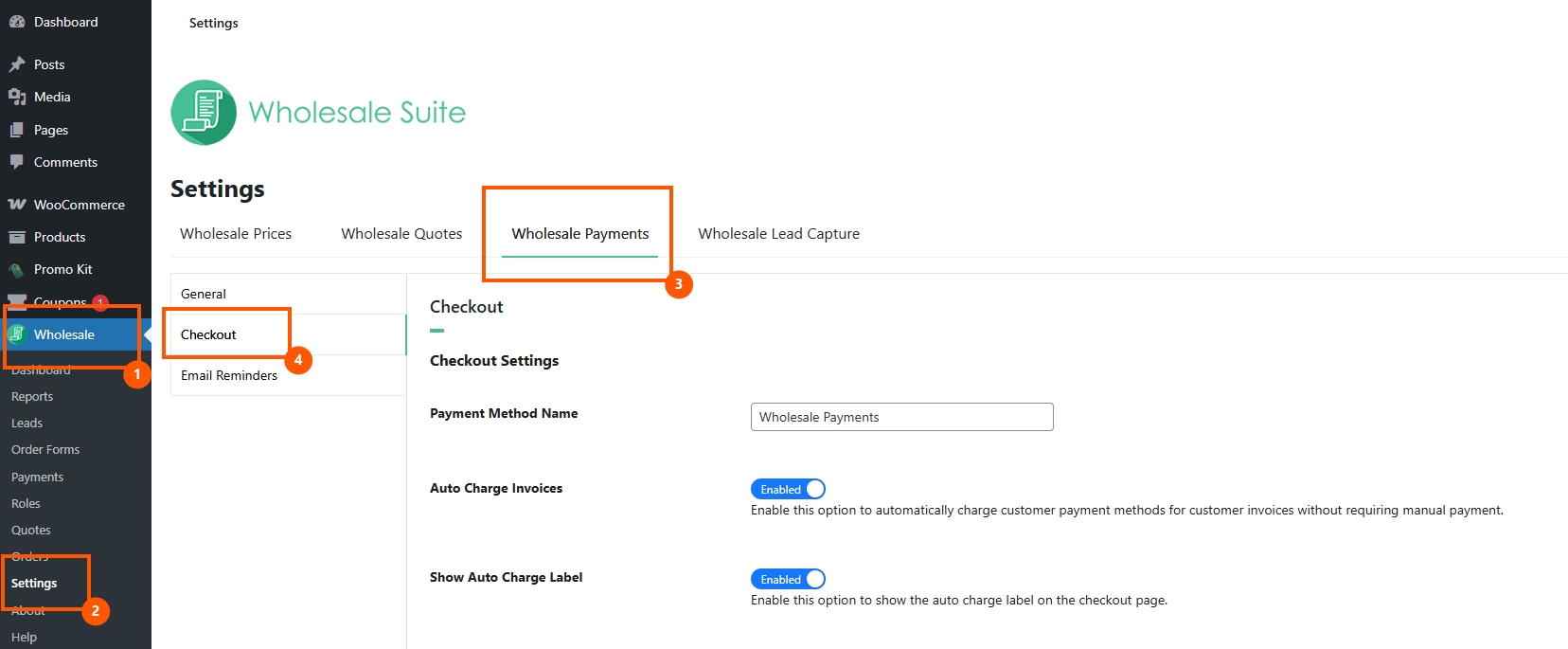
Step 1: Enable the feature
Navigate to WP Admin → Wholesale Settings → Wholesale Payments → Checkout. You’ll find a new Credit Limit section. Toggle the feature on to activate credit limit restriction across your store.

Step 2: Set a Global Credit Limit
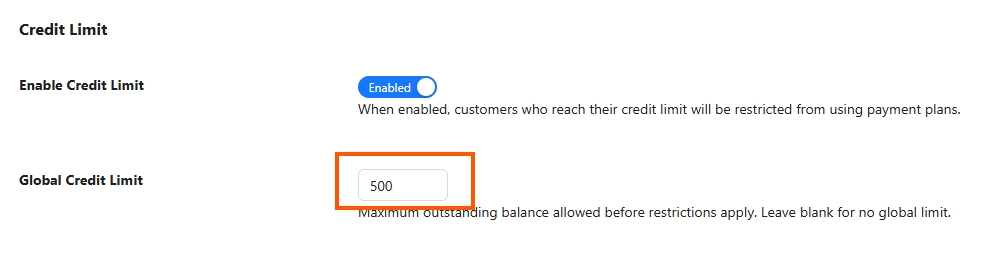
Once enabled, enter a Global Credit Limit amount. This is the default maximum outstanding balance allowed for all wholesale customers. For example, setting this to $500 means that any customer whose unpaid invoices total $500 or more will be subject to the restriction.
Step 3: Choose the Enforcement Behavior
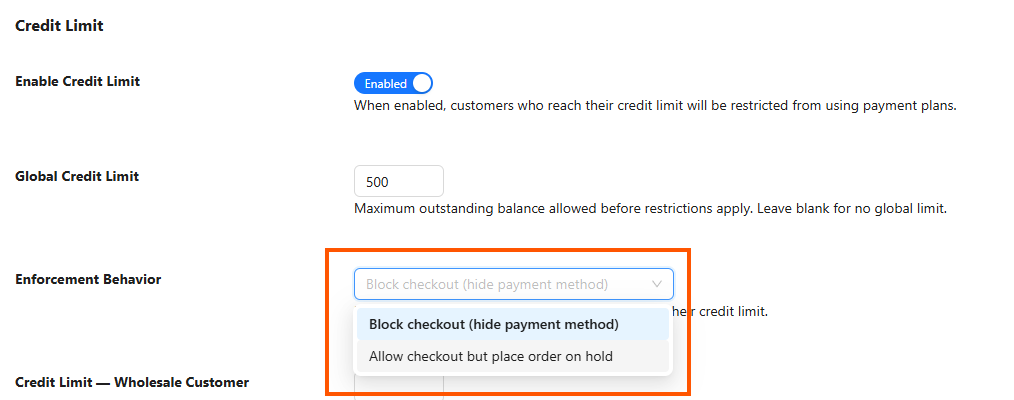
Select how you want the credit limit restriction to be enforced:
- Block checkout (hide payment method) — Best for strict enforcement. Customers over their limit simply cannot place new wholesale payment orders.
- Allow checkout but place order on hold — Best for a softer approach. Customers are warned but can still place orders, which you can then review before fulfilling.
Step 4: Save your settings
Click Save Changes, and your credit limit restriction is live.
The Credit Limit Hierarchy: Global, Per-Role, and Per-User
One of the most flexible aspects of the credit limit restriction system is its tiered hierarchy. You’re not limited to a single global number — you can fine-tune limits at three levels:
Global limit
This is the baseline. Every wholesale customer inherits the global credit limit unless overridden at a more specific level. It’s set under the Checkout settings tab as described above.
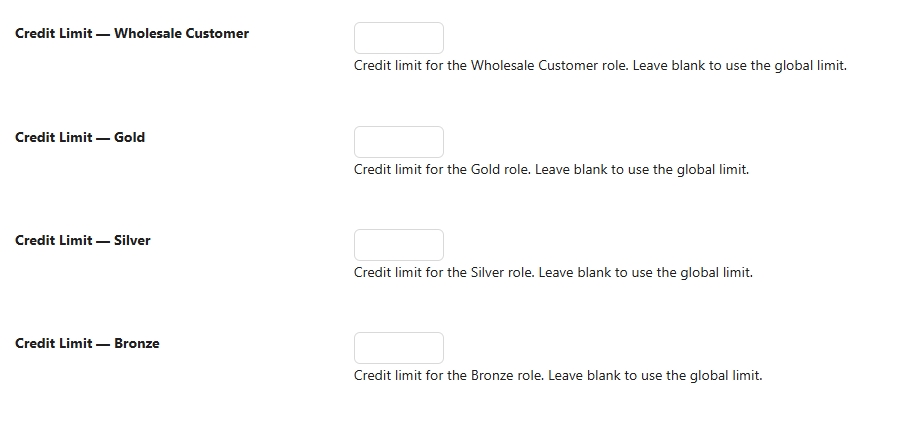
Per-role limit
If you have multiple wholesale roles (for example, “Wholesale Bronze,” “Wholesale Silver,” and “Wholesale Gold”), you can assign different credit limits to each role. A Gold-tier customer might get a $5,000 limit while Bronze-tier customers are capped at $500. Per-role limits override the global limit.
Per-user limit
For your most important or most risky accounts, you can set a credit limit directly on the individual user’s WordPress profile page. A per-user credit limit always takes priority over both the role-level and global limits.
The resolution order is: per-user → per-role → global. The system checks for the most specific limit first and falls back through the hierarchy until it finds one.
What Customers See
When enforcement is set to “Block”
If the credit limit restriction is configured to block checkout and the customer’s outstanding balance exceeds their limit, they will simply not see the Wholesale Payments payment method on the checkout page. Other payment methods (like bank transfer, check, or cash on delivery) remain available, so the customer can still place orders using alternative payment methods if desired.
When enforcement is set to “On Hold”
If the customer proceeds, the order is created with a status of On Hold, and an order note is added explaining that the order was held because the customer exceeded their credit limit. As the store admin, you can then review the order and decide whether to approve or cancel it.
Outstanding Balance Calculation
The outstanding balance used by the credit limit restriction is comprehensive. It pulls from two sources:
- Auto-charge invoices — These are tracked in the plugin’s dedicated
wpay_invoicesdatabase table. Any invoice with an unpaid or partially paid status contributes to the balance. - Non-auto-charge invoices — These are tracked via WooCommerce order meta (
amounts_due). The system aggregates the remaining amounts due across all qualifying orders.
By covering both paths, the credit limit restriction ensures that your balance calculations are always complete and accurate — no invoices slip through the cracks.
Get Started With Credit Limit Restriction Today
The credit limit restriction feature is available now in the latest version of Wholesale Payments. Whether you want to enforce hard blocks at checkout or simply flag high-balance orders for review, this feature gives you the control you need to manage wholesale credit risk effectively.
Here’s what you should know about this update:
- How to set up credit limit restriction
- Credit limit hierarchy
- What customers see
- Outstanding balance calculation
Head to Wholesale Settings → Wholesale Payments → Checkout to enable credit limit restriction and start protecting your accounts receivable today.
Frequently Asked Questions
Can I disable the credit limit restriction for specific customers?
Yes. Simply leave the per-user credit limit field blank on their profile, and ensure no role-level or global limits apply to them. Alternatively, you can set their per-user credit limit to an extremely high value.
What happens to existing orders when I enable credit limit restriction?
Existing orders are not affected. The credit limit restriction only applies at checkout time — it doesn’t retroactively change the status of orders that were already placed.
Does the credit limit restriction work with WooCommerce Blocks checkout?
Yes. The feature fully supports both the classic WooCommerce checkout and the newer Blocks-based checkout. Warning notices and payment method visibility work identically in both environments.
Can I use credit limit restriction alongside the overdue balance restriction?
Absolutely. Both features operate independently. A customer could be subject to a credit limit restriction, an overdue balance restriction, or both simultaneously. Each feature evaluates its own criteria and enforces its own behavior.
How do I know which credit limit applies to a given customer?
The system follows the hierarchy: per-user limit first, then per-role, then global. You can check a customer’s effective limit by viewing their WordPress user profile, where the per-user credit limit field is displayed. If that field is empty, the role-level or global limit applies.



