


When a wholesale customer places an order with a payment plan, when should the clock start ticking on their installments? Until now, Wholesale Payments anchored all payment plan schedules to the order date — the moment the customer clicks “Place Order.” But for many wholesale workflows, that doesn’t make sense.
What if you need to manufacture the product first? And what if fulfillment takes two weeks? What if the customer shouldn’t owe their first installment until they’ve actually received their goods?
Our new Payment Plan Schedule Start Date feature solves this by letting you tie payment plan schedules to the order’s completed date instead of the order date. This gives you full control over when installments begin, aligning with your actual fulfillment timeline.
Why Payment Plan Schedules Need Flexibility
In a typical retail scenario, orders are placed and fulfilled almost instantly. Tying payment plan schedules to the order date works fine because the customer receives their product within days.
Wholesale is different. Orders often involve custom manufacturing, bulk sourcing, quality checks, and complex shipping logistics. Weeks or even months can pass between when an order is placed and when it’s actually delivered. During that gap, what started on the order date may have already generated installments or even triggered overdue notices before the customer has received a single item.
This creates friction. Customers feel they’re being billed for products they haven’t received. Your support team fields complaints. And the relationship between you and your wholesale buyers suffers.
By allowing payment plan schedules to start from the completed date, you eliminate this mismatch entirely. Installments don’t begin until you mark the order as complete, which typically means the goods have been shipped or delivered.
How Payment Plan Schedules Work With This Feature
The new setting introduces two modes:
Order Date (default)
This is the existing behavior. It begins immediately upon order placement. Invoices are created at checkout, Stripe invoices are generated, and the installment timeline begins counting from the order date. Nothing changes if you leave this setting as-is.
Completed Date
When you select “Completed Date,” the behavior changes significantly:
At checkout:
- For auto-charge orders, no invoice rows are inserted into the database, and no Stripe invoices are created. Instead, the payment breakdown data is stored as order meta (_wpay_deferred_breakdown), effectively deferring all payment plan schedules.
- For non-auto-charge orders, a Stripe draft invoice is created but not finalized. This reserves the invoice structure without activating it.
On order completion:
- The system triggers invoice creation (for auto-charge) or invoice finalization (for non-auto-charge).
- All payment plan schedules are recalculated using the completion date as the anchor point. Invoice rows are inserted with timestamps based on when the order was completed, not when it was placed.
- Email reminders are scheduled from the completion date.
On cancellation or refund:
- If a deferred order is cancelled before completion, all deferral meta is cleaned up. For non-auto-charge orders, the draft Stripe invoice is deleted. No installments are ever created, and the payment plans are effectively void.
Setting Up Deferred Payment Plan Schedules
Configuration is simple:
- Go to WP Admin → Wholesale Settings → WooCommerce Wholesale Payments → Checkout.
- Find the new Payment Plan Schedule Start Date dropdown.
- Select “Completed Date” to defer payment plan schedules until the order is completed.
- Save your changes.
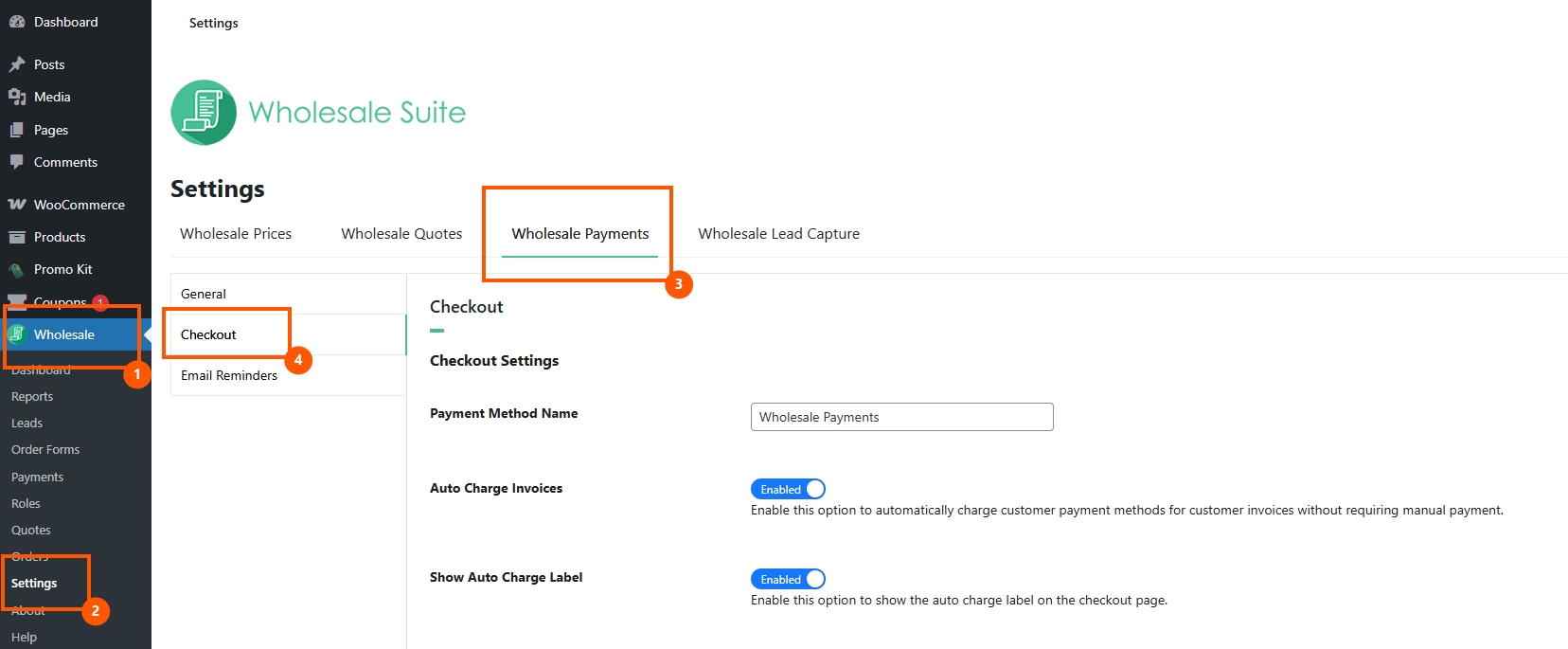

That’s it. From this point forward, all new orders placed with a payment plan will have their payment plan schedules anchored to the completion date.
Per-Order Safety
One of the most thoughtful aspects of this feature is its per-order design. When a customer places an order, the active setting at that moment is stored on the order itself as meta data (_wpay_schedule_start_date). This means:
- If you switch from “Order Date” to “Completed Date,” existing orders that were already placed under the “Order Date” setting are unaffected. Their payment plan schedules continue running from the original order date.
- If you later switch back to “Order Date,” orders that were placed under the “Completed Date” setting remain deferred until completion. Their payment plan schedules are still tied to the completed date.
This toggle-safe design ensures you can experiment with the setting or change it seasonally without worrying about disrupting your schedules for orders already in progress.
Practical Scenarios For Deferred Payment Plan Schedules
Scenario 1: Made-to-order products
You manufacture custom furniture for wholesale buyers. Each order takes 4–6 weeks to produce. With payment plan schedules tied to the completed date, your customer places an order in January, you manufacture through February, and mark the order complete in early March. The first installment is due in March — not January. The customer is billed only after they’ve received their goods.
Scenario 2: Seasonal pre-orders
You sell seasonal wholesale goods (holiday decorations, summer merchandise) that are ordered months in advance. By deferring to the completed date, customers can place pre-orders without immediately starting the installment clock. Payment plan schedules begin only when you ship in-season.
Scenario 3: Quality hold workflow
Your fulfillment process includes a quality assurance step. Orders sit in processing while samples are inspected. Deferring payment plan schedules means your team can take the time they need for QA without worrying about installments piling up in the meantime.
Align Your Payment Plan Schedules With Your Fulfillment Reality
The payment plan schedule feature is available now in the latest version of Wholesale Payments. If your fulfillment process involves any delay between order placement and delivery, deferred payment plan schedules will make your billing fairer, your customers happier, and your support queue shorter.
Here’s what you should know about this update:
Head to Wholesale Settings → Wholesale Payments → Checkout, select “Completed Date” from the Payment Plan Schedule Start Date dropdown, and start aligning your payment schedules with your actual delivery timeline today.
Frequently Asked Questions
What happens if I never mark a deferred order as complete?
The payment plan schedules remain in their “Pending Completion” state indefinitely. No invoices are created, no charges are made, and no email reminders are sent. The order sits in its current status waiting for completion. If you ultimately cancel the order, the deferred data is cleaned up automatically.
Can I mix deferred and non-deferred orders?
Yes. The setting is evaluated at checkout time and stored per-order. If you switch the setting partway through a day, orders placed before the switch follow the old behavior, and orders placed after follow the new behavior. Payment plan schedules on each order are independent.
Does this affect the payment amounts?
No. The installment amounts are calculated at checkout based on the order total and the selected payment plan. Deferring payment plan schedules to the completed date only changes when those installments are due, not how much they are.
What if the order is partially refunded before completion?
If a deferred order is fully refunded or cancelled, the deferral meta is cleaned up, and no invoices are created. Partial refund handling follows the standard WooCommerce refund flow — when activated, it will reflect the adjusted totals.
Do email reminders work with deferred payment plan schedules?
Yes. Email reminders are scheduled when the payment plan schedules are activated (at order completion), using the completion date as the anchor for all timing calculations. Customers receive reminders relative to their actual installment due dates.



