
If you’ve set WooCommerce Wholesale Prices Premium‘s Display Prices in the Shop option to Excluding tax so your wholesale prices show without tax, you may have noticed the crossed-out regular price next to it also switches to excluding tax, even though the rest of your store still shows including tax.
This happens because that setting doesn’t only control the wholesale price. It overrides how WooCommerce displays every price for wholesale roles, including the regular price shown alongside it. A short code snippet stops WooCommerce Wholesale Prices Premium from overriding the regular price’s tax display, so it keeps showing including tax while the wholesale price continues to show excluding tax.
Requirements
- WooCommerce Wholesale Prices installed and activated, with at least one wholesale role set up.
- This feature requires WooCommerce Wholesale Prices Premium. The Display Prices in the Shop setting isn’t available in the free plugin.
- Enable tax rates and calculations turned on under WooCommerce → Settings → General.
- Display Prices in the Shop set to Excluding tax under Wholesale → Settings → Wholesale Prices → Tax. This article addresses the mismatch that setting causes.
- Access to your theme’s child theme functions.php file, or a code snippet plugin such as WPCode.
Why the regular price also shows excluding tax
By default, a wholesale customer viewing a product page sees the regular price crossed out above the wholesale price.
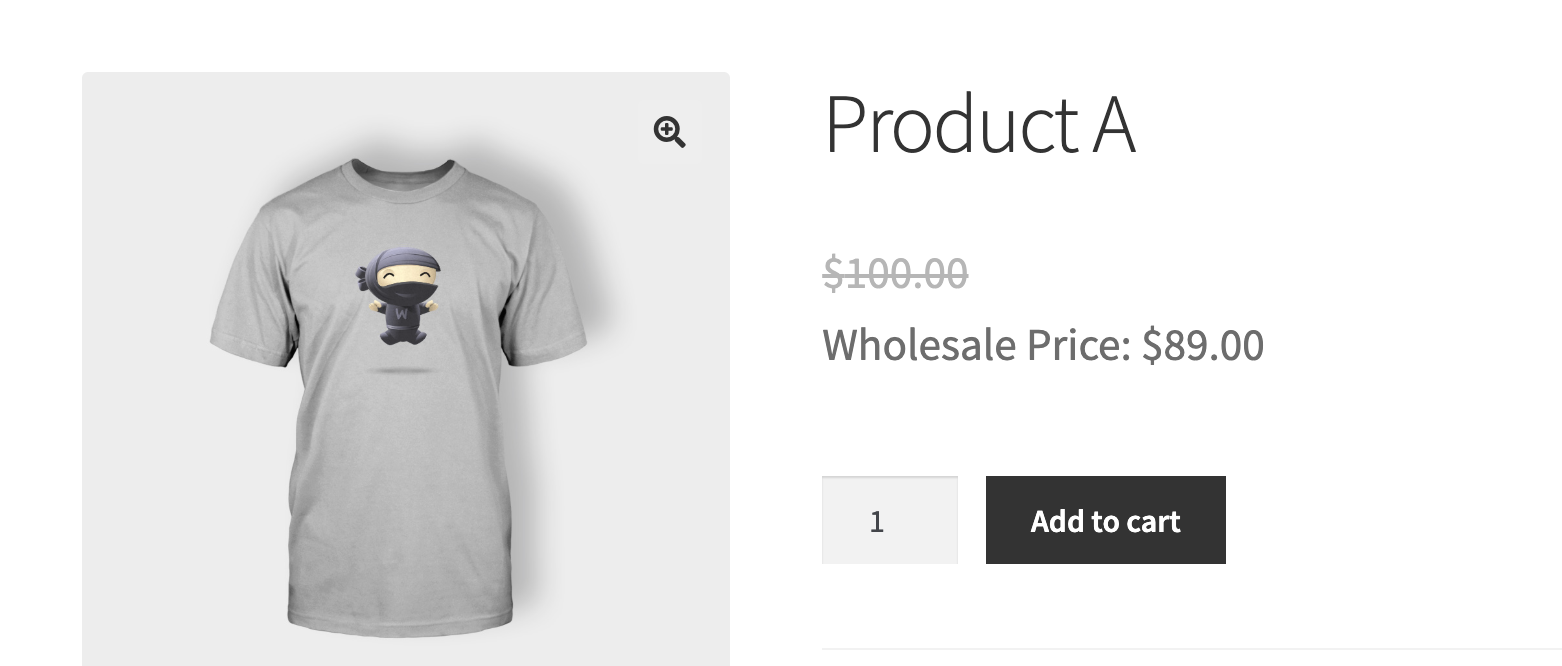
To see how the tax display is controlled for this pair of prices, go to Wholesale → Settings → Wholesale Prices → Tax. Under the Tax Options section, the Display Prices in the Shop field is described as choosing how wholesale roles see all prices throughout your shop pages, not only the wholesale price.
That’s why setting Display Prices in the Shop to Excluding tax to get an excluding-tax wholesale price also switches the crossed-out regular price to excluding tax for the same customer, even if your site’s own WooCommerce tax display is set to Including tax for everyone else.
Show the regular price including tax while keeping the wholesale price excluding tax
Add this snippet to your child theme’s functions.php file or use a code snippet plugin such as WPCode.
This stops WooCommerce Wholesale Prices Premium from overriding WooCommerce’s own tax display option for wholesale roles. Once it’s in place, the crossed-out regular price follows your store’s Display prices in the shop setting under WooCommerce → Settings → Tax (usually Including tax), while the wholesale price keeps calculating from Display Prices in the Shop under Wholesale → Settings → Wholesale Prices → Tax.
The snippet removes two separate filters: one for the shop and product pages, one for the cart and checkout pages. Both take effect once the snippet is active.
Troubleshooting
I added the snippet, but the regular price still shows excluding tax.
Confirm the snippet is active, either saved to the correct theme’s functions.php file or, if you’re using a snippet plugin such as WPCode, that the snippet’s status is set to active. Then clear any page cache or object cache and reload the product page. WooCommerce caches price fragments, so a cached page can keep showing the old tax display until it’s refreshed.
The mismatch has come back for one specific wholesale role.
Check whether that role has Tax Exemption enabled instead of relying on Display Prices in the Shop, either the general Tax Exemption checkbox or a per-role override under Wholesale Role / Tax Exemption Mapping. Tax-exempt roles always see the wholesale price excluding tax, and normally the regular price is forced to match. Since the snippet removes that match for every wholesale role, tax-exempt roles can end up with the same mismatch this snippet is meant to fix, just reversed. If you need this resolved for a tax-exempt role too, contact support for guidance specific to your setup.
Do administrator or shop manager accounts bypass this?
No. The tax display override only applies to accounts with a wholesale role assigned. An administrator or shop manager account without a wholesale role sees prices the same way a regular customer does. An administrator account with a wholesale role assigned is treated the same as any other wholesale customer with that role.
Frequently asked questions
Can I apply this fix to only the shop pages, or only the cart and checkout pages?
Yes. The snippet has two separate remove_filter() lines, one for the shop and product pages (option_woocommerce_tax_display_shop) and one for the cart and checkout pages (option_woocommerce_tax_display_cart). Delete whichever line you don’t need.
Does this snippet change how the wholesale price itself displays?
No. The wholesale price keeps following the Display Prices in the Shop setting under Wholesale → Settings → Wholesale Prices → Tax. The snippet only stops that setting from also overriding the regular price.
Does this affect regular, non-wholesale customers?
No. The override only applies to logged-in customers with a wholesale role assigned. Regular and guest customers keep seeing prices according to your store’s own WooCommerce tax display settings.
Does this work for variable and grouped products?
Yes. The tax display setting applies to how WooCommerce renders prices for a wholesale role across the store, regardless of product type.
What if a wholesale role has Tax Exemption enabled instead of Display Prices in the Shop?
This snippet is intended for roles using the Display Prices in the Shop dropdown. For roles using Tax Exemption instead, see the Troubleshooting section above, the same mismatch can reappear in reverse for those roles.
Could this conflict with my theme or another plugin?
The snippet only removes two filters that WooCommerce Wholesale Prices Premium itself registers, so it doesn’t touch any other plugin or theme code directly. If another plugin also changes WooCommerce’s tax display options for the same pages, test the change on a staging site first.
Can I remove the snippet later?
Yes. Delete the snippet or set it to inactive, then clear any cache. The regular price will go back to following the Display Prices in the Shop setting, the same as before the snippet was added.
Do I need to re-add this snippet after updating WooCommerce Wholesale Prices Premium?
No, not under normal circumstances. The snippet is separate from the plugin’s own files and isn’t affected by an update. If a future release changes the internal names the snippet refers to, contact support for an updated version.
Help & support
Wholesale Suite has a dedicated support team who knows the products, WooCommerce, and the industry very well. You’re welcome to make use of their expertise at any time, worldwide.
If you are an existing customer please go to the support ticket request form and send a message.
If you are a free plugin user, please send a support request on the forum. The WordPress.org support forums for the free plugin are actively monitored.

